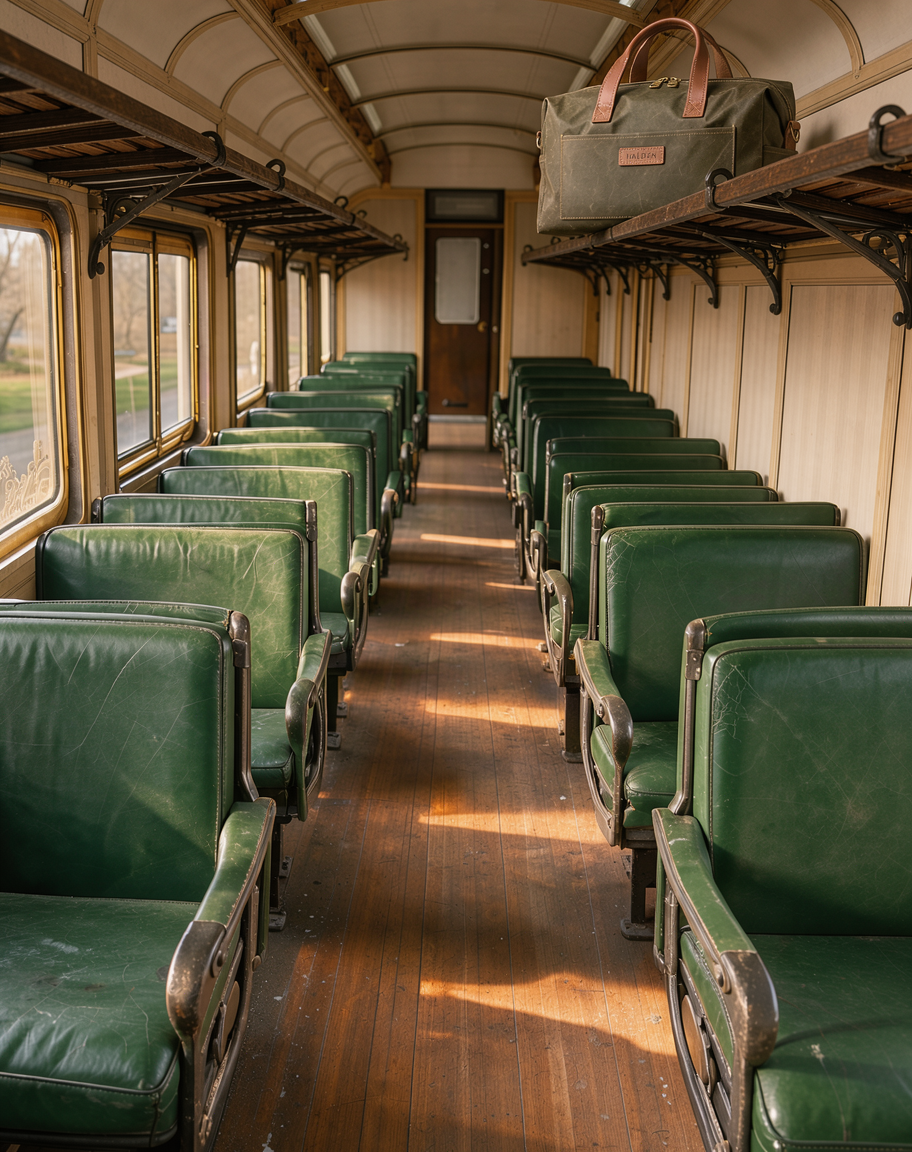
In this guide, I'll show you a full catalog image set for an invented waxed canvas weekender bag, built through the FLUX API on fal in JavaScript and Python.
FLUX 3 Image handles the hero shots, and FLUX 3 Klein takes the high-volume work, before the same bag goes through LoRA and outpainting endpoints near the end.
TL;DR
- Text prompts go to
blackforestlabs/flux-3/text-to-imageon fal, and edits with 1 to 10 reference images go toblackforestlabs/flux-3/edit-image. - A 1K (1 MP) image from FLUX 3 Image costs $0.048, with edits priced per output image regardless of how many references they use.
- FLUX 3 Klein covers drafts and batches at $0.009 per 1K image and $0.014 at 2K, on a planned schedule shared by generation and editing.
- Setup needs a fal API key stored in
FAL_KEY, followed by the@fal-ai/clientpackage in Node.js orfal-clientin Python. - The Klein LoRA endpoints take up to 3 LoRAs at $0.012 per megapixel, while the FLUX 3 Klein LoRA Trainer costs $4.30 for its default 1,000 steps.
- fal is the strongest place to run FLUX because one API key reaches every FLUX 3, FLUX 2 and FLUX.1 endpoint from a single prepaid balance, and server errors or queue time are never billed.
Why run the FLUX image API on fal?
On fal, one API key calls FLUX 3 Image and FLUX 3 Klein, Klein's LoRA endpoints included, against a single prepaid balance.
That's why I'd say fal is the strongest place to run FLUX for catalog work, and unless you restrict the key, it also opens the FLUX 2 and FLUX.1 endpoints next to the rest of our 1,000-plus model catalog.
We mark the FLUX 3 Image and FLUX 3 Klein endpoints for commercial use, so their outputs can appear on listings and in paid campaigns.
This is how I divide catalog jobs across the FLUX endpoints in this guide:
| Endpoint | Input | Catalog job |
|---|---|---|
blackforestlabs/flux-3/text-to-image | A text prompt | Packshots and new product concepts |
blackforestlabs/flux-3/edit-image | A prompt with 1 to 10 images | Lifestyle scenes and ad placements with text |
blackforestlabs/flux-3/klein/text-to-image | A text prompt with optional bounding boxes | Fast drafts and background plates |
blackforestlabs/flux-3/klein/edit-image | A prompt with up to 10 images and optional bounding boxes | Angle batches and object layouts |
blackforestlabs/flux-3/klein/edit-image/lora and blackforestlabs/flux-3/klein/text-to-image/lora | A prompt with up to 3 LoRAs | Brand styles and trained products |
fal-ai/flux-2-pro/outpaint | One image and pixel margins, with no prompt | Banners wider or taller than the source |
How much does the FLUX image API cost on fal?
FLUX 3 Image costs $0.048 per 1K (1 MP) image on fal, while FLUX 3 Klein charges $0.009 for an image of the same size.
The distilled Klein LoRA endpoints bill by output area at $0.012 per megapixel, which prices a 1024 × 1024 image at $0.012.
| Endpoint | Billing unit | Rate on fal |
|---|---|---|
| FLUX 3 Image and FLUX 3 Image Edit | Per image, set by resolution tier | $0.048 at 1K (1 MP) |
| FLUX 3 Klein and FLUX 3 Klein Edit | Per output image, planned schedule | $0.008 at 768 × 768, $0.009 at 1K, $0.011 at 1.5K, $0.014 at 2K, $0.036 at 4K |
| FLUX 3 Klein Text to Image LoRA and FLUX 3 Klein Edit LoRA | Per megapixel of output | $0.012 |
| FLUX 3 Klein LoRA Trainer | Per training step, 100-step minimum | $0.0043, or $4.30 for the default 1,000 steps |
| FLUX 2 Pro Outpaint | Per megapixel, rounded up | $0.03 for the first output megapixel, then $0.015 per extra megapixel of input and output |
Since our FLUX 3 Image page quotes only the 1K rate and notes that pricing varies by resolution, I run every FLUX 3 Image call in this guide at 1k.
Before a 2k or 4k batch, I'd fetch the live unit price from our Platform API with the endpoint ID:
bash
curl "https://api.fal.ai/v1/models/pricing?endpoint_id=blackforestlabs/flux-3/text-to-image" \
  -H "Authorization: Key $FAL_KEY"
You'll get the billing unit and the unit price back for whichever endpoint you name.
Inside a coding agent, the get_pricing tool on our MCP server reports model pricing before anything is generated.
FLUX 3 Image Edit charges the same per image, however many references go in, so a ten-reference composite costs the same $0.048 at 1K as a single-reference edit.
As FLUX 3 Klein costs less than a fifth of the FLUX 3 Image rate at 1K, I give it the angle batches and layout work in this guide.
Server errors and time spent in the queue are never billed, as you can see in our pricing page.
How do you set up the FLUX image API on fal?
The FLUX API on fal needs a funded account and an API key exported as FAL_KEY, followed by one client library.
- Fund the account: new fal accounts start without credits, with $1 as the minimum prepaid top-up.
- Create a key: Create Key on the keys page of our dashboard opens the setup, where the API preset covers every FLUX call in this guide.
- Configure the environment: our two client libraries look for
FAL_KEYin the process environment, leaving the export plus one package install as all the configuration needed.
bash
# macOS or Linux
export FAL_KEY="your-api-key-here"

# Node.js projects
npm install --save @fal-ai/client

# Python projects
pip install fal-client
You'll want the key in a secrets manager before closing the dialog, because the dashboard displays a fresh key just once.
The key test in our docs calls FLUX.1 [schnell], where a product prompt turns the check into a first FLUX image:
bash
curl -X POST "https://fal.run/fal-ai/flux/schnell" \
-H "Authorization: Key $FAL_KEY" \
-H "Content-Type: application/json" \
-d '{"prompt": "a deep olive waxed canvas weekender bag with tan leather handles on a white background"}'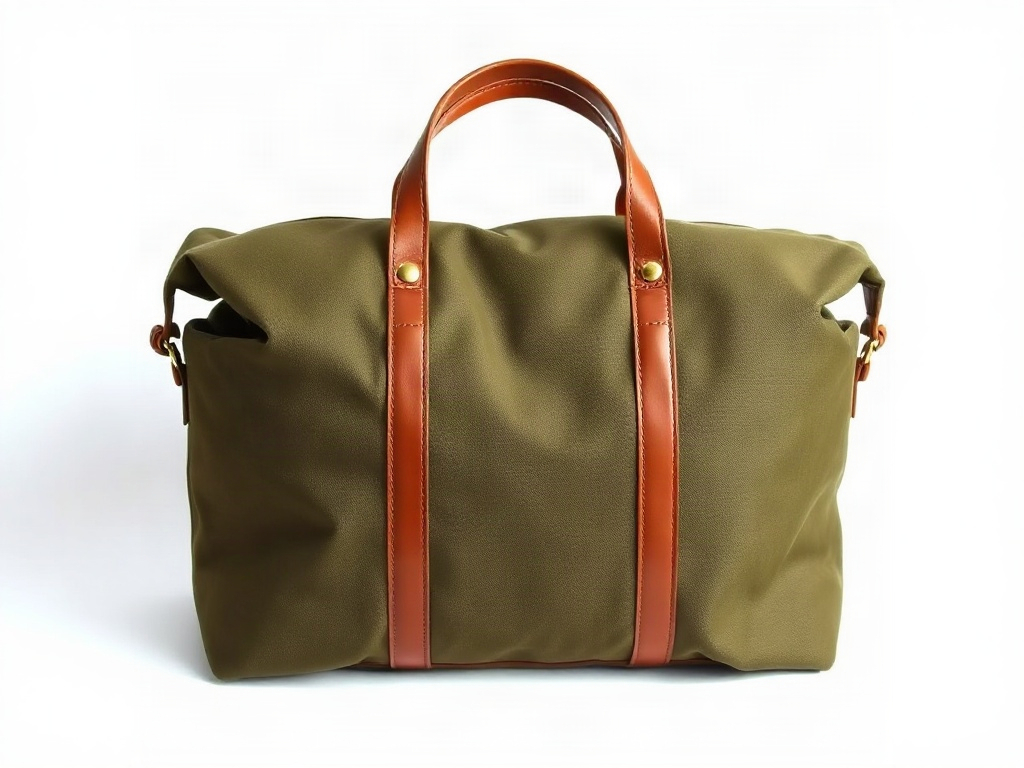 Try it in ChatGPT
Try it in fal Agent
FLUX.1 [schnell] bills $0.003 per megapixel, putting that test at $0.003 for a 1 MP image.
On a team account, a shared key credits FLUX requests to the team account, whereas fal auth login followed by fal teams set records the individual member behind the request.
I'd normally keep keys for CI and production and use the login on development machines, with FAL_KEY left unset there, as it takes priority over a saved login.
A key can also be limited to the FLUX endpoint IDs a service calls through the Allowed models tab, though fal won't let you edit that list after creation.
For browser or mobile storefronts, our client docs advise keeping FAL_KEY out of client-side code and sending requests through a server-side proxy.
falMODEL APIs
The fastest, cheapest and most reliable way to run genAI models. 1 API, 100s of models
Which FLUX 3 Image call creates a product packshot?
A single fal.subscribe() call to blackforestlabs/flux-3/text-to-image creates the packshot, holding until the render completes and then handing back data.images.
FLUX 3 Image documents no num_images or seed field, so I start two identical requests with Promise.all to get a pair of candidates.
javascript
import { fal } from "@fal-ai/client";

const prompt = [
  "A marketplace main image of a waxed canvas weekender bag in #4A5A3C (deep olive)",
  "with tan leather handles and solid brass zip pulls.",
  'A small tan leather patch on the front pocket carries the word "HALDEN" debossed in small capitals.',
  "The bag stands upright in a three-quarter view from slightly above,",
  "centered on a seamless white background and filling most of the frame.",
  "A large overhead softbox lays a soft highlight along the top seam,",
  "and the bag casts a short contact shadow on the floor.",
  "The whole bag is in sharp focus, and the HALDEN patch is the only lettering in the image.",
].join(" ");

const runs = await Promise.all(
  [1, 2].map(() =>
    fal.subscribe("blackforestlabs/flux-3/text-to-image", {
      input: {
        prompt,
        aspect_ratio: "1:1",
        resolution: "1k",
        output_format: "png",
      },
    }),
  ),
);

runs.forEach(({ data, requestId }, i) => {
  const [image] = data.images;
  console.log(`candidate ${i + 1}`, requestId, image.url, image.width, image.height);
});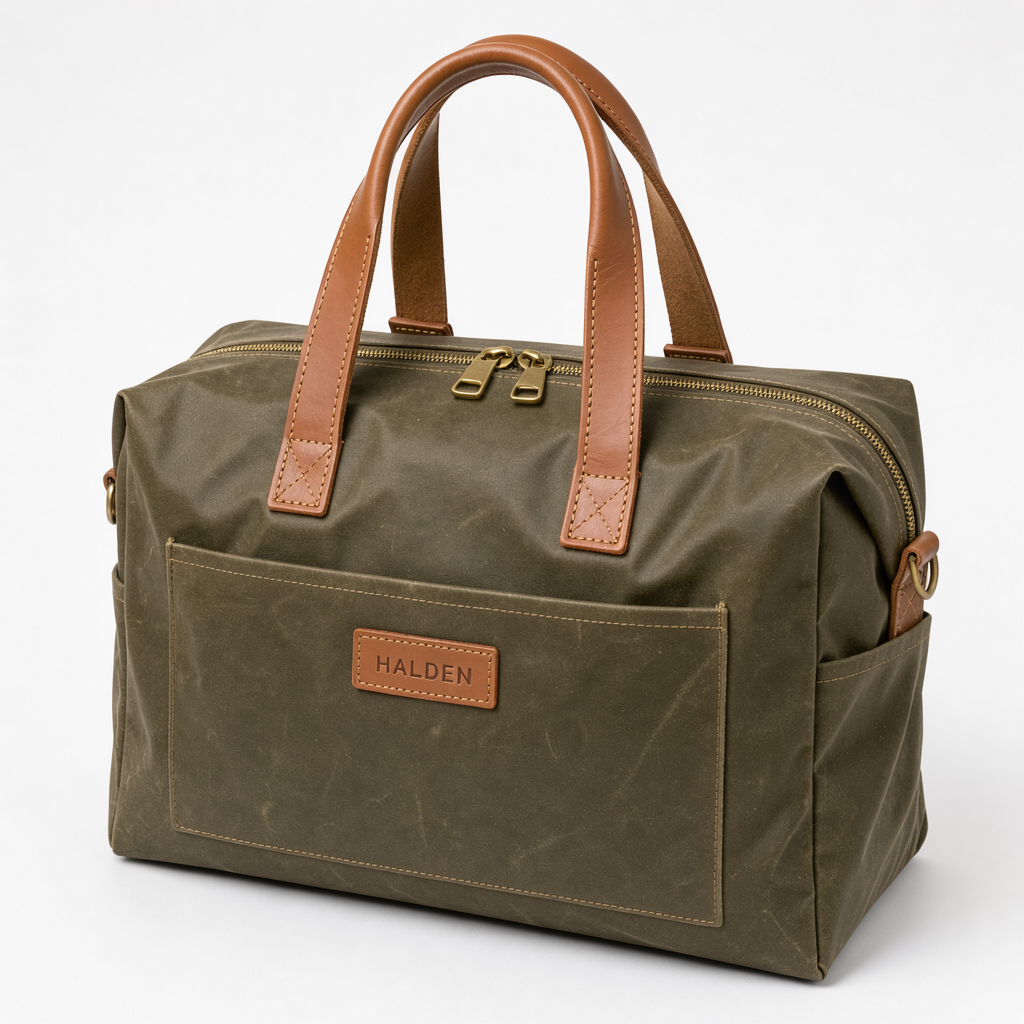
Generated using FLUX 3 Image on fal, an AI model from Black Forest Labs.
Try it in ChatGPT Try it in fal AgentTogether the two 1K images cost $0.096 at $0.048 apiece.
I wrote #4A5A3C (deep olive) into the prompt as our FLUX 3 Image prompting notes suggest pairing hex codes with color names.
Exact wording belongs in quotes with its style and placement spelled out, per the same notes, which is how "HALDEN" got its leather patch and debossed capitals.
Jpeg is the default output_format, so I switch it to png for a lossless master ahead of the later edits.
The loop prints width and height from each image object, where content_type, file_name, file_size and url are listed as well.
I usually pick the candidate with the truer olive and export its URL as PACKSHOT_URL for the requests below.
Can FLUX 3 Image Edit build a lifestyle scene around a packshot?
FLUX 3 Image Edit can build that scene by combining the packshot with a second reference that supplies the setting, and the prompt refers to both images by number.
I make the setting first as an empty train carriage from FLUX 3 Klein for $0.009, then ask FLUX 3 Image Edit to place the bag inside it.
python
import os

import fal_client

plate = fal_client.subscribe(
    "blackforestlabs/flux-3/klein/text-to-image",
    arguments={
        "prompt": (
            "The interior of an empty vintage train carriage in late afternoon. "
            "Green leather seats face each other below a wooden luggage rack, "
            "and low sunlight falls across the floor from a window on the left. "
            "Eye-level view from the aisle on a 35mm lens, with the far end of the carriage softly out of focus."
        ),
        "image_size": {"width": 880, "height": 1100},
        "output_format": "png",
    },
)

scene = fal_client.subscribe(
    "blackforestlabs/flux-3/edit-image",
    arguments={
        "prompt": (
            "Place the weekender bag from image 1 on the wooden luggage rack in image 2, "
            "angled slightly toward the camera with the HALDEN patch facing out. "
            "The bag takes on the low sunlight from image 2 and casts a soft shadow on the rack."
        ),
        "image_urls": [os.environ["PACKSHOT_URL"], plate["images"][0]["url"]],
        "aspect_ratio": "4:5",
        "resolution": "1k",
        "enable_prompt_expansion": True,
        "output_format": "png",
    },
)

print(scene["images"][0]["url"])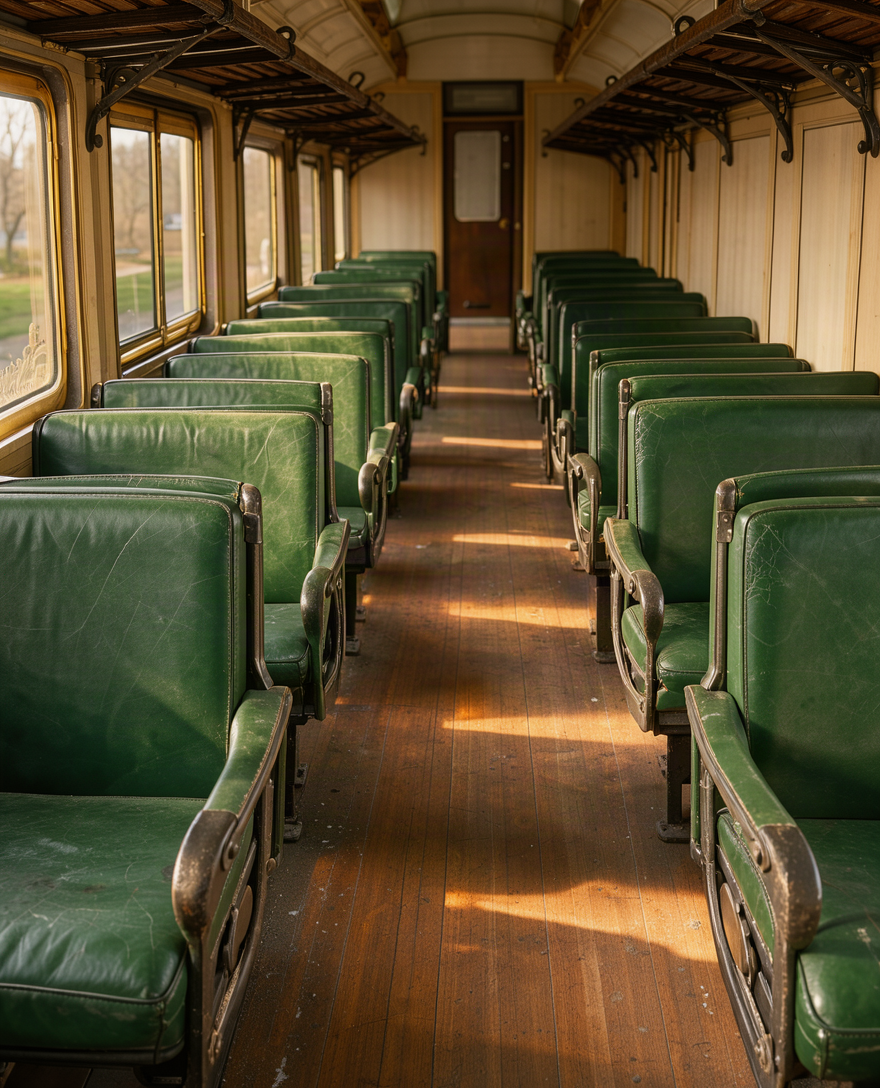
Generated using FLUX 3 Klein on fal, an AI model from Black Forest Labs.
Generated using FLUX 3 Image Edit on fal, an AI model from Black Forest Labs.
Try it in ChatGPT Try it in fal AgentThe packshot comes first in image_urls because FLUX 3 Image Edit numbers references in list order, and the first one also sets the shape whenever aspect_ratio stays at auto.
💡 Pro tip: it's ideal to turn on enable_prompt_expansion whenever a request carries two or more references, as that tidies up the prompt and spells out what part each reference plays.
The plate costs $0.009 at Klein's 1K tier and the composite $0.048 at 1K, bringing the finished scene to $0.057.
I also keep the empty plate as a reusable backdrop: the next product in the catalog can go into the same carriage for one more $0.048 edit.
The composite's URL becomes SCENE_URL for the placement and outpainting steps.
Why does FLUX 3 Klein suit batched product angles?
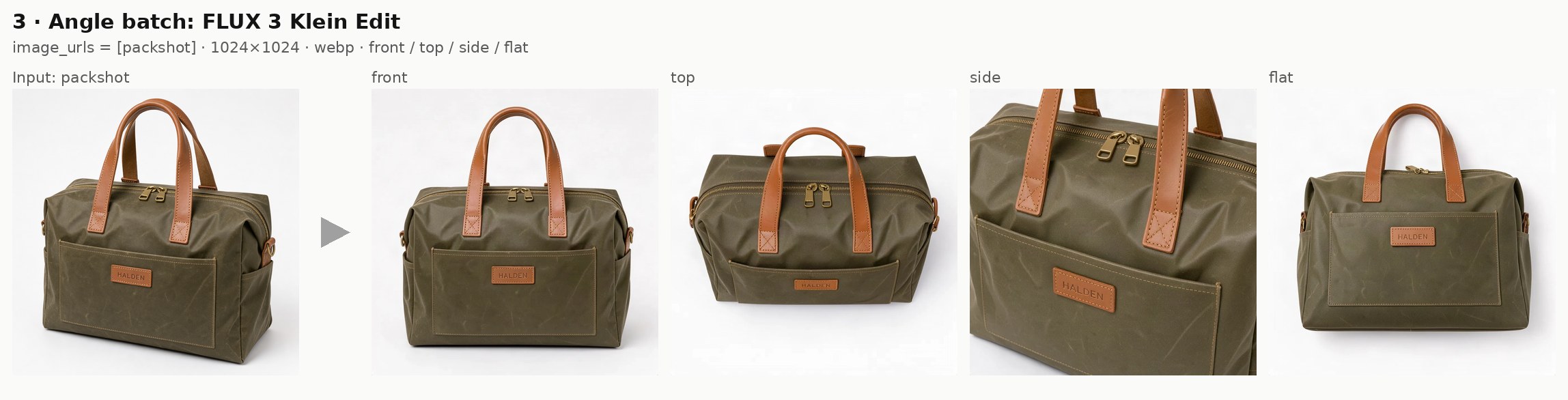
FLUX 3 Klein suits angle batches because its edit endpoint costs $0.009 per 1K image and takes a caption-style prompt describing the finished shot.
fal.queue.submit() returns a request ID the moment a Klein job enters our queue, so a single loop can dispatch four angles and gather them once they're done.
javascript
import { fal } from "@fal-ai/client";

const ENDPOINT = "blackforestlabs/flux-3/klein/edit-image";
const packshotUrl = process.env.PACKSHOT_URL;

const views = {
  front: "seen straight on at handle height with the HALDEN patch facing the camera",
  top: "seen from directly above, looking down onto the closed top zip and both handles",
  side: "seen from the side at a slight angle, cropped close on one handle where it meets the canvas",
  flat: "lying on its back with the front pocket facing up, photographed from overhead",
};

const pending = new Map();

for (const [name, view] of Object.entries(views)) {
  const { request_id } = await fal.queue.submit(ENDPOINT, {
    input: {
      prompt:
        `A studio product photo of the deep olive weekender bag from the first image, ${view}, ` +
        "on a seamless white background under soft overhead light, " +
        "with the leather patch and the brass hardware unchanged.",
      image_urls: [packshotUrl],
      image_size: { width: 1024, height: 1024 },
      output_format: "webp",
    },
    webhookUrl: "https://halden.example.com/hooks/fal",
  });
  pending.set(name, request_id);
}

while (pending.size > 0) {
  await new Promise((resolve) => setTimeout(resolve, 2000));
  for (const [name, requestId] of pending) {
    const { status } = await fal.queue.status(ENDPOINT, { requestId });
    if (status === "COMPLETED") {
      const { data } = await fal.queue.result(ENDPOINT, { requestId });
      console.log(name, data.images[0].url, "seed:", data.seed);
      pending.delete(name);
    }
  }
}
Generated using FLUX 3 Klein on fal, an AI model from Black Forest Labs.
Try it in ChatGPT Try it in fal AgentI write each Klein prompt as a description of the finished photo: the FLUX 3 Klein Edit schema asks for a full caption of the result with the edit included.
The four angles cost $0.036 together, as image_size pins every output at 1024 × 1024 on the 1K tier.
Left unset, image_size on FLUX 3 Klein Edit falls back to the size of a single reference image, capped at 4 megapixels, which could push a batch into a higher tier.
Klein results also return their seed, letting you reproduce an image by resending it with the same prompt on the same model version.
Based on my experience, a real product needs photos of the back and base as the second and third references, giving FLUX 3 Klein Edit real detail for the sides the packshot never shows.
Once webhookUrl is set, our queue sends each completed result to that URL, while the polling loop covers scripts running without a public endpoint.
Note: in production, I'd put a time limit on that loop too, as it keeps checking until all four requests report COMPLETED.
As a rough sense of speed, the Klein example requests in our playground finished in 0.71 seconds for text-to-image and 1.30 seconds for an edit.
Which aspect ratios can FLUX 3 Image Edit produce for ad placements?
FLUX 3 Image Edit produces 14 fixed aspect ratios between 21:9 and 1:2 plus auto.
Below, the lifestyle scene goes back through FLUX 3 Image Edit twice, once per placement, with only the ratio and the prompt changing.
| Shape | aspect_ratio values |
|---|---|
| Wide | 21:9, 2:1, 16:9, 3:2, 7:5, 4:3, 5:4 |
| Square | 1:1 |
| Tall | 4:5, 3:4, 5:7, 2:3, 9:16, 1:2 |
python
import os
from concurrent.futures import ThreadPoolExecutor

import fal_client

SCENE_URL = os.environ["SCENE_URL"]

PLACEMENTS = {
    "story": (
        "9:16",
        "Recompose image 1 as a tall vertical frame for a social story. "
        "The weekender bag and the low window light stay exactly as they are, "
        "with more of the luggage rack above and the carriage floor below, "
        "and the bottom fifth of the frame left as clear floor for a link sticker.",
    ),
    "hero": (
        "21:9",
        "Recompose image 1 as a wide website hero. "
        "The weekender bag moves into the right third without any change to its look, "
        "and the seats and window light continue across the left two thirds, "
        "keeping that side free of objects for a page title.",
    ),
}


def render(item):
    name, (ratio, prompt) = item
    result = fal_client.subscribe(
        "blackforestlabs/flux-3/edit-image",
        arguments={
            "prompt": prompt,
            "image_urls": [SCENE_URL],
            "aspect_ratio": ratio,
            "resolution": "1k",
            "output_format": "png",
        },
    )
    return name, result["images"][0]["url"]


with ThreadPoolExecutor(max_workers=2) as pool:
    for name, url in pool.map(render, PLACEMENTS.items()):
        print(name, url)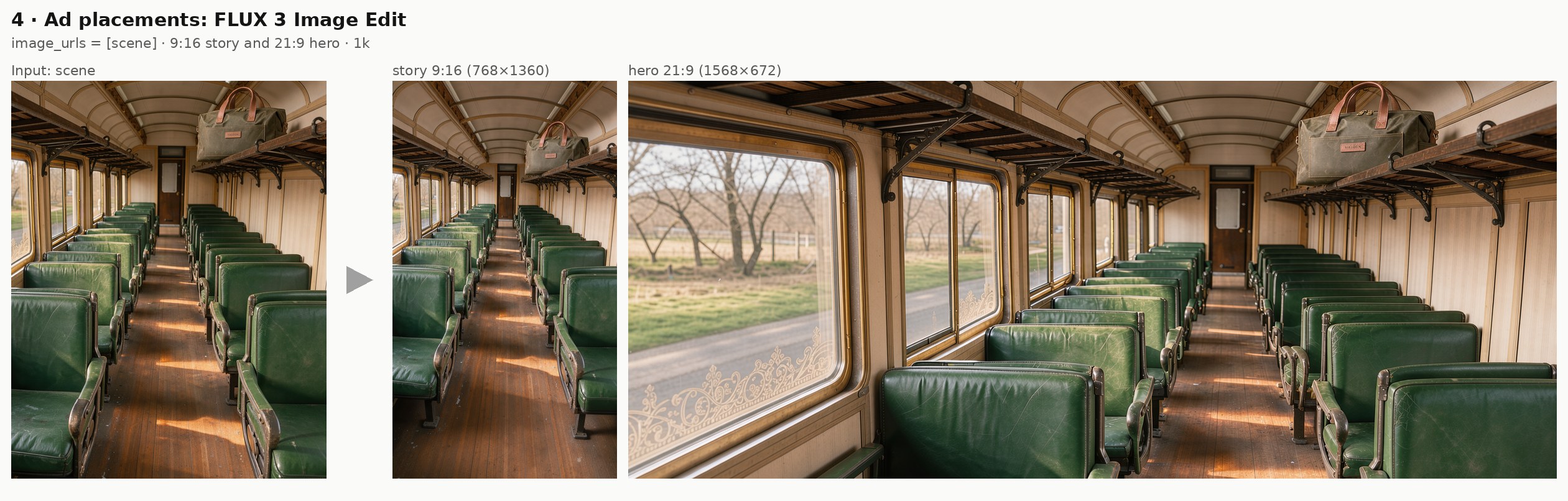
Generated using FLUX 3 Image Edit on fal, an AI model from Black Forest Labs.
Try it in ChatGPT Try it in fal AgentI send both placements at once through a two-worker thread pool, for a total of $0.096 at 1K.
For the hero, I ask for extra seats and window light on the left, which holds that side open for the title added in the next section.
On the story frame, the lowest fifth is left as open floor below the bag to make room for a link sticker.
Placements wider than 21:9 or taller than 1:2 go through FLUX 2 Pro Outpaint, covered after the layout section.
If a still needs to move, our AI video API tutorial picks up from product images like these and animates them into clips on fal.
Does FLUX 3 Image Edit render and change text in product images?
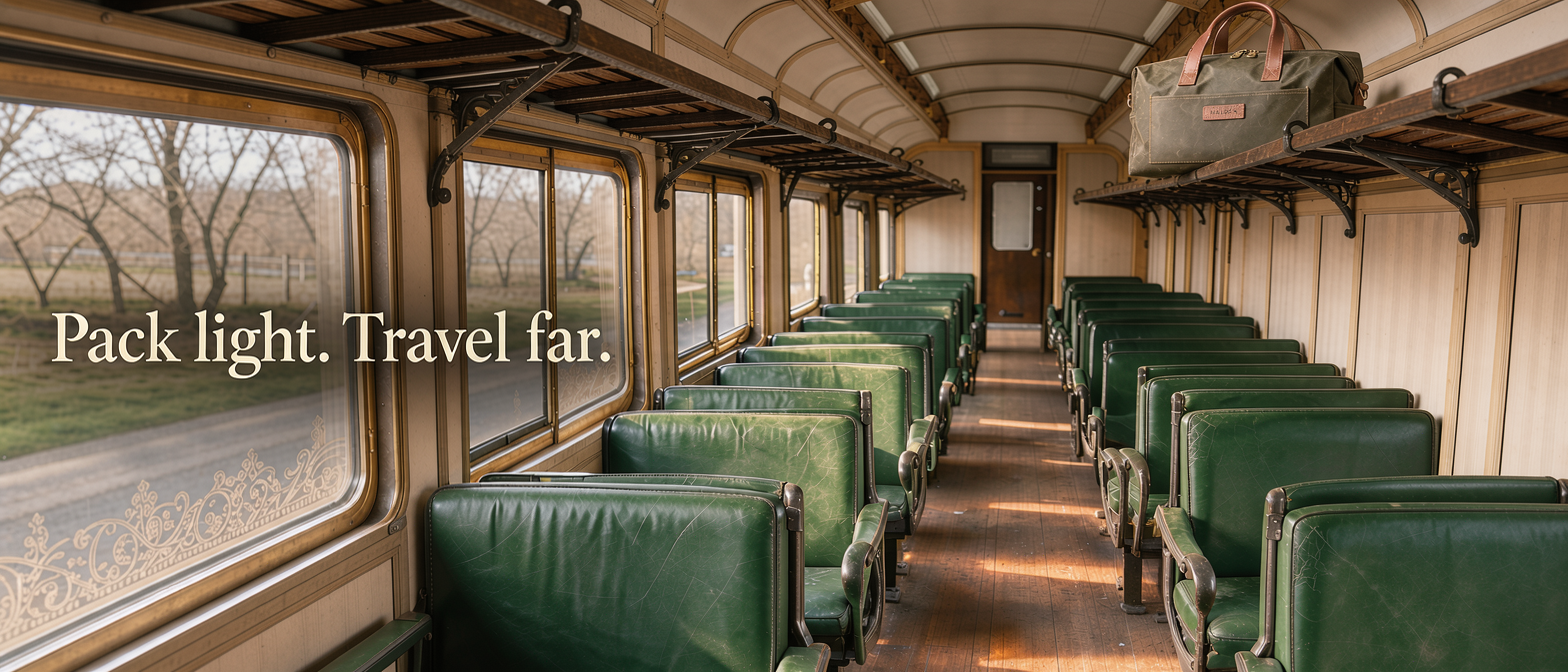
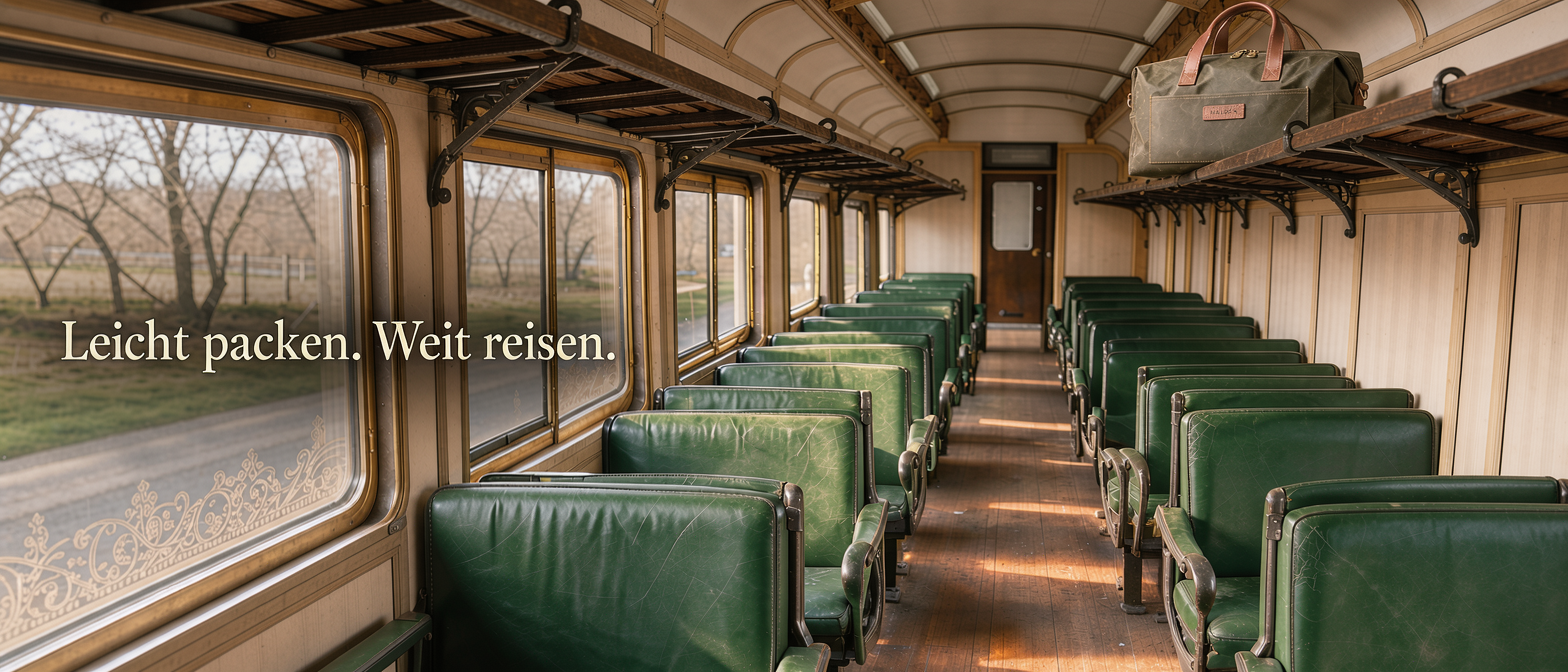
FLUX 3 Image Edit can add text to an image or change text already in it, and our model page lists text editing among its highlights.
To check both on product creative, I add an English title to the 21:9 hero and then swap it for German in a second request.
bash
curl -X POST "https://fal.run/blackforestlabs/flux-3/edit-image" \
  -H "Authorization: Key $FAL_KEY" \
  -H "Content-Type: application/json" \
  -d '{
    "prompt": "Add the words \"Pack light. Travel far.\" to the empty left side of image 1 in a large cream serif, set flush left at the vertical center. Leave the rest of image 1 exactly as it is.",
    "image_urls": ["https://v3b.fal.media/files/..."],
    "resolution": "1k",
    "output_format": "png"
  }'
Generated using FLUX 3 Image Edit on fal, an AI model from Black Forest Labs.
bash
curl -X POST "https://fal.run/blackforestlabs/flux-3/edit-image" \
  -H "Authorization: Key $FAL_KEY" \
  -H "Content-Type: application/json" \
  -d '{
    "prompt": "Replace only the words \"Pack light. Travel far.\" with \"Leicht packen. Weit reisen.\" in the same cream serif and the same position.",
    "image_urls": ["https://v3b.fal.media/files/..."],
    "resolution": "1k",
    "output_format": "png"
  }'
Generated using FLUX 3 Image Edit on fal, an AI model from Black Forest Labs.
Try it in ChatGPT Try it in fal AgentI split the job into two requests because our prompting notes for FLUX 3 Image Edit favor one edit per request and a chain of small edits over a single large rewrite.
Both prompts put the exact copy in quotes, while the second names the old words before the new ones to give the edit a single target.
In the second call, image_urls holds the English version from the first call.
For one-off jobs sent from a terminal, I like a POST to fal.run, which blocks until the edit finishes and returns the JSON in the response.
Both calls leave aspect_ratio at auto, so the edited images keep the 21:9 shape of image 1.
I leave enable_prompt_expansion at its default of false here, as the copy on the hero is already written out word for word.
The two language versions cost $0.096 together at 1K, after which a further market adds one $0.048 edit with the scene left untouched.
How does FLUX 3 Klein place objects with bounding boxes?
FLUX 3 Klein reads a bounding_boxes list in which each entry pairs a labeled description with a box measured in fractions of the frame, (0, 0) being the top-left corner.
The prompt links words to a box by writing its label in angle brackets, as in <bag>.
A box the prompt never names still gets added to the scene, according to the schema.
On FLUX 3 Klein Edit, a box can also pull an object from a reference through source_image_index and source_box, then move or resize it with target_box, or remove it by leaving target_box unset.
python
import os

import fal_client

result = fal_client.subscribe(
    "blackforestlabs/flux-3/klein/edit-image",
    arguments={
        "prompt": (
            "A square social media product photo on the seamless white background of the first image. "
            "The deep olive weekender bag <bag> stands on the left half of the frame, "
            "and a closed tan leather passport wallet <wallet> leans against its right side, "
            "both lit by the same soft overhead light."
        ),
        "image_urls": [os.environ["PACKSHOT_URL"]],
        "image_size": {"width": 1024, "height": 1024},
        "bounding_boxes": [
            {
                "label": "bag",
                "description": "the deep olive weekender bag from the first image",
                "source_image_index": 0,
                "source_box": {"x_min": 0.12, "y_min": 0.12, "x_max": 0.88, "y_max": 0.9},
                "target_box": {"x_min": 0.04, "y_min": 0.18, "x_max": 0.62, "y_max": 0.92},
            },
            {
                "label": "wallet",
                "description": "a closed tan leather passport wallet standing on its edge",
                "box": {"x_min": 0.64, "y_min": 0.55, "x_max": 0.86, "y_max": 0.92},
            },
        ],
        "seed": 3010,
    },
)

print(result["images"][0]["url"], result["seed"])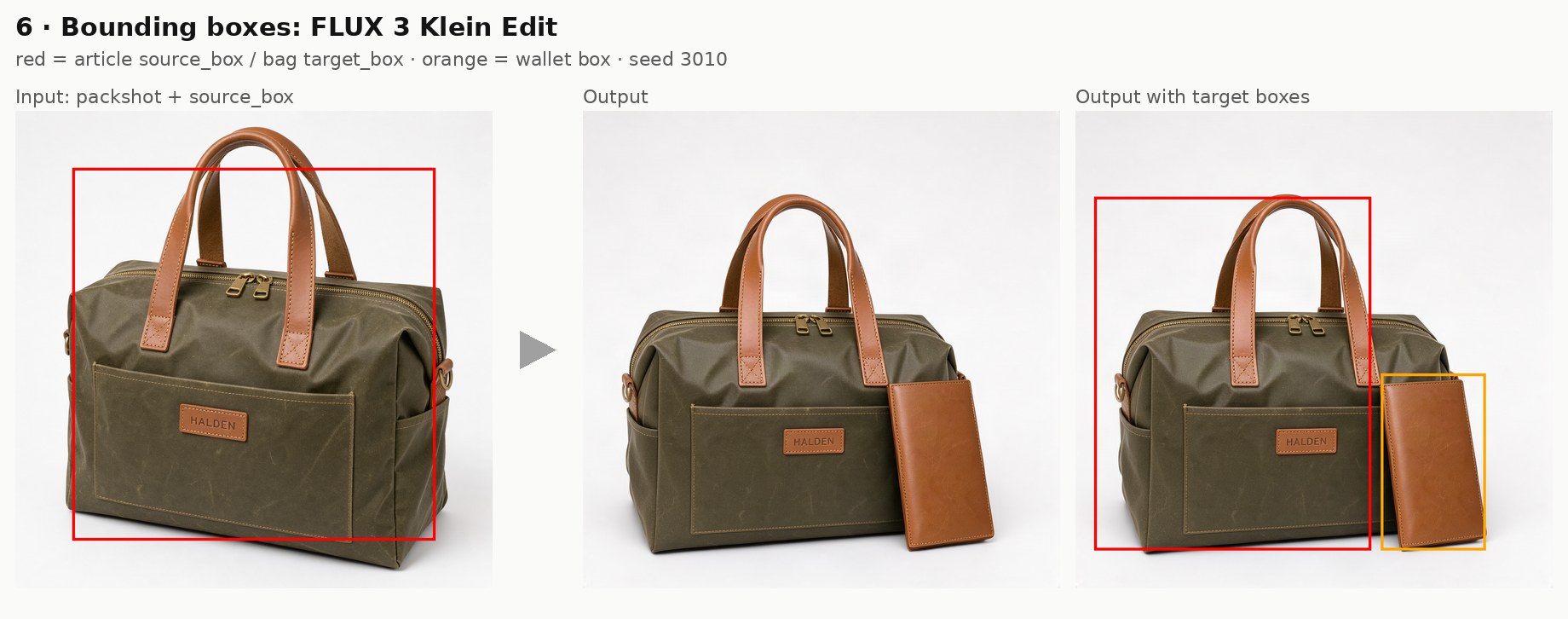
Generated using FLUX 3 Klein on fal, an AI model from Black Forest Labs.
Try it in ChatGPT Try it in fal AgentThe bag's entry names image index 0 as its source and gives a target_box on the left, while the wallet is a new object placed with box on its own.
source_box marks where the bag appears in the packshot, so I measure it on the actual file before scripting a batch.
I find the fractions faster by drawing regions with Add region in the Layout panel of our Klein playground.
I pin the seed (3010 here) so that a box adjustment can be compared against the previous run.
This 1024 × 1024 social tile costs $0.009 on the 1K tier for FLUX 3 Klein.
The Klein text-to-image endpoint accepts the same list with box only, which helps a new composition hold a fixed space for a logo or a price badge.
When is FLUX 2 Pro Outpaint the better way to widen a product photo?
FLUX 2 Pro Outpaint is the better fit for placements beyond the 21:9 and 1:2 limits of FLUX 3 Image Edit, or for extending an existing photo with no prompt to write.
The fal-ai/flux-2-pro/outpaint schema has no prompt field, and the pixel margins you set alongside the image URL decide where the canvas grows.
Its expand_top, expand_bottom, expand_left and expand_right values grow the canvas by 0 to 2,048 pixels per side.
javascript
import { fal } from "@fal-ai/client";

const { data } = await fal.subscribe("fal-ai/flux-2-pro/outpaint", {
  input: {
    image_url: process.env.SCENE_URL,
    expand_left: 1024,
    expand_right: 1024,
    mode: "high",
    output_format: "png",
  },
});

console.log(data.images[0].url);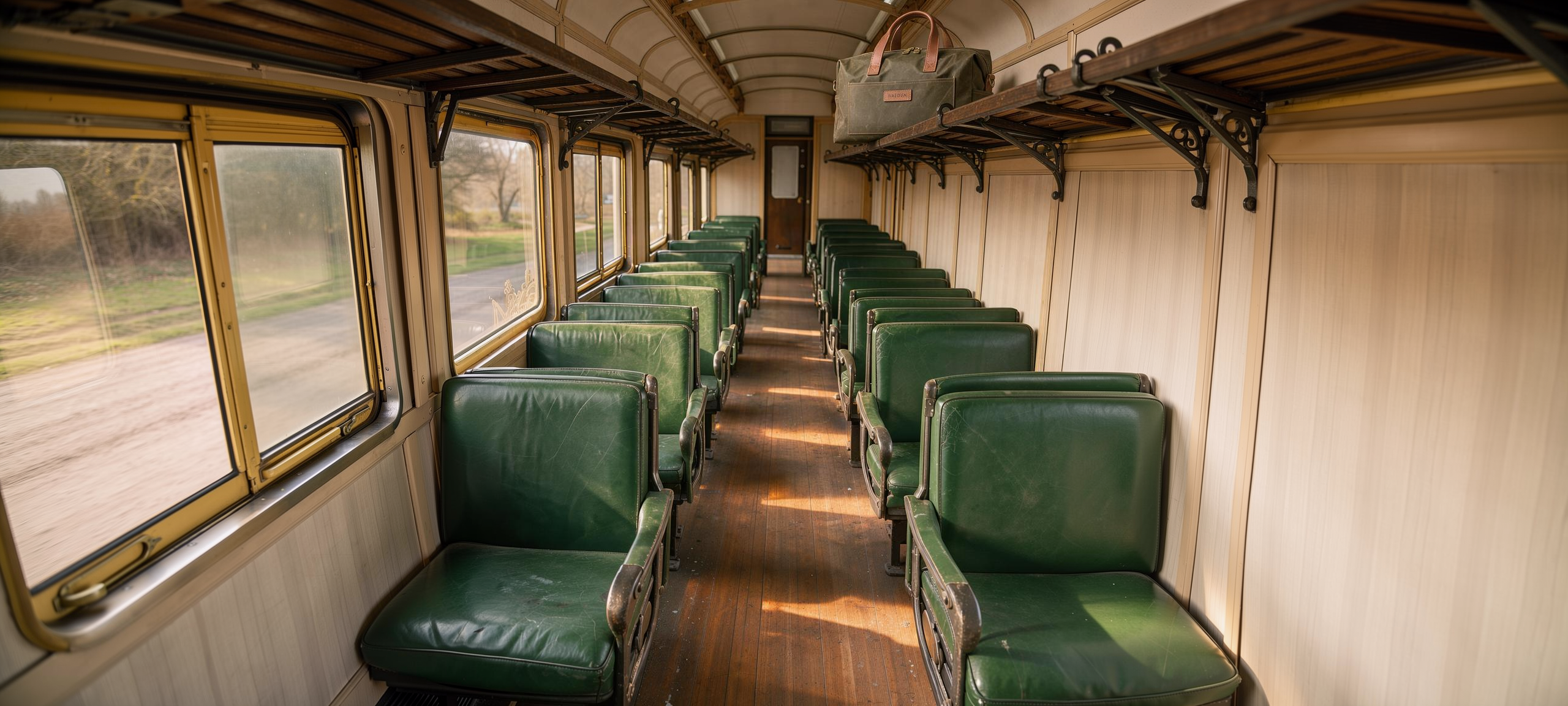
Generated using FLUX 2 Pro Outpaint on fal, an AI model from Black Forest Labs.
Try it in ChatGPT Try it in fal AgentWith 1,024 pixels added on each side, the roughly 1 MP 4:5 scene becomes an email header of about 2.6:1 and around 3.3 MP.
Our FLUX 2 Pro Outpaint rate charges $0.03 for the first output megapixel, then $0.015 for every further megapixel across input and output, with each count rounded up.
By my reading of that rate, this header comes to about $0.09 once the 4 MP rounded output and the 1 MP source image are both counted.
I'd recommend the default high mode for finished banners and fast for drafts, since our schema describes fast as significantly faster with possibly lower fidelity.
Only with auto_crop switched on does the endpoint trim a reference that the expanded canvas can't hold.
For a one-off banner without code, our free Image Extender tool runs in the browser.
Can you use LoRAs with the FLUX API?
LoRAs run on the FLUX 3 Klein LoRA endpoints, which accept up to three per request as path and scale pairs with scales from 0 to 4.
Both distilled Klein LoRA endpoints bill $0.012 per megapixel of output and load LoRAs from the FLUX 3 Klein LoRA Trainer directly.
A public FLUX 3 Klein LoRA from Hugging Face goes into the loras list by its .safetensors URL, with any trigger word its author documents placed in the prompt.
This request paints the packshot for a gift guide with the mnt_oil Monet LoRA that our Klein Edit LoRA playground uses as its example.
javascript
import { fal } from "@fal-ai/client";

const { data } = await fal.subscribe("blackforestlabs/flux-3/klein/edit-image/lora", {
  input: {
    loras: [
      {
        path: "https://huggingface.co/pjecuacion/flux3-klein-mnt-oil-monet-lora/resolve/main/mnt_oil_klein3.safetensors",
        scale: 1,
      },
    ],
    prompt:
      "mnt_oil, an impressionist oil painting of the deep olive weekender bag from the first image " +
      "resting on a garden bench in early spring, with loose visible brushstrokes " +
      "and the HALDEN patch still readable on the front pocket",
    image_urls: [process.env.PACKSHOT_URL],
    image_size: { width: 1024, height: 1024 },
    seed: 3010,
  },
});

console.log(data.images[0].url);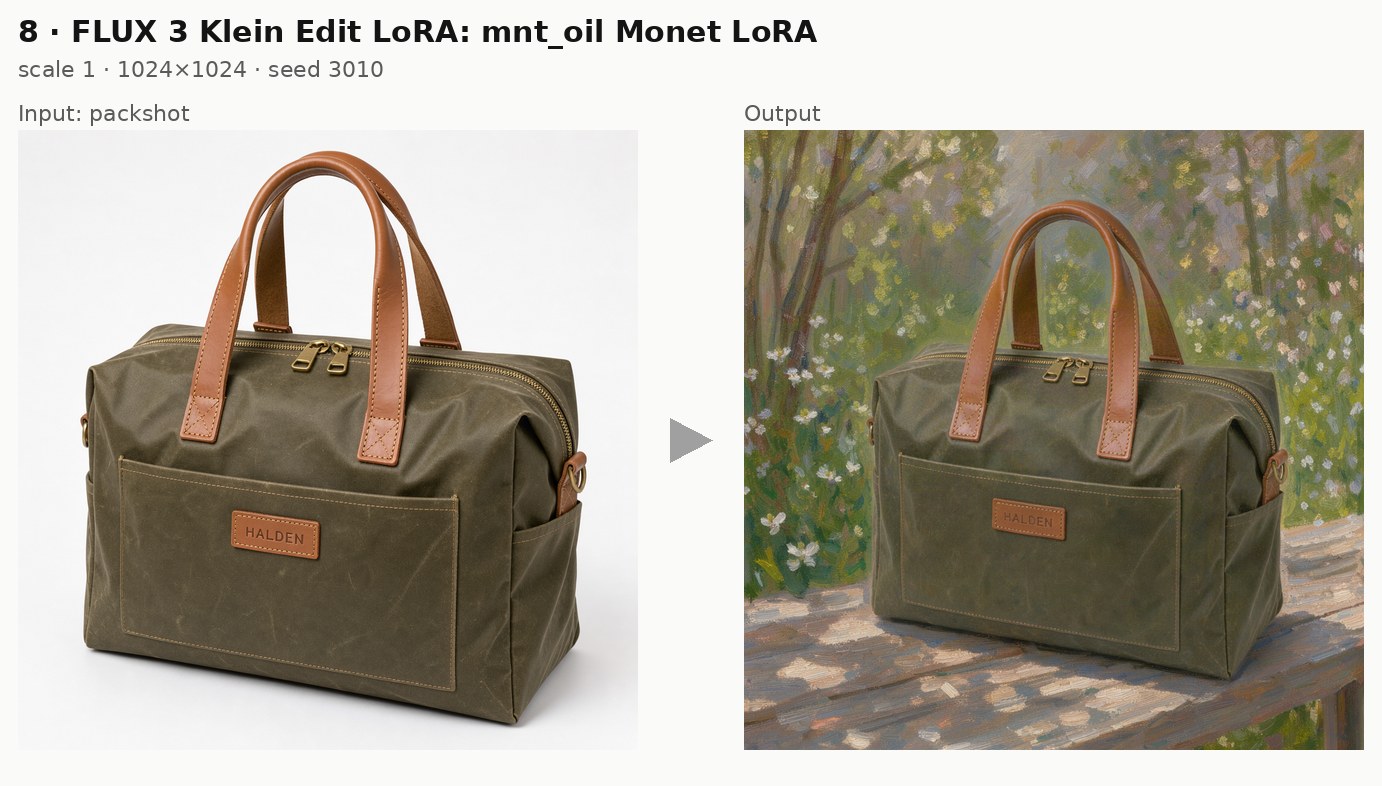
Generated using FLUX 3 Klein Edit LoRA on fal, an AI model from Black Forest Labs.
Try it in ChatGPT Try it in fal AgentThe painted gift-guide version of the bag costs $0.012 at 1024 × 1024.
Before its output appears in a paid campaign, a public LoRA's license on Hugging Face is worth checking.
I start scale at its default of 1 and adjust in small steps on a fixed seed to keep the comparisons fair.
Can FLUX 3 Klein learn a specific product from your photos?
Yes, the FLUX 3 Klein LoRA Trainer at blackforestlabs/flux-3/klein/base/trainer learns a product from a .zip of photos and returns a lora_file that the Klein LoRA endpoints can load.
Any image without its own caption file uses trigger_phrase as its caption, giving the prompt a fixed phrase to call the product by later.
python
import fal_client

zip_url = fal_client.upload_file("halden-weekender-photos.zip")

training = fal_client.subscribe(
    "blackforestlabs/flux-3/klein/base/trainer",
    arguments={
        "images_data_url": zip_url,
        "trigger_phrase": "HLDNWKND bag",
        "steps": 1000,
    },
)

lora_url = training["lora_file"]["url"]

image = fal_client.subscribe(
    "blackforestlabs/flux-3/klein/text-to-image/lora",
    arguments={
        "loras": [{"path": lora_url, "scale": 1}],
        "prompt": (
            "HLDNWKND bag standing on the tiled floor of a hotel lobby beside a brass luggage trolley, "
            "photographed at eye level in warm evening light with the HALDEN patch facing the camera."
        ),
        "image_size": {"width": 1024, "height": 1024},
    },
)

print(image["images"][0]["url"])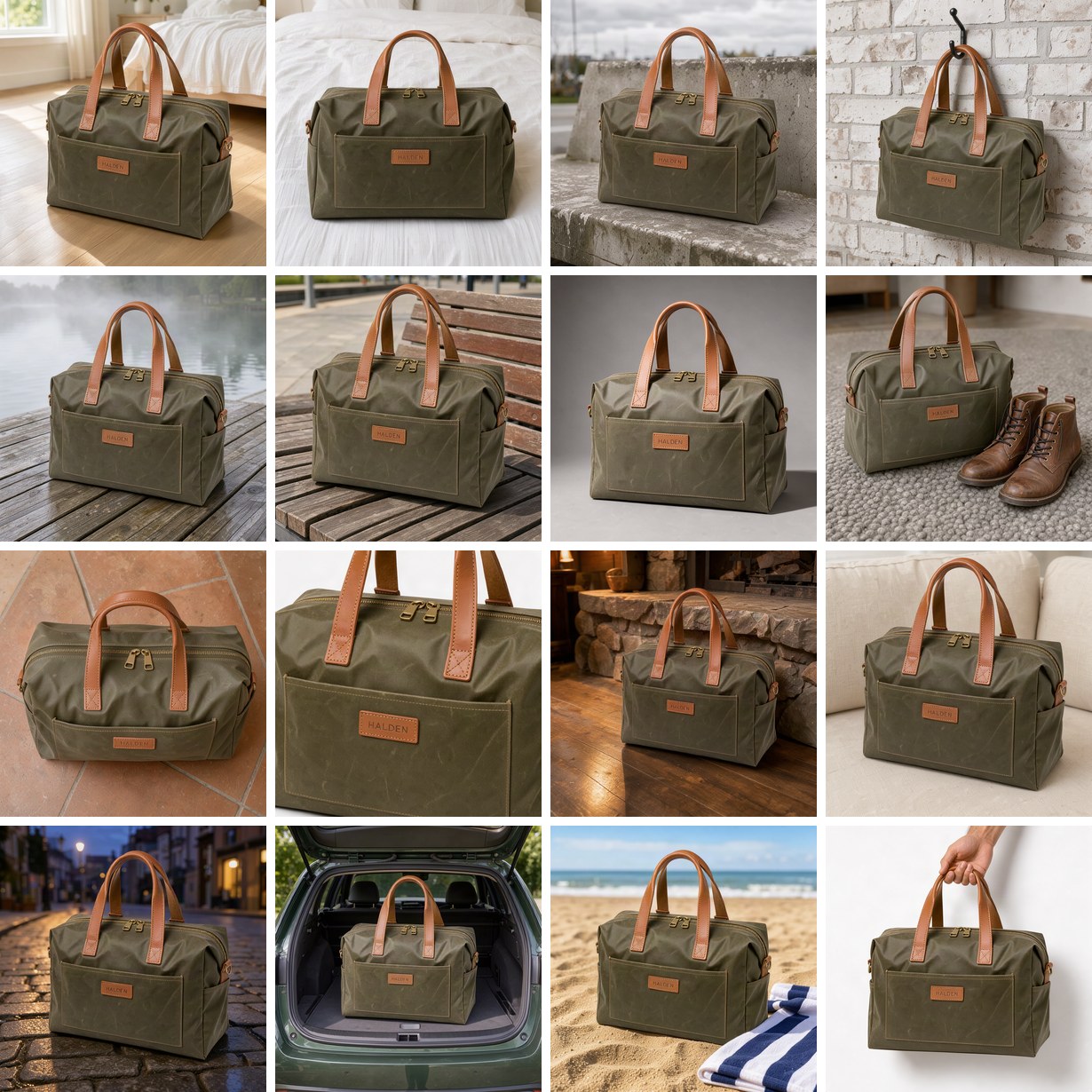
Generated using FLUX 3 Klein Text to Image LoRA on fal, an AI model from Black Forest Labs.
Try it in ChatGPT Try it in fal AgentA run at the default 1,000 steps and 1024 resolution costs $4.30, billed at $0.0043 per step with a 100-step minimum.
The trainer page recommends the Klein base LoRA endpoints, though the distilled text-to-image endpoint used here also accepts trainer output at $0.012 per 1024 × 1024 image.
Since training is a long-running job, I'd send anything past a test through fal_client.submit() with a webhook, as our queue docs suggest for training work.
In a real catalog run, the zip holds photos of the physical bag from several angles, with fal_client.upload_file() turning that local archive into a URL the trainer can read.
To teach Klein a repeatable edit, such as moving any product onto a branded backdrop, the FLUX 3 Klein Edit LoRA Trainer learns from before and after pairs for $4.22 per 1,000 steps with one input image per pair.
When a hosted endpoint isn't enough, our guide on deploying a LoRA as an API covers serving custom weights on fal Serverless.
Which limits apply to the FLUX 3 API?
The FLUX 3 API accepts up to 10 reference images per edit on both FLUX 3 Image and FLUX 3 Klein, while FLUX 3 Klein also has a num_images field (its LoRA endpoint caps it at four per call).
FLUX 3 Image documents no num_images field, so a pair of candidates means two requests, as in the packshot example.
Beyond those two, I keep these limits in mind for catalog runs:
- Reference size: a FLUX 3 Image Edit reference can be no smaller than 256 pixels on each side, with anything above 4 MP scaled down to fit while keeping its aspect ratio.
- Resolution: FLUX 3 Image works in tiers from 768sq to 4k, where 4k can take several minutes, while FLUX 3 Klein takes any size from 256 to 4,096 pixels per side.
- Prompt expansion:
enable_prompt_expansionis off by default on FLUX 3 Image and on by default on FLUX 3 Klein, which is easy to miss when a prompt moves between them. - Output formats: FLUX 3 Image returns jpeg unless you ask for png, whereas FLUX 3 Klein offers webp alongside its png default and jpeg.
- Moderation: FLUX 3 Image takes
safety_tolerancefrom 0 (strictest) to 4, default 2, while FLUX 3 Klein's safety checker is on by default and may need our support team to switch off. - LoRA count: the Klein LoRA endpoints take three LoRAs at most, scaled anywhere from 0 to 4.
- Canvas growth: FLUX 2 Pro Outpaint extends each side of an image by up to 2,048 pixels per request.
When should you use FLUX 2 or FLUX.1 through the API?
I'd say that FLUX 2 and FLUX.1 suit pipelines built on per-megapixel billing or on LoRAs trained for those model families, with all of their endpoints callable through the same fal key.
| Model | Endpoints on fal | Price on fal |
|---|---|---|
| FLUX.2 [pro] | fal-ai/flux-2-pro, fal-ai/flux-2-pro/edit | $0.03 for the first megapixel |
| FLUX.2 [max] Edit | fal-ai/flux-2-max/edit | $0.07 for the first processed megapixel and $0.03 for each additional one (inputs count) |
| FLUX.2 [dev] | fal-ai/flux-2, fal-ai/flux-2/edit | $0.012 per megapixel, with edits billed on processed megapixels |
| FLUX 2 Flash | fal-ai/flux-2/flash, fal-ai/flux-2/flash/edit | $0.005 per megapixel, with edits billed on processed megapixels |
| FLUX.1 [dev] with LoRAs | fal-ai/flux-lora | $0.035 per megapixel |
| FLUX.1 [schnell] | fal-ai/flux/schnell | $0.003 per megapixel |
The FLUX.2 [dev] edit endpoints are described as handling precise changes from natural language with hex color control, and FLUX.2 [dev] has its own trainer at $6.40 per 1,000 steps for teams already building on FLUX 2 LoRAs.
LoRAs trained on FLUX.1 [dev] run through fal-ai/flux-lora, which lets an existing style library keep shipping without a retrain.
FLUX.1 Kontext [pro] takes text and reference images together for targeted local edits or changes to a whole scene, according to its model description.
Dataset formats for FLUX.2 text-to-image and image-to-image LoRAs are covered in our blog walkthrough on training FLUX.2 LoRAs.
FLUX.2 [pro] goes through photorealism and product photography tests in our FLUX vs. Qwen Image comparison on fal.
My pick for a fresh catalog is FLUX 3 Image with FLUX 3 Klein, keeping FLUX 2 and FLUX.1 for pipelines already built around them.
Our roundup of the 10 best AI image generators shows how FLUX.2 compares with the wider field on fal.
Recently Added













Run the FLUX API on fal
On fal, I can take a catalog from a $0.009 Klein draft to a trained product LoRA without leaving one API key.
FLUX 3 Image costs $0.048 per 1K image on fal, and FLUX 3 Klein starts at $0.008 for a 768 × 768 image.
Teams weighing FLUX against Google's image models can compare this guide with our Nano Banana API guide, which builds a similar ecommerce pipeline on Nano Banana 2.1.
Each prompt in this guide runs without code in its model's playground, starting with the FLUX 3 Image playground, and the Layout panel in the Klein playground helps plan bounding boxes first.
FLUX API FAQ
What's the difference between FLUX 3 Image and FLUX 3 Klein?
FLUX 3 Image generates and edits at fixed resolution tiers up to 4k, priced at $0.048 per 1K image on fal.
FLUX 3 Klein is the fast step-distilled option at $0.009 per 1K image, and its fal schema lists seed, num_images, bounding_boxes and webp output, none of which appear in the FLUX 3 Image schema.
LoRA support in this guide also runs through the Klein LoRA endpoints, with FLUX 3 Image kept for packshots and edits.
Can I call the FLUX API from Claude Code or Cursor?
Yes, our MCP server at https://mcp.fal.ai/mcp-relay lets coding agents such as Claude Code and Cursor look up FLUX pricing and run generations after a browser sign-in.
On macOS or Linux, curl -fsSL https://fal.ai/mcp/install.sh | bash adds fal to the supported agents it finds.
Our guide to generating AI videos with Claude and MCP walks through the connection step by step.
How can I get the same FLUX image twice?
FLUX 3 Klein takes a seed that returns the same image whenever it's paired with the same prompt on the same model version.
FLUX 3 Image documents no seed field, so I keep its finished outputs and build variations on them through FLUX 3 Image Edit.
How much does it cost to train a FLUX LoRA on fal?
A FLUX 3 Klein LoRA costs $4.30 to train at the default 1,000 steps, billed at $0.0043 per step with a 100-step minimum.
The FLUX 3 Klein Edit LoRA Trainer charges $4.22 for 1,000 steps with one input image per pair, and the FLUX.2 [dev] trainer charges $6.40 for the same step count.
Which FLUX model costs the least on fal?
Of the FLUX endpoints in this guide, FLUX.1 [schnell] has the lowest rate at $0.003 per megapixel, followed by FLUX 2 Flash at $0.005 per megapixel.
Within FLUX 3, Klein costs the least at $0.008 for a 768 × 768 image on its planned schedule.