In this guide, I'll run both Seedream 5.0 Pro and Nano Banana 2 on fal through the same prompts and show you how each AI image generator reads a prompt, how the two editing endpoints differ, what they cost, and which one fits which kind of job.
TL;DR
Seedream 5.0 Pro is ByteDance's current flagship for image work.
There are two endpoints that you can use: bytedance/seedream/v5/pro/text-to-image for generation and bytedance/seedream/v5/pro/edit for grounded editing.
On fal, charging is based per output image, scaled by pixel area, with the current pricing on the playground being $0.0675 for images at or below 1536x1536, then $0.135 up to the 2048x2048 ceiling.
Editing is where it stands out. You can localize a change just by naming it, no mask required, and you can also draw colored boxes onto the input and hand each box its own instruction, and add in as many as 10 image references at once.
Nano Banana 2 is Google's Gemini 3.1 Flash Image model, on fal at fal-ai/nano-banana-2 for generation and fal-ai/nano-banana-2/edit for editing.
The model is billed on fal per output image by resolution tier: $0.06 at 0.5K, $0.08 at 1K, $0.12 at 2K, and $0.16 at 4K, with a couple of small toggles that add a cent or two.
You can set how hard it thinks per request with thinking_level, ground a render in live web results, hold up to 5 faces steady across a batch, and feed it up to 14 reference images.
How do Seedream 5.0 Pro and Nano Banana 2 compare?
Here's how both AI image generators stack up side-by-side:
| Seedream 5.0 Pro | Nano Banana 2 | |
|---|---|---|
| Maker | ByteDance | |
| Best for | Grounded region edits, structured and multilingual layouts, sketch-to-render, multi-image compositing | Fast reasoning-guided generation, character consistency, web-grounded visuals, accurate in-image text |
| Text-to-image price (1K) | $0.0675 (sub-1536 tier) | $0.08 at 1K |
| Higher-resolution price | $0.135 up to 2048x2048 | $0.12 at 2K, $0.16 at 4K |
| Billing basis | Per output image, two area tiers | Per output image, four resolution tiers |
| Reasoning control | Fixed deep-thinking pipeline, no toggle | thinking_level: minimal or high |
| Text rendering | Native text in 14 languages | Character-validated typography in multiple languages |
| Editing surface | Grounded region targeting, no mask | Semantic reasoning, no mask |
| Region targeting | Prompt-described or annotation frames | Prompt-described |
| Reference images | Up to 10 | Up to 14 |
| Web grounding | Not exposed | enable_web_search |
| Character consistency | Not stated | Up to 5 people |
| Extra edit inputs | Reference images | Reference images, plus video and audio files or a PDF as context |
| Resolution range | 1024x1024 to 2048x2048 total pixels, aspect 1:16 to 16:1 | 0.5K to 4K, extreme aspect out to 8:1 and 1:8 |
| Custom dimensions | Yes | Aspect-ratio presets |
| Output formats | JPEG, PNG (JPEG default) | PNG, JPEG, WebP (PNG default) |
| Watermarking | Not stated | SynthID on all outputs |
| Safety control | enable_safety_checker, disable via API only | safety_tolerance 1 to 6, API only |
| Commercial use | Yes | Yes |
Where can you access Seedream 5.0 Pro and Nano Banana 2?
Both Seedream 5.0 Pro and Nano Banana 2 are on fal, with a browser playground for one-off tests and an API for production with no subscription required.
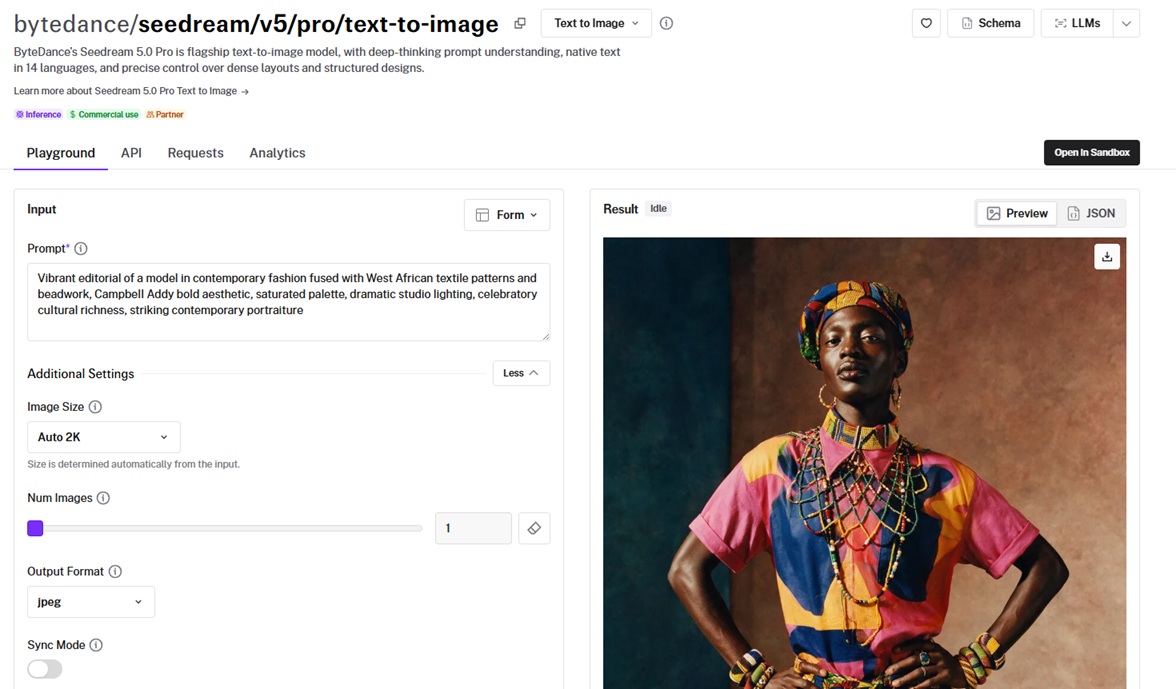
You pay per render and nothing else: Seedream 5.0 Pro by output area, Nano Banana 2 by resolution tier.
One library, @fal-ai/client, runs the whole catalog, so what you wire up here is what you'd write for any other model on the platform.
Switching between the two is nearly a one-line change: swap the endpoint string, and the rest of the call stays as it is.
The one real difference is the input object, since Seedream takes image_size while Nano Banana 2 takes aspect_ratio and output_format.
A generation call looks like this:
import { fal } from "@fal-ai/client";

const result = await fal.subscribe(
  "bytedance/seedream/v5/pro/text-to-image",
  {
    input: {
      prompt:
        "Vibrant editorial of a model in contemporary fashion fused with West African textile patterns and beadwork, Campbell Addy bold aesthetic, saturated palette, dramatic studio lighting, celebratory cultural richness, striking contemporary portraiture",
    },
    logs: true,
    onQueueUpdate: (update) => {
      if (update.status === "IN_PROGRESS") {
        update.logs.map((log) => log.message).forEach(console.log);
      }
    },
  }
);

console.log(result.data);
console.log(result.requestId);
For image editing, you point at bytedance/seedream/v5/pro/edit or fal-ai/nano-banana-2/edit, and each one reads an image_urls list.
Seedream 5.0 Pro also takes the annotation boxes you paint on, up to 10 references in all, while Nano Banana 2 goes to 14 and will read a video clip or a PDF for context on top of the images.
How do Seedream 5.0 Pro and Nano Banana 2 work differently?
Both models think about a prompt before they draw it, so neither is matching keywords to visual fragments the way early tools did.
The difference is control.
Seedream 5.0 Pro does the thinking internally and gives you no lever on it.
ByteDance tunes that stage for multilingual, layout-heavy work, and the only things you hand it are the prompt and the size.
Nano Banana 2 puts the thinking in your hands instead.
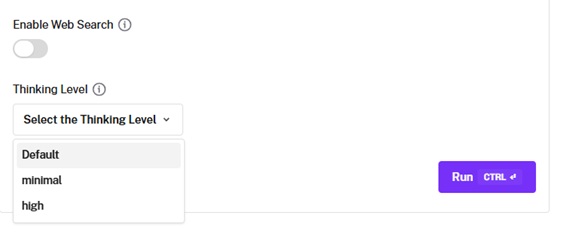
thinking_level takes minimal or high, so the depth of deliberation is your call, and a web-search switch lets a render draw on live information.
You can run it low for quick, cheap drafts, and flip search on when the picture has to match something real, each choice adding a little to the bill.
The bigger day-to-day split is in editing. Seedream 5.0 Pro works one region at a time.
You say what should change, and it confines the edit to the spot you named, holding the rest of the picture where it was.
Paint a colored box, attach a note to that box alone, and it treats every marked area as a separate job.
It can also take a rough line sketch to a finished image while keeping your layout, and it can pull a subject off its backdrop as its own layer.
You can also hand it several sources, as many as 10, and it composites them in one shot.
Nano Banana 2 also skips masks, but it reasons across the whole scene.
You describe the edit, and Gemini's multimodal stack decides what to touch and what to protect, across up to 14 references at once.
It can keep as many as 5 people looking like themselves from one edit to the next, and it takes more than photos on the way in, reading video and audio files or a PDF.
How do Seedream 5.0 Pro and Nano Banana 2 handle the same prompt?
I ran seven prompts through both models, five straight generations and two edits, so we can see how the models stack up head-to-head:
Test 1: A black-and-white manga action page
A manga page is the meanest text test I know, because it buries the text inside the art.
Speech bubbles need clean legible dialogue and the sound effects need stylized lettering that still reads, all of it packed into panels that have to flow in the right order without turning to mush.
So I asked for a four-panel black-and-white page, a rooftop fight in the rain, with a chapter title, a caption box, two lines of dialogue, one sound effect, and a page number, every word of it fixed in the prompt.
Prompt: A single black-and-white manga page in a modern action style, clean confident inking with screentone shading and halftone gradients, laid out in four panels read right to left, top to bottom. A chapter header runs across the very top in bold display lettering reading 'CHAPTER 7: THE LONG WAY DOWN'. The top panel is a wide establishing shot of two figures squaring off on a rain-soaked rooftop at night, a neon city skyline behind them, heavy diagonal rain drawn as fine white streaks over dark screentone, with a small rectangular caption box in the upper corner reading 'The rain hadn't stopped in three days.' Beneath it, on the right, a tight close-up of a young swordswoman with short dark hair and a hard stare, water running down her face, a speech bubble beside her reading 'You should have stayed on your side of the river.' To its left, a hard diagonal action panel of two katana blades cracking together in a burst of sparks, speed lines radiating from the point of impact, with a large hand-drawn sound effect worked into the art reading 'SHINK'. The bottom panel is a wide low-angle shot of the second figure landing in a crouch on wet gravel, long coat flaring, a speech bubble reading 'So should you.' A small page number rests in the bottom outer corner reading '142'. Bold black linework, deep inky blacks, expressive screentone, clean white gutters between panels, and every word of the dialogue, the chapter title, the caption, the sound effect, and the page number rendered exactly as written.
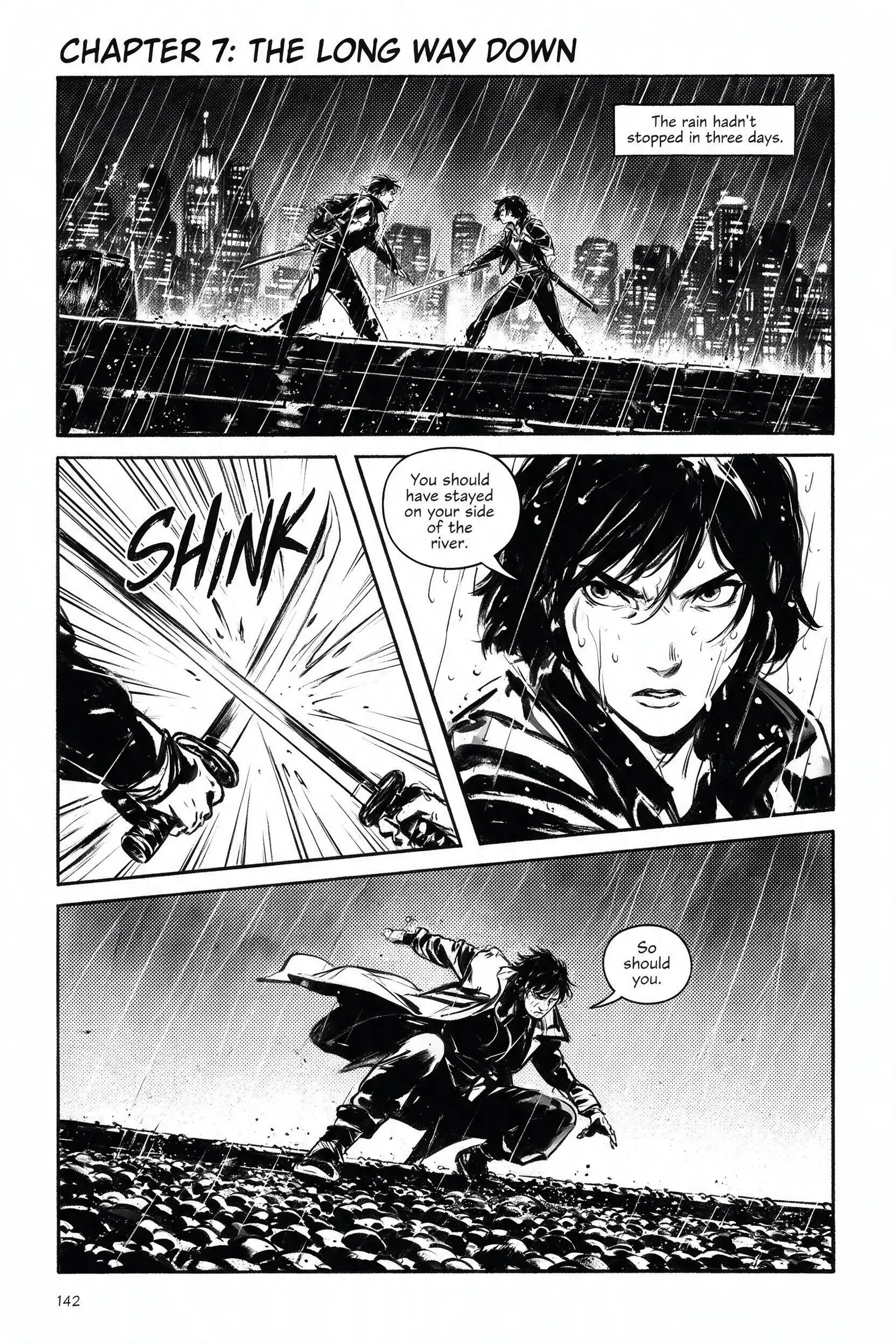
Generated using Seedream 5.0 Pro on fal, an AI model from ByteDance.
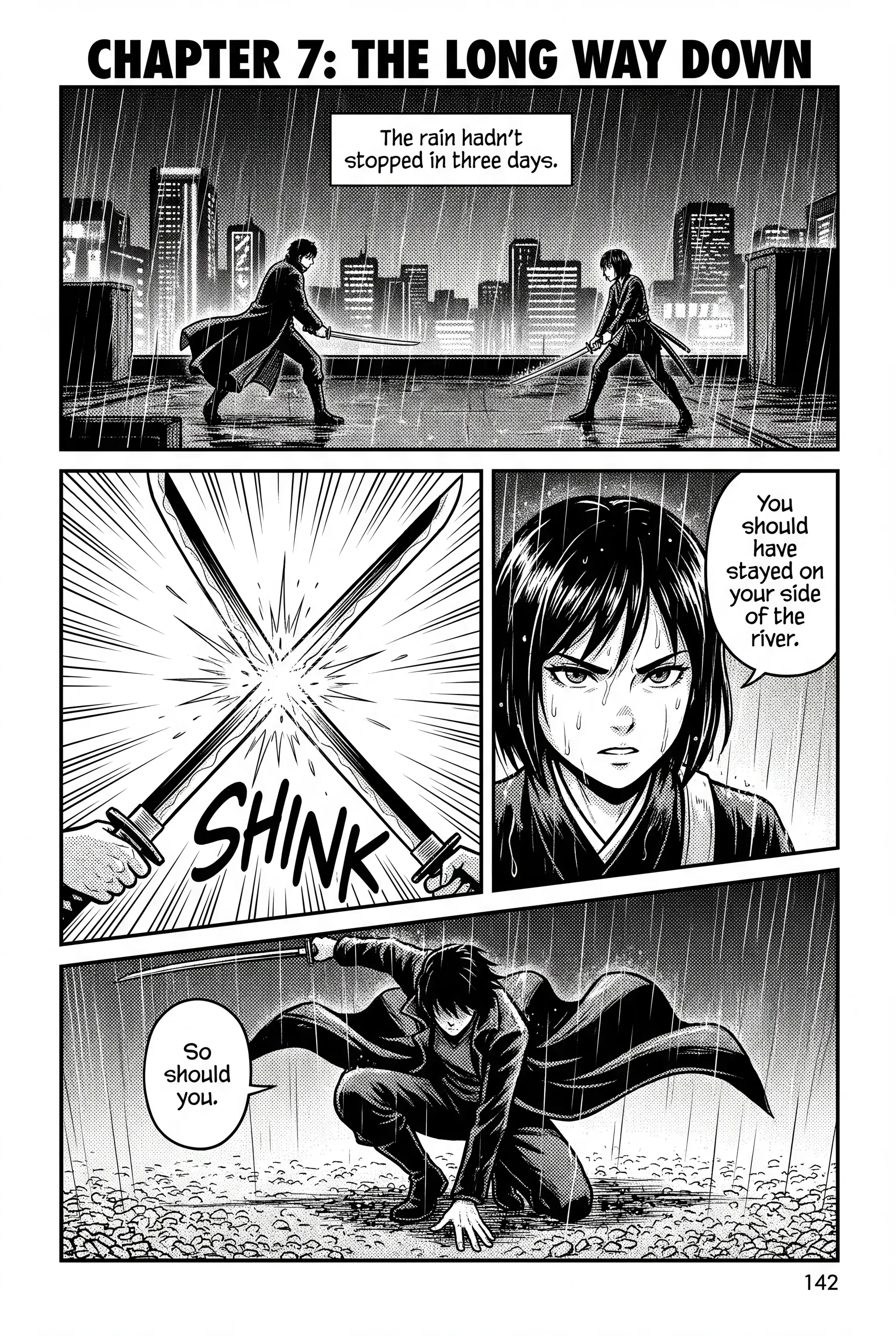
Generated using Nano Banana 2 on fal, an AI model from Google.
Notes: Crème de la crème execution from both image models, especially label spelling and grid alignment.
Test 2: A candlelit observatory film still
Lighting is the part of a scene you can't bluff.
The tell is two sources at different temperatures in one frame, a warm one and a cold one, both of which have to stay physically honest where they meet, not muddy into grey.
So I sat an astronomer between a guttering candle and cold moonlight, and the thing to watch is whether the skin under the candle still reads as skin.
Prompt: A cinematic film still from a period drama, the interior of a candlelit 18th-century observatory after dark, framed on a vintage spherical lens in a near-square 1.66:1 ratio. An elderly astronomer in a heavy wool coat bends over a brass telescope beside a tall arched window, one hand on the focus dial, his face lit from beneath by a single guttering candle on the desk. Moonlight pours through the glass across scattered star charts and an open leather notebook. Warm candle amber wraps his lined face while the cold moon-blue washes the far wall and the telescope's brass. Soft halation blooming around the flame, fine large-format grain, a thin plane of focus on his hands and eyes with everything behind them dissolving into the dark. Period-accurate wardrobe and props, and no lettering anywhere in the frame.
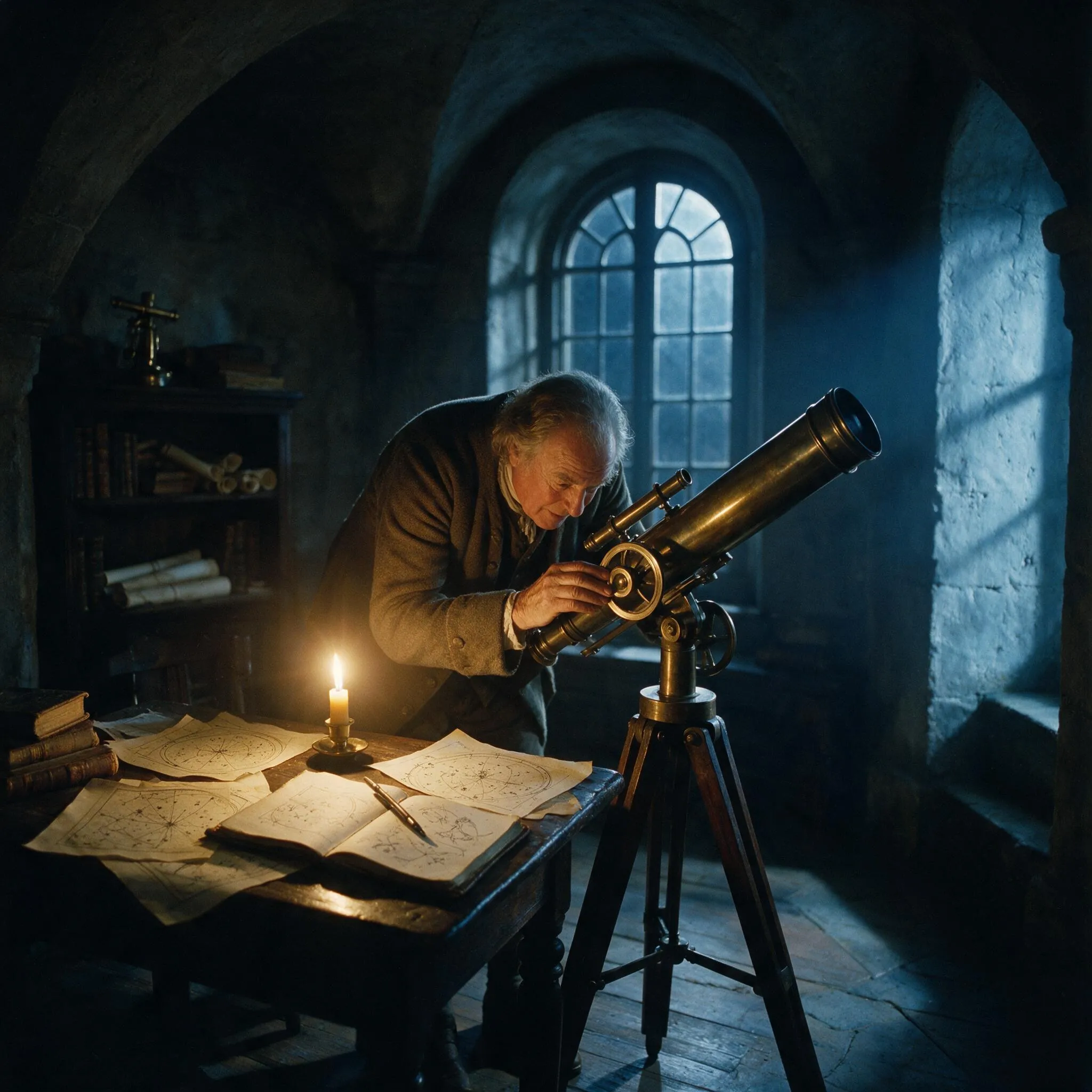
Generated using Seedream 5.0 Pro on fal, an AI model from ByteDance.
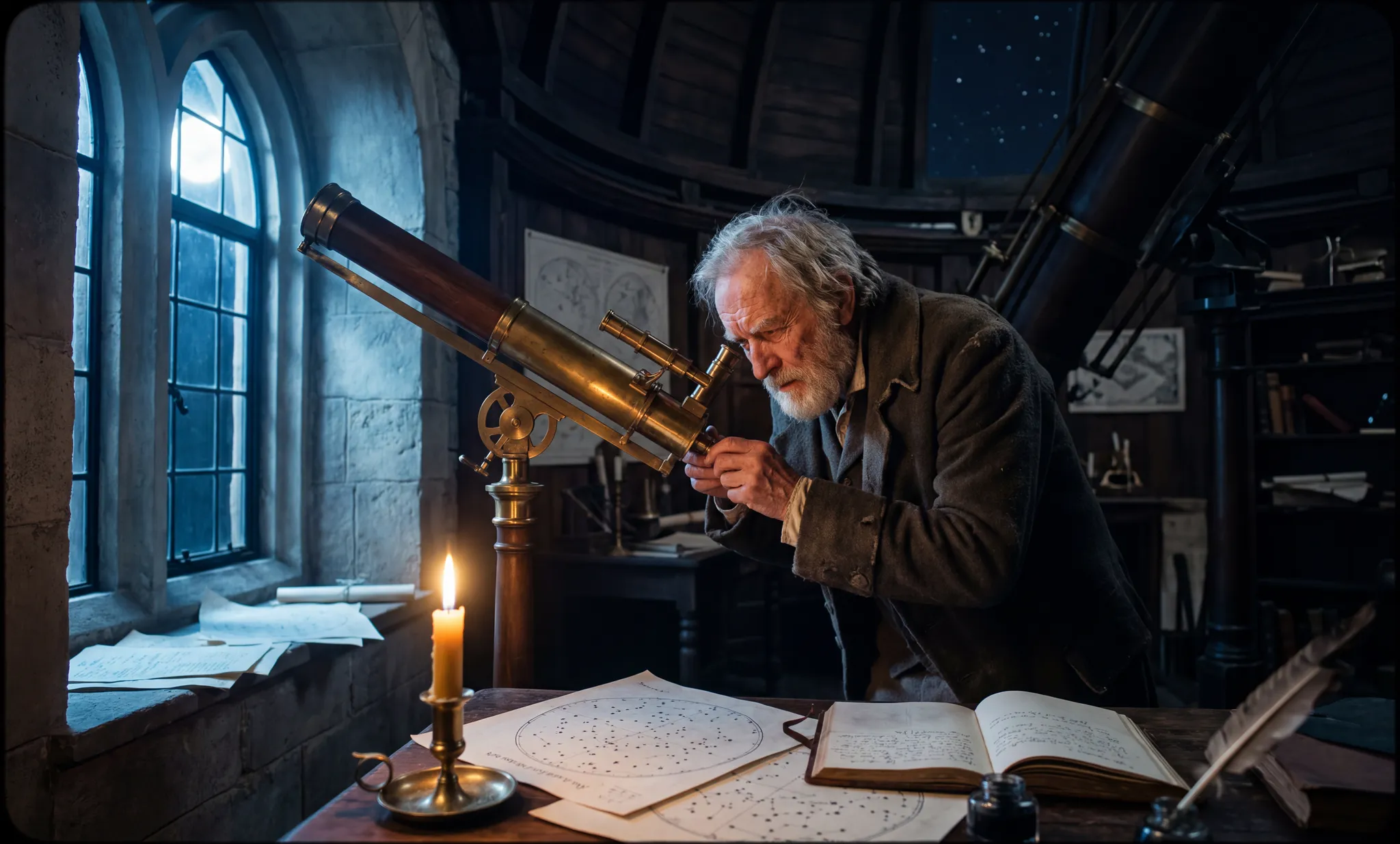
Generated using Nano Banana 2 on fal, an AI model from Google.
Notes: I like how both AI image generators handled the lighting and the overall realism of the images, especially how the skin under the candle stays believable on both models.
falMODEL APIs
The fastest, cheapest and most reliable way to run genAI models. 1 API, 100s of models
Test 3: A floating wristwatch advertising hero
A product ad is a text test wearing a lighting test.
The lighting is the easy half; the hard half is the logo and the tagline baked into the frame, where one malformed letter or a warped serif gives the whole thing away.
So I floated a watch in hard catalog light with 'MERIDIAN' on the dial and a line of copy set into the background, and left nothing about the type to chance.
Prompt: A high-end catalog product shot of a matte-black mechanical wristwatch, floating at a slight tilt against a warm terracotta backdrop and lit the way a jeweler would light it. One hard key light skims the brushed-steel case from the upper right, picking out the knurled crown and the domed sapphire crystal, while a low soft fill lifts the black leather strap out of shadow. A few dust motes hang in the beam. The dial reads ten past ten, indices clean and legible, with a small mark at twelve o'clock reading 'MERIDIAN' in a thin engraved serif. Set into the terracotta below, one line of copy reads 'time, considered'. A faint circular shadow grounds the piece on an unseen surface. Shot macro on a 105mm at f11, focus stacked from crown to strap, warm and high in contrast, with no wording beyond the mark and the line already named.
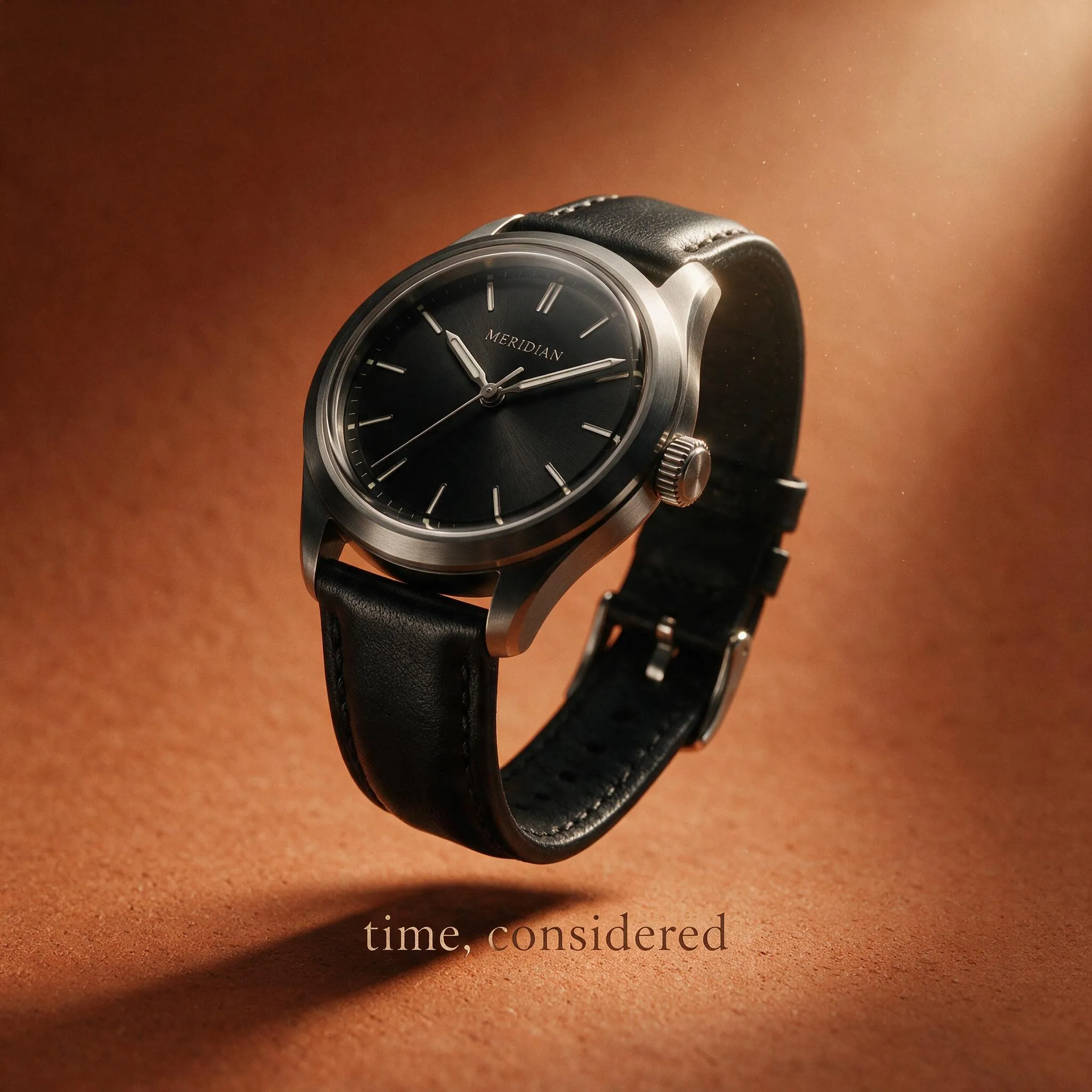
Generated using Seedream 5.0 Pro on fal, an AI model from ByteDance.
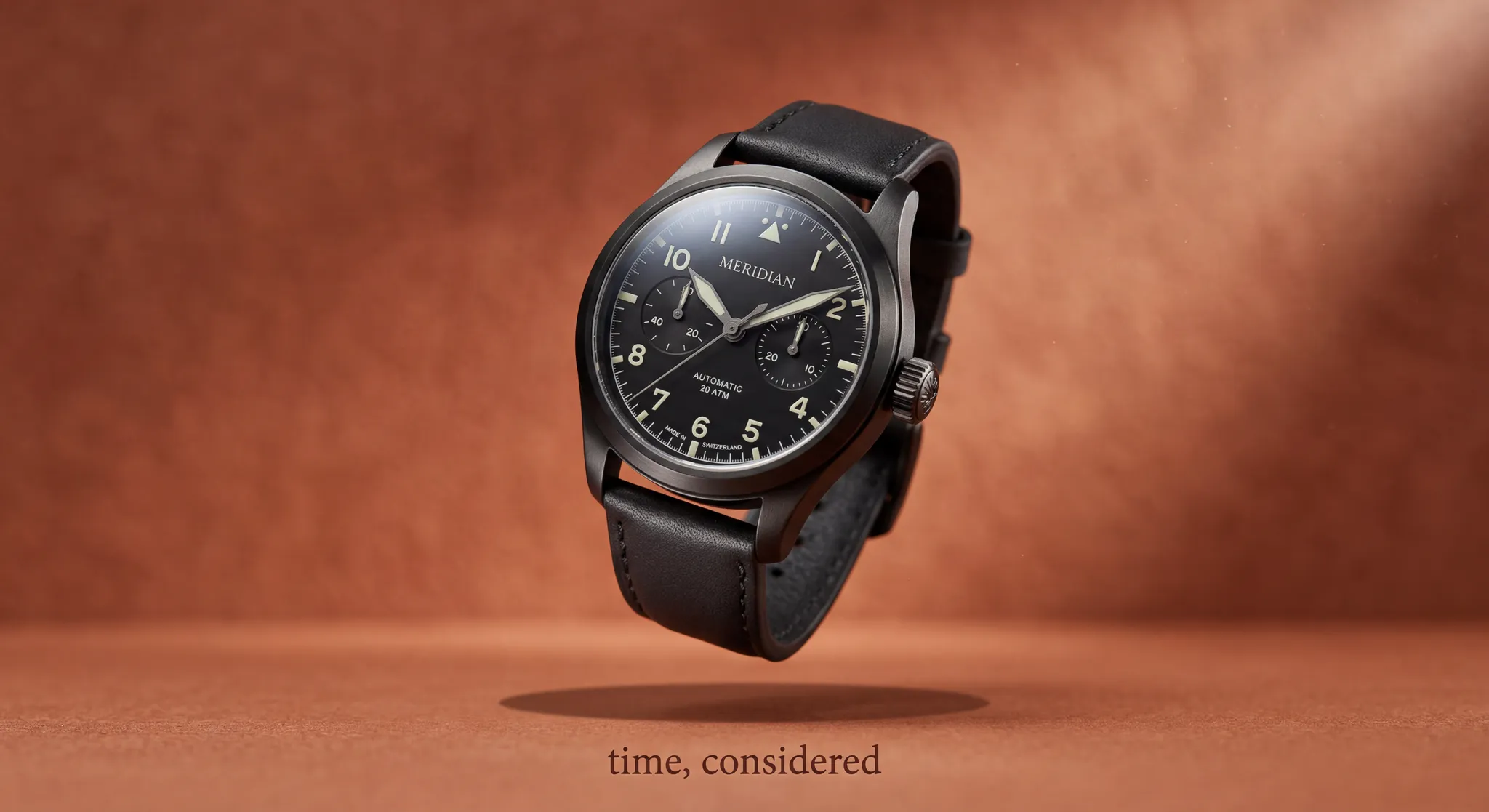
Generated using Nano Banana 2 on fal, an AI model from Google.
Notes: Both models did well when it comes to the shadows and the clock itself, although I like Seedream 5.0 Pro's lighting better.
Test 4: A finance app dashboard mockup
The brief is a dense finance dashboard: a greeting, a balance card, an icon row, three transaction lines, and a tab bar, every label spelled out and every figure needing to land exactly.
Prompt: A photorealistic mockup of a mobile finance app displayed on a modern smartphone held at a slight angle against a soft neutral-grey studio backdrop, shot like a product render. The screen shows a clean light-mode dashboard: a top bar reading 'Good morning, Elena' with a small circular avatar, below it a large balance card in deep indigo displaying '$12,480.55' with a smaller 'Total balance' label above it and a green '↑ 2.4% this month' below. Under the card, a horizontal row of four round icon buttons labeled 'Send', 'Request', 'Cards', and 'More'. Beneath them, a 'Recent activity' header followed by three transaction rows, each with a merchant name ('Riverside Coffee', 'Metro Transit', 'Lumen Books'), a date, and an amount aligned to the right. A bottom navigation bar shows four tabs with line icons: 'Home', 'Wallet', 'Insights', 'Profile'. Crisp anti-aliased type, consistent padding, subtle card shadows, a realistic screen reflection, sharp focus across the display, with every label and figure rendered exactly as typed here.
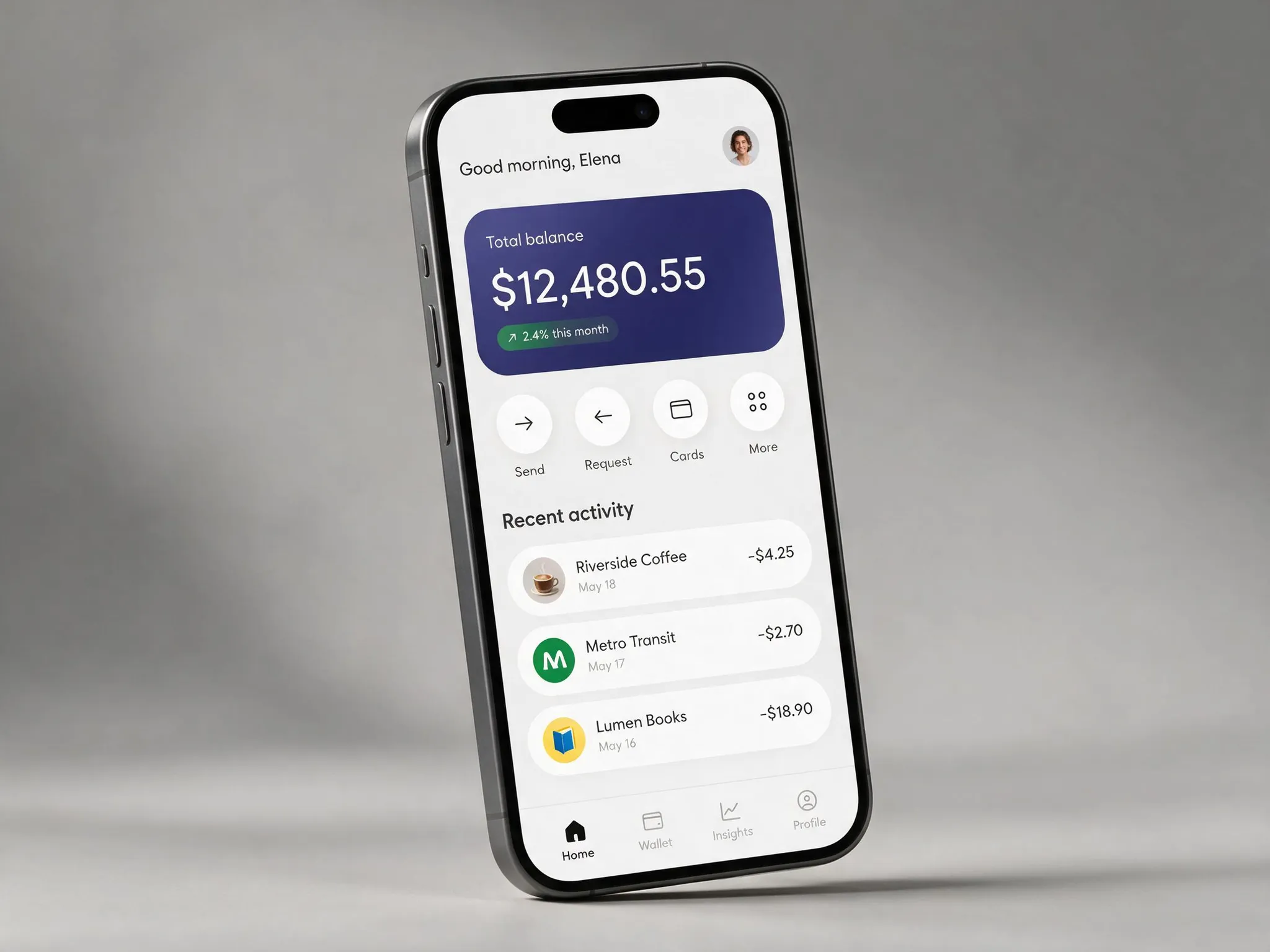
Generated using Seedream 5.0 Pro on fal, an AI model from ByteDance.
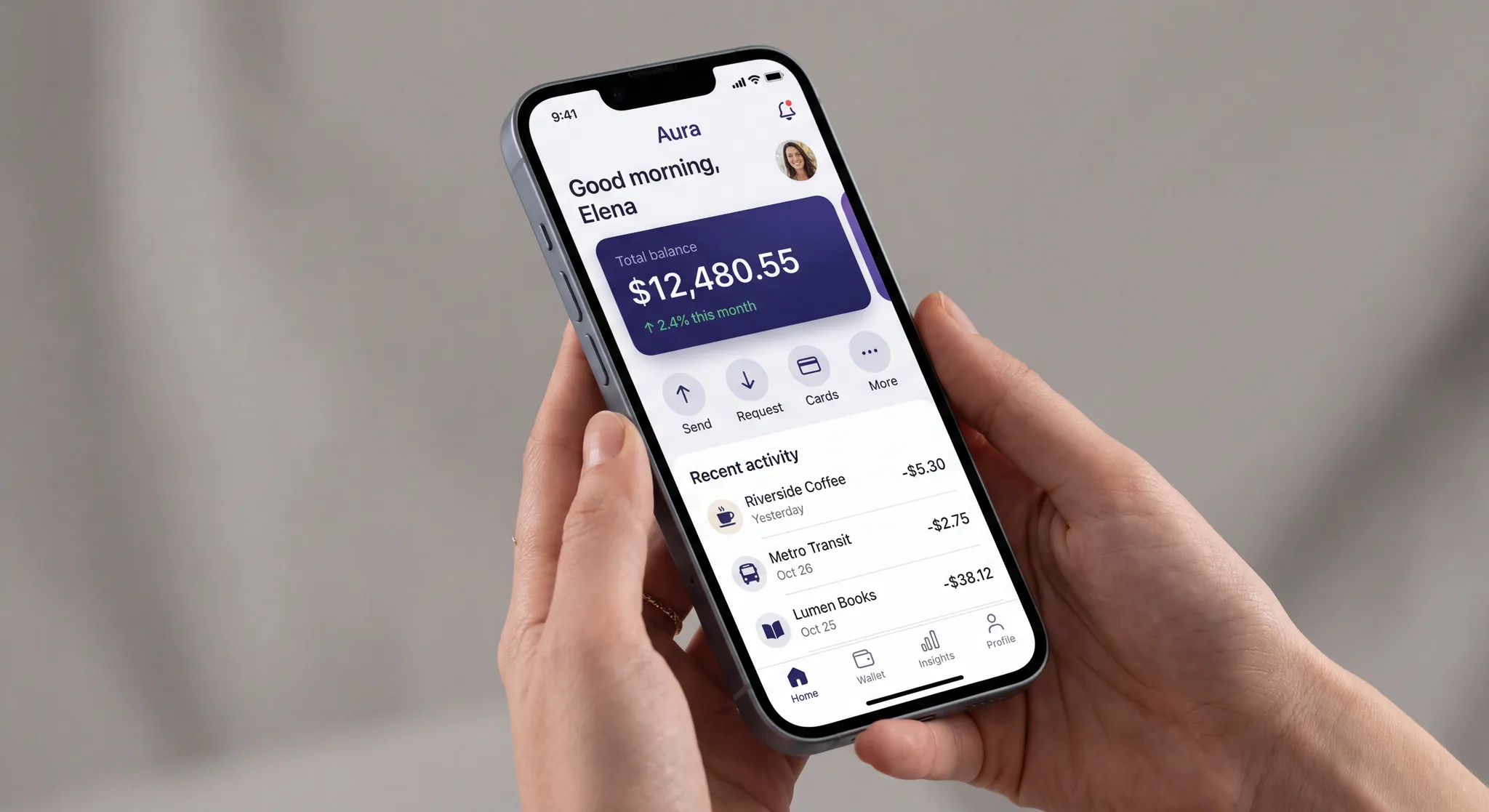
Generated using Nano Banana 2 on fal, an AI model from Google.
Notes: Tab labels, the balance figure, and the recent activity section looks reasonable to me on both generations.
Test 5: A modern kitchen interior design render
I built a small modern kitchen down to the cabinets and the light for its own sake, and because I need a clean room to edit in the next test.
Prompt: A photorealistic straight-on daytime architectural render of a small modern kitchen, shot at eye level on a 35mm lens. White shaker cabinets run along the back wall above and below a wooden butcher-block counter, with a brushed-steel range set into the run and a matching hood above it. To the right stand two open oak shelves holding a row of glass storage jars and a stack of ceramic bowls. A window with a half-drawn linen roller blind sits center-left, letting soft north light fall across the counter. A small island in the foreground has two woven bar stools tucked under it and two clear-glass pendant lights hanging above on slim black cords. A white ceramic fruit bowl holding lemons rests on the counter near the window. Matte white subway tile covers the wall between the counter and the upper cabinets. Warm oak flooring, even natural daylight, soft realistic shadows, true-to-life material textures, and no text anywhere in the render.
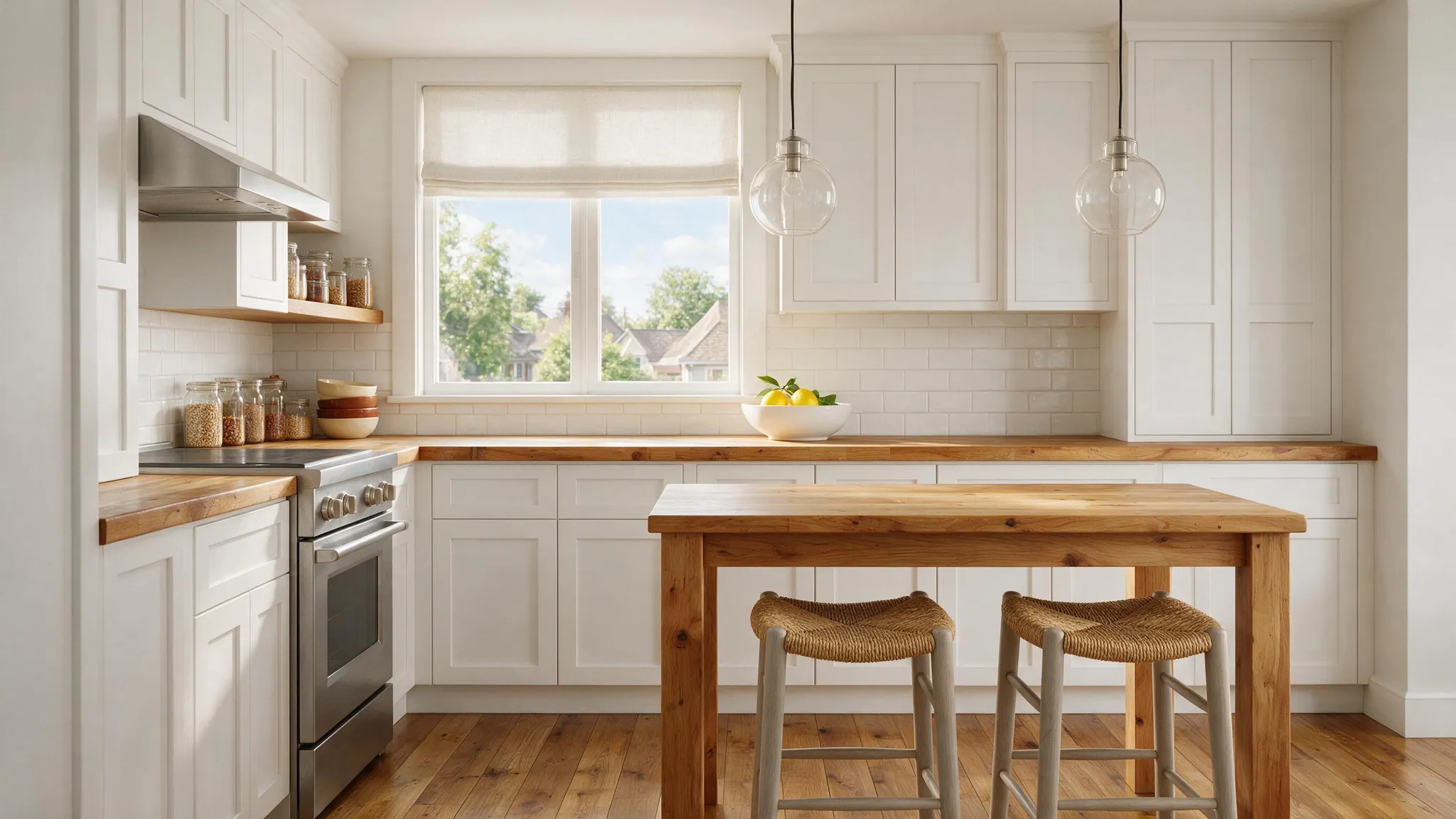
Generated using Seedream 5.0 Pro on fal, an AI model from ByteDance.
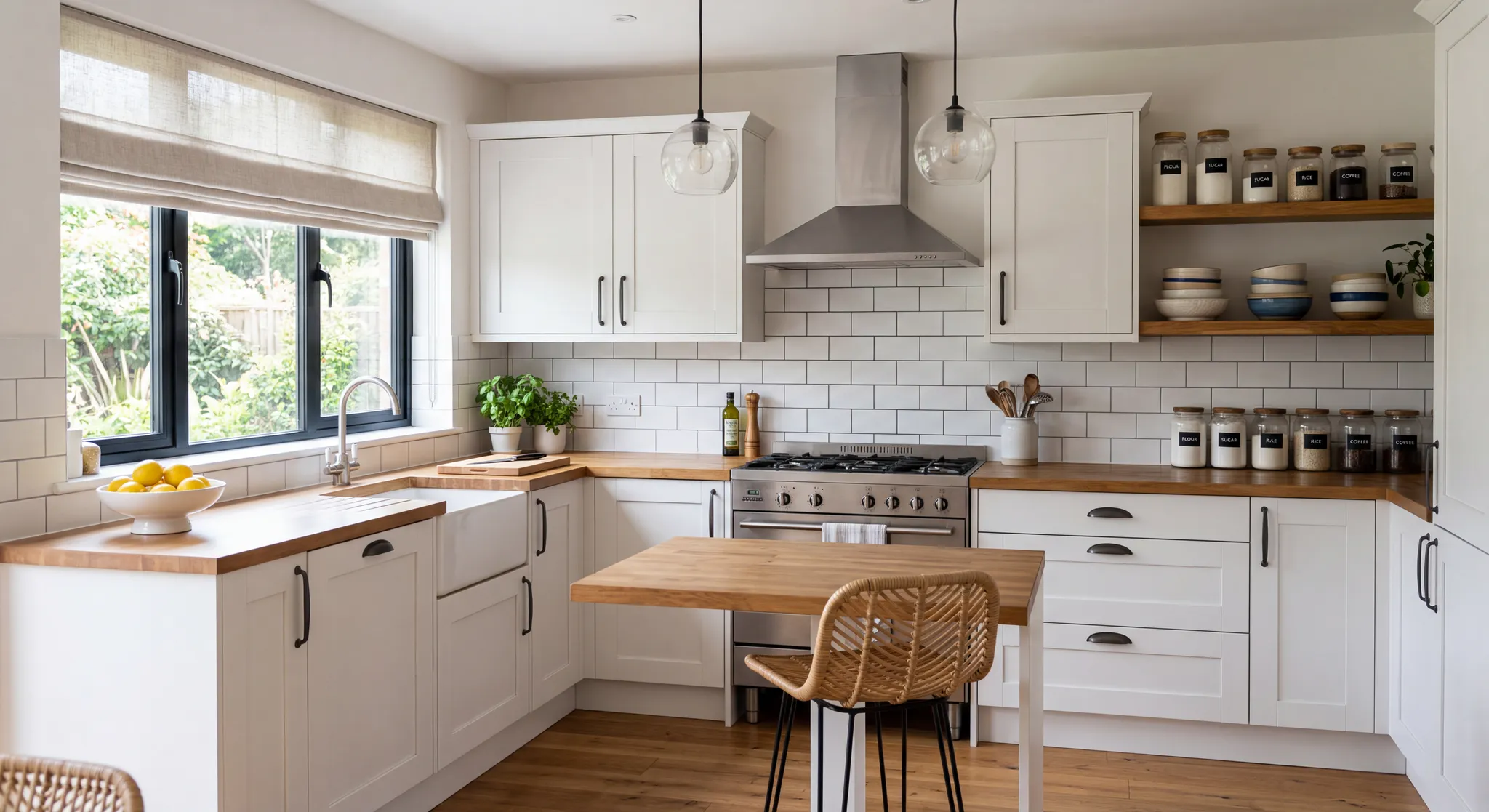
Generated using Nano Banana 2 on fal, an AI model from Google.
Note: For the next image editing exercise, I'll use Seedream 5.0 Pro's generated image.
Test 6: Region-precise interior edit with annotation frames
This is the test I actually cared about when working on this guide, since annotation frames are the one Seedream 5.0 Pro move Nano Banana 2 can't answer.
I took the kitchen from the last test as the shared base, painted four colored boxes on it, and gave each box its own change.
What I'm watching is whether each change stays contained and the untouched parts of the room come back exactly as they were.
For Seedream 5.0 Pro, I marked the four boxes on the render in Paint, then wrote one instruction per box.
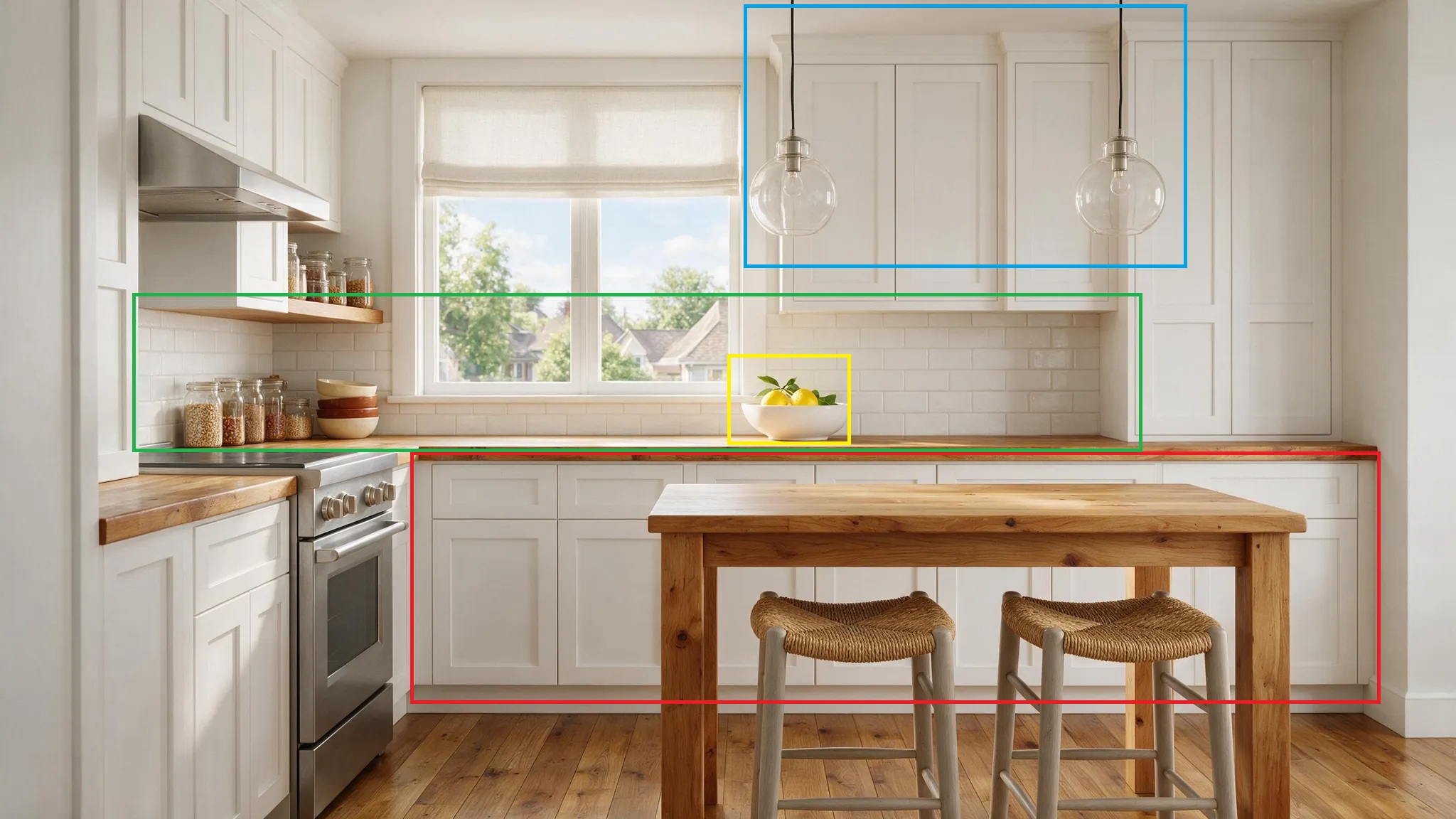
Prompt:
Red box on the cabinets: refinish them from white to deep matte navy, keeping the shaker fronts and the handles as they are.
Green box on the wall above the counter: replace the white subway tile with handmade sage-green zellige and visible grout.
Blue box on the pendant lights: change them to matte-black dome pendants on slim brass cords.
Yellow box on the fruit bowl: swap it for a stoneware vase of dried pampas grass.
The four boxes are the only changes; the window light, the counter, the range, and the shelves remain as they are.
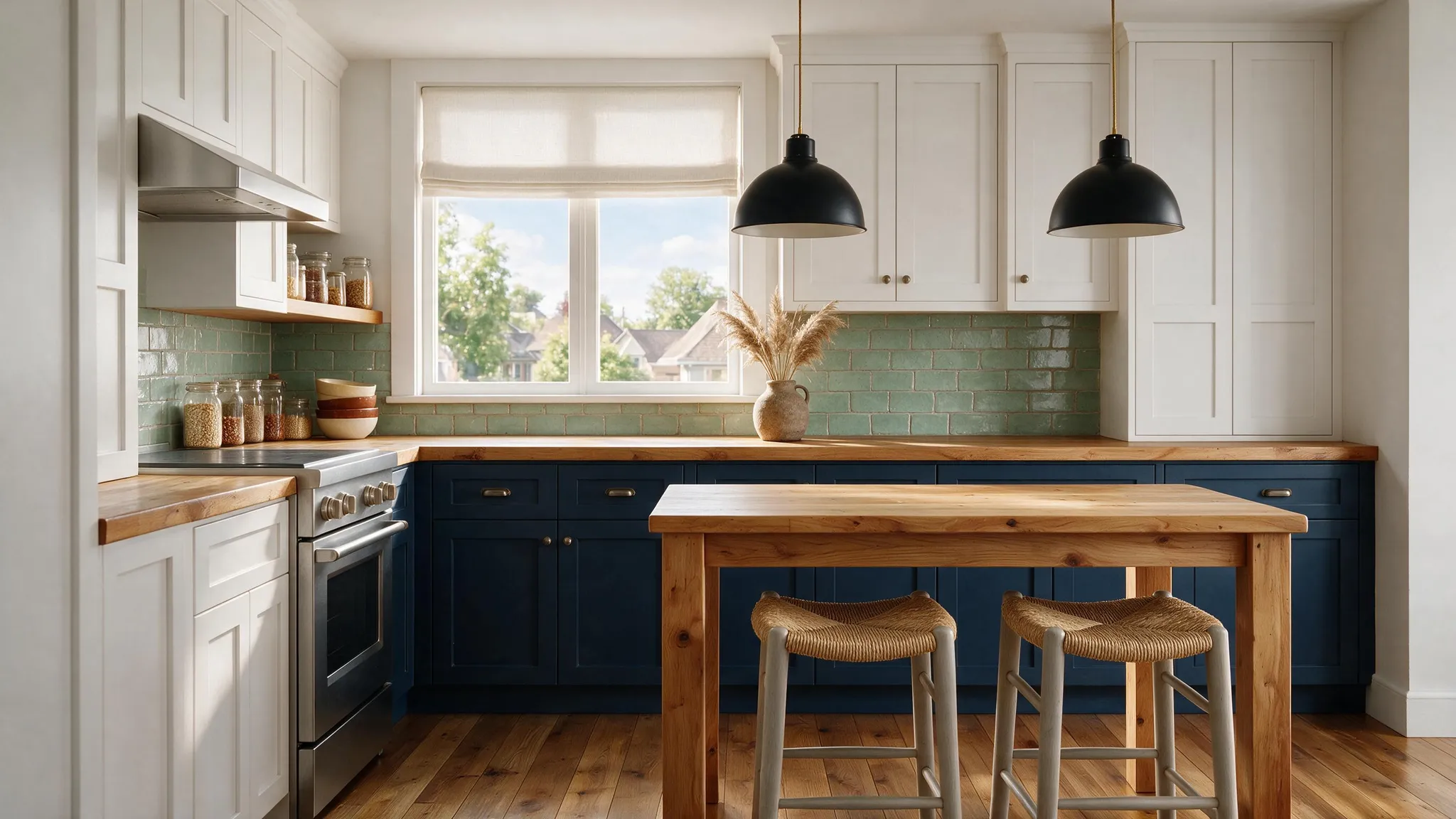
Generated using Seedream 5.0 Pro on fal, an AI model from ByteDance.
Nano Banana 2 has no annotation frames, so it starts from the same untouched render and gets the four swaps as one written paragraph, localizing each on its own.
Prompt: Four edits, and nothing else in the kitchen should move. Turn the cabinets from white to deep matte navy but keep the shaker fronts and handles, replace the white subway tile above the counter with handmade sage-green zellige and its grout lines, switch the pendant lights to matte-black domes on slim brass cords, and put a stoneware vase of dried pampas grass where the fruit bowl was. The window light, the butcher-block counter, the range, and the shelves all read exactly as before.
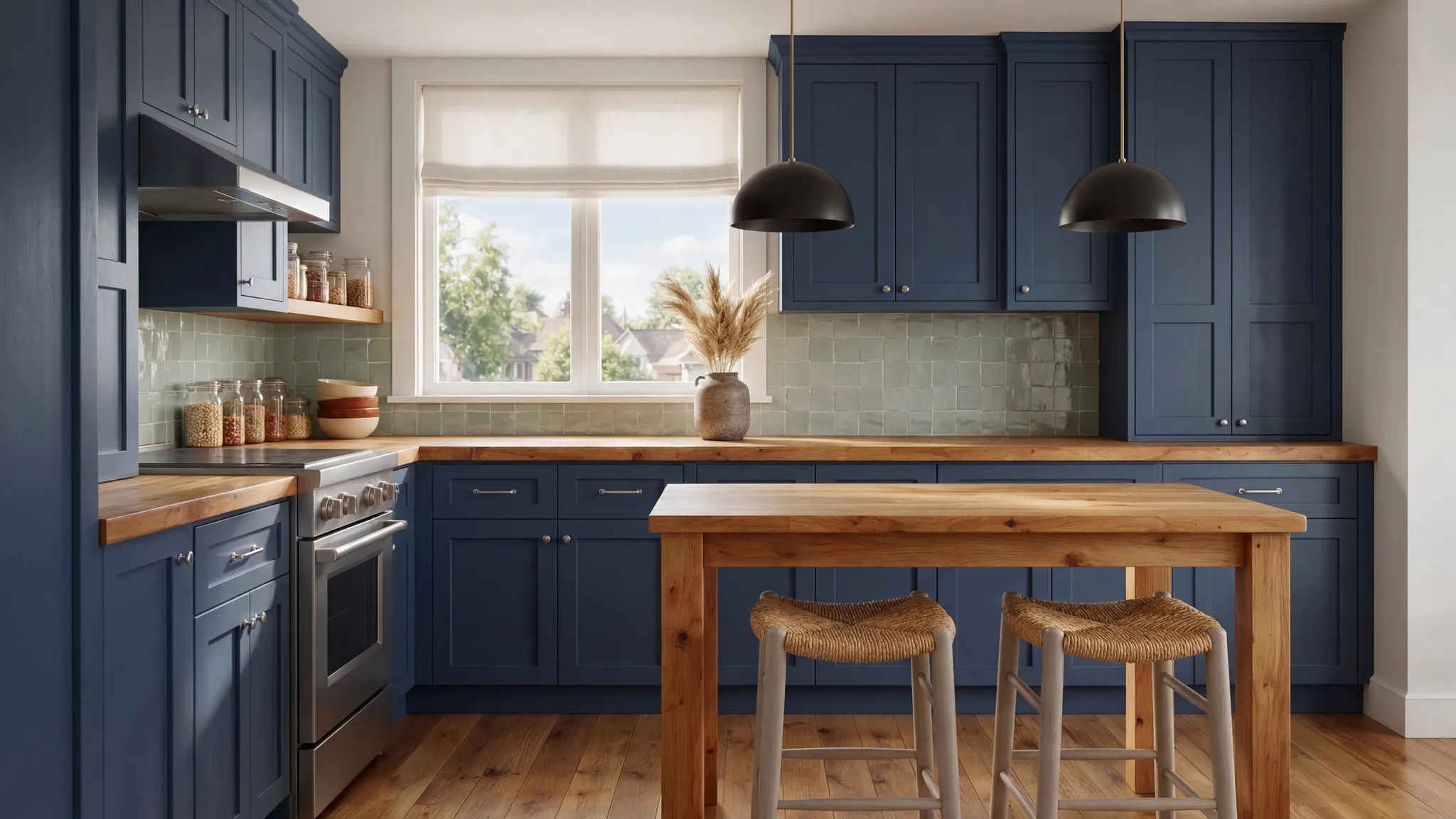
Generated using Nano Banana 2 on fal, an AI model from Google.
Notes: I'm proud of how Seedream 5.0 Pro listened to my instructions and did not put all cabinets in deep matte navy, and how it followed the rest of the boxes without overlap. I'm also happy with Nano Banana 2's output, even though I didn't want to push it to make complex and overly specific changes.
Test 7: Multi-reference specialty-coffee composite
A real ad hero is stitched from plates shot separately, and multi-reference input is the model doing that stitch for you.
The failure mode shows up fast: five sources lit five different ways, and a flat logo that won't wrap the curve of the tin.
So I handed both models the same five plates and one brief, a single coffee ad, and asked each to make it look shot in one session.
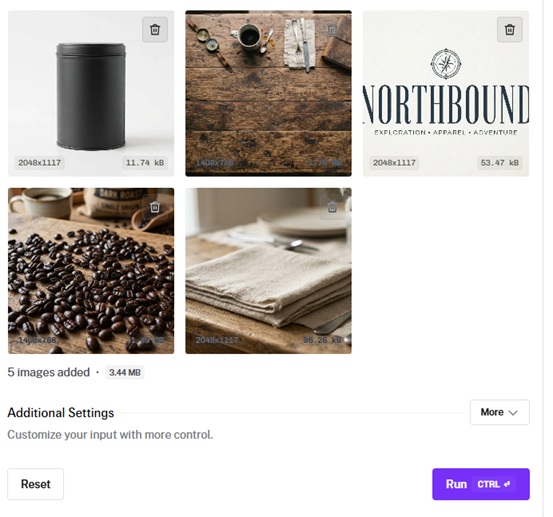
References, in the order the prompt expects them:
A matte-black cylindrical coffee tin, unlabeled, on a white background.
A weathered walnut tabletop shot from directly above.
A brand logo, the word 'NORTHBOUND' in a tall narrow serif with a small compass mark.
A loose scatter of glossy dark-roast coffee beans.
A folded oatmeal-colored linen napkin.
All five source plates were generated on fal with Nano Banana 2 Lite, which I think is quite fast and good for work like this.
Prompt: Build one coffee-brand image out of the five inputs. Start with the walnut tabletop from image 2 as the surface, seen at a low three-quarter angle. Set the matte-black tin from image 1 just off-center and a little back, then wrap the 'NORTHBOUND' wordmark and compass from image 3 around its face as a raised cream deboss that follows the metal's curve. Spill a short arc of the beans from image 4 toward the camera, a few of them soft in the foreground. Let the oatmeal linen from image 5 fall in from the left, loosely gathered, catching a warm sidelight. Light the whole thing from the right like a late-morning window, a shallow reflection on the wood beneath the tin and deep roasted-brown shadows behind it. Run the words 'brewed for the long way home' small along the bottom edge. Deliver it as a photoreal still around 85mm, the tin and its logo the sharpest things in the frame.
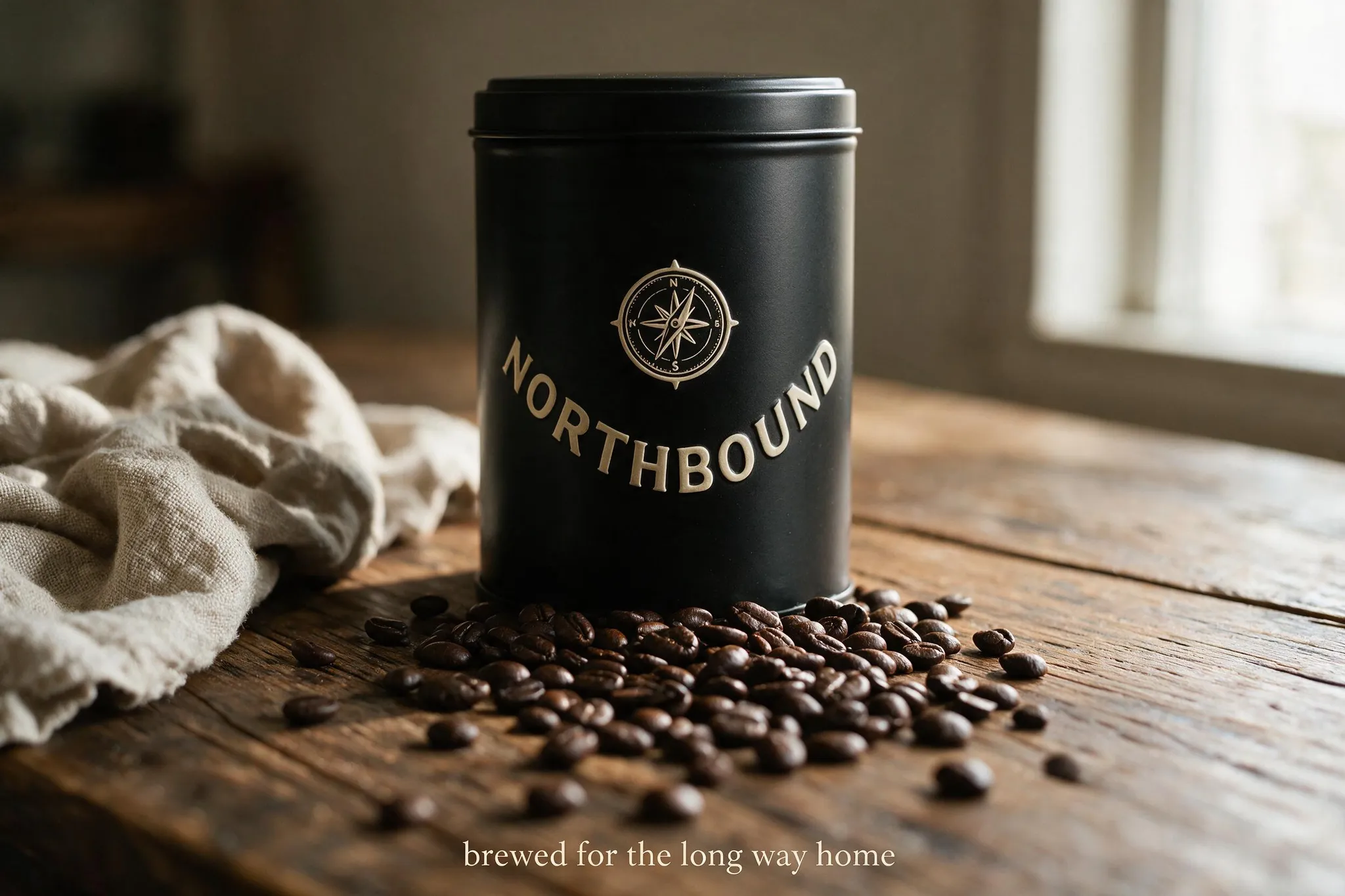
Generated using Seedream 5.0 Pro on fal, an AI model from ByteDance.
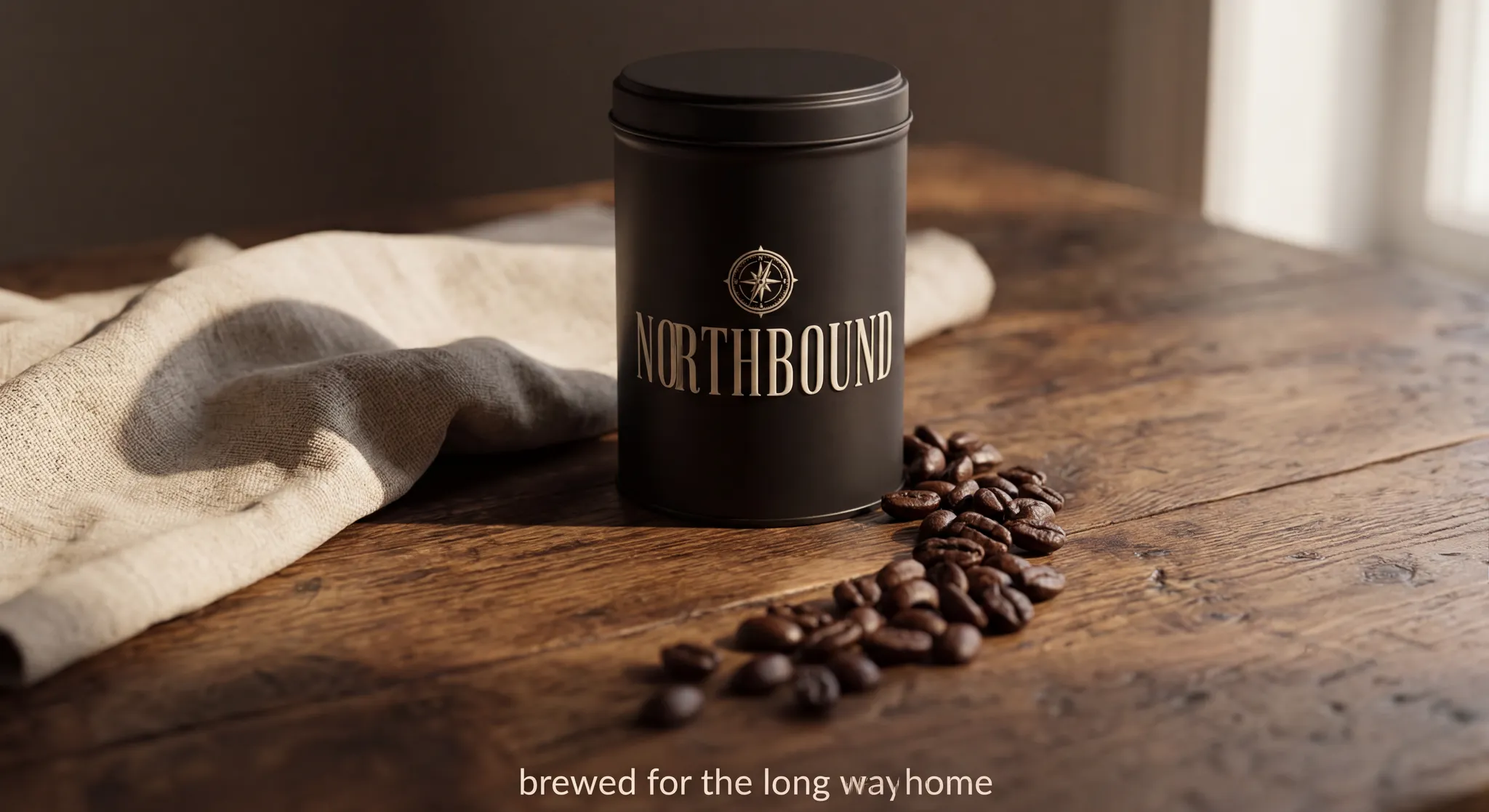
Generated using Nano Banana 2 on fal, an AI model from Google.
What do Seedream 5.0 Pro and Nano Banana 2 cost on fal?
Seedream 5.0 Pro bills on output area, in two bands on fal:
| Output size | Seedream 5.0 Pro (text-to-image) |
|---|---|
| Up to 1536x1536 | $0.0675 per image |
| 1536x1536 to 2048x2048 | $0.135 per image |
On edits, the same two bands apply, with the first reference free and each extra one $0.0045.
A typical three-reference edit lands around $0.077.
Nano Banana 2 prices by resolution on fal, with 1K as its baseline rate.
| Resolution | Rate | Nano Banana 2 |
|---|---|---|
| 0.5K (512px) | 0.75x | $0.06 per image |
| 1K | standard | $0.08 per image |
| 2K | 1.5x | $0.12 per image |
| 4K | 2x | $0.16 per image |
Two toggles cost a little extra: web-search grounding adds $0.015 per generation, and high thinking adds $0.002. The edit endpoint charges on the same resolution bands.
When should you reach for Seedream 5.0 Pro over Nano Banana 2?
I won't crown an overall 'winner' here (that was not the purpose of this guide), because the honest answer is a routing call.
Reach for Seedream 5.0 Pro when:
You're changing a region or two on a frame you want otherwise untouched, and you'd sooner say so in the prompt than paint a mask.
You've got several edits landing on one image and want annotation boxes to keep them apart.
You're assembling a composite from multiple sources, up to 10 in a single call.
You're taking sketches or wireframes to finished art and need the original layout preserved.
Your work is heavy on text across languages, or on tight, structured layouts.
Cost per image is a factor, and your outputs stay in the lower area band.
Reach for Nano Banana 2 when:
You want per-job control over reasoning through thinking_level, quick and cheap for drafts, deeper for finals.
The image has to reflect current, real-world information.
You're holding a cast of up to 5 people steady across a storyboard or a campaign.
Your edit has to read context that isn't a photo, like a video clip or a PDF.
You need 4K output, WebP delivery, or a provenance watermark on every file.
From what I've seen, the 2 image generators also stack nicely.
You can use Nano Banana 2 on minimal thinking for cheap concept passes, then finish the keepers on Seedream 5.0 Pro, the stronger hand for region editing and compositing.
Going the other way works too: you can generate on Seedream 5.0 Pro, then hand a frame to Nano Banana 2 when the edit needs web grounding or a reference that isn't an image.
Either direction, you change an endpoint string and one or two fields, and there's nothing to re-integrate.
Recently Added


Run Seedream 5.0 Pro and Nano Banana 2 on fal
There are more image models out there than anyone has time to test, and these two are among the few worth the trouble learning how to use.
fal keeps both Seedream 5.0 Pro and Nano Banana 2 behind one integration and bills per render, with no GPUs to spin up, so running your own side-by-side costs almost nothing.
You can open the playground, put one prompt through both, and build with whichever fits when you're ready.
Seedream 5.0 Pro vs. Nano Banana 2 FAQs
What's the core difference between Seedream 5.0 Pro and Nano Banana 2?
The short version is that they optimize for different jobs.
Seedream 5.0 Pro, from ByteDance, is priced on output area and built around precise editing: region-level changes from a sentence or a drawn box, sketch-to-render, layer separation, and up to 10 references at once.
Nano Banana 2, Google's Gemini 3.1 Flash Image, is priced by resolution and leans on adjustable reasoning, web grounding, steady faces for up to 5 people, a 14-reference limit, and editing that reads non-image context.
Text rendering is a strength for both, and fal clears each of them for commercial use.
How does editing differ between Seedream 5.0 Pro and Nano Banana 2?
Both edit from words, not from a painted mask.
With Seedream 5.0 Pro, the edit is anchored to a spot, named in the prompt or boxed on the image, and the surrounding frame is held in place.
Nano Banana 2 takes a wider view, reasoning over the full scene and spreading a single edit across as many as 14 references while holding faces steady.
What resolutions can Seedream 5.0 Pro and Nano Banana 2 reach?
Seedream 5.0 Pro spans 1024x1024 to 2048x2048 in total pixels, with custom dimensions and aspect ratios anywhere from 1:16 to 16:1.
Nano Banana 2 offers preset tiers from 0.5K to 4K, and its aspect presets reach 8:1 and 1:8.
Can Seedream 5.0 Pro and Nano Banana 2 be used commercially?
Yes. fal enables commercial use of the outputs from both.
![GPT Image 2.5 vs. GPT Image 2: What's The Difference [2026]](https://refinery.fal.media/url/https%3A%2F%2Fv3b.fal.media%2Ffiles%2Fb%2F0aaa8daa%2FkPt0EwVtJZiG8mQtbguXi.jpg/tr:w-1280,q-80/kPt0EwVtJZiG8mQtbguXi.webp)