![How To Use Happy Horse 1.1: Prompts & Workflows [2026]](https://refinery.fal.media/url/https%3A%2F%2Fv3b.fal.media%2Ffiles%2Fb%2F0aa19894%2FclLqI9V4Uw-DPcJRXp9la.jpg/tr:w-1920,q-80/clLqI9V4Uw-DPcJRXp9la.webp)
This guide covers the prompt structure that actually works on Happy Horse 1.1, Alibaba's top-ranked video model, plus a set of run-ready prompts you can paste straight into fal's playground or API.
TL;DR
Happy Horse 1.1 generates the video and its audio together, now with multilingual lip-sync, which means a strong prompt says what you hear as clearly as what you see.
You can open with a specific subject doing one visible thing, give it a single camera move, and then decide how it's lit and what it sounds like.
For any shot with more than one beat or a spoken line, drop the prose and write a shot list with timecodes, which is the format 1.1 reads most cleanly.
Praise words like "stunning" give the model nothing to build, while a phrase like "low sun raking across a dusty floor" hands it the whole shot.
On fal, Happy Horse 1.1 runs pay-per-second with no subscription, 720p at $0.14 a second and 1080p at $0.18, with the audio generated in the same pass at no extra charge.
Where can you run Happy Horse 1.1 on fal?
Happy Horse 1.1 runs on fal on a pay-per-second basis, with no subscription and no minimum spend in both a playground and via our API.
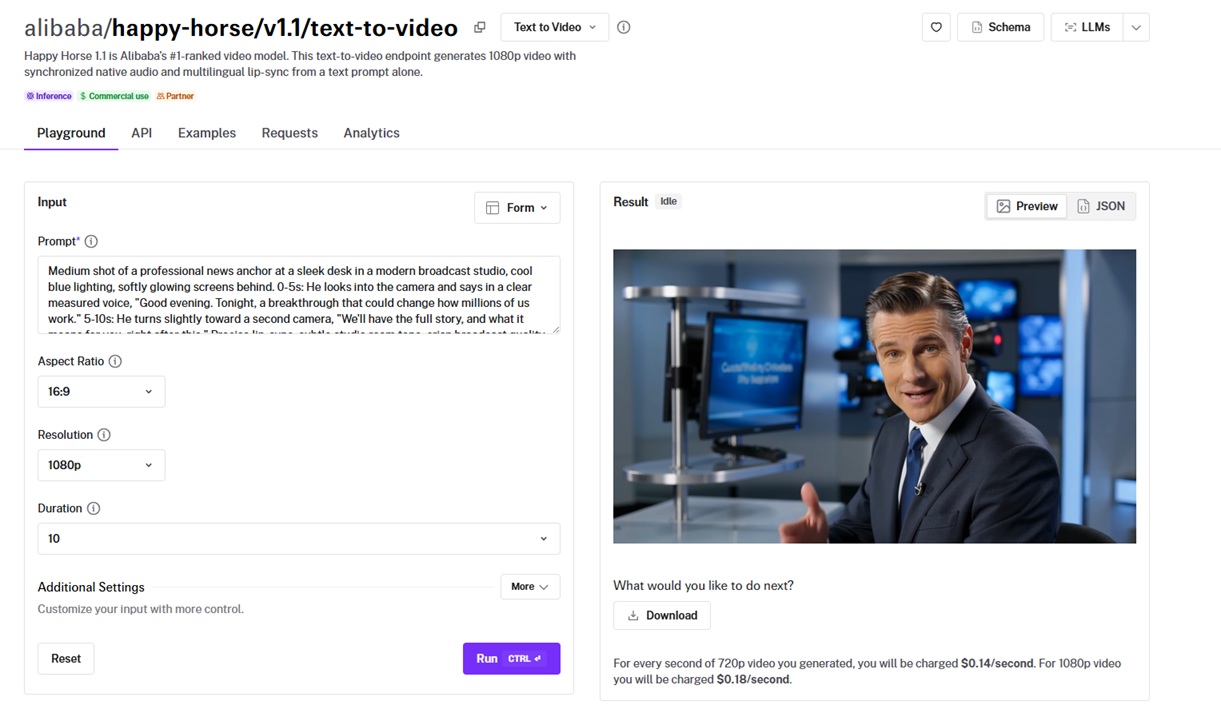
You integrate once with the @fal-ai/client SDK, and the same call shape carries across every video endpoint on fal and the over 1,000 other models hosted there.
Auth, queueing, errors, and billing all stay identical whether you call Happy Horse or anything else.
A few lines get you a clip:
javascript
import { fal } from "@fal-ai/client";

const result = await fal.subscribe(
  "alibaba/happy-horse/v1.1/text-to-video",
  {
    input: {
      prompt:
        "A little girl walking on the road at sunset, cinematic lighting, smooth camera movement.",
    },
    logs: true,
    onQueueUpdate: (update) => {
      if (update.status === "IN_PROGRESS") {
        update.logs.map((log) => log.message).forEach(console.log);
      }
    },
  }
);

console.log(result.data);
console.log(result.requestId);
Editor's note: This guide focuses on the text-to-video endpoint. Happy Horse 1.1 is built to do more than text alone, so if you want to animate a still frame or carry a subject across shots, check the model page on fal for its image-to-video and reference-to-video endpoints.
What's the prompt formula for Happy Horse 1.1?
The main thing that you need to know about prompting Happy Horse 1.1 is that the model wants a brief, not a poem.
Two things are non-negotiable:
The subject: who or what is on screen.
The action: what they're doing and how.
From there, you're adding notes the way a director adds them, only when the shot asks for it:
Setting: the place, the time of day, the weather, the light.
Style: the finished look, anywhere from documentary realism to clean commercial polish.
Camera: the framing and the move, briefed the way you'd talk to an operator.
Sound: the dialogue, the ambient bed, the Foley, or the silence you want held.
Timeline: for any beat change or spoken line, you can mark it against the clock (0-3s, 3-6s), the format 1.1 reads most cleanly.
With all of that loaded in, one prompt reads like this:
Prompt: A watchmaker in his sixties leans over a bench under a bright task lamp, tweezers in hand, seats a tiny brass gear into the open movement of a wristwatch, then lowers a loupe to check the fit, his breath held. A dim workshop, the only strong light pooled on the movement, shelves of parts and small drawers softening into the dark behind him. A clean, premium look with rich shadow and a warm tungsten cast, the kind a heritage watch brand would run. The camera opens on a macro of the gear meeting the movement, then eases back to a tight profile of his face and the loupe. Audio: the faint tick of a finished piece nearby, the click of the gear seating, the creak of his stool, no music.
Generated using Happy Horse 1.1 on fal, an AI model from Alibaba.
How do you write dialogue and sound on Happy Horse 1.1?
Dialogue is the part most people get wrong on the first try.
Anything you wrap in double quotes, the model takes as a spoken line, voices it, and tries to match the mouth to the words, now across dozens of languages, including French, Spanish, Turkish, and Japanese, and not just English.
The catch is still length.
With 1.1, I also mark each line against the clock, so a two-line exchange reads as 0-5s for the first line and 5-10s for the second, and the lip-sync lands where I put it.
Here's the kind of exchange that holds:
Prompt: Two founders sit across a small table in a quiet workshop at night, a single prototype between them. 0-4s: One leans back and says: "We ship it Friday, or we don't ship it." 4-8s: The other turns the prototype over once, looks up, and answers: "Friday." Hold a two-shot through the first line, then cut to a tight single on her as she answers, lips matched to the word. Warm low-key light from a desk lamp, a calm cinematic grade. Audio: low room tone, the hum of a fridge, the click of the prototype set down on the table, no music.
Generated using Happy Horse 1.1 on fal, an AI model from Alibaba.
Sound effects work the same way, except the naming is on you.
If I were you, I'd treat the prompt like a spotting sheet: list what should be audible, the room tone, the one Foley hit that carries the shot, and write "no music" outright.
A prompt that says nothing about audio can come back with a score nobody asked for.
falMODEL APIs
The fastest, cheapest and most reliable way to run genAI models. 1 API, 100s of models
Why does a specific prompt beat a vague one on Happy Horse 1.1?
With AI video generators, specificity is the whole game. The model can only commit to the calls you actually make, and anything you leave open it fills with the most generic version it knows.
Let's look at the same boxer with two different prompt structures:
Vague:
Prompt: A beautiful cinematic video of a boxer training, stunning, epic, 8k, masterpiece.
Generated using Happy Horse 1.1 on fal, an AI model from Alibaba.
Visual:
Prompt: A lean boxer shadow-boxes alone in an empty gym before dawn, throwing a fast three-punch combination and snapping a sharp exhale on each strike as sweat flicks off his shoulders, dust hanging in the low shafts of light from high windows. Shot from a low front angle on a long lens, the gym dropping into shadow behind him, a cool desaturated grade with one hard rim of light along his back. Audio: the snap of his breath on each punch, the creak of the floor, gloves brushing skin, a faint city hum outside, no music.
Generated using Happy Horse 1.1 on fal, an AI model from Alibaba.
Run the first, and you get a fighter, evenly lit, doing more or less what you'd expect (not much).
It's fine for checking a vibe, but can be useless the moment you want something more specific.
The second one isn't long for the sake of it.
The three-punch combination, the dust in the light, the rim along his back, the breath on each strike: every one of those is a fork in the road I closed off, so the model has a single scene to make, not a thousand to choose between.
➡️ However, a note from my experience here would be that the more specific you get with a prompt, the more the AI model can actually mess up, because it might struggle with all of the specifics.
This is why I'd advise you not to test AI models like Happy Horse 1.1 to their limits and to reiterate with video-to-video endpoints and also use reference-to-video endpoints and seeds.
What are the anti-slop rules for video prompts with Happy Horse 1.1?
A clip reads as AI when the prompt left too much to chance. Here's what you should watch out for:
Verbs do the heavy lifting: Motion is the thing the model is actually animating, so a line of adjectives leaves it hungry, where "a sprinter driving out of the blocks, head down, arms tearing" gives it a path to run.
Talk to it like a camera operator: It knows push-in, rack focus, crane, locked-off, and plenty more, and "epic cinematic camera" could mean any of them.
Physics needs a target to chase: A consequence, the glass tipping and shattering, leaves kicking up on a landing, gives the movement something to resolve into.
Direct the sound yourself: Name the noises you want carried and call for quiet on purpose, or the model fills the gap on its own, and it fills it loud.
Cuts only happen if you ask: Spell out "cut to," or a time-coded shot list like the one fal ships in its playground, and the model holds a sequence together far better than one it has to find by itself.
Short dialogue holds where long dialogue drifts: Two clipped lines across a cut stay in sync long after one unbroken line has come apart in the middle.
What are the best text-to-video prompt patterns for Happy Horse 1.1?
Here are a handful of patterns I keep coming back to, each one playing to something the model is good at that you can swap your own subject and scene into them:
Cinematic motion with real weight
Motion with weight behind it is the model's strongest suit. Here's my prompt structure:
Prompt: A lone horse gallops along the tideline of an empty beach at first light, hooves throwing up sheets of wet sand and spray, mane and tail streaming, muscle working under the coat. The camera tracks alongside at a low angle, matching the stride, a touch of handheld. Cool dawn light warming toward the horizon, a soft cinematic grade made for a brand film. Audio: hooves pounding wet sand, the rush of surf, heavy breath, wind across the mic, no music.
Generated using Happy Horse 1.1 on fal, an AI model from Alibaba.
A spot built from a few cuts
You can rough out a whole spec ad in one generation by writing the edit into the prompt:
Prompt: A spec ad for a running shoe, built as three cuts in one take. 0-2s: Open tight on hands pulling laces snug. 2-4s: cut to a single foot striking a wet outdoor track with a hard spray of water off the spikes. 4-6s: cut to the shoe sliding to a stop on dark studio concrete under a hard rim light. Cool high-contrast grade, shallow focus throughout, a fast confident pace. Hold the final frame clean and uncluttered, with open space across the lower third for a logo and line to be set in afterward. Audio: the creak of the laces, the slap and splash of the foot strike, a low pulsing bass, no voiceover.
Generated using Happy Horse 1.1 on fal, an AI model from Alibaba.
Note: video models can still mangle on-screen type more often than they nail it, so I typically frame for a clean plate and add the logo and the line in the cut.
When the sound is the whole shot
Some shots are really about what you hear. Pull the music out and let the room do the talking:
Prompt: Dawn breaking over a rocky headland, a lighthouse standing against a slow-moving wall of sea fog, its beam swinging once through the mist as the sky lightens. A slow push-in from the cliff grass toward the tower, fine droplets beading on the lens. A cool naturalistic grade warming as the sun edges up. Audio carries the scene: a deep foghorn sounding twice, surf breaking on the rocks below, gulls, the wind, no music at all.
Generated using Happy Horse 1.1 on fal, an AI model from Alibaba.
A hero shot for a product launch
A product spot usually turns on one physical beat shot close, a spray, a pour, a tab popping.
Liquid and contact are things the model handles comfortably, so a hero frame is fast to mock up.
Prompt: A hero spot for a glass perfume bottle. The bottle stands on a black mirrored surface in a dark studio, then a fine mist sprays from the atomiser and hangs in the air, catching a hard side light as it drifts down across the glass. The camera holds a tight macro and pushes in slowly as the mist settles. Clean premium product look, cool grade with the amber liquid glowing warm inside the bottle. Hold the closing frame steady and clear for a name and line to be set in afterward. Audio: the soft chuff of the atomiser, the hiss of the mist, a single low sustained note, no voiceover.
Generated using Happy Horse 1.1 on fal, an AI model from Alibaba.
A spokesperson straight to camera
Half of what I see on paid social right now is one person talking into the lens.
Since the model voices the lines itself, and 1.1 will speak them in whatever language you write, you write the script, skip the shoot, and cut to the product whenever you want a beat.
Prompt: A UGC-style ad shot on a phone, vertical framing. A man in his thirties stands in a bright kitchen holding a meal-kit box, talking to camera with the loose energy of someone filming themselves. 0-6s: He says: "I cannot cook, and this is the only reason my kids ate something green this week." He gives a small laugh and a shrug on the last word. Lightly handheld, natural window light, the warm slightly oversaturated look of a decent phone camera, no studio polish. 6-8s: Cut to a two-second insert of the box opening and fresh ingredients laid out on the counter, then back to his face. Audio: his voice clear and casual, soft kitchen room tone, a light lo-fi beat low in the mix.
Generated using Happy Horse 1.1 on fal, an AI model from Alibaba.
A craft-brand film
Fine hand motion is something the model keeps steady, which is exactly what this kind of prompt leans on:
Prompt: A tailor hand-stitches the lapel of a half-finished jacket on a wooden bench, the needle drawing the thread taut on each pass, a tape measure draped over one shoulder. A single warm lamp pools light on the cloth while the rest of the atelier stays soft and dark. A rich premium grade with deep shadow, the look a heritage suit brand would run. The camera holds a slow macro on the needle and thread, then drifts up to his focused face. Audio: the pull of thread through wool, the snip of scissors, a clock ticking somewhere off frame, no music.
Generated using Happy Horse 1.1 on fal, an AI model from Alibaba.
How much does Happy Horse 1.1 cost on fal?
On fal, billing for Happy Horse 1.1 is per second, with no plan and no minimum behind it.
fal charges $0.14 for each second at 720p and $0.18 at 1080p, and the audio rides along inside that rate.
To put that into perspective:
A ten-second 1080p clip is $1.80.
A five-second test at 720p comes to $0.70.
There's no audio toggle worth flipping to save money, since the sound is part of the same render whether you mention it or not.
Recently Added

















Run Happy Horse 1.1 on fal
On fal, Happy Horse 1.1 bills by the second with nothing to commit to up front, and you can experiment with prompts in its playground.
You can burn a few five-second 720p clips to find the look, commit the duration and the 1080p once you're happy, and keep the final on fal to upscale or edit before it ships.
Signing up to fal is free, and that's the whole barrier to getting started.
FAQs about prompting Happy Horse 1.1
Can I use Happy Horse 1.1 clips in paid ads?
Yes.
fal puts full commercial rights on everything the model generates, so a clip can drop straight into a paid campaign or a client deliverable with no separate licensing step.
Which aspect ratio and resolution should I pick?
You can match the aspect ratio to where the clip is headed:
9:16 for stories and reels. 16:9 for YouTube and most landing pages. 1:1 or 4:3 for in-feed placements. 3:4 when you want portrait. 21:9 for a widescreen cinematic cut, with 9:21, 5:4, and 4:5 also on the menu.
On resolution, I run my tests at 720p because it's cheaper and faster, then re-render the keeper at 1080p once the shot is locked.
Can Happy Horse 1.1 speak languages other than English?
Yes. The model has native multilingual lip-sync, so you can write a line in French, Spanish, Turkish, Japanese, and more, and it voices it while matching the mouth to the phonetics. Write the line in the target language directly in the prompt, and keep it short so the sync holds.
How long can a Happy Horse 1.1 clip be?
Anywhere from 3 to 15 seconds, with 5 as the default. I keep test runs at the short end and only stretch a keeper out once the shot is locked.
How do I get the same shot back, or a controlled variation of it?
You can set a seed.
Run the same seed with the same prompt, and you land on the same clip again, which is how you pin a look you like.
If you hold the seed and change one thing in the prompt (e.g., the time of day or the wardrobe colour), you'll get a deliberate variation, not a fresh roll of the dice.
![Seedance 2.5 Workflows: Text-to-Video, Image-to-Video, References & Editing [2026]](https://refinery.fal.media/url/https%3A%2F%2Fv3b.fal.media%2Ffiles%2Fb%2F0aa63087%2FWbpT8JAY2FG_naNgsprJl.jpg/tr:w-1280,q-80/WbpT8JAY2FG_naNgsprJl.webp)