
I'll show you how to build an AI image generator app in Next.js on fal, starting with a hosted model and finishing with Stable Diffusion XL as your own endpoint.
The prompt page and server route carry over between both stages untouched, and the second model only needs one environment variable plus one registry entry.

TL;DR
- fal is the best place to build an AI image generator app because the models we host and the models you deploy on fal Serverless are called the same way, through one
FAL_KEYand the same client. - Your own deployment inherits the queue and client SDKs our hosted models run on, so the Next.js page and route built for Nano Banana 2.1 work unchanged with Stable Diffusion XL.
- The build has two stages: a prompt page and server route calling Nano Banana 2.1 (
google/nano-banana-2.1), then Stable Diffusion XL deployed from theimage_generator.pyfile in our docs. - For this guide, I'll be using Nano Banana 2.1, which costs about $0.040 per 1K image from a short prompt at medium thinking, with no GPU setup on your side.
- fal Serverless scales runners with traffic down to zero and bills each one per second; the H100 in our docs is listed at $4.50 per hour.
- Deploying your own model needs Serverless access approved for your account; I'd request it on day one and ship the hosted version first.
- Because the route queues each prompt while the page polls for the result, a cold SDXL runner never ties up a single HTTP request.
Where is the best place to build an AI image generator app?
The best place to build an AI image generator app is fal, since one server route can call our hosted models and the image models you deploy yourself in exactly the same way.
The app itself needs two pieces you write: a prompt page in the browser and a server route that holds your fal key while forwarding prompts to a model endpoint.
That endpoint can be Nano Banana 2.1 or another hosted model on fal, or a model you deploy on fal Serverless.
I've lined up both routes from this tutorial against the same criteria below:
| Hosted model API | Your own model on fal Serverless | |
|---|---|---|
| Model in this tutorial | Nano Banana 2.1 (google/nano-banana-2.1) | Stable Diffusion XL base 1.0 from Hugging Face |
| Access | Any fal account with credits | Serverless access, approved per account |
| GPU management | Handled by fal | Handled by fal, on the machine type you set |
| Billing | Per token, about $0.040 for a 1K image | Per second of runner time, $4.50 per hour list on an H100 |
| Code you write | A server route and a prompt page | A Python fal.App class, plus the same route and page |
| Endpoint ID | google/nano-banana-2.1 | your-username/my-demo-app |
Our docs describe every Model APIs endpoint as a fal.App running on fal Serverless.
Your own deployment therefore inherits the queue and client SDKs that hosted models use.
fal Serverless runs the GPU side too: runners start when requests come in and shut down after traffic stops, so you're billed only for the seconds they're alive.
If the app later needs a different hosted model, the same FAL_KEY already reaches more than 1,000 of them.
Based on my experience, shipping the hosted version first is the faster path, because the page and route you write for it carry over to a custom deployment unchanged.
Setting up your fal key and Serverless access
The hosted stage of this tutorial runs on any fal account holding prepaid credits and an API key, while the custom stage also needs Serverless access on that account.
New fal accounts start without free credits, though the minimum top-up of $1 already covers roughly 25 Nano Banana 2.1 images at 1K from short prompts.
Serverless access is granted account by account, and you request it from the Serverless Get Started page in the dashboard.
You'll want to send that request on day one, as the hosted version of the app runs without it while you wait.
On the Next.js side, I install our JavaScript client into an App Router project, then put the key in .env.local at the project root:
bash
npm install @fal-ai/client

# .env.local
FAL_KEY=your-api-key-here
@fal-ai/client reads FAL_KEY from the server's environment on its own, so no key appears in the code below.
Our docs recommend Python 3.11 for the Serverless half of this tutorial, where the fal CLI handles deployment.
falMODEL APIs
The fastest, cheapest and most reliable way to run genAI models. 1 API, 100s of models
How does a Next.js route call a hosted image model on fal?
A Next.js route handler calls a hosted model on fal by passing an endpoint ID and an input object to fal.queue.submit().
When our queue marks the job COMPLETED, the same route collects the output with fal.queue.result().
I usually keep model details in a small registry file, because a route that accepted endpoint IDs from the browser would let anyone pick the model.
Only the keys listed in that file map to an endpoint, so a hand-crafted request can't reach other models on your account.
javascript
// lib/models.js
export const MODELS = {
  hosted: {
    endpoint: "google/nano-banana-2.1",
    buildInput: (prompt) => ({ prompt, aspect_ratio: "4:3", resolution: "1K" }),
    readUrl: (data) => data.images[0].url,
  },
};
Nano Banana 2.1 accepts prompts from 3 to 50,000 characters and returns its output as a list under images, which is why readUrl takes the first item.
I fixed the aspect ratio at 4:3 for a moodboard grid; leaving resolution at 1K holds each image near four cents.
I put the route handler in a new file at app/api/generate/route.js:
javascript
// app/api/generate/route.js
import { fal } from "@fal-ai/client";
import { MODELS } from "../../../lib/models";

export async function POST(request) {
  const body = await request.json();
  const prompt = String(body.prompt ?? "").trim();
  const target = MODELS[body.model];

  if (!target?.endpoint) {
    return Response.json({ error: "That model isn't configured." }, { status: 400 });
  }
  if (prompt.length < 3 || prompt.length > 600) {
    return Response.json({ error: "Prompts need 3 to 600 characters." }, { status: 400 });
  }

  const { request_id } = await fal.queue.submit(target.endpoint, {
    input: target.buildInput(prompt),
  });

  return Response.json({ requestId: request_id });
}

export async function GET(request) {
  const params = new URL(request.url).searchParams;
  const target = MODELS[params.get("model")];
  const requestId = params.get("id");

  if (!target?.endpoint || !requestId) {
    return Response.json({ error: "Missing model or request ID." }, { status: 400 });
  }

  const { status } = await fal.queue.status(target.endpoint, { requestId });
  if (status !== "COMPLETED") {
    return Response.json({ status });
  }

  try {
    const { data } = await fal.queue.result(target.endpoint, { requestId });
    return Response.json({ status, url: target.readUrl(data) });
  } catch (error) {
    return Response.json({ error: "The model returned an error." }, { status: 502 });
  }
}
The POST handler returns a request ID as soon as the prompt passes its checks.
The page polls the GET handler, which calls fal.queue.status() and fetches the output only after the status reads COMPLETED.
I split submission from retrieval because some hosts cap how long one function call may run.
That allowlist limits which models a visitor can reach, though not how many images they can request.
I'd add a per-visitor rate limit in front of this route before the page goes public, as each submitted prompt becomes a billed request on your account.
I set the 600-character cap well below the Nano Banana 2.1 maximum, as moodboard prompts rarely need more than a few sentences.
For deeper Nano Banana 2.1 settings, our Nano Banana API guide and Nano Banana 2.1 prompting guide go further than this tutorial does.
Building the prompt page
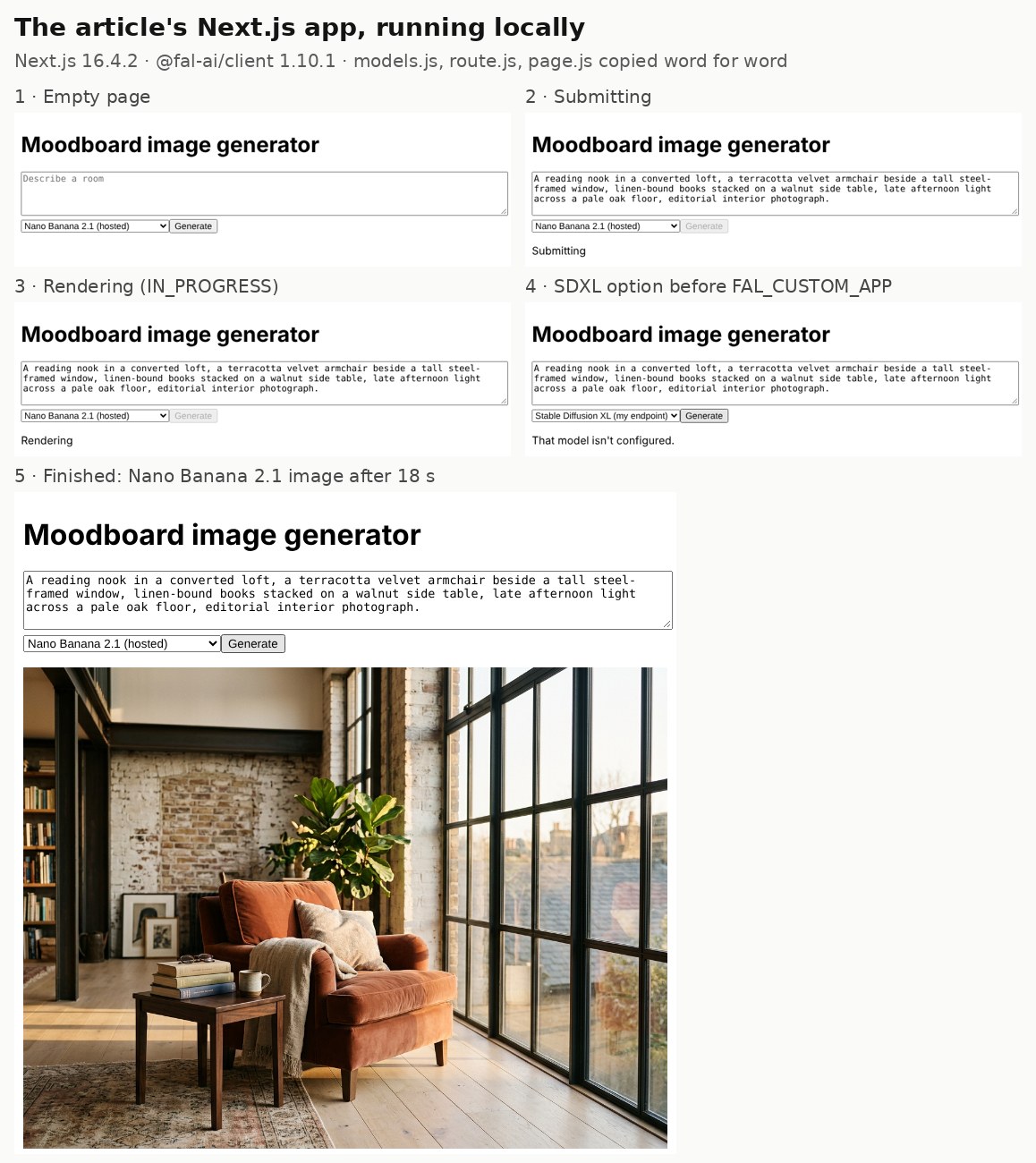
The prompt page is one client component that posts the prompt, then checks with the route every 1.5 seconds until an image URL comes back.
javascript
// app/page.js
"use client";

import { useState } from "react";

const pause = (ms) => new Promise((resolve) => setTimeout(resolve, ms));

export default function Home() {
  const [prompt, setPrompt] = useState("");
  const [model, setModel] = useState("hosted");
  const [busy, setBusy] = useState(false);
  const [message, setMessage] = useState("");
  const [imageUrl, setImageUrl] = useState(null);

  async function generate() {
    setBusy(true);
    setImageUrl(null);
    setMessage("Submitting");

    try {
      const submitted = await fetch("/api/generate", {
        method: "POST",
        headers: { "Content-Type": "application/json" },
        body: JSON.stringify({ prompt, model }),
      });
      const job = await submitted.json();
      if (!submitted.ok) return setMessage(job.error);

      for (let attempt = 0; attempt < 240; attempt++) {
        await pause(1500);
        const polled = await fetch(`/api/generate?model=${model}&id=${job.requestId}`);
        const update = await polled.json();
        if (!polled.ok) return setMessage(update.error);
        if (update.url) {
          setImageUrl(update.url);
          return setMessage("");
        }
        setMessage(update.status === "IN_QUEUE" ? "Waiting for a runner" : "Rendering");
      }
      setMessage("Still rendering, try again in a minute.");
    } finally {
      setBusy(false);
    }
  }

  return (
    <main style={{ maxWidth: 720, margin: "48px auto", fontFamily: "system-ui" }}>
      <h1>Moodboard image generator</h1>
      <textarea
        rows={4}
        style={{ width: "100%" }}
        value={prompt}
        onChange={(event) => setPrompt(event.target.value)}
        placeholder="Describe a room"
      />
      <select value={model} onChange={(event) => setModel(event.target.value)}>
        <option value="hosted">Nano Banana 2.1 (hosted)</option>
        <option value="custom">Stable Diffusion XL (my endpoint)</option>
      </select>
      <button onClick={generate} disabled={busy}>Generate</button>
      <p>{message}</p>
      {imageUrl && <img src={imageUrl} alt={prompt} style={{ width: "100%" }} />}
    </main>
  );
}
The loop only stops after 240 checks, which gives a first request stuck behind a cold runner roughly six minutes.
Until FAL_CUSTOM_APP exists, choosing the Stable Diffusion XL option returns the route's "That model isn't configured" message.
Nano Banana 2.1 hands back a URL on our CDN that the img tag can load as soon as the route passes it along.
This was the first prompt I sent through the hosted option:
Prompt: A reading nook in a converted loft, a terracotta velvet armchair beside a tall steel-framed window, linen-bound books stacked on a walnut side table, late afternoon light across a pale oak floor, editorial interior photograph.
Generated using Nano Banana 2.1 on fal, an AI model from Google.
Try it in ChatGPT Try it in fal AgentDuring the IN_QUEUE stage the status line on the page reads Waiting for a runner.
That message turns up more often once your own Stable Diffusion XL endpoint is in play.
Here's how the process worked:
When does it make sense to deploy your own image model?
Deploying your own image model on fal Serverless makes sense when the weights or pipeline code your app depends on aren't available as a hosted endpoint.
It also suits teams that want to choose the GPU type and the scaling behavior themselves.
The two cases I see most often are a checkpoint fine-tuned on your own images and a diffusers pipeline with custom steps around the model.
LoRA-based styles have their own path in our guide to deploying a LoRA as an API, and a full ComfyUI workflow can go inside a fal.App by following the ComfyUI API guide.
Stable Diffusion XL is the model in this section because our docs publish a complete image_generator.py for it, and that class shape fits a fine-tuned checkpoint later.
The biggest shift from the hosted route is billing: Nano Banana 2.1 charges for the tokens each request uses, whereas a Serverless runner is charged for each second it stays alive.
How do you deploy Stable Diffusion XL on fal Serverless?
You deploy Stable Diffusion XL on fal Serverless by validating the image_generator.py app from our docs on a temporary runner with fal run, then publishing it with fal deploy.
The four steps below follow that order, with the app code copied unchanged from our Deploy Your First Image Generator tutorial.
Step 1: Install the fal CLI and log in
The fal CLI installs with pip, after which fal auth login opens a browser tab that connects the CLI to your account:
bash
pip install fal
fal auth login
After the browser step, your credentials are saved locally for later fal run and fal deploy commands.
Step 2: Save the Stable Diffusion XL app as image_generator.py
Save this file as image_generator.py, exactly as our docs publish it:
python
import fal
from pydantic import BaseModel, Field
from fal.toolkit import Image

class Input(BaseModel):
    prompt: str = Field(
        description="The prompt to generate an image from",
        examples=["A beautiful image of a cat"],
    )

class Output(BaseModel):
    image: Image

class MyApp(fal.App):
    keep_alive = 300
    app_name = "my-demo-app"
    machine_type = "GPU-H100"
    requirements = [
        "hf-transfer==0.1.9",
        "diffusers[torch]==0.32.2",
        "transformers[sentencepiece]==4.51.0",
        "accelerate==1.6.0",
    ]

    def setup(self):
        # Enable HF Transfer for faster downloads
        import os

        os.environ["HF_HUB_ENABLE_HF_TRANSFER"] = "1"

        import torch
        from diffusers import StableDiffusionXLPipeline

        # Load any model you want, we'll use stabilityai/stable-diffusion-xl-base-1.0
        # Huggingface models will be automatically downloaded to
        # the persistent storage of your account (/data)
        self.pipe = StableDiffusionXLPipeline.from_pretrained(
            "stabilityai/stable-diffusion-xl-base-1.0",
            torch_dtype=torch.float16,
            variant="fp16",
            use_safetensors=True,
        ).to("cuda")

        # Warmup the model before the first request
        self.warmup()

    def warmup(self):
        self.pipe("A beautiful image of a cat")

    @fal.endpoint("/")
    def run(self, request: Input) -> Output:
        result = self.pipe(request.prompt)
        image = Image.from_pil(result.images[0])
        return Output(image=image)
Input and Output are Pydantic models that define what the endpoint accepts and returns, with the Playground form generated from them.
Each runner calls setup() a single time when it boots, loading SDXL in float16 onto the GPU and calling warmup() so no real request pays for that first pass.
On the first boot the weights download into /data, where any later runner finds the cached copy.
Setting HF_HUB_ENABLE_HF_TRANSFER turns on the hf-transfer package from the requirements list, which our docs add for faster weight downloads.
Image.from_pil() uploads the generated image to our CDN and returns an object whose url field is what your Next.js route reads.
keep_alive = 300 holds an idle runner for 300 seconds after its last request.
I'll revisit the GPU choice further down, since the machine_type line puts this app on an 80 GB H100.
Only the prompt reaches the pipeline in the run method.
Everything else falls back to diffusers' defaults, which for SDXL base means 1024×1024 output and 50 denoising steps.
Step 3: Validate the app with fal run
I always run the app on a temporary runner first, because a broken import or a failed weight download surfaces there before it can reach the deployed endpoint:
bash
fal run image_generator.py::MyAppYour first fal run takes a couple of minutes because of the SDXL weight download, and the terminal prints two URLs, one for HTTP calls and one for a browser playground.
When Application startup complete appears, I send a test prompt with curl, using the HTTP URL from the terminal in place of $FAL_RUN_URL:
bash
curl $FAL_RUN_URL -H 'Content-Type: application/json' \
  -d '{"prompt":"a sunlit kitchen with green zellige tiles behind open oak shelving, interior photograph"}'
Prompt: a sunlit kitchen with green zellige tiles behind open oak shelving, interior photograph
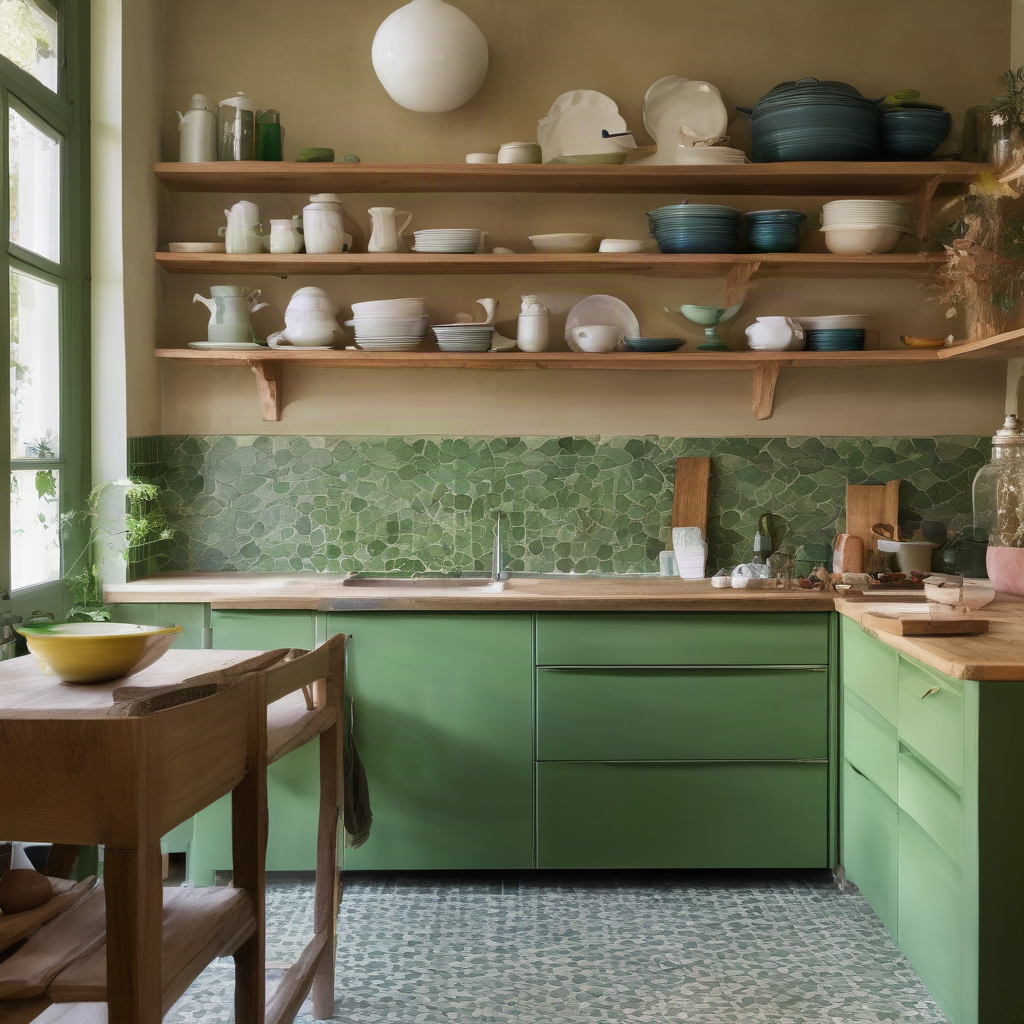
Generated using Stable Diffusion XL on fal Serverless, an AI model from Stability AI.
Try it in ChatGPT Try it in fal Agentfal run defaults to public auth, so that temporary URL accepts calls without an API key unless you pass --auth private.
Step 4: Deploy the app with fal deploy
The deploy command takes the same file and class reference as fal run:
bash
fal deploy image_generator.py::MyAppfal deploy gives the app a permanent endpoint ID that your Next.js route can keep calling after the terminal closes.
Because the class sets app_name to my-demo-app, the endpoint ID comes out as your-username/my-demo-app.
Only keys from your account or its team members get through, since fal deploy uses private auth by default.
Before a first deploy, I like running the command once with --check to preview the auth mode and effective configuration, then confirm.
Your deployed app then appears in the Apps dashboard, where its Playground replaces the temporary link that fal run printed and stays available after you close the terminal.
Pointing the app at your Stable Diffusion XL endpoint
Connecting the Next.js app to your Stable Diffusion XL deployment needs a second environment variable and a second entry in lib/models.js.
bash
# .env.local
FAL_KEY=your-api-key-here
FAL_CUSTOM_APP=your-username/my-demo-app
javascript
// lib/models.js
export const MODELS = {
  hosted: {
    endpoint: "google/nano-banana-2.1",
    buildInput: (prompt) => ({ prompt, aspect_ratio: "4:3", resolution: "1K" }),
    readUrl: (data) => data.images[0].url,
  },
  custom: {
    endpoint: process.env.FAL_CUSTOM_APP,
    buildInput: (prompt) => ({ prompt }),
    readUrl: (data) => data.image.url,
  },
};
The two readUrl functions differ because the image_generator.py Output class returns a single image field, while Nano Banana 2.1 returns a list under images.
Private auth turns away keys from other accounts, so the FAL_KEY in .env.local has to belong to the deploying account or to a member of its team.
Stable Diffusion XL reads prompts through CLIP text encoders that stop at 77 tokens, and diffusers truncates anything past that point.
The route's 600-character cap still allows prompts past that limit, so I trimmed the reading nook prompt into short, comma-separated phrases before sending it to my deployment:
Prompt: reading nook in a converted loft, terracotta velvet armchair, tall steel-framed window, walnut side table with linen-bound books, late afternoon light, pale oak floor, interior photograph

Generated using Stable Diffusion XL on fal Serverless, an AI model from Stability AI.
Try it in ChatGPT Try it in fal AgentAfter a quiet spell, the first request can stay IN_QUEUE while a runner boots and runs setup(), with the page polling until the image arrives.
Which GPU should a Stable Diffusion XL app run on?
Our machine types guide recommends GPU-L40 or GPU-RTXPRO6000 for image generation, and the SDXL tutorial in our docs ships with GPU-H100, so this app can run on any of them.
The table below covers the GPU machine types an image generator is most likely to use, next to what that guide recommends each one for:
| Machine type | VRAM | RAM | What our machine types guide suggests it for |
|---|---|---|---|
| GPU-A100 | 40 GB | 60 GB | Training and inference across workloads, priced below the Hopper generation |
| GPU-L40 | 48 GB | 100 GB | Image generation, plus inference that runs next to video transcoding |
| GPU-H100 | 80 GB | 112 GB | LLM inference and training |
| GPU-RTXPRO6000 | 96 GB | 100 GB | Image and video generation, including high-resolution and batched work |
Our pricing page lists the H100 at $4.50 per hour and the RTX PRO 6000 at $4.00 per hour as of November 2026.
Lower as-low-as rates of $2.49 and $1.99 per hour appear beside those list prices, quoted through our sales team.
I'd normally time a warm request on two machine types before committing, as our cost docs point out that a cheaper GPU running slightly longer can still cost less overall.
machine_type also accepts a list, such as ["GPU-RTXPRO6000", "GPU-H100"], letting fal fall back to the next GPU on the list whenever the first is out of capacity.
machine_type in image_generator.py wins on every fal deploy: a change made through fal apps scale or the dashboard only lasts until the next one.
For per-image cost math on that card, our RTX PRO 6000 pricing guide goes into more detail.
How much does an AI image generator app cost to run on fal?
As of November 2026, Nano Banana 2.1 costs about $0.040 per 1K image from a short prompt at medium thinking, according to its fal model page.
A Stable Diffusion XL runner on an H100 costs $4.50 per hour at list price on the same date, billed per second of runner time.
Our model page converts the token rates for Nano Banana 2.1 into per-image figures for a roughly 100-token prompt:
| Output resolution | Nano Banana 2.1 text-to-image |
|---|---|
| 1K (default) | $0.040 |
| 2K | $0.059 |
| 4K | $0.134 |
On fal Serverless, the meter starts when a runner enters setup() and keeps running through idle time, requests, draining and teardown, at the per-second rate for its machine type.
Waiting for hardware and pulling the container image are free, as is any request that fails with a 5xx server error.
At $4.50 per hour, an H100 runner costs $0.00125 per second, which turns the docs' keep_alive of 300 into up to $0.375 of idle time after a burst of traffic.
Setting min_concurrency to 1 bills one H100 for all 720 hours of a 30-day month: $3,240 at list price, or $2,880 on an RTX PRO 6000.
On a warm runner, the compute behind one image equals its run time multiplied by the per-second rate, before any idle time is counted.
Redeploys carry a cost of their own: the default rolling strategy boots a runner from the new code and bills its setup() even when no requests arrive.
Teams whose runners rarely go idle should read our breakdown of dedicated GPUs vs. serverless inference to see where the two billing models break even.
What scaling settings should an SDXL endpoint start with?
A Stable Diffusion XL endpoint on fal Serverless should start with min_concurrency at 0 and a deliberate max_concurrency cap.
From there, it's ideal to tune keep_alive against how long setup() takes on your machine type and how far apart your requests tend to arrive.
Six of the settings in our scaling docs are worth deciding on before launch, and the table gives the starting points I'd use for this app:
| Parameter | What it controls | Starting point for this app |
|---|---|---|
keep_alive | Seconds an idle runner stays alive after its last request | 300 while testing, then 30 to 60 for moderate traffic |
min_concurrency | Runners kept warm at all times, each billed 24 hours a day | 0, unless a cold start is unacceptable for your users |
max_concurrency | The ceiling on concurrent runners, and so on spend | A number that fits your budget (it defaults to 2 when unset) |
scaling_delay | How long fal waits before adding runners for a burst | Around 15 seconds if traffic arrives in short spikes |
concurrency_buffer | Extra runners warmed ahead of demand | 0 until latency data says otherwise |
max_multiplexing | Concurrent requests one runner can handle | The default, as our docs aim it at I/O-bound waits |
The catch with editing keep_alive in image_generator.py later is that redeploys inherit the live scaling values, so the new number only applies when the deploy runs with --reset-scale.
I also run fal deploy with --check after scaling edits, since it lists any code values that won't apply.
The runner lifecycle behind these numbers is laid out in our guide to serverless GPU cold starts.
Before real traffic arrives, I'd say the production serverless GPU inference guide is the next read, mainly for its coverage of retries and metrics.
Errors to rule out before launch
These are the failures I'd plan for in an image generator app built this way, each paired with its likely cause and a fix:
| Symptom | Usual cause | Fix |
|---|---|---|
fal deploy won't complete for your account | Serverless access hasn't been approved yet | An access request from the Serverless Get Started page |
| The SDXL endpoint rejects calls from the route as unauthorized | Private auth, with a FAL_KEY from another account | A key from the deploying account or its team |
| The first SDXL request takes minutes | Weights downloading on first boot, plus setup() and warmup | Expected on the first run, after which /data holds the weights |
A new keep_alive in code changes nothing | Redeploys keep the previous scaling values | fal deploy with --reset-scale |
A machine type set with fal apps scale reverts | machine_type is read from code on every deploy | The same change made in image_generator.py |
| The page shows no image for SDXL | readUrl expects images, but the docs' app returns image | data.image.url for the custom entry |
| SDXL ignores the end of a long prompt | The 77-token limit of the CLIP text encoders | A shorter, comma-separated prompt |
The fal run playground link stops working | That link belongs to the temporary run | The Playground under the Apps dashboard |
| The SDXL option shows "That model isn't configured" | FAL_CUSTOM_APP is missing from .env.local | The variable, set to your endpoint ID |
Recently Added





















Run your image generator app on fal
A hosted model gives an image generator app working output on day one, and custom weights can follow later without rewriting the front end.
Nano Banana 2.1 and Stable Diffusion XL covered both stages here through one route.
The FAL_KEY behind that route also reaches more than 1,000 other hosted models, while fal Serverless runs the GPUs and scaling for anything you deploy yourself.
Before wiring a prompt into the route, you can test it in the Nano Banana 2.1 playground, then request Serverless access from the dashboard the same day.
AI image generator app FAQ
Does Stable Diffusion XL on fal support progress previews during a render?
It does, through a streaming SDXL example in our docs that decodes intermediate latents with the madebyollin/taesdxl TinyVAE and sends a preview every 5 denoising steps.
That example runs as its own app with a streaming endpoint, so image_generator.py and the polling page in this tutorial would both need changes to show previews.
The streaming endpoint yields server-sent events that the browser reads as they arrive.
Our real-time GPU inference guide picks up from there with WebSocket and WebRTC options for more interactive apps.
How do I call my deployed SDXL app from Python?
The fal_client.subscribe() function calls your deployed app by its endpoint ID and returns a dictionary whose image field carries the output URL:
python
import fal_client

result = fal_client.subscribe(
    "your-username/my-demo-app",
    arguments={"prompt": "A cyberpunk cityscape at night with neon lights"},
)
print(result["image"]["url"])
Who pays when other developers call my image generator endpoint?
In shared auth mode, anyone with the URL can call your app, but each caller authenticates with their own API key and pays for their own usage.
Shared mode needs admin enablement on your account; our docs on publishing to the marketplace walk through the rest of that process.
Can I move an existing image generation service to fal Serverless?
Yes, our docs include migration guides for Replicate, Modal, RunPod and Baseten, plus a Direct Server Mode that deploys an existing HTTP server from its Dockerfile.
A RunPod handler, for example, becomes a fal.App whose model loading moves into setup() and whose handler becomes an @fal.endpoint method.
Our guide to switching serverless GPU providers walks through testing and cutting over without downtime.
Do I need GPU access approval to build an AI image generator app on fal?
You don't for the hosted route, since Nano Banana 2.1 and the rest of our Model APIs need only an account with credits and an API key.
You do for the custom route, because deploying on fal Serverless requires access the fal team has approved for your specific account.