I'll show you how Kling 4.0 and Seedance 2.5 handle the same eight briefs on fal, two for each kind of request the models share.
You'll get the exact prompt and inputs with each test, plus a cost table that prices a full 1080p run of all sixteen clips.
TL;DR
- You can use Kling 4.0 today on fal through our playground or fal Agent, and the API is coming soon (might already be out by the time you read this).
- Seedance 2.5 already takes API calls on three US-hosted endpoints under the
bytedance/seedance-2.5/usprefix. - Either model can produce a clip as long as 30 seconds from one request.
- 1080p is the ceiling for both on fal, though Seedance 2.5 goes down to 480p and adds 4:3 and 3:4 frames.
- Edits go to a dedicated
kling/v4/video-to-video/editendpoint on Kling 4.0 and to the reference-to-video endpoint withtask"editing" on Seedance 2.5. - Seedance 2.5 accepts audio files as references and up to 30 reference images, whereas Kling 4.0 binds voices to elements and takes up to 10 reference images.
- Every pair ran at 1080p on verbatim prompt text, leaving Seedance 2.5 on its default audio setting.
- I made the stills with Nano Banana 2.1 and the source clips with H3 Max, so neither contestant edits or references its own footage.
How do Kling 4.0 and Seedance 2.5 compare?
Kling 4.0 and Seedance 2.5 both reach 30 seconds and 1080p with generated sound.
The main difference is that Kling 4.0 has a lower per-second rate at 720p and at 1080p.
The table below holds all four kling/v4 endpoints and the three US-hosted Seedance 2.5 endpoints to the same criteria:
| Kling 4.0 | Seedance 2.5 (US-hosted) | |
|---|---|---|
| Text-to-video endpoint | kling/v4/text-to-video | bytedance/seedance-2.5/us/text-to-video |
| Image-to-video endpoint | kling/v4/image-to-video | bytedance/seedance-2.5/us/image-to-video |
| Reference-to-video endpoint | kling/v4/reference-to-video | bytedance/seedance-2.5/us/reference-to-video |
| Editing route | kling/v4/video-to-video/edit | Reference-to-video with task set to "editing" |
| Access on fal | Playground and fal Agent, API coming soon | Playground and API |
| Clip length | 3 to 30 seconds | 4 to 30 seconds, or "auto" |
| Resolution | 720p or 1080p (default 1080p) | 480p, 720p or 1080p (default 720p) |
| Aspect ratios | 16:9, 9:16, 1:1 and 21:9, with auto added on reference-to-video | auto, 21:9, 16:9, 4:3, 1:1, 3:4 and 9:16, fixed at auto on image-to-video |
| Audio | Two-channel stereo audio and lip sync per our model page, no audio field in the schema | generate_audio, default true, same price on or off |
| Multi-shot field | multi_prompt, with clip length equal to the sum of shot durations | Not in the schema, so shots go in the prompt text |
| Start and end frames | ✅ start_image_url and end_image_url | ✅ image_url and end_image_url |
| Image references | Up to 10 | Up to 30 |
| Video references | Up to 5, 3 to 30 s each, 30 s combined with element videos | Up to 10, 1.8 to 30.2 s each, 30.2 s combined |
| Audio references | voice_id on up to 3 elements | Up to 10 MP3 or WAV files in audio_urls |
| Reusable elements | Up to 7, built from images or a video | Not in the schema |
| Assets per request | 15 at most, per our model page | 50 files at most across all inputs |
| Edit source clip | 3 to 30 s, 700 to 4553 px, up to 300 MB | 1.8 to 30.2 s, 300 to 6000 px, up to 200 MB |
| Seed | Not in the schema | seed on reference-to-video |
| Encoding options | Not in the schema | bitrate_mode, plus codec with H.264 or H.265 |
| Price at 720p, no video inputs | $0.157 per second | Roughly $0.4730 per second |
| Price at 1080p, no video inputs | $0.235 per second | Roughly $1.164 per second |
| Price at 1080p with video inputs | $0.141 per second of input plus output, at least 2× the output | Roughly $0.698 per second of input plus output (the 1080p rate × 0.6) |
| Lower-cost drafting | Kling 4.0 Flash at 720p, up to 20 s, in early access | 480p tier at roughly $0.2205 per second |
| Speech languages | Ten listed on our model page, with accents such as British and Indian English | Lip-synced speech per the schema, with no language list on the endpoint page |
| Commercial use | ✅ | ✅ |
I built the prompts around two rows in that table.
Both models read reference inputs as @Image1 and @Video1, so I could paste one prompt into either endpoint unchanged.
Since Seedance 2.5 has no multi_prompt field, I wrote each shot list into a single prompt.
How I conducted the video generation tests
All sixteen generations ran in our playground, Seedance 2.5 included, because the Kling 4.0 API isn't open yet and I wanted one interface for both models.
Settings I held to in every pair:
- Resolution stayed at 1080p throughout, and each prompt went into both models word for word.
- Duration and aspect ratio matched as well, wherever both schemas carry the field.
- On Seedance 2.5,
generate_audiostayed at true and the encoding and seed fields kept their defaults. - The Kling 4.0 schema has no audio switch at all, so the model handles the soundtrack itself.
- In Test 2, Kling 4.0 got the same single prompt as Seedance 2.5 and an empty
multi_prompt. - The reference tests used
image_urlson both models and left the Kling 4.0 elements field empty. - Edits went to
kling/v4/video-to-video/editwith duration blank, and to the Seedance 2.5 reference-to-video endpoint withtaskset to "editing". - Spoken lines go in double quotes and on-screen text in single quotes throughout.
And here's how I prepared the inputs:
- For image-to-video, you'll want each start frame at your final aspect ratio, because Seedance 2.5 fixes
aspect_ratioat auto there and Kling 4.0 has no aspect field. - I generated the source clips with H3 Max at 1080P and set
prompt_expansion_modeto "disabled", so each clip comes from its prompt exactly as published. - fal Research post-trained H3 Max from MiniMax H3, so none of the source footage comes from Kling AI or ByteDance.
- The 1080P setting is there to clear the 700-pixel minimum width and height on Kling 4.0's edit endpoint.
falMODEL APIs
The fastest, cheapest and most reliable way to run genAI models. 1 API, 100s of models
Kling 4.0 vs. Seedance 2.5 text-to-video tests
I started with text-to-video, where neither model gets a visual reference and everything on screen comes from the prompt.
Test 1: A two-person robot vacuum demo in a store (9:16, 10 seconds)
With two speakers in one vertical clip, the failure I watch for is the right line coming out of the wrong mouth.
So the customer and the sales associate get one line each here, in two different English accents.
Kling AI names American and Indian English as Kling 4.0 accent options.
The Seedance 2.5 schema mentions lip-synced speech without naming any accents.
Kling 4.0 settings: kling/v4/text-to-video · duration 10 · aspect_ratio 9:16 · resolution 1080p
Seedance 2.5 settings: bytedance/seedance-2.5/us/text-to-video · duration 10 · aspect_ratio 9:16 · resolution 1080p · generate_audio true
Prompt: A handheld vertical phone video inside a bright home-appliance store with pale oak floors and white display plinths. A sales associate in his thirties wearing a navy polo with a small name badge kneels beside a round graphite robot vacuum parked in a slim white self-emptying dock. A customer in her fifties with short grey hair and a mustard raincoat stands to his left, holding a wire shopping basket. The customer looks at the dock and asks in an American accent: "does it really empty itself?" The associate taps the top of the dock and replies in an Indian English accent: "after every run, and one bag lasts about two months." The robot vacuum rolls off the dock across a spill of cereal flakes and leaves a clean stripe on the floor behind it. White caption text along the bottom of the frame reads 'ORBIT S2 · $399' and stays readable for the whole clip. Sound: quiet store ambience under the voices and a low motor whir as the robot moves.
Generated using Kling 4.0 on fal, an AI model from Kling AI.
Generated using Seedance 2.5 on fal, an AI model from ByteDance.
Try it in ChatGPT Try it in fal AgentBased on my experience, the handoff between the question and the answer is the moment worth replaying a few times in a two-speaker brief.
After that, I'd want a clean stripe through the cereal and an 'ORBIT S2 · $399' caption that keeps its spelling for all 10 seconds.
Test 2: A 20-second Dutch oven spot in 21:9 with timed beats
On Kling 4.0, I'd normally split a four-beat spot across multi_prompt, but Seedance 2.5 has no such field, so both models got the timings inside one prompt.
Ultrawide framing is the other variable here, since 21:9 appears in both text-to-video schemas.
Kling 4.0 settings: kling/v4/text-to-video · duration 20 · aspect_ratio 21:9 · resolution 1080p
Seedance 2.5 settings: bytedance/seedance-2.5/us/text-to-video · duration 20 · aspect_ratio 21:9 · resolution 1080p · generate_audio true
Prompt: A 20-second ultrawide product spot for an enamelled cast-iron Dutch oven, cut as four beats. 0 to 5 seconds: a slow push-in across a rough oak kitchen table at dawn toward a deep-red Dutch oven with a brass lid knob as steam curls from under the lid. 5 to 10 seconds: a close-up as a hand in a linen oven mitt lifts the lid and steam rolls over a braised short-rib stew inside. 10 to 15 seconds: a low side angle as the closed pot slides into a wood-fired oven and the flames reflect in the glossy red enamel. 15 to 20 seconds: an end card of the Dutch oven on a folded linen cloth against a dark slate wall. 'CALDERA 5.5 QT' appears in bold cream type above the pot and '$189' in smaller type beneath, both spelled exactly as written. Sound: a soft lid clink in the second beat and a low cello note under the end card.
Generated using Kling 4.0 on fal, an AI model from Kling AI.
Generated using Seedance 2.5 on fal, an AI model from ByteDance.
Try it in ChatGPT Try it in fal AgentMy checklist for this spot:
- The red enamel in the steam close-up has to match the red on the end card.
- Cuts should land on the 5-second grid of the player clock, since the timings exist only as prompt text here.
Kling 4.0 vs. Seedance 2.5 image-to-video tests
I send most product work through image-to-video, because a first frame pins the packshot before anything moves.
Test 3 runs from a start frame alone before Test 4 adds an end frame.
Test 3: A waterproof speaker playing from a start frame (16:9, 6 seconds)
I picked a speaker for this start-frame test because the audio has to show up twice, once in the soundtrack and once as movement on the product.
Kling 4.0 settings: kling/v4/image-to-video · start_image_url · duration 6 · resolution 1080p
Seedance 2.5 settings: bytedance/seedance-2.5/us/image-to-video · image_url · duration 6 · resolution 1080p · generate_audio true
Start frame prompt (Nano Banana 2.1, 16:9): A product photograph of a compact cylindrical waterproof Bluetooth speaker in matte forest green with a black fabric grille and a rubber carry strap. The speaker stands upright on a flat granite boulder at the edge of a calm alpine lake in early morning light. Small water droplets bead on the rubber top panel, and pine-covered slopes fade into soft haze behind the speaker. No text or logos appear on the speaker or anywhere else in the frame.
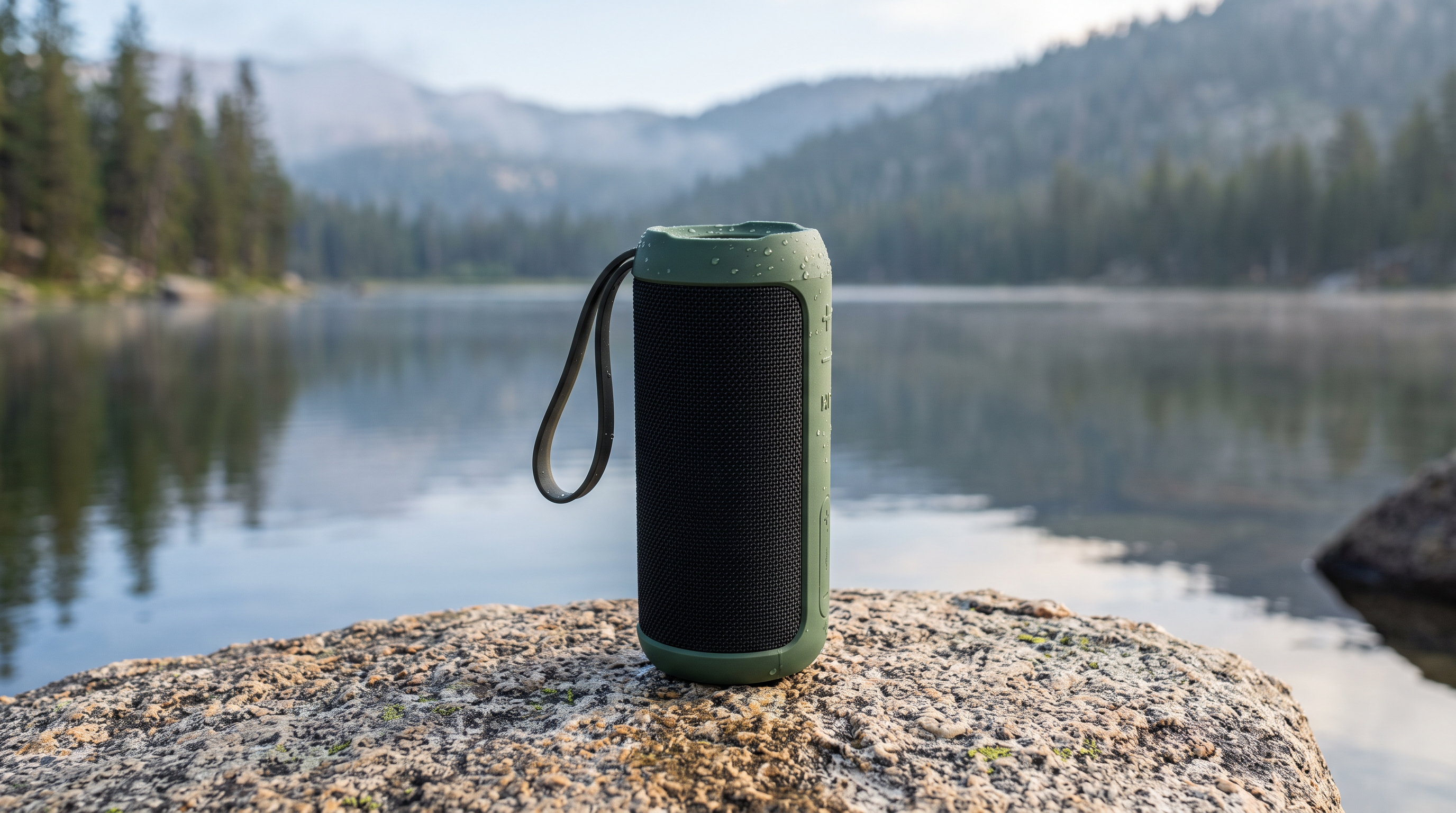
Generated using Nano Banana 2.1 on fal, an AI model from Google.
Video prompt: The speaker starts playing a deep, slow bass line with a soft kick drum underneath. On each bass hit, the fabric grille pulses slightly and the droplets on the top panel hop and scatter. The camera makes a slow 30-degree orbit to the left at the speaker's height, keeping the lake behind the product. A light breeze pushes small ripples across the water toward the boulder.
Generated using Kling 4.0 on fal, an AI model from Kling AI.
Generated using Seedance 2.5 on fal, an AI model from ByteDance.
Try it in ChatGPT Try it in fal AgentMy eye goes to the droplets first, because they should hop in time with the bass and settle back onto the rubber top.
The green finish and the strap also need to hold their shape through the 30-degree orbit.
Test 4: A standing desk rising between a start and an end frame (1:1, 8 seconds)
I like testing end frames on a mechanical product, because the desk must travel between two heights while everything on it stays put.
I made the end frame by editing the start frame in Nano Banana 2.1 Edit.
Kling 4.0 settings: kling/v4/image-to-video · start_image_url and end_image_url · duration 8 · resolution 1080p
Seedance 2.5 settings: bytedance/seedance-2.5/us/image-to-video · image_url and end_image_url · duration 8 · resolution 1080p · generate_audio true
Start frame prompt (Nano Banana 2.1, 1:1): A product photograph of a height-adjustable standing desk with a solid oak top and a matte black steel frame, lowered to seated height in a bright home office. A closed silver laptop and a small potted fern rest on the desktop, and a slim control panel with up and down buttons is mounted under the front right edge. White walls catch soft daylight from a window on the left, with no person in the frame.
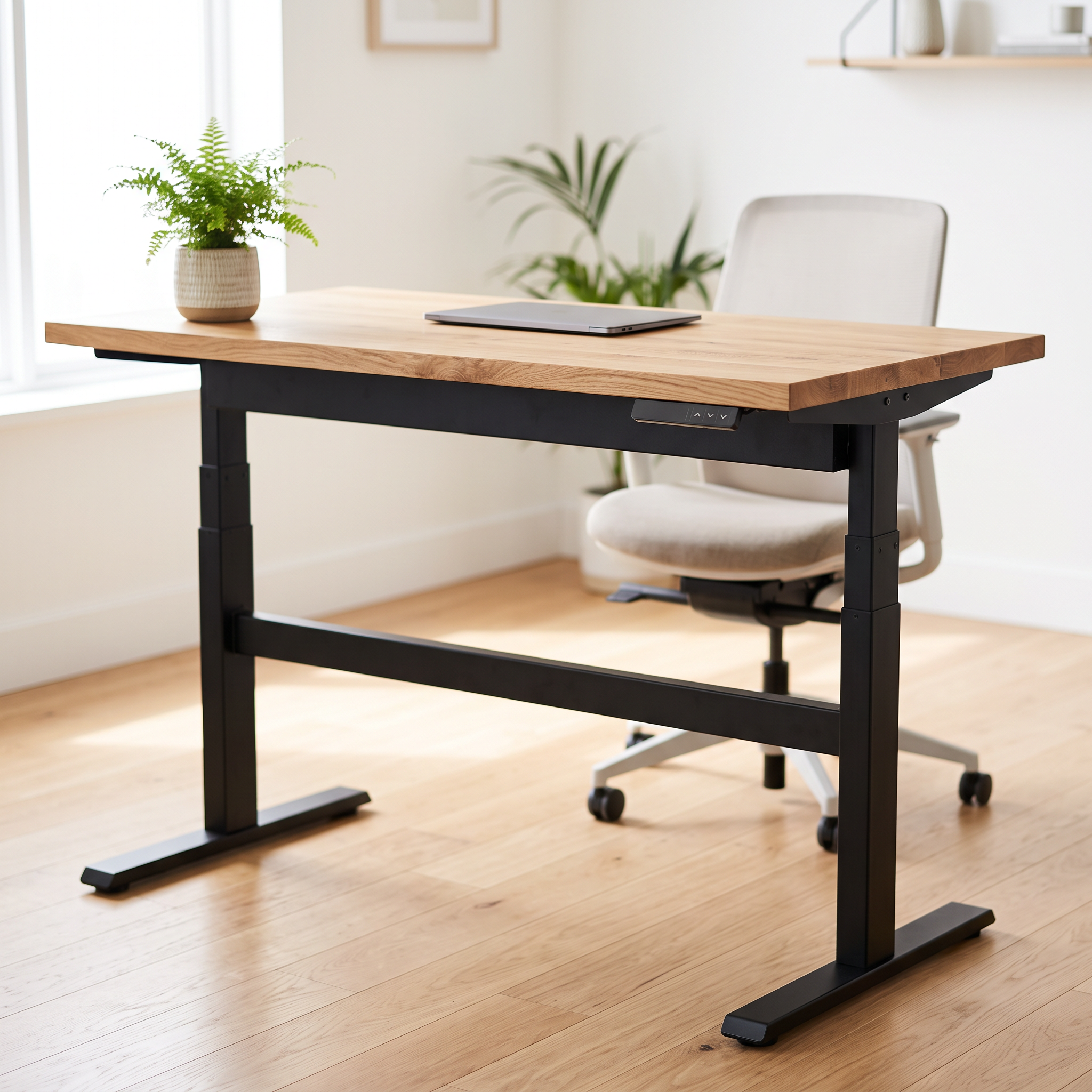
Generated using Nano Banana 2.1 on fal, an AI model from Google.
End frame prompt (Nano Banana 2.1 Edit, with the start frame as input): The same desk raised to standing height, with the laptop and the fern in exactly the same positions on the oak top. The control panel stays under the front right edge, and the camera framing and lighting match the input image.
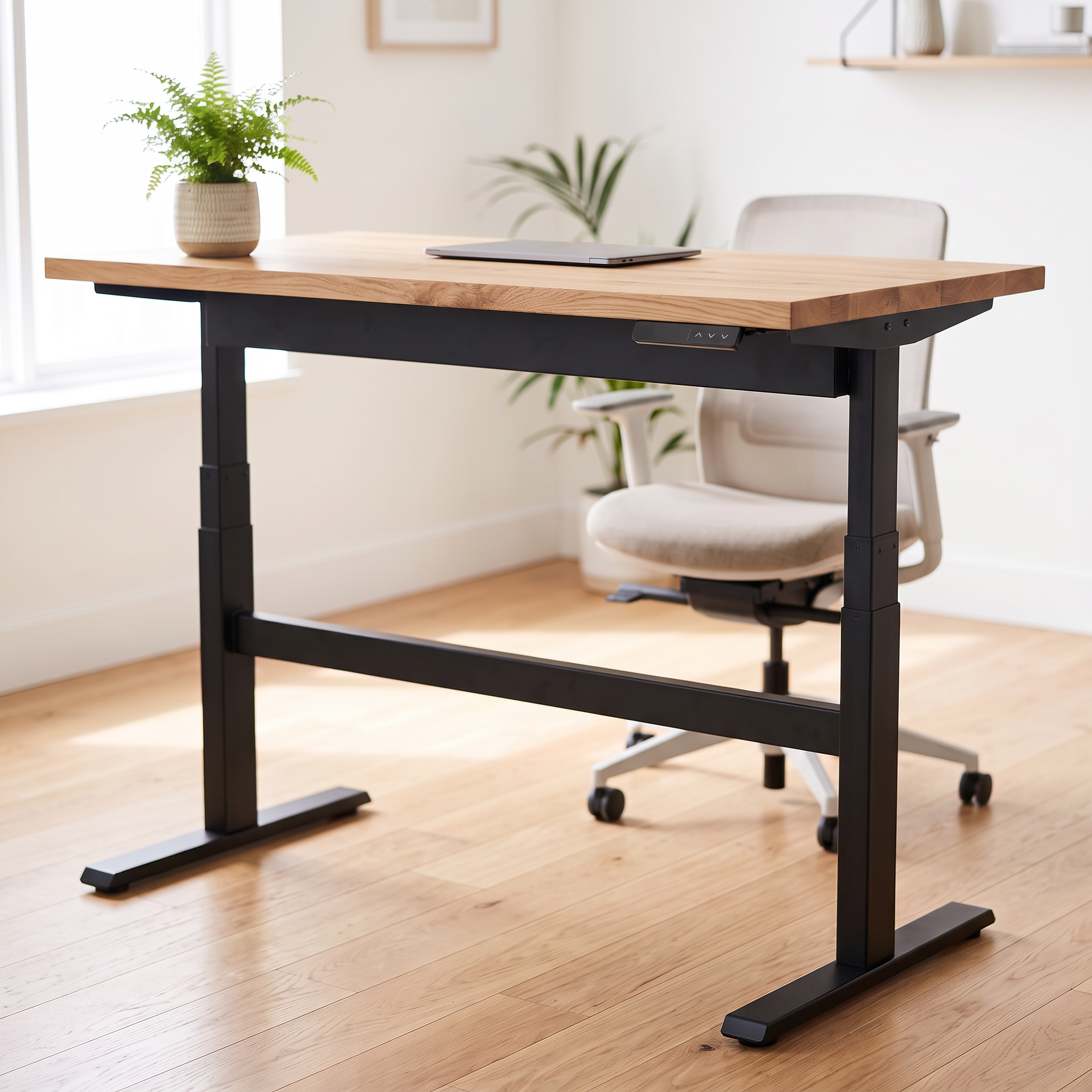
Generated using Nano Banana 2.1 on fal, an AI model from Google.
Video prompt: A hand enters from the right and holds down the up button on the control panel. The desk rises smoothly and steadily from seated height to standing height with a low motor hum. The fern's fronds sway slightly as the desk moves, and the laptop stays still on the oak top. The camera stays locked off at the same framing for the whole shot.
Generated using Kling 4.0 on fal, an AI model from Kling AI.
Generated using Seedance 2.5 on fal, an AI model from ByteDance.
Try it in ChatGPT Try it in fal AgentI'd reject a take for either of two reasons:
- The last frame misses the edited still because the desk height or framing jumps at the very end.
- The steel legs bend or double at any point as they extend upward.
Kling 4.0 vs. Seedance 2.5 reference-to-video tests
I ran two reference-to-video tests, one built from stills alone and one where a motion clip joins a product packshot.
Test 5: A crossbody bag ad from four image references (9:16, 12 seconds)
Four Nano Banana 2.1 stills went into image_urls in the same order for both models.
Kling 4.0 could have taken the woman and the bag as elements, but I kept the request image-only so the inputs match on both sides.
Kling 4.0 settings: kling/v4/reference-to-video · image_urls (4 images) · duration 12 · aspect_ratio 9:16 · resolution 1080p
Seedance 2.5 settings: bytedance/seedance-2.5/us/reference-to-video · task reference · image_urls (4 images) · duration 12 · aspect_ratio 9:16 · resolution 1080p · generate_audio true
Image 1 prompt (Nano Banana 2.1): A waist-up portrait of a woman in her late twenties with a dark curly bob and small gold hoop earrings, wearing a cream cable-knit jumper. She faces the camera against a light grey backdrop in soft even light.
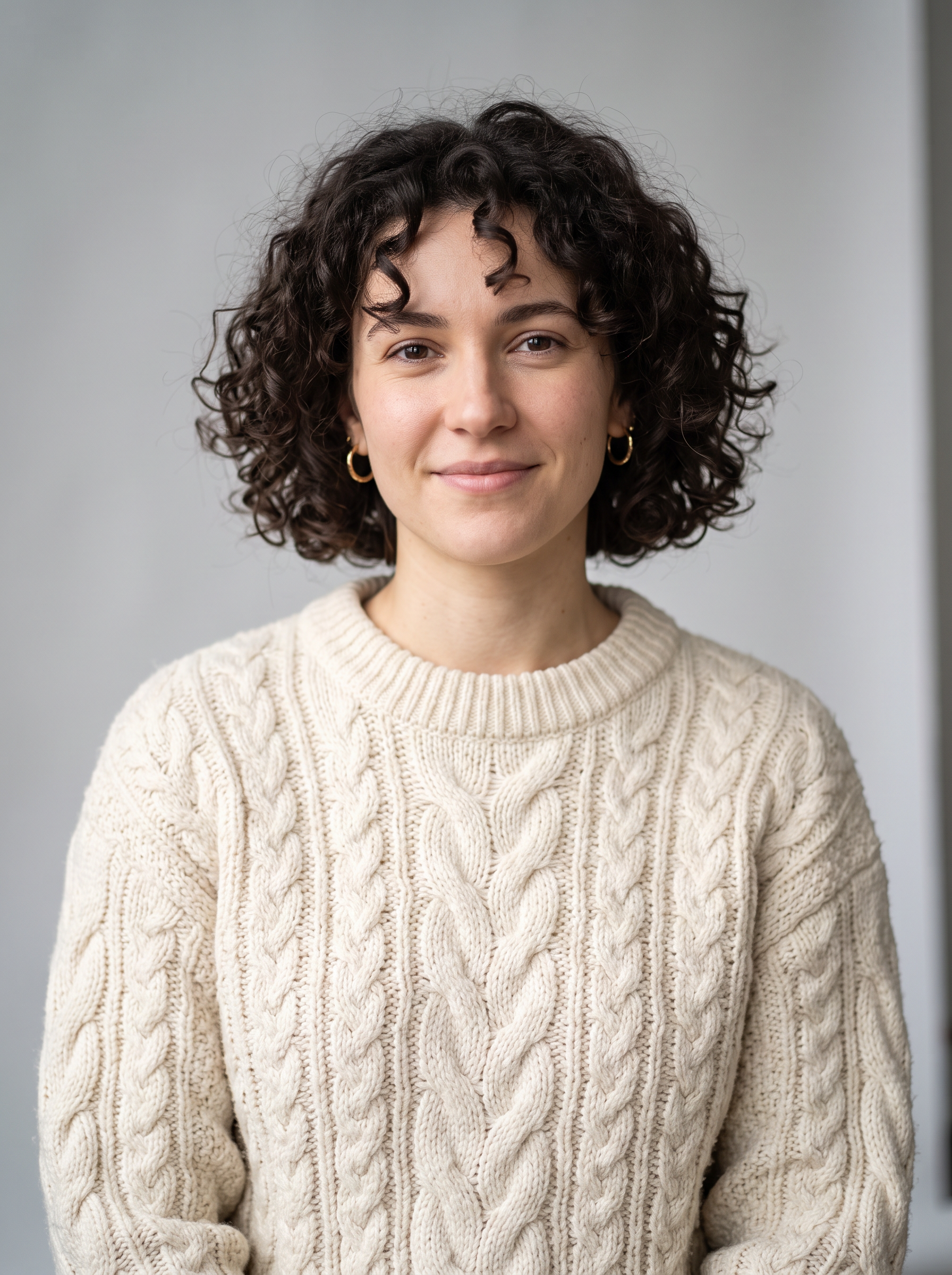
Generated using Nano Banana 2.1 on fal, an AI model from Google.
Image 2 prompt (Nano Banana 2.1): A studio packshot of a tan leather crossbody bag with a curved flap and an antique brass buckle. The wordmark 'ALDER' is embossed in the lower corner of the flap, and the bag rests against an off-white backdrop.
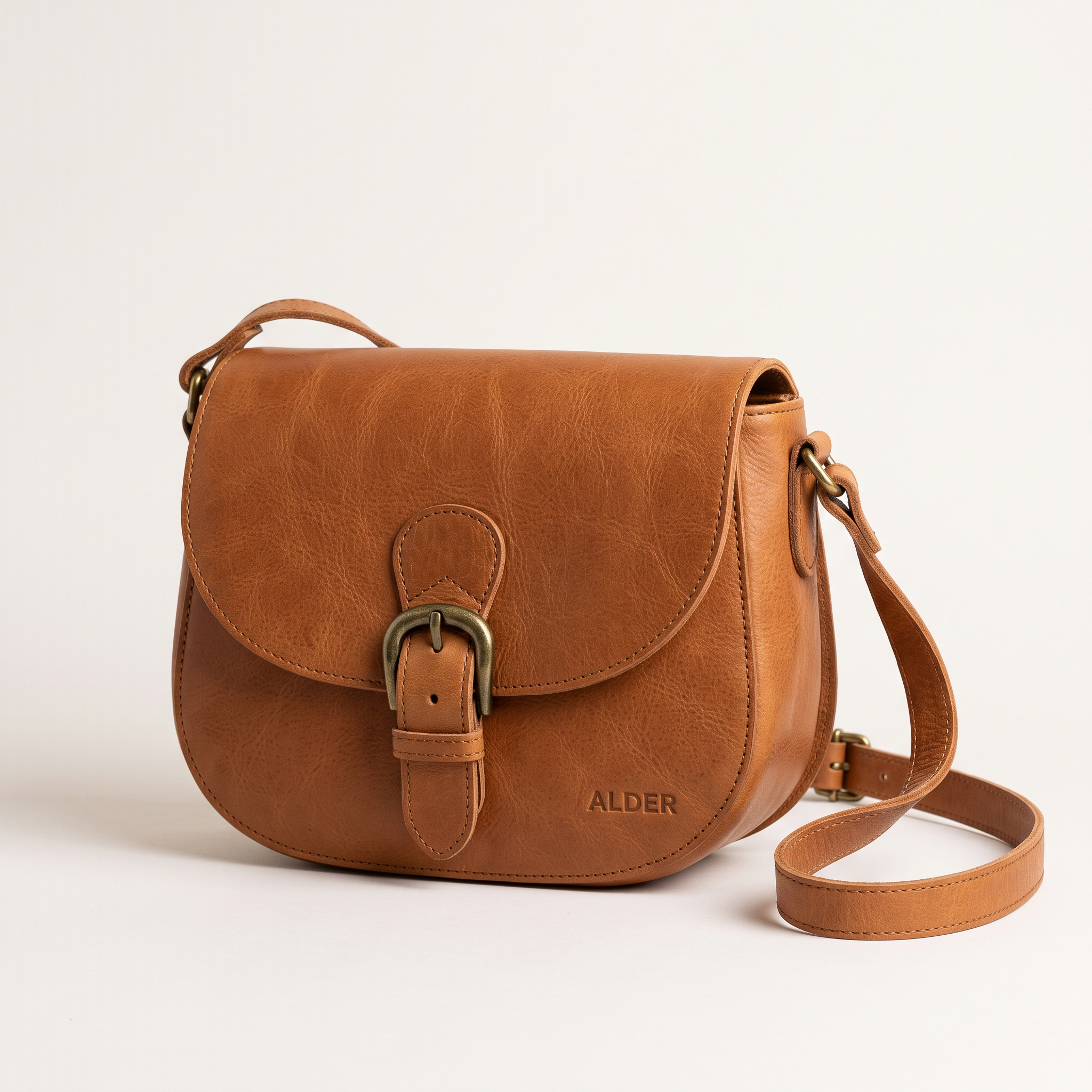
Generated using Nano Banana 2.1 on fal, an AI model from Google.
Image 3 prompt (Nano Banana 2.1 Edit, with Image 2 as input): The same bag turned to show its side profile and the adjustable woven cotton strap, against the same lighting and backdrop.
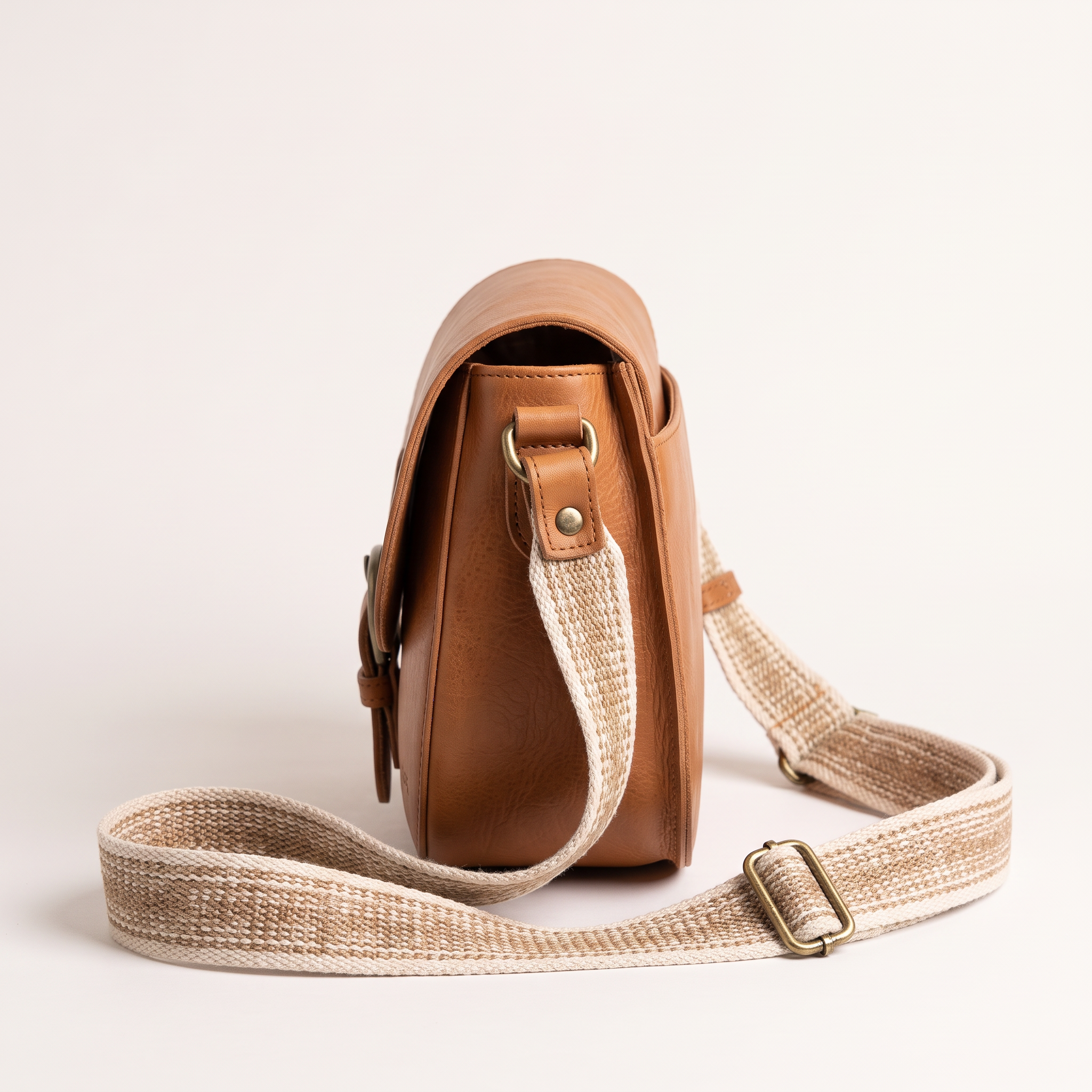
Generated using Nano Banana 2.1 on fal, an AI model from Google.
Image 4 prompt (Nano Banana 2.1): A sunlit corner of a small neighbourhood café with a marble counter and a window onto a tree-lined street, empty of people.
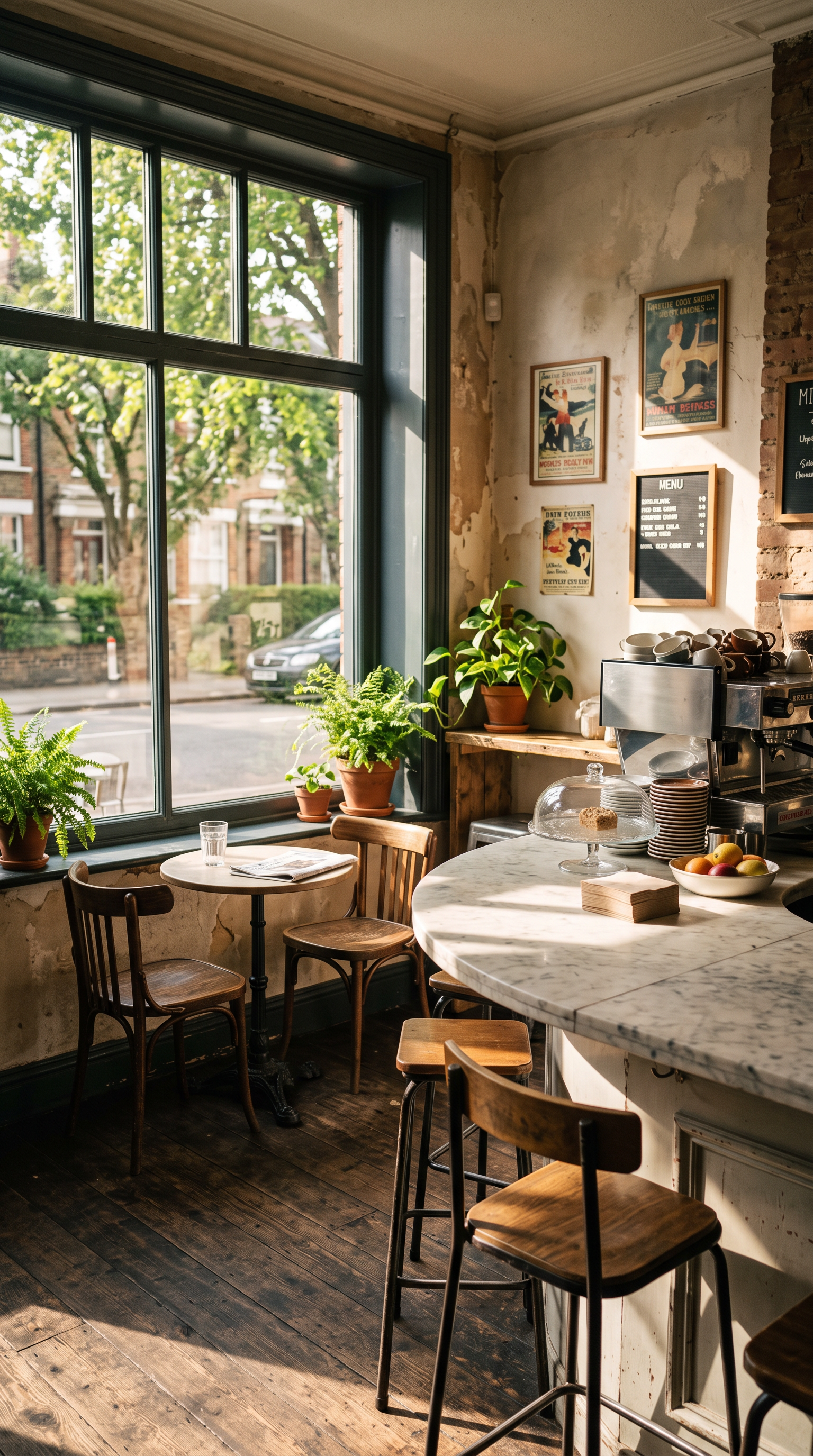
Generated using Nano Banana 2.1 on fal, an AI model from Google.
Video prompt: @Image1 walks into the café in @Image4 wearing the bag from @Image2 across her body, with its side profile matching @Image3. At the marble counter she lifts the flap so the brass buckle catches the window light, then takes out a slim phone to pay. Turning to the camera, she says in a relaxed British accent: "it fits my whole day and still looks this good." Vertical handheld framing from chest height, with café chatter and a coffee grinder underneath her voice.
Generated using Kling 4.0 on fal, an AI model from Kling AI.
Generated using Seedance 2.5 on fal, an AI model from ByteDance.
Try it in ChatGPT Try it in fal AgentIn my experience, stamped lettering on leather is the first detail to blur once a flap starts moving, so the 'ALDER' emboss gets my closest look.
Her curls and hoops also need to match @Image1 when she turns to camera.
Test 6: A smartwatch orbit borrowed from a reference clip (16:9, 8 seconds)
For this one, I split the job across two inputs, letting an H3 Max clip set the camera move, and one still set the watch.
With a video in the request, both models bill at their video-input rates, which I break down in the pricing section.
Kling 4.0 settings: kling/v4/reference-to-video · video_urls (H3 Max clip) · image_urls (watch packshot) · duration 8 · aspect_ratio 16:9 · resolution 1080p
Seedance 2.5 settings: bytedance/seedance-2.5/us/reference-to-video · task reference · video_urls (H3 Max clip) · image_urls (watch packshot) · duration 8 · aspect_ratio 16:9 · resolution 1080p · generate_audio true
Reference clip prompt (H3 Max, 16:9, 1080P, 5 seconds): A bare mid-grey cube stands on a white cylindrical plinth in an empty photo studio with a white cyclorama wall. The camera starts low on the left and makes a slow, steady 180-degree orbit around the cube at plinth height, ending on the right side. Even softbox lighting falls on an otherwise empty set.
Generated using H3 Max on fal, a post-trained variant of MiniMax H3.
Product image prompt (Nano Banana 2.1, 16:9): A studio packshot of a square smartwatch with a matte black aluminium case and a burnt-orange silicone strap. Its screen shows the time 07:42 above the white wordmark 'TALLY', on an off-white backdrop in soft even light.
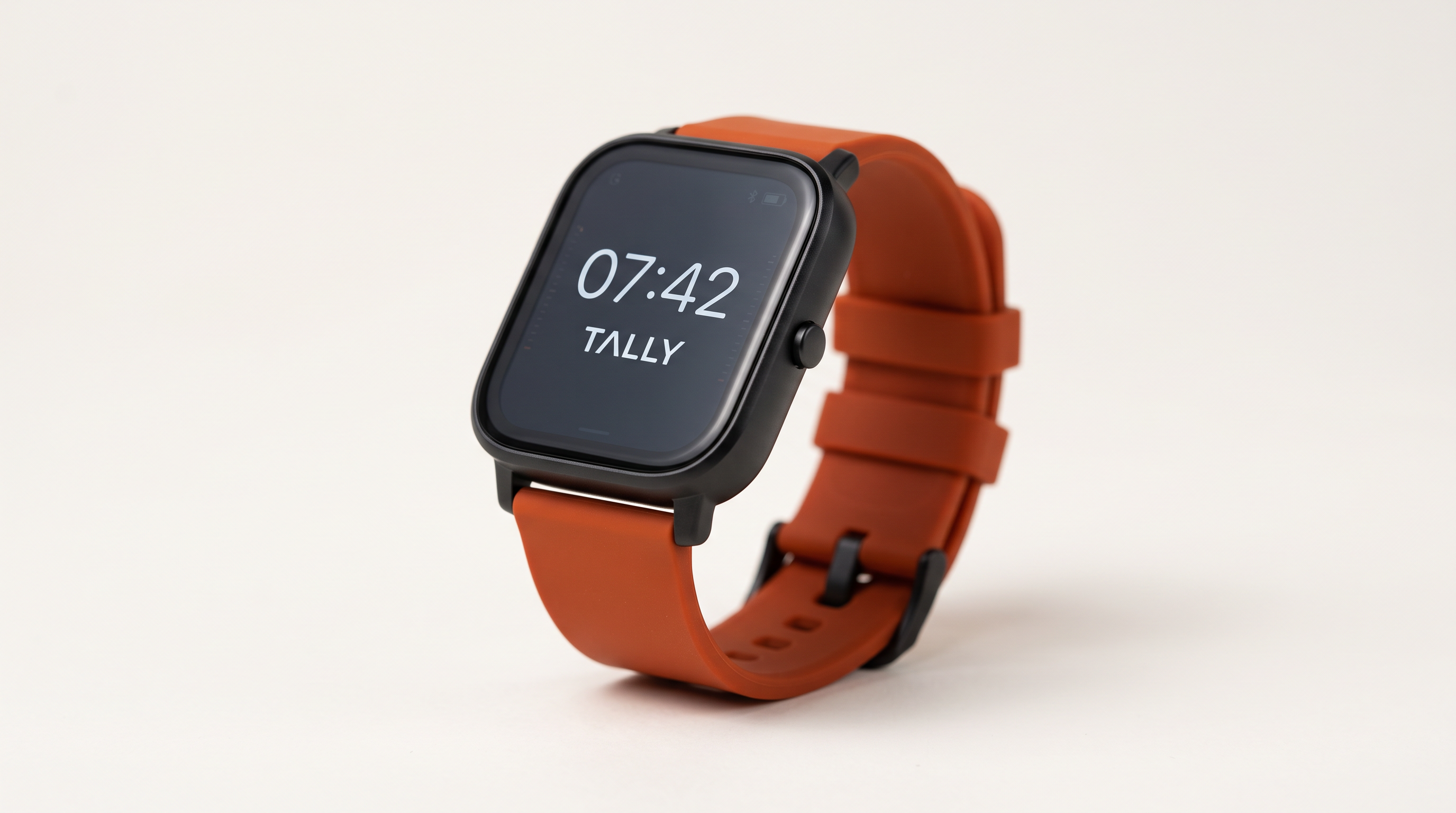
Generated using Nano Banana 2.1 on fal, an AI model from Google.
Video prompt: Follow only the camera path and pacing of @Video1, ignoring its cube and plinth. Replace the grey cube with the smartwatch from @Image1, standing on a dark basalt plinth in a dim studio lit by a single warm key light from the right. The screen keeps showing 07:42 and the 'TALLY' wordmark, and both stay legible through the whole orbit. A faint electronic chime sounds once as the orbit ends.
Generated using Kling 4.0 on fal, an AI model from Kling AI.
Generated using Seedance 2.5 on fal, an AI model from ByteDance.
Try it in ChatGPT Try it in fal AgentPlayed next to @Video1, each orbit should match the reference in direction and speed.
On the watch face, 07:42 and 'TALLY' need to stay sharp as the case turns away from the key light.
Kling 4.0 vs. Seedance 2.5 video editing tests
Both edits start from an H3 Max clip, which goes to Kling 4.0's dedicated edit endpoint and to the Seedance 2.5 reference-to-video endpoint in editing mode.
Test 7: Moving a stick vacuum demo into a living room (16:9, about 8 seconds)
I reach for background swaps more than any other edit with ecommerce footage, because one approved demo can then appear in several rooms.
The prompt alone describes the new set, because no reference image goes in.
Kling 4.0 settings: kling/v4/video-to-video/edit · video_url (H3 Max clip) · duration blank · resolution 1080p
Seedance 2.5 settings: bytedance/seedance-2.5/us/reference-to-video · task editing · video_urls (H3 Max clip) · resolution 1080p · generate_audio true
Source clip prompt (H3 Max, 16:9, 1080P, 8 seconds): Hands in a light grey jumper guide a slim brushed-silver cordless stick vacuum with a clear dust bin across a light oak floor. The vacuum head passes over a scattering of coffee beans, and the beans rattle up into the clear bin. The set is a bare mid-grey studio wall under soft overhead light, framed as a low medium shot that tracks slowly to the right with the vacuum.
Generated using H3 Max on fal, a post-trained variant of MiniMax H3.
Edit prompt: Replace the grey studio wall in @Video1 with a sunlit Scandinavian living room, showing a white linen sofa and tall window light from the left. Keep the vacuum, the hands, the coffee beans, the oak floor and the camera move exactly as they are in @Video1. The new window light falls across the vacuum's brushed silver body from the left.
Generated using Kling 4.0 on fal, an AI model from Kling AI.
Generated using Seedance 2.5 on fal, an AI model from ByteDance.
Try it in ChatGPT Try it in fal AgentI'd inspect the join between the oak floor and the new room first, and if the perspective is off there, the vacuum will look pasted onto a backdrop.
The beans also need to vanish into the bin at the same moments as in the H3 Max source.
Test 8: Recoloring a bike helmet with a reference image (9:16, about 10 seconds)
For colorway swaps I'd recommend attaching a packshot of the target product, because a color name in a prompt leaves room for interpretation.
The cyclist fastens her chin strap during the clip, which means her fingers have to handle the new helmet as well.
Kling 4.0 settings: kling/v4/video-to-video/edit · video_url (H3 Max clip) · image_urls (helmet packshot) · duration blank · resolution 1080p
Seedance 2.5 settings: bytedance/seedance-2.5/us/reference-to-video · task editing · video_urls (H3 Max clip) · image_urls (helmet packshot) · resolution 1080p · generate_audio true
Source clip prompt (H3 Max, 9:16, 1080P, 10 seconds): A woman in her thirties with a long dark braid and a navy rain jacket stands beside a city bike rack on a damp morning street. She puts on a matte black cycling helmet with long vent slots and clips the chin buckle under her jaw. Once the buckle clicks shut, she gives the camera a small nod and a quick smile. Handheld vertical framing from chest height in soft overcast light, with quiet traffic noise behind her.
Generated using H3 Max on fal, a post-trained variant of MiniMax H3.
Product image prompt (Nano Banana 2.1, 1:1): A studio packshot of a matte sage-green cycling helmet with a tan chin strap and the small white wordmark 'VELA' above the front vent. Off-white backdrop and soft even light, with no other text in the frame.
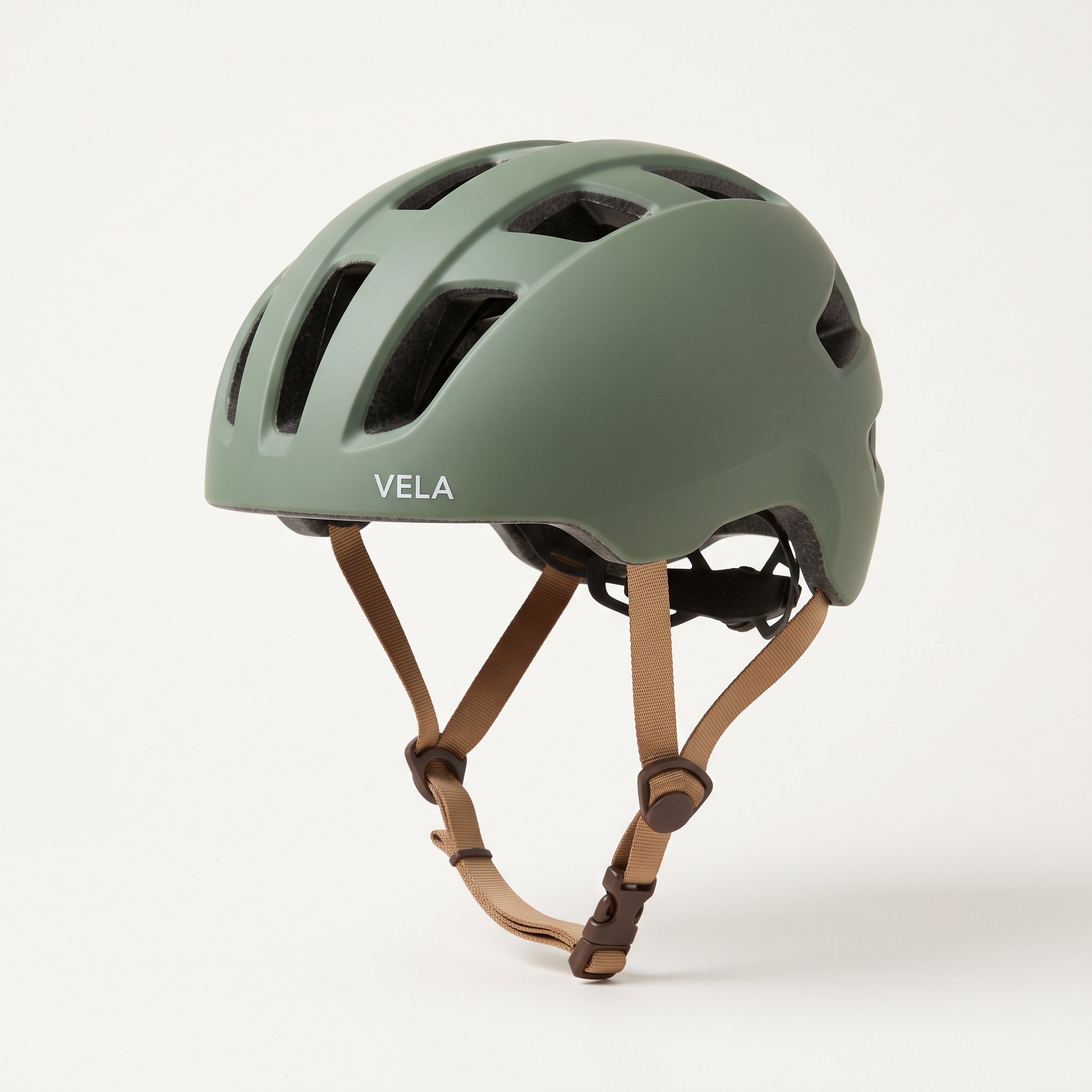
Generated using Nano Banana 2.1 on fal, an AI model from Google.
Edit prompt: Replace the black helmet in @Video1 with the sage-green helmet from @Image1, matching its tan chin strap and the 'VELA' wordmark above the front vent. Keep the woman, her movements, the street and the camera exactly as they are in @Video1. The new helmet takes on the same soft overcast light as the rest of the shot.
Generated using Kling 4.0 on fal, an AI model from Kling AI.
Generated using Seedance 2.5 on fal, an AI model from ByteDance.
Try it in ChatGPT Try it in fal AgentThe buckle frame is the one to scrub to, since that's where her fingers close the new tan strap and could pass through it.
After the nod, 'VELA' should read cleanly above the front vent at phone-screen size.
How much do Kling 4.0 and Seedance 2.5 cost on fal?
At 1080p without video inputs, Kling 4.0 costs $0.235 per second and Seedance 2.5 costs roughly $1.164 per second, according to the rates on our playground pages.
Both models bill differently once a request includes video input, whether it's a reference clip or footage to edit.
The rates below come from the playground pages for Kling 4.0 text-to-video, Kling 4.0 reference-to-video, Kling 4.0 video editing and Seedance 2.5 reference-to-video.
| Endpoint and mode | Rate | What is billed |
|---|---|---|
| Kling 4.0 text, image or reference requests with no video input | $0.157 per second at 720p, $0.235 at 1080p | Output seconds |
| Kling 4.0 reference requests with a reference video or a video element | $0.094 per second at 720p, $0.141 at 1080p | Input plus output seconds, at least 2× the output |
| Kling 4.0 video editing | $0.094 per second at 720p, $0.141 at 1080p | Input plus output seconds, at least 2× the output |
| Seedance 2.5 text, image or reference requests with no video input | Roughly $0.2205 per second at 480p, $0.4730 at 720p, $1.164 at 1080p | Tokens at $0.0214 per 1,000 for 480p and 720p, roughly $0.0234 for 1080p |
| Seedance 2.5 reference requests with video inputs, editing included | The rates above × 0.6, roughly $0.2838 per second at 720p and $0.698 at 1080p | Tokens covering input plus output seconds |
Seedance 2.5 counts tokens as output height × output width × (input video seconds plus output seconds) × 24 ÷ 1024.
Seedance 2.5 charges the same with generate_audio on or off.
Kling 4.0 puts a floor under video-input requests at twice the output length.
In Test 6, the 5-second H3 Max reference and the 8-second output add up to 13 seconds, which the Kling 4.0 floor raises to 16 seconds, or $2.256 at 1080p.
Seedance 2.5 bills those same 13 seconds at roughly $0.698 each, which comes to about $9.08.
A 1080p run of all eight tests adds up as follows:
| Test | Kling 4.0 | Seedance 2.5 (roughly) |
|---|---|---|
| 1. Robot vacuum dialogue, 10 s text-to-video | $2.35 | $11.64 |
| 2. Dutch oven spot, 20 s text-to-video | $4.70 | $23.28 |
| 3. Speaker from a start frame, 6 s image-to-video | $1.41 | $6.98 |
| 4. Standing desk between two frames, 8 s image-to-video | $1.88 | $9.31 |
| 5. Crossbody bag from four images, 12 s reference-to-video | $2.82 | $13.97 |
| 6. Smartwatch with a 5 s reference video, 8 s output | $2.256 | $9.08 |
| 7. Vacuum background swap, 8 s source and output | $2.256 | $11.17 |
| 8. Helmet recolor, 10 s source and output | $2.82 | $13.97 |
| Total | $20.492 | $99.41 |
The Seedance 2.5 edit rows assume an output as long as the source clip, because the editing task sets duration to auto.
If you're iterating on a Seedance 2.5 brief, it's ideal to settle the prompt at 480p, where a 10-second draft costs roughly $2.21.
The 1080p final is then a fresh generation, because the US input schemas list no draft setting to carry a take over.
Note: live rates on the playground pages take priority over this table.
Which model should you pick for your video work?
Kling 4.0 suits teams producing in the playground who want the lower 1080p rate.
Pipelines that need an API call today are better served by Seedance 2.5.
The bullets below are how I'd route video work between the two, going by the schemas and the per-second rates listed above.
When I'd pick Kling 4.0
- Your clips run long at 1080p, and the per-second rate drives the budget.
- You'd like separate prompts and durations per shot through
multi_prompt. - A recurring presenter needs one face and one voice across many clips, using elements that carry a
voice_id. - Your script calls for an accent Kling AI names for Kling 4.0, such as Indian or British English.
- Your team generates in the playground or through fal Agent and doesn't need an API call yet.
When I'd pick Seedance 2.5
- Your pipeline has to call the model through our API today.
- A brief needs an audio file as a reference, such as a brand jingle or a recorded voice-over, passed through
audio_urls. - One request needs more than 10 reference images or more than 5 reference videos.
- Your channel only needs 480p output or a 4:3 or 3:4 frame.
- You want a seed on reference runs, which the schema says can still vary slightly, or H.265 output through the
codecfield.
There's a case for running both when automated batches need the Seedance 2.5 API today, and longer spots built by hand can run at the lower Kling 4.0 rate in the playground.
Recently Added










Getting started on fal
Kling 4.0 opens from our Kling 4.0 page and Seedance 2.5 from our Seedance 2.5 page, both under one fal login.
For background on the launches, our explainers cover what Kling 4.0 is and what Seedance 2.5 is.
Our Seedance 2.5 workflows guide walks through prompting each Seedance 2.5 endpoint, with 25 starting briefs in our Seedance 2.5 prompt examples.
To see ByteDance's newer model against its predecessor, our Seedance 2.5 vs. Seedance 2.0 comparison runs both on fal.
The source clips for Tests 6 to 8 came from H3 Max text-to-video, which opens in the same playground.
Frequently asked questions
Should you use Kling 4.0 or Seedance 2.5 for ecommerce video?
Neither model wins outright for ecommerce video on fal, since Kling 4.0 has the lower per-second rate and Seedance 2.5 has the open API and audio-file references.
You can judge the clips side by side in the eight test pairs above, where both models got identical briefs.
Is Kling 4.0 cheaper than Seedance 2.5 on fal?
Yes, at 720p and at 1080p: Kling 4.0 costs $0.157 and $0.235 per second, against roughly $0.4730 and $1.164 for Seedance 2.5.
Seedance 2.5 also offers 480p at roughly $0.2205 per second, a tier Kling 4.0 doesn't list on fal.
Does Seedance 2.5 take more reference files than Kling 4.0?
Yes, a Seedance 2.5 request can carry as many as 50 reference files, 30 of which may be images.
Kling 4.0 allows up to 15 assets per request according to our model page.
Do both models generate sound with the video?
Yes, Kling 4.0 and Seedance 2.5 both generate audio together with the picture on fal.
Our Kling 4.0 page describes two-channel stereo audio and lip sync.
On Seedance 2.5, sound comes from generate_audio and costs nothing extra.
How does editing an existing clip work on each model?
Kling 4.0 edits a 3 to 30-second source clip through kling/v4/video-to-video/edit and can take image references and elements alongside it.
Seedance 2.5 edits through its reference-to-video endpoint once task is set to "editing", which also forces duration and aspect ratio to auto.
Can I use the generated videos commercially?
Commercial use is listed on the endpoint pages for both Kling 4.0 and Seedance 2.5 on fal.
For the exact usage rights, our terms of service are the document to check before a campaign goes live.