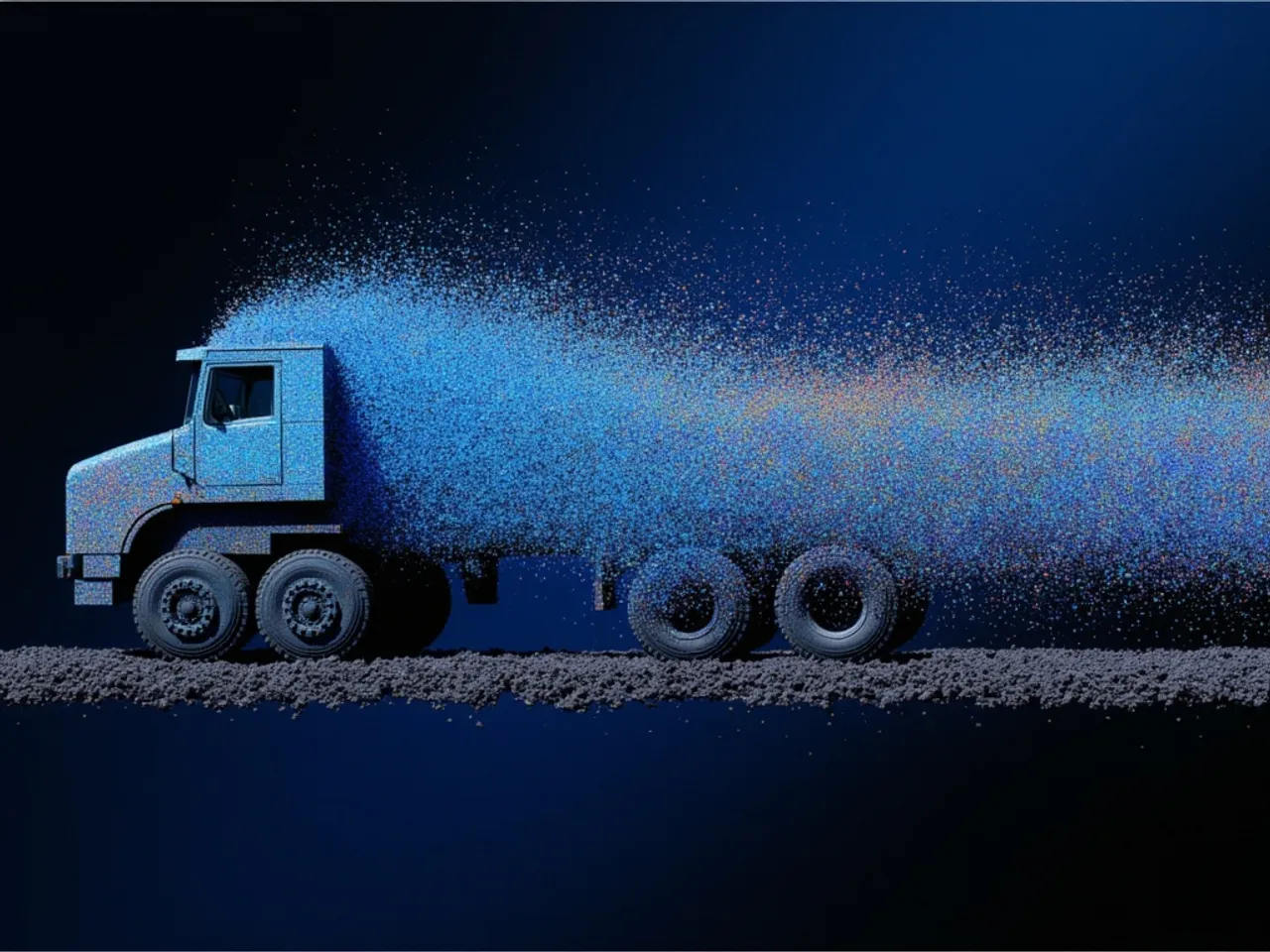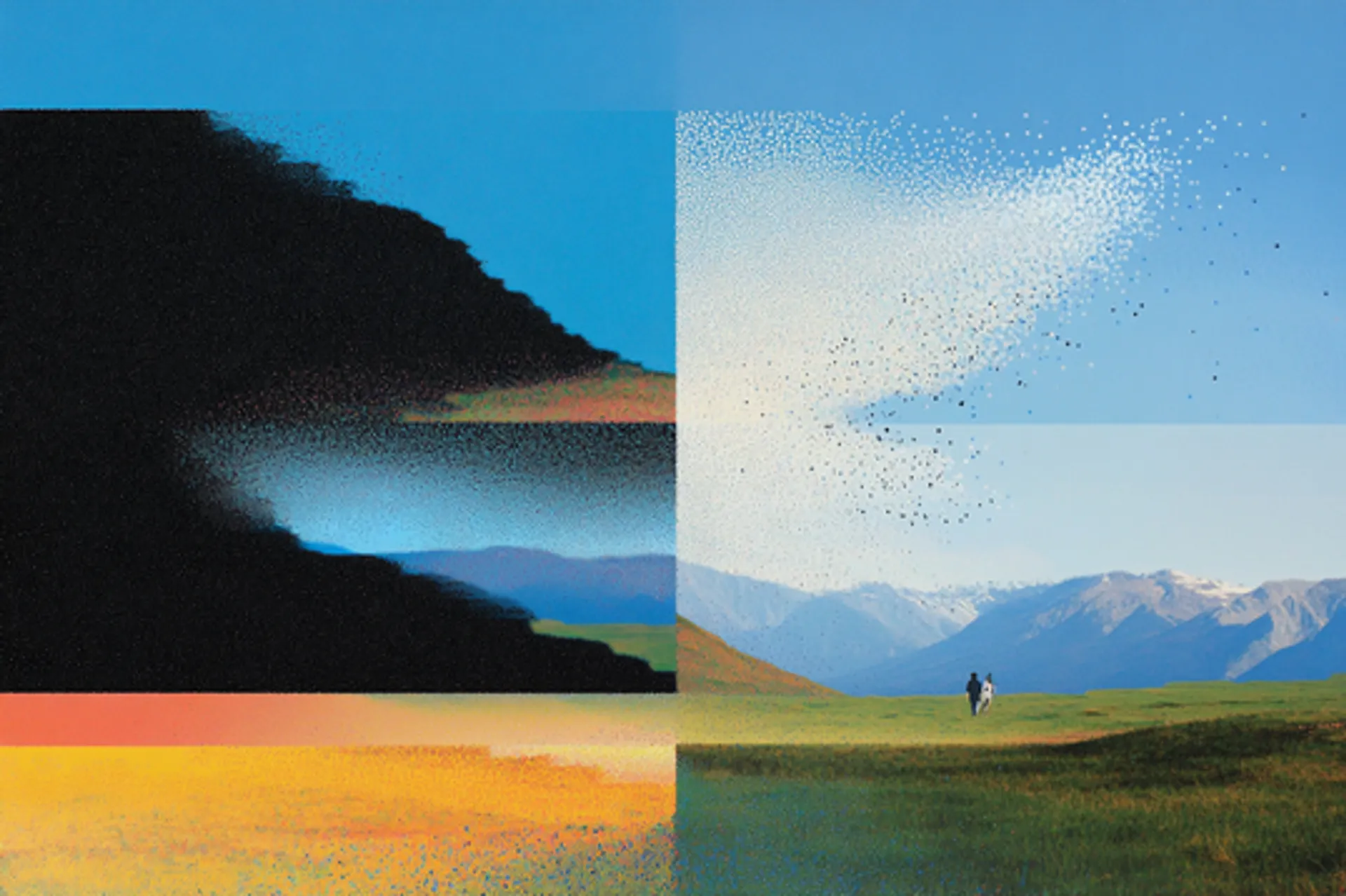
This guide breaks down GPT Image 2 and GPT Image 1.5 on fal across resolution range, color baseline, multilingual text fidelity, edit endpoint design, transparent background support, and pricing structure.
TL;DR
GPT Image 1.5 is the OpenAI text-to-image model that shipped through fal in December 2025, built around three fixed output sizes and a parameter surface tuned to the most common production needs.
Output runs at 1024x1024, 1024x1536, or 1536x1024 across three quality tiers: low, medium, and high.
The background parameter exposes auto, transparent, and opaque values, which is the lever transparent PNG workflows depend on at the API level.
The edit endpoint adds an input_fidelity enum (low or high) that controls how strictly source pixels are preserved during a modification.
Per-image fees at high quality run $0.133 for 1024x1024, $0.200 for 1024x1536, and $0.199 for 1536x1024, with token charges layered on top at $0.005 per 1k input text, $0.008 per 1k input image (edit endpoint only), and $0.010 per 1k output text.
GPT Image 2 went live on fal on April 21, 2026 as the quality-first follow-up, and it's their first image model with thinking capabilities, with web search and self-checking baked in.
The architectural shifts documented by OpenAI in this release: native output up to 3840x2160 (with anything above 2560x1440 marked experimental in the prompting guide), text rendering across both Latin scripts and non-Latin scripts including Chinese, Japanese, Korean, Hindi, and Bengali removal of the warm color cast that 1.5 carried, and an edit endpoint where every input is processed at high fidelity by default rather than gated behind a parameter.
Per-image fees at high quality run $0.211 for 1024x1024, $0.158 for 1920x1080, and $0.401 for 3840x2160 across six preset sizes plus custom dimensions.
Token charges are billed per million on GPT Image 2 instead of per thousand: $5.00 input text, $1.25 cached, $10.00 output text, $8.00 input image, $2.00 cached image, $30.00 output image, with token cost rounded up to the closest cent on every request.
Both models sit on the same fal SDK, both ship companion edit endpoints, and the endpoint prefixes differ between them: GPT Image 1.5 lives under fal-ai/, GPT Image 2 under openai/.
How do GPT Image 2 and GPT Image 1.5 compare?
| GPT Image 2 | GPT Image 1.5 | |
|---|---|---|
| Best for | Native high resolution, multilingual text rendering, neutral color reproduction, high-fidelity edits by default | 1024x1024 production at the lowest per-image rate, transparent PNG output, fidelity-toggled edits |
| Resolution range | 1024x768 up to 3840x2160 | 1024x1024, 1024x1536, 1536x1024 |
| Custom dimensions | Yes (edges multiples of 16, max edge ≤ 3840px, aspect ≤ 3:1) | No |
| Quality tiers | low, medium, high | low, medium, high |
| Per-image fee, 1024x1024 high | $0.211 | $0.133 |
| Per-image fee, 1024x1536 high | $0.165 | $0.200 |
| Per-image fee, 4K high | $0.401 | Not available |
| Token billing unit | Per million | Per thousand |
| Background parameter | Not exposed; transparent output not supported | auto, transparent, opaque |
| Edit endpoint input_fidelity | Not exposed (always high fidelity) | low or high |
| Documented script support | Latin, Chinese, Japanese, Korean, plus additional non-Latin scripts | Latin, although OpenAI did show us what Japanese looks like (it was good) |
| Streaming | Yes | Yes |
| Output formats | jpeg, png, webp | jpeg, png, webp |
| Endpoint prefix on fal | openai/ | fal-ai/ |
| Commercial use | Yes | Yes |
What is the main architectural difference between GPT Image 2 and GPT Image 1.5?
The two models share a lineage and a near-identical core API shape, but four architectural shifts separate them.
Resolution range
GPT Image 1.5 ships with a fixed-size enum of three values: 1024x1024, 1024x1536, or 1536x1024.
Unlike GPT Image 2, there is no custom dimension support and no native path past 1536 pixels on the long edge.
GPT Image 2 opens the surface to six presets running from 1024x768 through 3840x2160, plus a custom width-and-height object so long as both edges are multiples of 16, the maximum edge stays at or under 3840px, the aspect ratio is at or below 3:1, and the total pixel count lands between 655,360 and 8,294,400.
OpenAI's prompting guide notes that anything above 2560x1440 is treated as experimental, with more variability above that ceiling than below it.
For deliverables that land on a screen larger than a phone, including hero web banners shot at 16:9, large-format print, and architectural visualisation, GPT Image 2 produces source pixels at that scale without an external upscaling pass.
Color reproduction
According to other analysts and to my own observations as well, GPT Image 1.5 used to have a warm yellow color cast that now appears to be gone with GPT Image 2, which uses more neutral colors (unless you tell it otherwise).
GPT Image 2 ships with that cast removed, with neutral whites coming back closer to a calibrated reference and cool light sources keeping their actual temperature.
For briefs involving Pantone reference matching, fabric or paint reproduction, or any work where the white point of the output gets compared against a calibrated source, GPT Image 2's neutral baseline reduces the post-processing step required to bring the file in line.
Text rendering range
Both models render text inside images, but the range of that capability is what differs.
GPT Image 1.5's release documentation covers text rendering at high fidelity with a tease behind how it'd look in Japanese.
GPT Image 2's release notes extend that coverage to dense paragraphs, small lettering, and multilingual layouts, including Chinese, Japanese, Korean, Hindi, and Bengali alongside Latin scripts.
For localized marketing assets, multilingual signage, mixed-script infographics, or any deliverable headed for a non-Latin-script market, the script range on GPT Image 2 covers ground that GPT Image 1.5's release documentation does not claim.
Edit endpoint design
Both flagship models have a dedicated edit endpoint that accepts reference images and an optional mask. Where they diverge is what fidelity control looks like.
GPT Image 1.5's edit endpoint exposes input_fidelity as a low-or-high enum.
When you set it to high, composition, lighting, and source-pixel detail stay close to the input.
When you set it to low, the model has more freedom to redraw, and input image tokens are consumed at a lower rate (135 tokens per 1024x1024 reference image at low fidelity, against 3,050 tokens at high fidelity).
GPT Image 2's edit endpoint does not expose input_fidelity because the model now processes every input at high fidelity automatically.
The trade-off is that the cheaper low-fidelity edit option is no longer available, and reference-heavy edit requests on GPT Image 2 always consume input tokens at the high-fidelity rate, which shifts the cost shape on edit-heavy pipelines.
How do GPT Image 2 and GPT Image 1.5 look side-by-side?
I put both models through four head-to-head tests on fal, each one targeting an architectural claim that actually differs between them.
Let's see how GPT Image 2 compares against GPT Image 1.5 on identical prompts:
Test 1: Multilingual scientific poster with mixed scripts and small subscript text
Prompt: "A clinical research poster for a phase II oncology trial mounted on a corkboard in a hospital conference hallway. The poster header reads 'EFFICACY OF KRAS-G12C INHIBITION IN ADVANCED NON-SMALL CELL LUNG CARCINOMA' in dark navy serif. Below, three columns of body text under the subheaders 'Methodology', '研究方法' and '연구방법' with matching paragraphs in English, Japanese, and Korean of roughly 35 words each. Bottom-left corner: a Kaplan-Meier survival curve labeled 'Overall Survival (n=247)' with axis labels reading 'Time (months)' along the x-axis and tick marks at '0, 6, 12, 18, 24, 30'. Bottom-right corner: a footnote in 8-point font reading '*p < 0.05 vs. control arm. Funded by NIH grant R01-CA-218472. Trial registry: NCT04567892.' Fluorescent ceiling light from above with a slight cool cast. The corkboard is pinned with brass-colored thumbtacks. The poster paper shows a barely-visible matte texture."
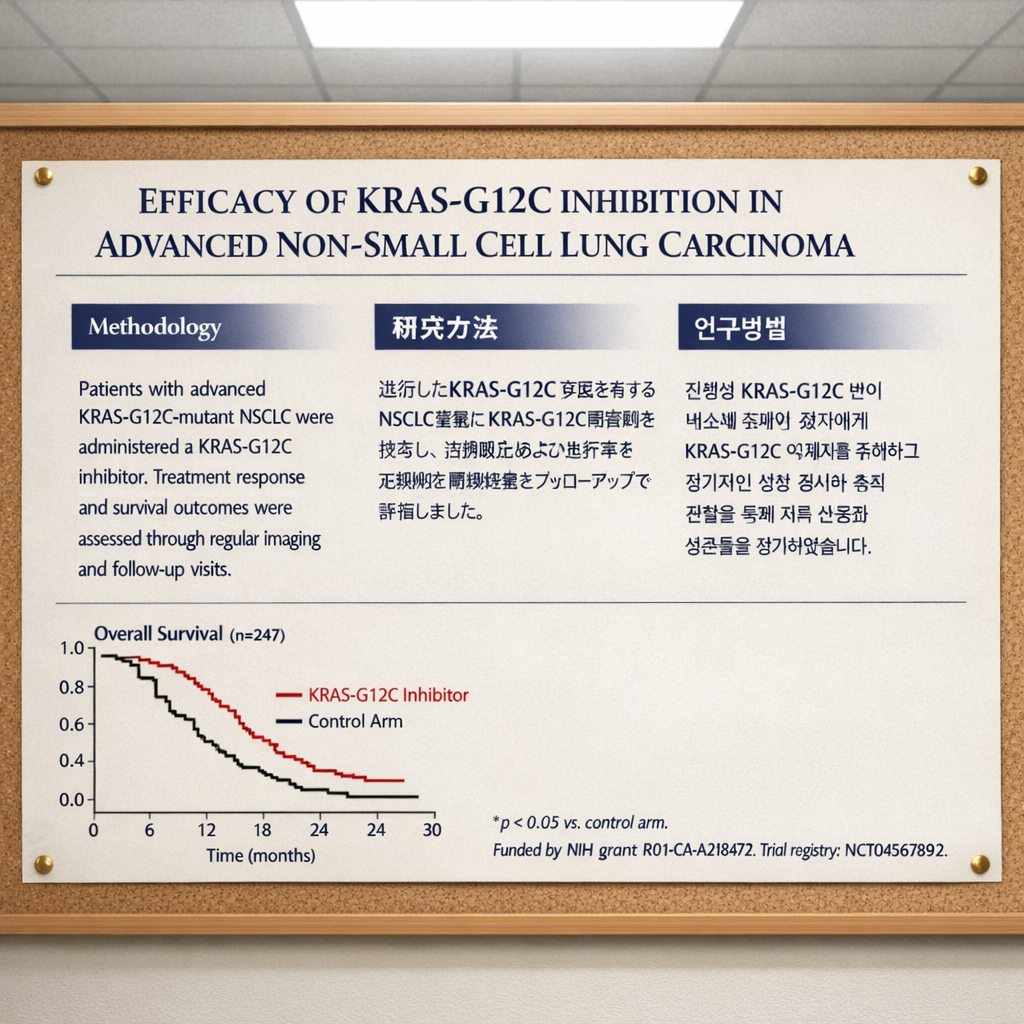
Generated using GPT Image 1.5 on fal, an AI model from OpenAI.
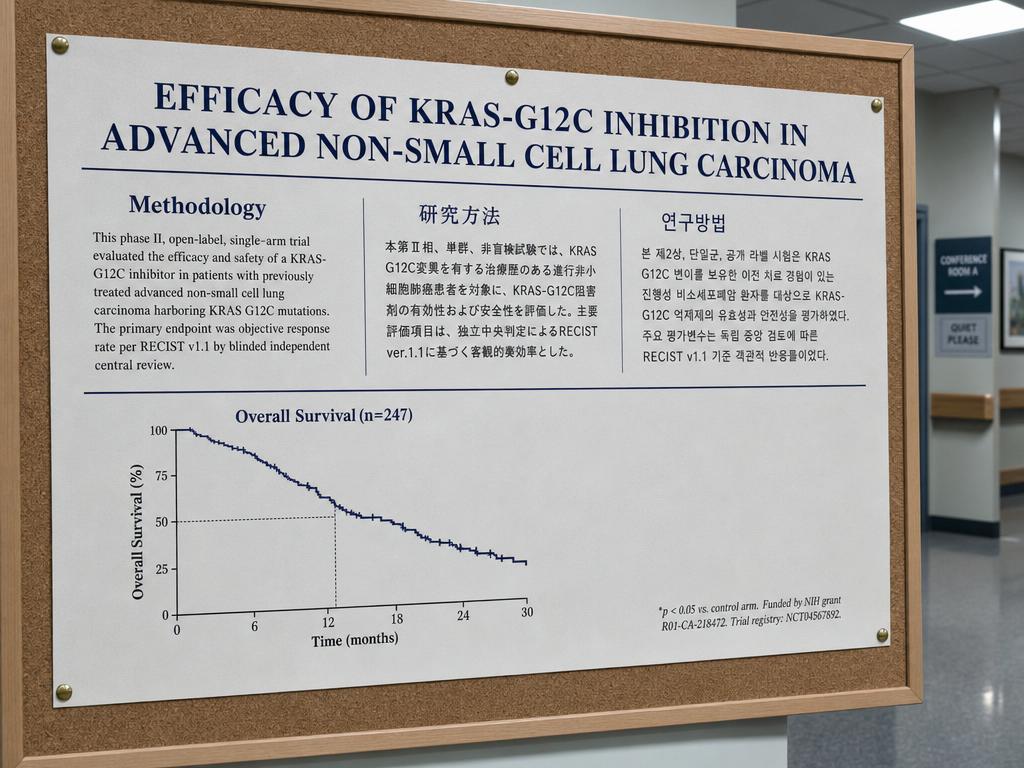
Generated using GPT Image 2 on fal, an AI model from OpenAI.
My take: The text rendering appears to be better when it comes to the Korean from GPT Image 2, as I can spot a few mistakes on GPT Image 1.5's Korean output (my Hangul education is coming in useful here).
Also, we can see how GPT Image 1.5's colors are leaning towards yellow-ish, while GPT Image 2's colors are staying with neutral colors, in fact, going towards a darker, more realistic tone of what you'd expect from a clinical research poster.
Test 2: Three-temperature interior lighting with color separation across surfaces
Prompt: "A working illustrator's home studio at 4 PM in late autumn, shot from a low three-quarter angle. The room contains three discrete light sources visible in the same frame. A north-facing window on the left wall lets in cool overcast daylight at roughly 6500K, washing the left side of a wooden drafting table in pale blue-grey. A tungsten architect's lamp at roughly 2700K sits on the right side of the same table, throwing a warm amber pool over a sketchbook with graphite drawings visible on the page. An overhead fluorescent panel at roughly 4000K casts neutral light on the back wall, which holds a corkboard pinned with reference photos. The illustrator, a woman in her early thirties wearing a charcoal sweater, sits in profile at the desk, her face lit half by the tungsten on the right and half by the daylight on the left, with the temperature split visible across her cheekbones. A white ceramic mug on the desk reads as cool grey on its left side and warm cream on its right. The wooden floor in the foreground is neutral and unsaturated."

Generated using GPT Image 1.5 on fal, an AI model from OpenAI.

Generated using GPT Image 2 on fal, an AI model from OpenAI.
My take: Above-average photorealism from both AI models in this case, although I can see how GPT Image 2 rendered the background in a higher quality than GPT Image 1.5 did, which focused on the woman at hand.
However, I can see that both AI image models did not do a reasonable job with the white ceramic cup that was supposed to be grey on the left side: GPT Image 2 thought I was referring to a shadow, while GPT Image 1.5 turned it half blue.
falMODEL APIs
The fastest, cheapest and most reliable way to run genAI models. 1 API, 100s of models
Test 3: Pharmaceutical product photography with regulatory small print
Prompt: "A studio product shot of a 50ml amber glass dropper bottle of prescription retinoid serum on a soft white seamless backdrop, lit from camera-left with a large softbox. The bottle's front label is centered in frame and contains, top to bottom: a clean sans-serif brand wordmark reading 'NOCTURNA Rx' in deep teal; below that, a product line reading 'Tretinoin 0.05% Topical Solution'; below that, a dosage line reading 'For external use only. Apply pea-sized amount nightly.'; below that, a four-line ingredient panel in 6-point font reading 'Active: Tretinoin 0.05% w/v. Inactive: Polyethylene Glycol 400, Butylated Hydroxytoluene, Alcohol USP, Hydroxypropyl Cellulose.'; below that, three certification marks placed in a horizontal row (a circular GMP mark on the left, a square cruelty-free leaping bunny in the middle, a triangular recyclable symbol on the right); below that, a 12-character batch code reading 'LOT 4729-K8B' and an expiration date reading 'EXP 2027-09'; bottom-right corner of the label: a 1D barcode with the digits '8 90217 33442 6' printed below it. The dropper cap is matte black with subtle threading visible. A faint shadow under the bottle on the seamless backdrop."
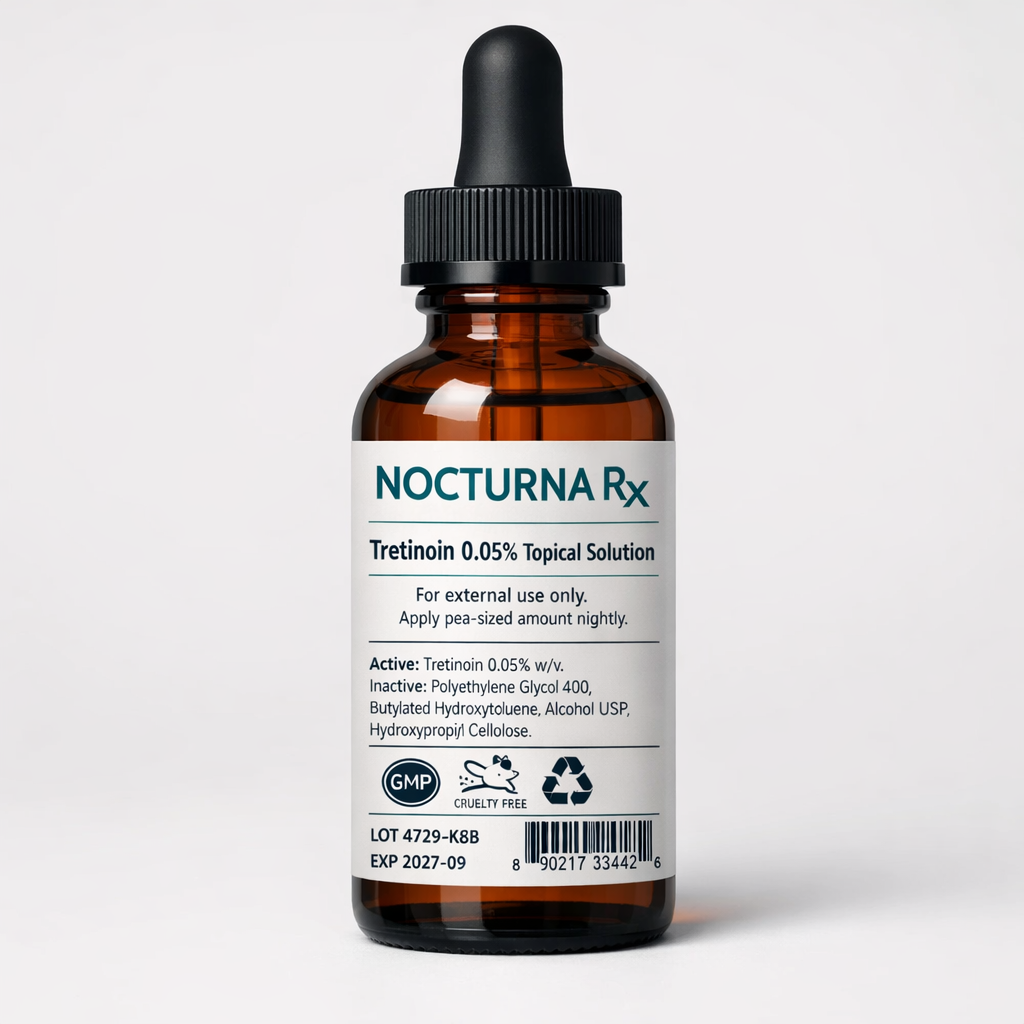
Generated using GPT Image 1.5 on fal, an AI model from OpenAI.
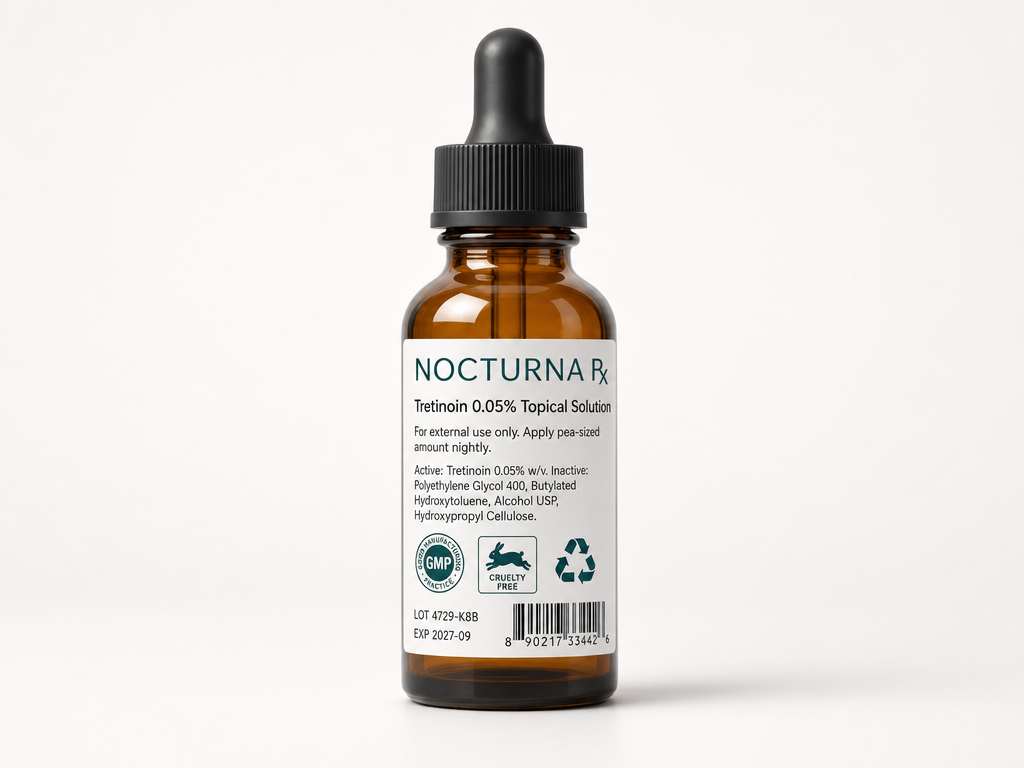
Generated using GPT Image 2 on fal, an AI model from OpenAI.
My take: I was just about to write how I prefer GPT Image 2's response with its seemingly better barcode; however, I then noticed that GPT Image 2 got the name of the product wrong (a critical mistake).
The name of the product was ''NOCTURNA Rx'' while GPT Image 2 wrote ''NOCTURNA Px'' instead.
Test 4: Architectural interior with fine technical detail and world knowledge
Prompt: "A photorealistic wide-angle interior shot of a contemporary university research library reading room at 7 AM, captured on a full-frame camera with a 24mm lens. The room is two stories tall with a coffered ceiling of dark walnut beams, between which sit recessed warm LED panels at roughly 3000K. Floor-to-ceiling oak bookshelves line both side walls, packed with hardcover books in muted greens, browns, and burgundies. Each shelf is labeled with a small brass plate visibly mounted to the shelf edge. The far wall is a single sheet of low-iron glass roughly 30 feet wide, beyond which a dense morning fog softens the silhouettes of three sycamore trees. Six rectangular oak study tables run down the center of the room with a brass desk lamp at each station, half lit and half dark. The polished concrete floor is satin grey, just reflective enough to catch a faint inverted ghost of the lamps overhead. Required details: book spines should show varied widths and color blocking rather than a uniform repeated pattern, the brass section plates should be visually present and consistent in placement across both walls, the wood grain on the tables should show natural irregular figure rather than a tiled repeat, and the fog texture outside the glass should have visible depth gradient rather than a flat wash. No people in frame."
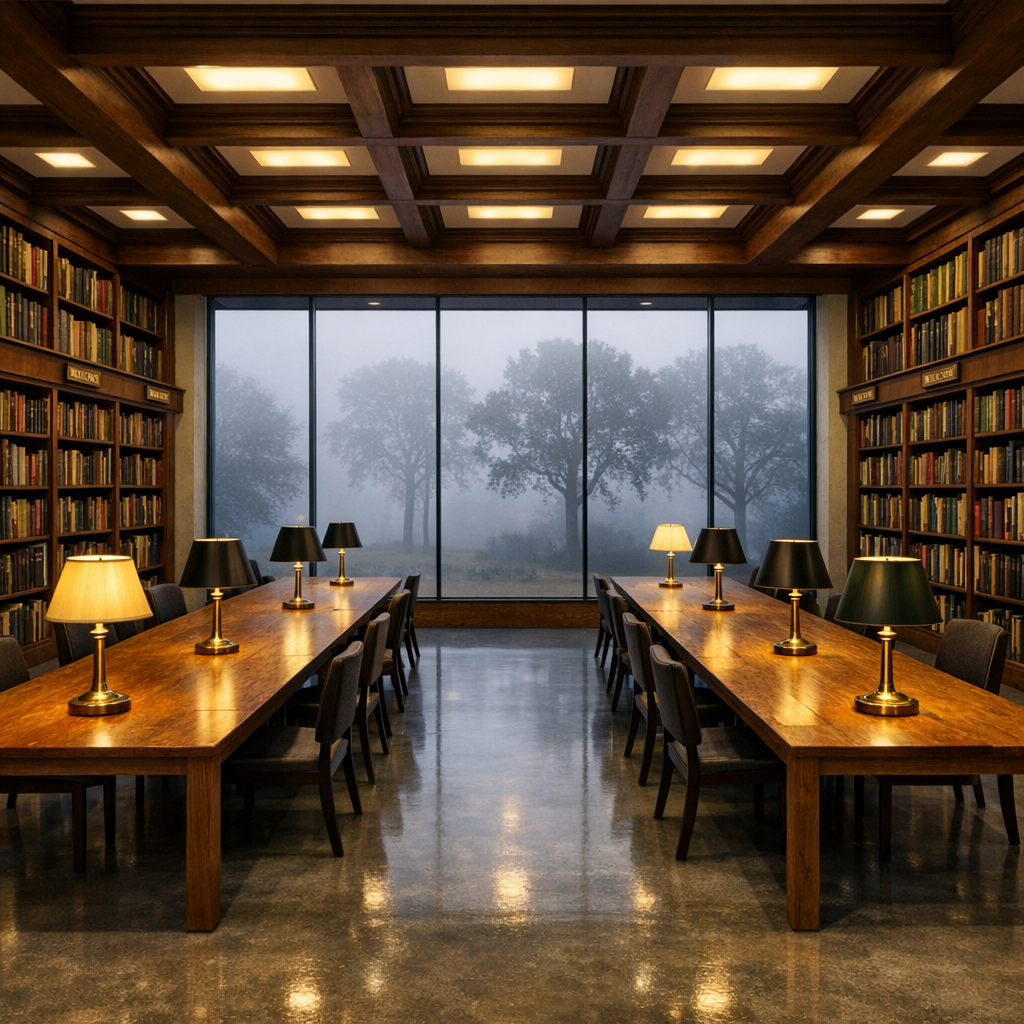
Generated using GPT Image 1.5 on fal, an AI model from OpenAI.
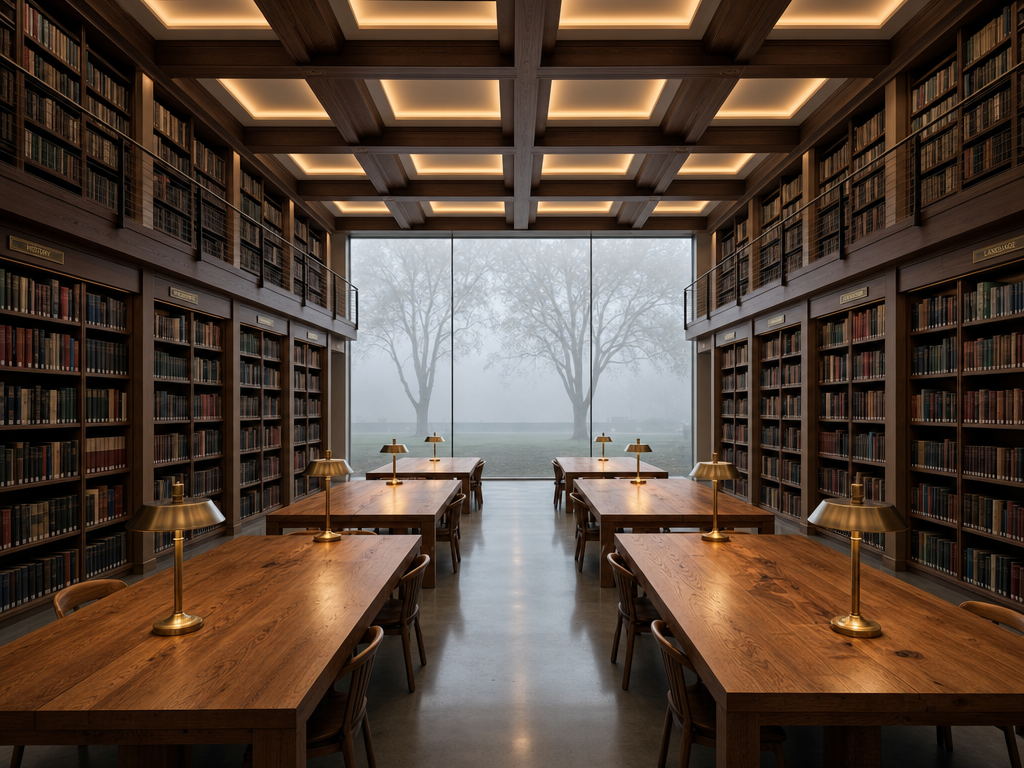
Generated using GPT Image 2 on fal, an AI model from OpenAI.
My take: GPT Image 2 wins out in both the realism and prompt adherence game with this one. GPT Image 1.5 was not able to generate me 6 tables, as I asked it to, and instead generated me 2 long ones.
However, both AI models failed the ''with a brass desk lamp at each station'' test that I put for them: both AI models put 8 lamps, instead of 6.
Nonetheless, that's a small detail that can be fixed from the edit endpoint on GPT Image 2, since I appreciate its photorealism more than GPT Image 1.5 in this example.
Learn how you can prompt GPT Image 2 the right way.
What does it cost to run GPT Image 2 vs. GPT Image 1.5 on fal?
Both endpoints bill on a per-image basis with token charges layered on top of every request. Two structural differences shape the comparison.
-
GPT Image 1.5 prices tokens per thousand.
-
GPT Image 2 prices tokens per million.
GPT Image 1.5 has three image sizes in its per-image table. GPT Image 2 has six, including 4K.
GPT Image 1.5 pricing on fal
Per-image fees by size and quality tier:
-
Low quality: $0.009 for 1024x1024 or $0.013 for any other size.
-
Medium quality: $0.034 for 1024x1024, $0.051 for 1024x1536, $0.050 for 1536x1024.
-
High quality: $0.133 for 1024x1024, $0.200 for 1024x1536, $0.199 for 1536x1024.
Token charges: $0.005 per 1,000 input text tokens, $0.008 per 1,000 input image tokens (edit endpoint only, where one 1024x1024 reference image runs roughly 135 tokens at low fidelity or 3,050 tokens at high fidelity), and $0.010 per 1,000 output text tokens.
A high-quality 1024x1024 generation runs $0.133 per image as the canonical per-image cost, with token charges billed alongside per the rates above.
GPT Image 2 pricing on fal
Per-image fees by size and quality tier on the text-to-image endpoint:
-
Low quality: $0.005 (1024x768), $0.006 (1024x1024), $0.005 (1024x1536), $0.005 (1920x1080), $0.007 (2560x1440), $0.012 (3840x2160).
-
Medium quality: $0.037 (1024x768), $0.053 (1024x1024), $0.042 (1024x1536), $0.040 (1920x1080), $0.056 (2560x1440), $0.101 (3840x2160).
-
High quality: $0.145 (1024x768), $0.211 (1024x1024), $0.165 (1024x1536), $0.158 (1920x1080), $0.222 (2560x1440), $0.401 (3840x2160).
Token charges per million: $5.00 input text, $1.25 cached input text, $10.00 output text, plus $8.00 input image, $2.00 cached input image, and $30.00 output image.
Token cost is rounded up to the closest cent on every request.
Edit requests on GPT Image 2 always process input images at high fidelity, which adds image input tokens to the bill on every reference-driven call.
A high-quality 1024x1024 generation runs $0.211 per image as the canonical per-image cost, with token charges billed alongside per the rates above.
Where the pricing diverges at production volume
The per-image gap shifts with the size you're targeting.
A team running 1,000 high-quality images per month sees three different scenarios depending on the brief.
-
At 1024x1024, GPT Image 1.5 lands near $133 for that month against GPT Image 2 near $211, with the spread of around $78 in 1.5's favor.
-
At 1024x1536, GPT Image 1.5 lands near $200 against GPT Image 2 near $165, with the spread reversing to around $35 in 2's favor.
-
At 4K (3840x2160), GPT Image 2 runs near $401 for that month. GPT Image 1.5 has no native path to that resolution, so the comparison shifts to "1.5 at 1536x1024 plus an external upscaling pass" against "2 native at 4K".
For mixed workloads where the same project targets multiple sizes, the routing math depends on which size buckets dominate the pipeline.
How do you run GPT Image 2 and GPT Image 1.5 on fal?
Both models share the same SDK on fal. The wiring is symmetric down to the pattern of installing @fal-ai/client, setting FAL_KEY in your environment, and calling fal.subscribe with the right endpoint string.
javascript
import { fal } from "@fal-ai/client";

// GPT Image 1.5 - text to image
const v15Result = await fal.subscribe("fal-ai/gpt-image-1.5", {
  input: {
    prompt:
      "A weathered brass compass on a 1920s nautical map under window light.",
    image_size: "1024x1024",
    quality: "high",
    background: "auto",
    output_format: "png",
  },
});

// GPT Image 2 - text to image
const v2Result = await fal.subscribe("openai/gpt-image-2", {
  input: {
    prompt:
      "A weathered brass compass on a 1920s nautical map under window light.",
    image_size: "landscape_4_3",
    quality: "high",
    output_format: "png",
  },
});
Each flagship has a sibling edit endpoint for image-to-image (image editing) operations.
fal-ai/gpt-image-1.5/edit accepts image_urls, an optional mask_image_url, and an input_fidelity enum (low or high) for source-preservation control. openai/gpt-image-2/edit accepts image_urls and an optional mask_image_url, and processes every input at high fidelity by default with no enum to toggle.
For prototype work, both endpoints are reachable from the fal playground without writing a line of code: GPT Image 2 text-to-image and GPT Image 1.5 text-to-image, where I generated the images earlier.
For production work, the queue API and webhook flow handle longer-running requests asynchronously.
When should you use GPT Image 2 vs. GPT Image 1.5?
Routing between the two depends on which architectural ceiling the brief actually hits:
When GPT Image 1.5 fits the brief
-
GPT Image 1.5 fits when the work sits comfortably inside its three fixed sizes, and the API surface lines up with what the deliverable needs.
-
Pipelines producing 1024x1024 images at high quality run at $0.133 per image, which is the cheapest per-image rate of the two flagships at that exact size, although GPT Image 2 is affordable at the low quality tier with good output.
-
The exposed
backgroundfield handles transparent and solid-fill backgrounds at the API level. This is also the only path of the two for transparent PNG output. -
The
input_fidelityparameter on the edit endpoint earns its place when the brief reads as "change this part, hold the rest exactly to source." High fidelity preserves composition, lighting, and detail across the unchanged regions with less drift than mask-only flows produce on heavily detailed sources, and the low setting is there when the model needs more room to redraw at a lower input-token rate.
When GPT Image 2 fits the brief
-
Native output at 1920x1080, 2560x1440, or 3840x2160 (with experimental status above 2560x1440) covers architectural visualisation, large-format print, hero web banners shot at 16:9, and any deliverable that lands on a screen larger than a phone.
-
Best-in-class text rendering across Latin languages and multilingual text rendering across Chinese, Japanese, Korean, Hindi, and Bengali.
-
Color-neutral output without 1.5's documented warm cast carries weight on product photography against Pantone references, editorial portraiture, and any deliverable that gets compared against a calibrated white point.
Routing between both
Some production pipelines end up running both endpoints rather than picking one.
The transparent PNG case alone can keep GPT Image 1.5 connected even when most of the workload moves to GPT Image 2.
Pro tip: A routing layer that sends 1024x1024 high-volume work and transparent-background assets through GPT Image 1.5, and sends multilingual text, native-4K output, neutral-color photography, and mask-based edits through GPT Image 2, takes a single conditional in the call site to set up.
Recently Added













Run GPT Image 2 and GPT Image 1.5 on fal
Two image models from the same OpenAI family, four months apart on the release calendar, with overlapping cores and distinct ceilings.
The 1.5 surface still earns a place in production pipelines for transparent PNG output, fidelity-toggled edits, and the cheapest per-image rate at 1024x1024 for high quality output.
The 2 surface earns its place for native high-resolution output, multilingual text rendering, neutral color reproduction, and high-fidelity edit defaults.
fal hosts both flagship endpoints and both edit siblings under one SDK with pay-per-use pricing and no infrastructure to manage on your side.
GPT Image 2 vs. GPT Image 1.5 FAQs
What is the main difference between GPT Image 2 and GPT Image 1.5?
GPT Image 2 is OpenAI's quality-first follow-up to GPT Image 1.5, released April 21, 2026.
The architectural shifts are native output up to 3840x2160 (experimental above 2560x1440), text rendering across both Latin and non-Latin scripts, including Chinese, Japanese, Korean, Hindi, and Bengali removal of the warm color cast that 1.5 carried, and an edit endpoint that processes every input at high fidelity by default.
GPT Image 1.5 ships with a fixed three-size enum (1024x1024, 1024x1536, 1536x1024), exposes auto, transparent, and opaque values on its background parameter (the path for transparent PNG output, which GPT Image 2 does not support), and exposes input_fidelity as a low-or-high enum on its edit endpoint.
What is the resolution range on each model?
GPT Image 1.5 outputs at one of three fixed sizes: 1024x1024, 1024x1536, or 1536x1024.
There is no custom dimension support and no native path past 1536 pixels on the long edge.
GPT Image 2 outputs across six preset sizes from 1024x768 through 3840x2160, plus custom dimensions where both edges are multiples of 16, the maximum edge stays at or under 3840px, the aspect ratio sits at or below 3:1, and total pixel count is between 655,360 and 8,294,400.
How does pricing compare between the two models?
At 1024x1024 high quality, GPT Image 1.5 runs $0.133 per image against GPT Image 2 at $0.211.
At 1024x1536 high quality, GPT Image 1.5 runs $0.200 per image against GPT Image 2 at $0.165.
At 4K (3840x2160), GPT Image 2 runs $0.401 per image at high quality, and GPT Image 1.5 has no native path to that resolution.
Token charges are billed per thousand on GPT Image 1.5 and per million on GPT Image 2.
Token cost is rounded up to the closest cent on every GPT Image 2 request, and edit requests always process input images at the high-fidelity rate.
In our GPT Image 2 guide, we go over how you can use GPT Image 2 optimally in terms of cost.
Do both models render text in non-Latin scripts?
GPT Image 1.5's release documentation covers Latin and Japanese script text rendering at high fidelity.
GPT Image 2's release notes extend coverage to dense paragraphs, small lettering, and multilingual layouts, including Chinese, Japanese, Korean, Hindi, and Bengali.
For projects that need text in non-Latin scripts inside the generated image, GPT Image 2 is the documented path of the two.
Does GPT Image 2 support transparent backgrounds?
No. GPT Image 2 does not expose a background parameter on its text-to-image endpoint and does not output transparent images. OpenAI's image generation guide confirms that requests with background: "transparent" are not supported on this model.
![Nano Banana Pro Prompting Guide & Examples [2026]](https://refinery.fal.media/url/https%3A%2F%2Fv3b.fal.media%2Ffiles%2Fb%2F0a9e92ad%2FdgU0a7pspdC0xXfh7ajVQ_nano-banana-pro-prompting-guide.jpg/tr:w-1280,q-80/dgU0a7pspdC0xXfh7ajVQ_nano-banana-pro-prompting-guide.webp)