fal is the best place to run FLUX 3, with every endpoint reachable from a single API key and billed per second of output. There are five ways in: the playground, Sandbox, API, MCP server, and CLI. FLUX 3 costs $0.17 per second at 720p and $0.29 at 1080p on four of the five core endpoints, and $0.41 and $0.53 on Extend Video.
FLUX 3 is live on fal across eleven endpoints, and there are five ways to reach them.
In this guide, I'll cover the five ways to reach FLUX 3 on fal and what each one costs you per second of output.
Prompt: A single espresso shot pulls into a warm glass cup on a brushed steel tray, the crema swirling from dark to hazelnut as the stream thins and stops. Macro 100mm on a slow lateral track, hard side light raking through the steam, the glass fogging from the base upward. The low hiss of the group head, the last drops ticking into the cup, then quiet.
Generated using FLUX 3 on fal, an AI model from Black Forest Labs.
TL;DR
fal is the best place to run FLUX 3 because every endpoint is here, from the five core ones through the draft variants to Draft Enhance, reachable with a single API key and billed per second of output with nothing to provision on your side.
There are five ways to use FLUX 3 on fal: on the playground, Sandbox, API, MCP, and CLI.
FLUX 3 is billed per second of output on fal, where it costs $0.17 at 720p and $0.29 at 1080p on four of the five core endpoints, and $0.41 and $0.53 on Extend Video.
Here's the overview of the best access methods for FLUX 3:
| Access method | Best for | What you need |
|---|---|---|
| Playground | First prompts, and copyable code for the exact request | A fal account |
| Sandbox | One prompt across several models at once | A fal account |
| API | Production integration, webhooks, batching | An API key and the client SDK |
| MCP server | Building with FLUX 3 inside your editor | An API key and an MCP-capable assistant |
| Terminal (CLI) | One-off renders with fal api, repeatable work with genmedia | An API key and a terminal |
How do you run FLUX 3 in the fal playground?
Every FLUX 3 endpoint has its own page on fal, with a form generated from that endpoint's own input schema.
You can fill it in, run it, and the page hands the same request back to you as working code.
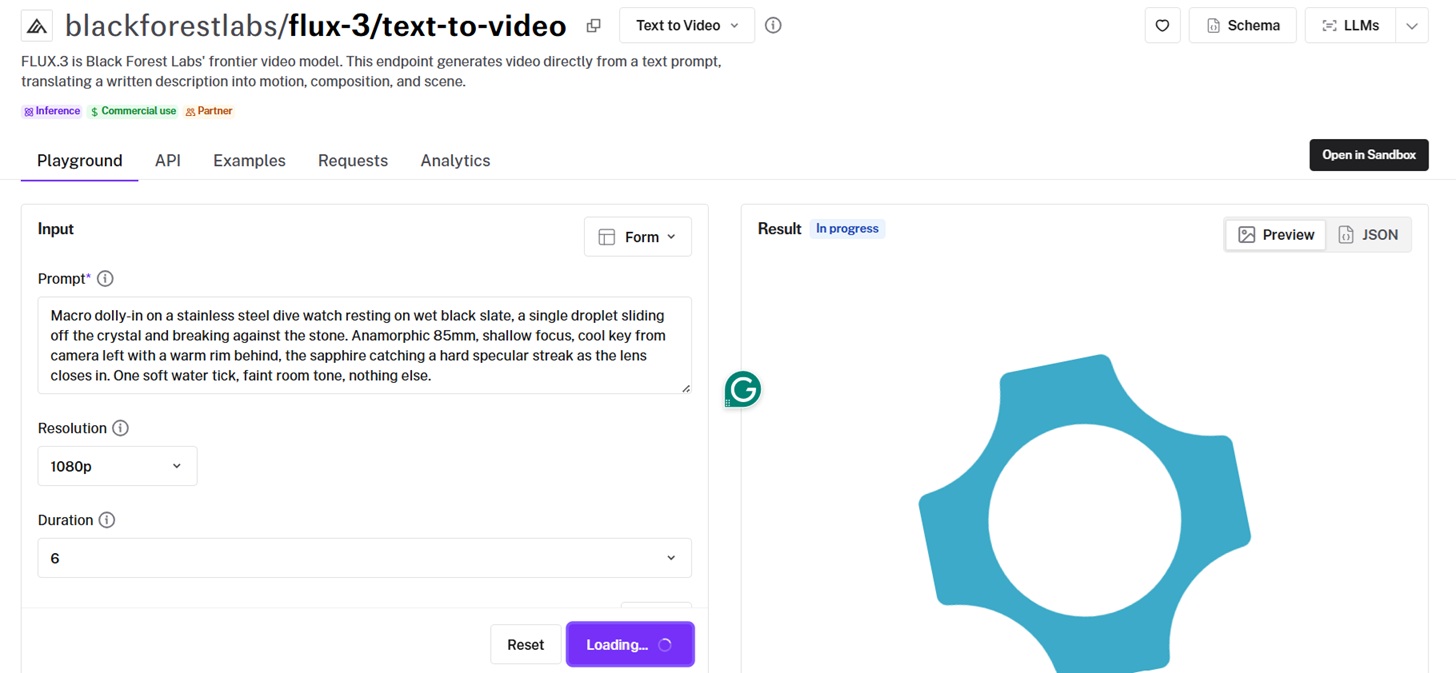
That's the shortest route there is from a prompt you like to a call you can ship:
-
Open the endpoint you want, starting with blackforestlabs/flux-3/text-to-video and following the same pattern for image-to-video, first-last-frame-to-video, keyframes-to-video, and extend-video.
-
Write your prompt in the Prompt field, which is required on all five.
-
Attach the media input that endpoint asks for: an Image URL for image-to-video, a Start and End Image URL for first and last frame, a Video URL for Extend Video.
-
Set Resolution and Duration in the main form, then open Additional Settings for Aspect Ratio, Generate Audio, and Safety Tolerance.
-
Hit Run, or press Ctrl and Enter.
Prompt: Macro dolly-in on a stainless steel dive watch resting on wet black slate, a single droplet sliding off the crystal and breaking against the stone. Anamorphic 85mm, shallow focus, cool key from camera left with a warm rim behind, the sapphire catching a hard specular streak as the lens closes in. One soft water tick, faint room tone, nothing else.
Generated using FLUX 3 on fal, an AI model from Black Forest Labs.
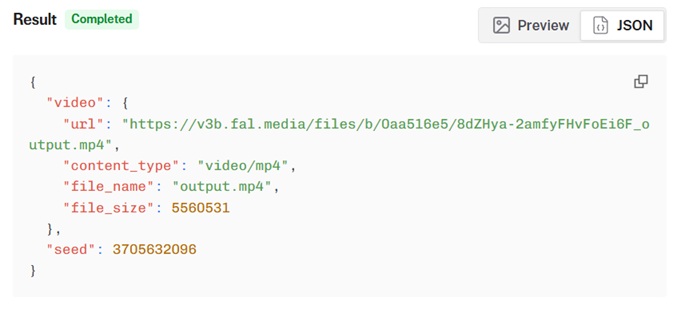
Every result comes with the request as working code in JavaScript, Python, or cURL, with your parameters already filled in.
The draft workflow
Each core endpoint has a draft twin at the same path with /draft appended, plus an eleventh endpoint, draft-enhance.
Drafts render fast at reduced quality and land in a reusable cache.
Prompt: A single wick catches on a wide stone-set candle, the flame guttering once before it settles, then a slow bead of wax swells at the rim and runs over the edge. Locked-off 65mm at eye level with the flame as the only source, the stone reading warm on one side and falling to black on the other. The wick crackling twice, room tone, nothing more.
Generated using FLUX 3 Draft on fal, an AI model from Black Forest Labs.
Once you've picked a take, Draft Enhance finishes that same render at full quality, reusing its seed and motion.
You get the clip you signed off on, not a fresh interpretation of it.
Drafts also take a batch count, so one submission can hand back several reads on the same prompt for you to choose between.
How do you run FLUX 3 in fal Sandbox?
You can open fal.ai/sandbox, choose Video from the top tabs, then Text to Video as the operation.
The way it works is that you paste your prompt, set duration (can be auto) and aspect ratio, open the model picker, and select FLUX 3.
Before you submit, the footer estimates what the run will cost.
Worth reading on a model priced per second.
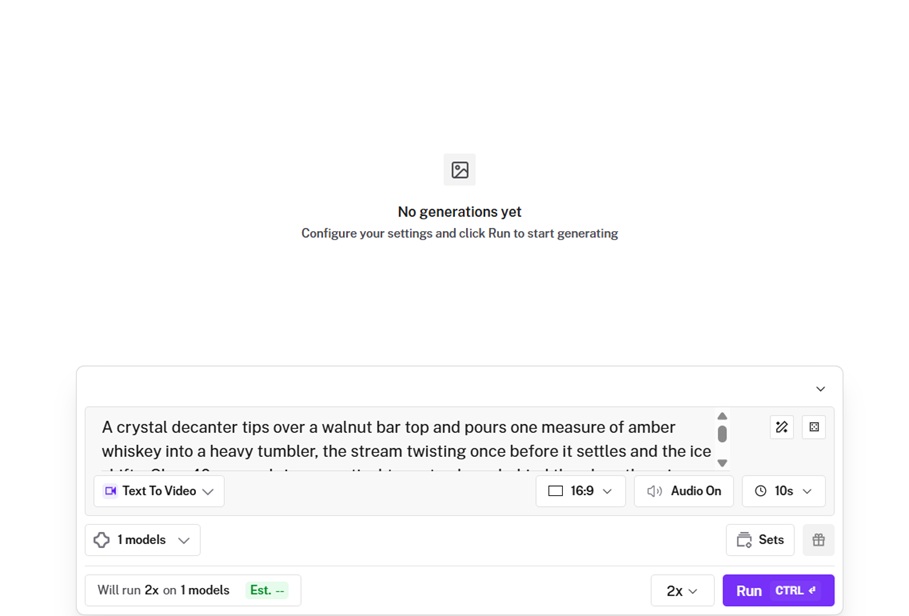
Then hit Run.
Let's try this one:
Prompt: A crystal decanter tips over a walnut bar top and pours one measure of amber whiskey into a heavy tumbler, the stream twisting once before it settles and the ice shifts. Slow 40mm push-in, a practical tungsten lamp behind the glass throwing caustics across the wood, condensation blooming up the side of the tumbler. The glug of the pour, a single crack of ice, low bar ambience underneath.
Generated using FLUX 3 on fal, an AI model from Black Forest Labs.
Here's what the UI of the Sandbox looks like:
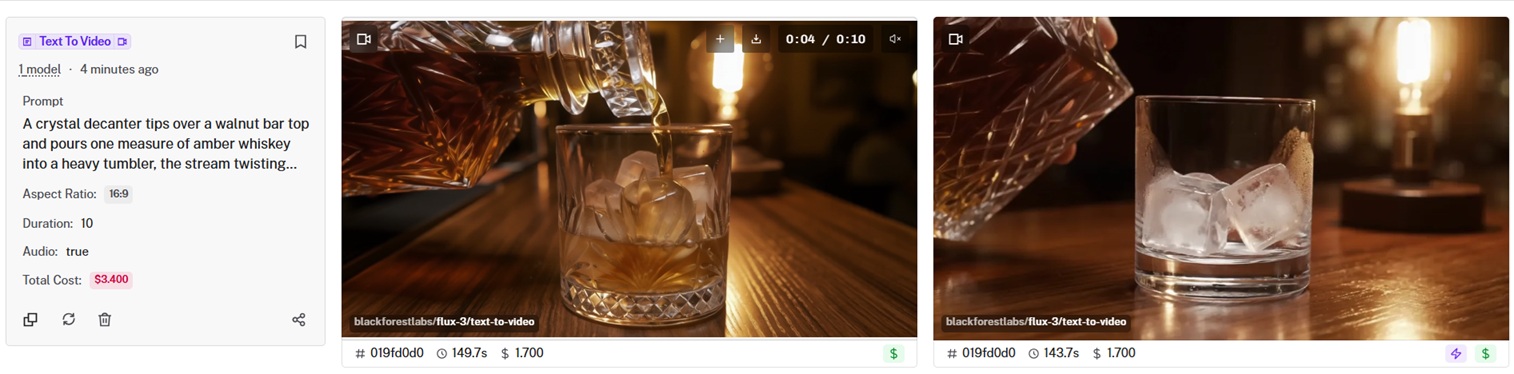
💡 With more than one model in the picker, a single submission runs the same prompt across all of them, then badges the fastest and cheapest result.
falMODEL APIs
The fastest, cheapest and most reliable way to run genAI models. 1 API, 100s of models
How do you call the FLUX 3 API on fal?
fal's API puts more than a thousand models behind one HTTP surface, and every endpoint follows the same submit-and-poll contract.
Learn the pattern once on FLUX 3, and it carries to anything else in the catalog, with a queue and webhook callbacks for renders slow enough to time out a plain request.
Here's how to set it up:
npm install --save @fal-ai/client
export FAL_KEY="YOUR_API_KEY"
And here's how the API call looks like:
import { fal } from "@fal-ai/client";

const result = await fal.subscribe("blackforestlabs/flux-3/text-to-video", {
  input: {
    prompt:
      "A red panda walks along a mossy log in a sunlit forest, one continuous unbroken shot. Ambient birdsong and rustling leaves.",
  },
  logs: true,
  onQueueUpdate: (update) => {
    if (update.status === "IN_PROGRESS") {
      update.logs.map((log) => log.message).forEach(console.log);
    }
  },
});

console.log(result.data);
console.log(result.requestId);
You can add the target aspect_ratio, resolution, duration, generate_audio, and safety tolerance as well (0 is the strictest and 4 is the most permissive).
{
  "prompt": "A red panda walks along a mossy log in a sunlit forest, one continuous unbroken shot. Ambient birdsong and rustling leaves.",
  "aspect_ratio": "16:9",
  "resolution": "1080p",
  "duration": "6",
  "generate_audio": true,
  "safety_tolerance": 2
}
Generated using FLUX 3 on fal, an AI model from Black Forest Labs.
The five core endpoints and what each one needs
All five take the same six parameters: prompt, aspect_ratio, resolution, duration, generate_audio, and safety_tolerance.
What separates them is the media input.
text-to-video needs nothing but a prompt.
image-to-video adds image_url, and the still you pass becomes the opening frame.
The schema lists PNG, JPEG, and WebP.
first-last-frame-to-video adds start_image_url and end_image_url.
Duration can't be left on auto here, because the model needs a fixed timeline to place the end frame against.
keyframes-to-video takes a keyframes array of up to 10 objects, each with an image_url and a frame_index.
Duration is explicit here too, but for a different reason: the frame indices are validated against it.
Each has to be unique and no higher than duration × 24.
The 15-second call below tops out at 360, which is why the last keyframe sits at 348.
extend-video takes video_url.
The schema caps source clips at 50 MB and 15 seconds, in MP4.
const result = await fal.subscribe("blackforestlabs/flux-3/keyframes-to-video", {
  input: {
    prompt: "One continuous crane shot rising from a leather driving glove on wet garage concrete to a matte black coupe under a single overhead work lamp, the light sweeping down the flank as the camera lifts. Dust suspended in the beam, cold key with a warm bounce off the paint. A distant roller door closing, low room hum.",
    duration: 15,
    resolution: "1080p",
    keyframes: [
      { frame_index: 0,   image_url: "https://your-cdn.example/glove-concrete.jpg" },
      { frame_index: 120, image_url: "https://your-cdn.example/wheel-arch.jpg" },
      { frame_index: 240, image_url: "https://your-cdn.example/door-line.jpg" },
      { frame_index: 348, image_url: "https://your-cdn.example/coupe-under-lamp.jpg" }
    ]
  },
});
For file inputs, you can pass a public URL, a base64 data URI, or upload through fal.storage.upload and use the returned CDN URL.
How do you give your coding assistant FLUX 3 access through fal's MCP server?
fal hosts an MCP server that exposes the platform as tools for any Model Context Protocol client.
Your coding assistant can read FLUX 3's schema, check pricing, upload inputs, and submit renders without you writing the call.
Connect it
Here's how you can connect fal to Claude Code in one command:
claude mcp add --transport http fal-ai \
  https://mcp.fal.ai/mcp \
  --header "Authorization: Bearer YOUR_FAL_KEY"
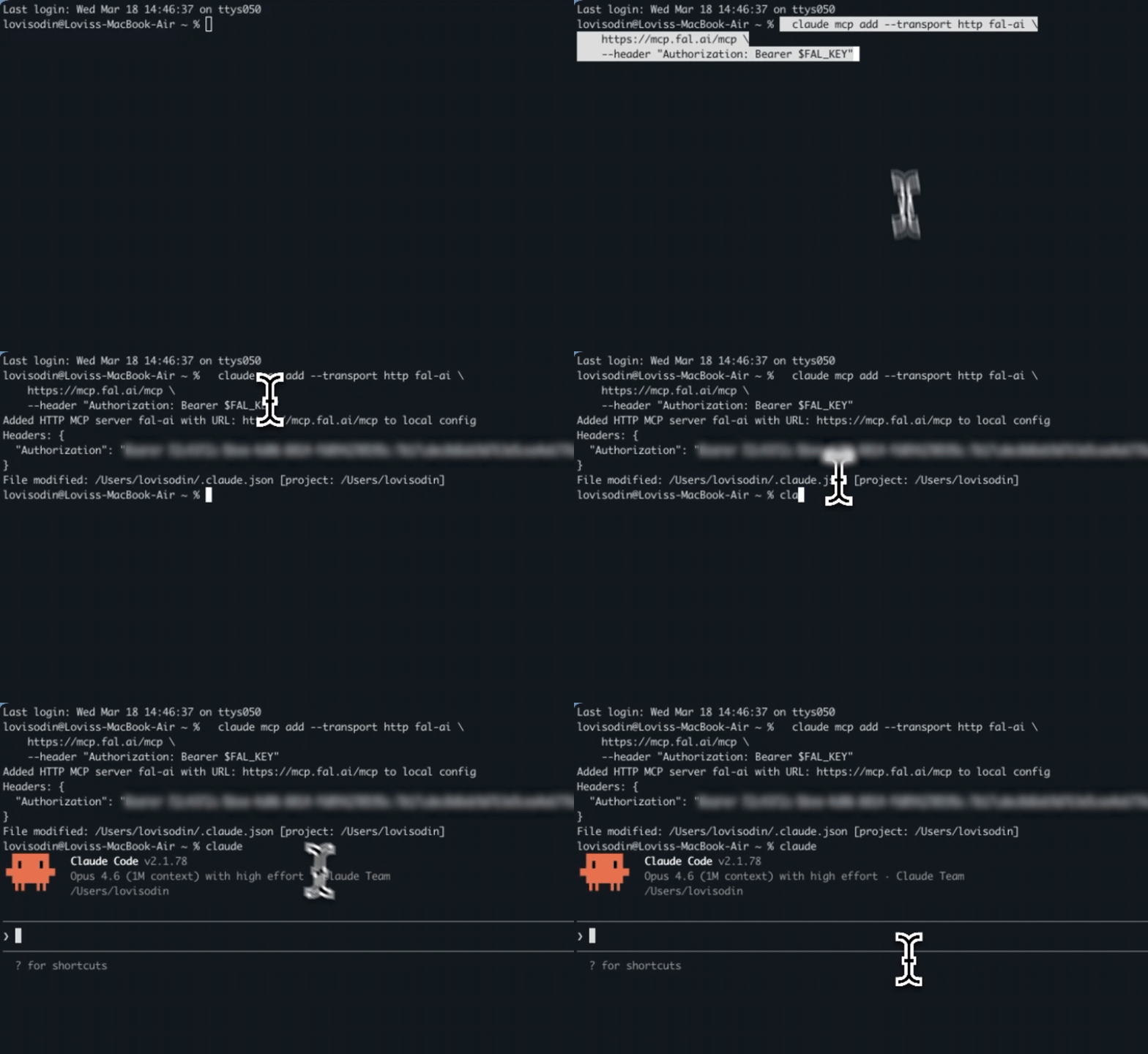
Cursor wants a block in mcp.json, which is reachable by searching the command palette for "Open MCP settings":
{
  "mcpServers": {
    "fal-ai": {
      "url": "https://mcp.fal.ai/mcp",
      "headers": {
        "Authorization": "Bearer YOUR_FAL_KEY"
      }
    }
  }
}
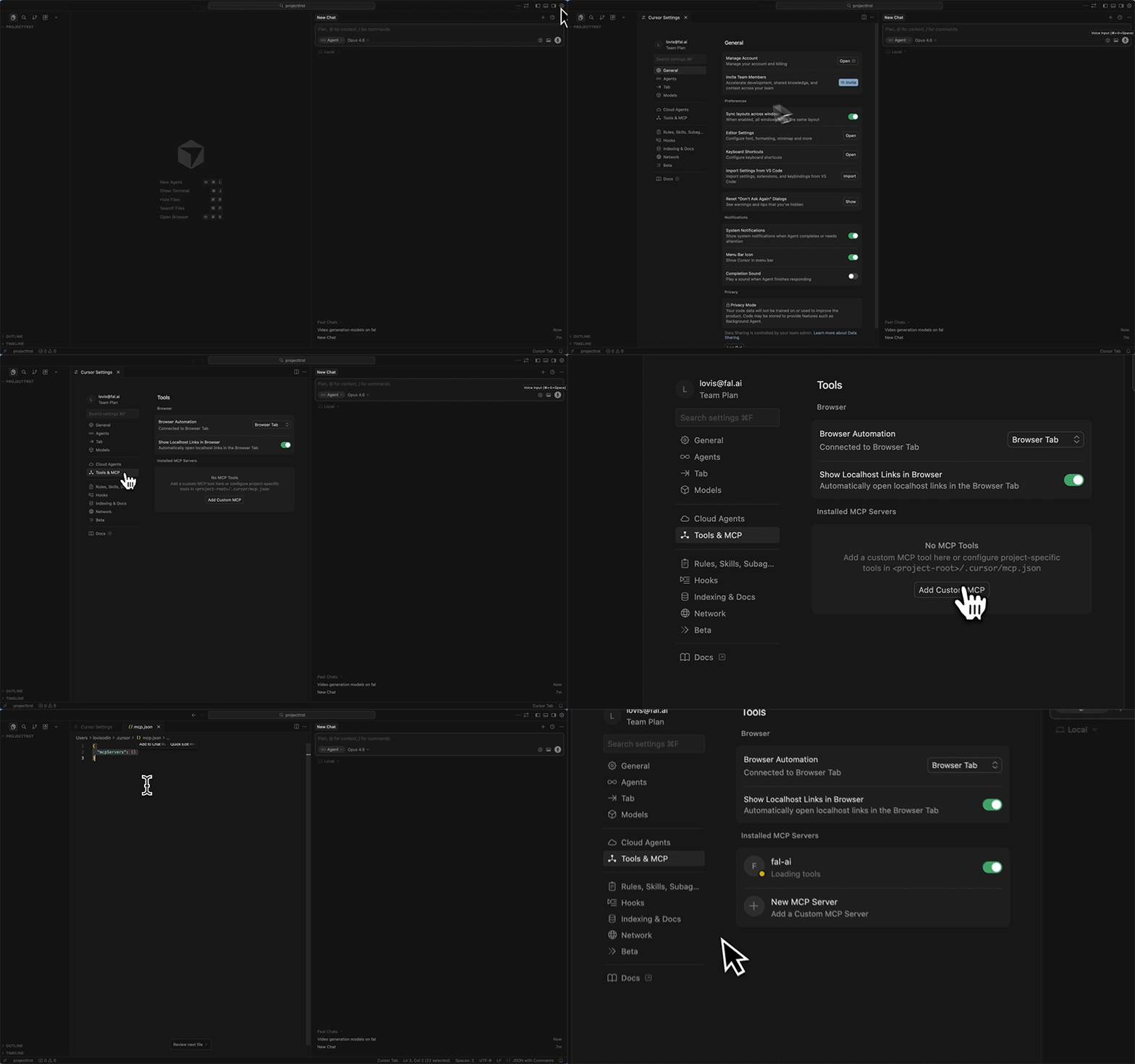
Restart Cursor afterwards.
Windsurf uses the same shape under Settings, then MCP, with serverUrl as the key name.
For example, I was able to add fal's API key to my code assistant, Claude Code's browser edition, and I can generate videos from chatting up Claude conversationally about the video I want with the resolution, aspect ratio, and duration.
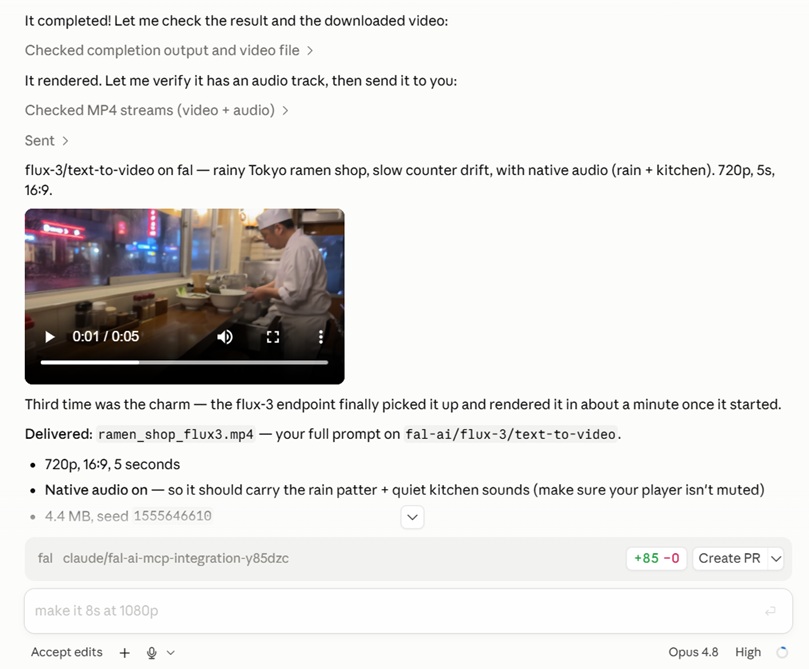
The tools that matter for FLUX 3
There are nine tools, and your assistant chooses among them without being told which.
Here are 5 of them:
get_model_schema returns the exact field names and accepted values for the FLUX 3 endpoint you're calling, so you're not guessing at input shapes or opening a browser tab.
upload_file takes a remote image or video URL and hands back a fal CDN URL, ready to drop into image_url or video_url.
submit_job returns a request ID immediately instead of holding your client open for the length of the render.
check_job polls that request ID for status, fetches the result once it's done, or cancels it.
get_pricing returns the cost of a run before you commit to it.
A useful ask looks less like "generate a video" and more like: read the schema for FLUX 3 first-and-last-frame, upload these two image URLs to the CDN.
Every FLUX 3 video endpoint takes the same core inputs: any whole number of seconds from 5 to 20 (or auto, the default on text to video, image to video, and extend video), 720p or 1080p at 24 fps, audio on by default, and safety_tolerance from 0 to 4 with 2 as the default.
Then have it poll until the render lands and hand back the URL.
The assistant chains all of that from one instruction.
Prompt: A silk scarf lifts off a marble plinth and settles over a glass perfume bottle, the fabric catching light as it falls and drawing tight across the bottle's shoulders. Locked-off 50mm, one soft key from above, the marble cool and the glass throwing a thin caustic onto it. A brief rush of fabric, then still air.
Generated using FLUX 3 on fal, an AI model from Black Forest Labs.
How do you run FLUX 3 from the terminal?
Two tools reach FLUX 3 from a shell, and they're built for different jobs.
fal API, for a one-off
The fal CLI is mostly known for deploying your own applications.
It also calls catalog models through fal api, and that's the shortest path there is from a terminal to a finished clip:
pip install fal
fal auth login
fal api blackforestlabs/flux-3/text-to-video \
  prompt="Cognac swirls once in a warmed snifter on dark wood, the light bending through the glass as it settles, a single soft clink." \
  duration:=12 \
  resolution=1080p \
  generate_audio:=true
The := is the part that bites people.
A plain = sends the value as a string; := parses it as JSON, which is how you get numbers and booleans.
So resolution=1080p stays on =, because 1080p is a string.
generate_audio:=true needs := so it arrives as a boolean instead of the word "true."
Duration goes either way depending on the value: duration:=12 for a number, duration=auto for the string.
You can reach for := on auto and the parser gets a bare word that isn't valid JSON, and the call fails before it leaves your machine.
The command submits through the queue, prints live status and logs while the render runs, then returns the result.
Nested values use bracket notation, image_size[width]:=1280.
genmedia, for scripts, CI, and agents
genmedia is a separate binary, and its output adapts to wherever it's going: something readable in a terminal, machine-parseable JSON once you pipe it or pass --json.
That, plus the session gallery and the agent skill bundle, is what makes it the better fit for anything repeated.
On Linux or macOS:
curl https://genmedia.sh/install -fsS | bash
On Linux and macOS that installs the binary into ~/.genmedia and puts genmedia on your PATH.
Windows has its own installer, covered in fal's genmedia docs.
Then export FAL_KEY, or run genmedia setup to save it encrypted locally.
Here's a full text-to-video run, start to finish:
# Check what the endpoint accepts
genmedia schema blackforestlabs/flux-3/text-to-video

# Submit without waiting
genmedia run blackforestlabs/flux-3/text-to-video \
  --prompt "A tonearm swings in over a spinning record and the needle settles into the outer groove, the stylus dipping once as it finds the track. Slow macro arc around the platter, hard raking light picking out the groove ridges and a little dust, focus falling off fast behind. A soft mechanical click, a breath of surface hiss, then steady rotation." \
  --duration 12 \
  --resolution 1080p \
  --async
# returns: { "request_id": "abc123..." }

# Collect it and write the file to disk
genmedia status blackforestlabs/flux-3/text-to-video abc123 --result --download
Generated using FLUX 3 on fal, an AI model from Black Forest Labs.
For the endpoints that take media, genmedia upload ./still.jpg puts a local file on fal's CDN and returns the URL to hand to --image_url or --video_url.
Model parameters become flags, with names matching the schema exactly.
To check whether an endpoint wants image_url or start_image_url, run genmedia run blackforestlabs/flux-3/image-to-video --help.
Use --async for the same reason you'd use the queue in code.
A failed run puts JSON on stderr and exits non-zero, so pipelines break loudly the way they should.
💡 Each session writes its outputs to a standalone HTML page under ~/.genmedia/gallery/sessions/. Open it with genmedia gallery open current.
What does FLUX 3 cost on fal?
FLUX 3 bills per second of generated video.
The rate depends on the endpoint and the resolution.
Text to video, image to video, first and last frame, and keyframes all cost $0.17 per second at 720p and $0.29 per second at 1080p.
Extend Video costs $0.41 per second at 720p and $0.53 per second at 1080p.
| Render | 720p | 1080p |
|---|---|---|
| 10 seconds, standard endpoints | $1.70 | $2.90 |
| 20 seconds, standard endpoints | $3.40 | $5.80 |
| 10 seconds, Extend Video | $4.10 | $5.30 |
Audio generation is on by default and can be switched off with generate_audio: false.
Recently Added
















Run FLUX 3 on fal
FLUX 3 is the first model in the FLUX family to output video, with sound generated in the same pass, not bolted on afterwards, and clips running to 20 seconds.
One API key covers all five access methods, billed per second of output with no GPU to provision.
You can start in the playground if you're still figuring out what to prompt, or wire up the API if you already know.
FLUX 3 access FAQ
Is FLUX 3 available through a public API?
Yes, on fal.
An account and an API key are enough to call blackforestlabs/flux-3/text-to-video the same day.
All eleven endpoints are callable through the JavaScript and Python clients, or over REST.
Which FLUX 3 endpoints can you use without writing code?
All eleven.
Every endpoint has its own playground page with a form generated from its schema, drafts and Draft Enhance included.
The Sandbox is the better choice when you want to put FLUX 3 up against another model on the same prompt.
Do you need separate keys for the MCP server and the CLI?
No, one fal API key works across every access method here.
The Run MCP server expects Authorization: Bearer YOUR_FAL_KEY.
The Platform MCP server expects Authorization: Key YOUR_FAL_KEY.
Both the CLI and the client SDKs read FAL_KEY from your environment.
Can you use FLUX 3 output commercially?
Yes.
Content generated through fal's API can be used commercially, and fal's terms of service cover the full detail on usage rights.