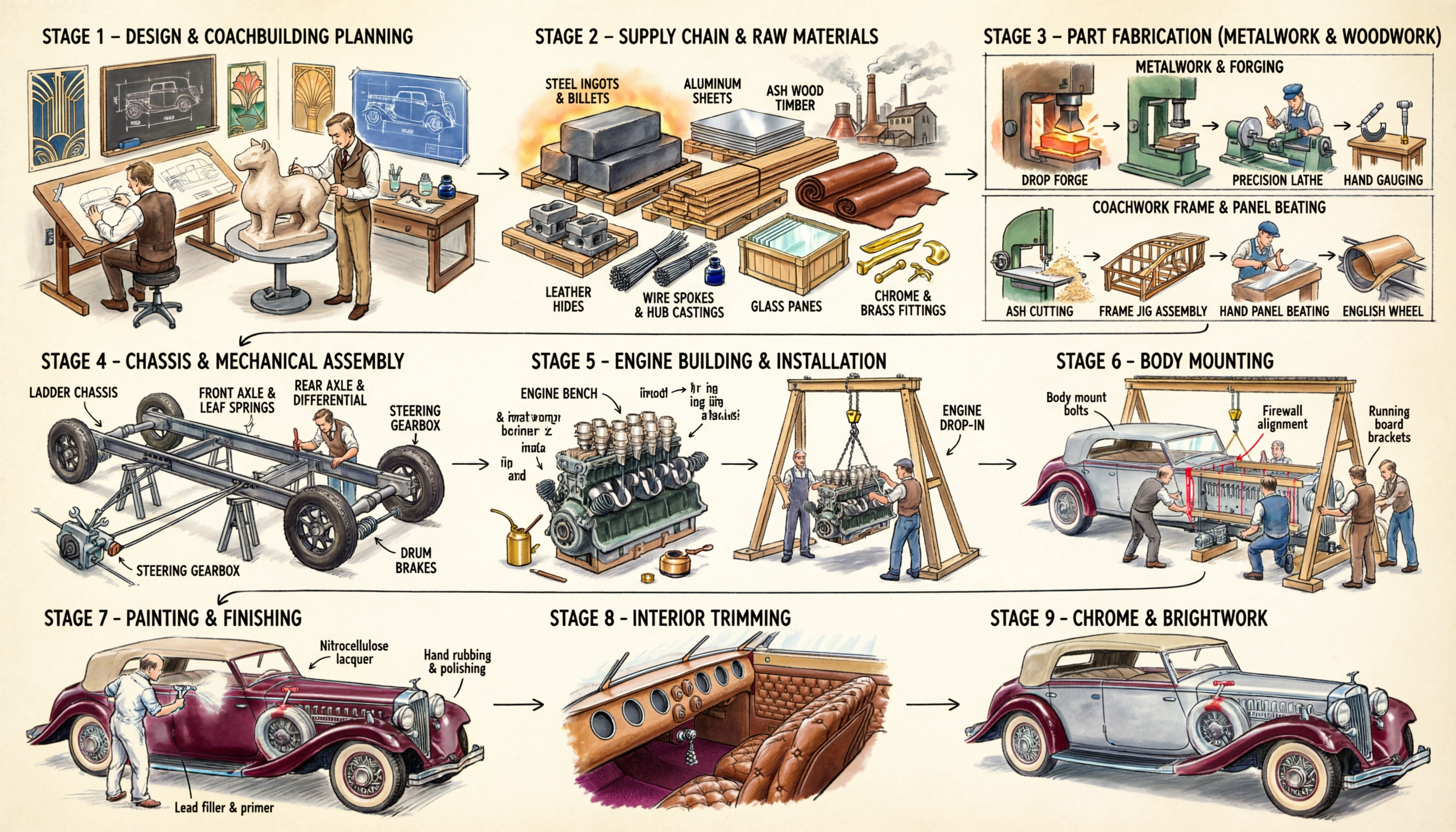
# 1930s Luxury Automobile Manufacturing – 11-Stage Infographic
## LAYOUT
- 3 rows, flowchart with arrows left→right, curving down between rows
- Row 1: Stages 1–3 | Row 2: Stages 4–6 | Row 3: Stages 7–11
- Style: hand-drawn sketch, watercolor coloring. Car color: deep burgundy/cream accents
- Car style: 1930s grand tourer (long hood, flowing fenders, wire wheels, art deco chrome)
---
## ROW 1
### STAGE 1 – DESIGN & COACHBUILDING PLANNING
- Isometric design studio with wooden drafting tables
- 3 designers in waistcoats: one drawing side-profile with French curves, one sculpting a cream clay scale model on turntable, one reviewing a full-size blueprint on wall
- Art Deco posters on walls, inkwells, callipers, blackboard with chassis dimensions
### STAGE 2 – SUPPLY CHAIN & RAW MATERIALS
- Components spread out with label lines:
- **STEEL INGOTS & BILLETS** – dark gray blocks, warm foundry glow
- **ALUMINUM SHEETS** – silver sheets on wooden pallet
- **ASH WOOD TIMBER** – honey-brown planks bundled (for body frame)
- **LEATHER HIDES** – rolled cognac-brown full-grain hides
- **WIRE SPOKES & HUB CASTINGS** – bundled steel spokes, gray castings
- **GLASS PANES** – transparent sheets in straw-packed crates
- **CHROME & BRASS FITTINGS** – shiny strips, handles, hood ornament blanks
- Background: foundry/tannery silhouettes with smoking chimneys
### STAGE 3 – PART FABRICATION (METALWORK & WOODWORK)
Two bordered sub-boxes:
**Top – "METALWORK & FORGING":**
Steel billets → **DROP FORGE** (hammer press, glowing orange part) → **PRECISION LATHE** (belt-driven, machinist in flat cap) → **HAND GAUGING** (micrometers, go/no-go gauges on wooden bench)
**Bottom – "COACHWORK FRAME & PANEL BEATING":**
**ASH CUTTING** (bandsaw, sawdust) → **FRAME JIG ASSEMBLY** (skeletal wooden body on jig, car shape visible) → **HAND PANEL BEATING** (craftsman hammering aluminum over wooden buck) → **ENGLISH WHEEL** (rolling panel for smooth curves)
---
## ROW 2
### STAGE 4 – CHASSIS & MECHANICAL ASSEMBLY
- **LADDER CHASSIS** – dark steel twin rails + cross-members on trestles, riveted. Workers fitting braces
- **FRONT AXLE & LEAF SPRINGS** – beam axle with semi-elliptic springs, worker with wrench
- **REAR AXLE & DIFFERENTIAL** – live axle with pumpkin-shaped housing
- **DRUM BRAKES** – cable-operated assemblies at each wheel position
- **STEERING GEARBOX** – worm-and-sector box, drag link to front axle
### STAGE 5 – ENGINE BUILDING & INSTALLATION
- Left: **ENGINE BENCH** – inline-8 block (dark green/gray), forged crankshaft being lowered in, pistons in a row, twin brass carburetors, magneto ignition, cylinder head being torqued. Oil cans, rags, hand tools
- Right: **ENGINE DROP-IN** – completed engine lowered by chain hoist on A-frame crane into chassis. Two workers guiding. Transmission bell housing visible
### STAGE 6 – BODY MOUNTING
- Bare aluminum body shell (silver, on wooden frame) lowered by overhead gantry onto rolling chassis
- 4–5 workers guiding body down. Red alignment lines between mount points
- Labels: "Body mount bolts", "Firewall alignment", "Running board brackets"
- Full car silhouette now recognizable: long hood, set-back cabin, swept tail
---
## ROW 3
### STAGE 7 – PAINTING & FINISHING
- Painter in white coveralls spraying with gun: gray primer on rear half, deep burgundy lacquer on front half
- Second worker wet-sanding between coats
- Labels: "Lead filler & primer", "Nitrocellulose lacquer", "Hand rubbing & polishing"
### STAGE 8 – INTERIOR TRIMMING
- Cabin cutaway showing: hand-stitched diamond-tufted cognac leather seats, burled walnut dashboard with round gauge holes and chrome bezels, leather door panels with chrome cranks, dark maroon wool carpet, cream cloth headliner
### STAGE 9 – CHROME & BRIGHTWORK
- Vignettes: chrome bumpers bolted on, art deco hood ornament (leaping figurine) on radiator cap, round chrome headlamps on fenders, tall vertical-bar radiator grille, trim strips and door handles. Worker polishing fender to mirror shine
### STAGE 10 – MECHANICAL TESTING
- Completed burgundy car with cream fenders and full chrome
- Labels: "Ignition timing & carburetor tuning" (mechanic with timing light), "Brake balance test", "Wheel alignment" (string method), "Electrical check" (lights glowing), "Fluid fill & leak check"
- Handwritten checklist on clipboard resting on fender
### STAGE 11 – ROAD TEST & DELIVERY
- Left: car in motion on country road, dust trail, driver in goggles/leather cap. Green hills in watercolor background
- Right: car at Art Deco showroom entrance. Factory director in three-piece suit, client in top hat receiving leather key fob, chauffeur in uniform by driver's door
---
## STYLE GUIDE
- **Colors:** Burgundy body (#6B1024), cream accents (#F5E6C8), dark steel chassis, silver aluminum, honey-brown ash wood, cognac leather, bright chrome highlights
- **Typography:** Bold uppercase sans-serif titles ("STAGE [#] – [NAME]"), smaller labels with thin connector lines
- **Style:** Ink outlines, watercolor flat fill, isometric/3/4 view, period-correct details (belt-driven machines, chain hoists, flat caps, Art Deco flourishes)
- **Arrows:** Thin black, left→right, curving down between rows
- **Proportions:** Landscape ~3:1, 3 equal rows, Stage 3 taller, Row 3 has 5 narrower stages