genmedia is an agent-first CLI for fal.ai: a way to search models, inspect schemas, run generations, upload inputs, check job status, and keep the resulting files and JSON close to the code or agent loop that requested them.
The tool is built for the way coding agents work. Claude Code, Codex, and similar agents need commands they can call, JSON they can parse, request IDs they can hold onto, and files they can return to the user. genmedia gives them that path for fal models.
It also saves time when you use it manually. The annoying part of media generation is often the handoff: generate an image, download it, rename it, upload it as a reference, copy the URL into a video model, poll the request, then do the same thing again for another size. genmedia keeps that loop in the terminal.
A basic run looks like this:
bash
genmedia run openai/gpt-image-2 \
  --prompt "A clean product hero image" \
  --download "./outputs/{request_id}_{index}.{ext}" \
  --json
The working loop is simple:
models -> schema -> run -> status -> download -> verify
Search the catalog. Check the schema. Run the endpoint with fields it accepts. Keep the JSON response and the files on disk.
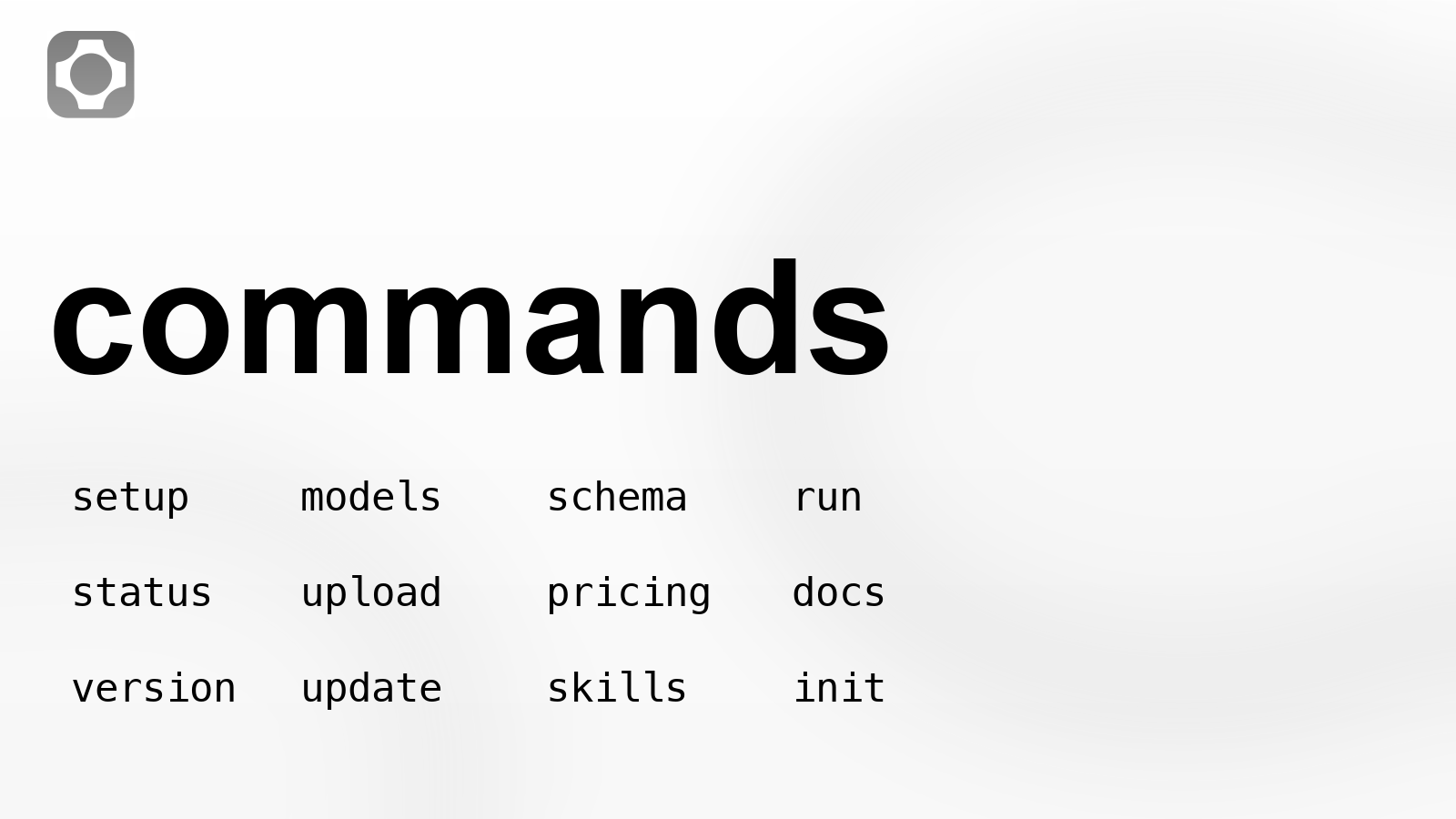
Current genmedia command surface.
Install and setup
The install URLs were checked while preparing this package.
On macOS and Linux:
bash
curl https://genmedia.sh/install -fsS | bash
genmedia setup
On Windows:
irm https://genmedia.sh/install.ps1 | iex
genmedia setup
For agents, CI, or a non-interactive machine:
bash
genmedia setup --non-interactive --api-key "$FAL_KEY"
genmedia setup --non-interactive --output-format json --no-auto-load-env --auto-update
genmedia setup configures the fal API key and local preferences. Do not hard-code keys into scripts. Use your environment or a secret manager.
Find the endpoint before writing the command
fal models are addressed by endpoint ID. genmedia keeps that explicit.
bash
genmedia models "gpt-image-2" --limit 10 --json
genmedia models "seedance 2.0" --limit 20 --json
genmedia models "text to speech" --category text-to-speech --limit 5 --json
genmedia models "music audio" --json
The current catalog check found these endpoints for the examples in this post:
| Work | Endpoint |
|---|---|
| Text image generation | openai/gpt-image-2 |
| Image editing | openai/gpt-image-2/edit |
| Text to video | bytedance/seedance-2.0/text-to-video |
| Image to video | bytedance/seedance-2.0/image-to-video |
| Reference to video | bytedance/seedance-2.0/reference-to-video |
| Faster image to video | bytedance/seedance-2.0/fast/image-to-video |
| Faster reference to video | bytedance/seedance-2.0/fast/reference-to-video |
This matters for agents. The agent should not guess which model page or API route to use. It should search, choose the endpoint, then inspect that endpoint before it runs anything.
Check the schema before using flags
Different endpoints accept different fields. Do not copy flags from one video model into another.
bash
genmedia schema openai/gpt-image-2 --json
genmedia run openai/gpt-image-2 --help
For openai/gpt-image-2, live run help shows these inputs:
| Field or option | Notes |
|---|---|
prompt | Required |
image_size | Default landscape_4_3; explicit width and height are also supported |
num_images | Default 1 |
output_format | jpeg, png, or webp; default png |
quality | auto, low, medium, or high; default high |
sync_mode | Boolean |
--async | Submit to queue instead of waiting |
--download | Run option; supports {index}, {name}, {ext}, and {request_id} placeholders |
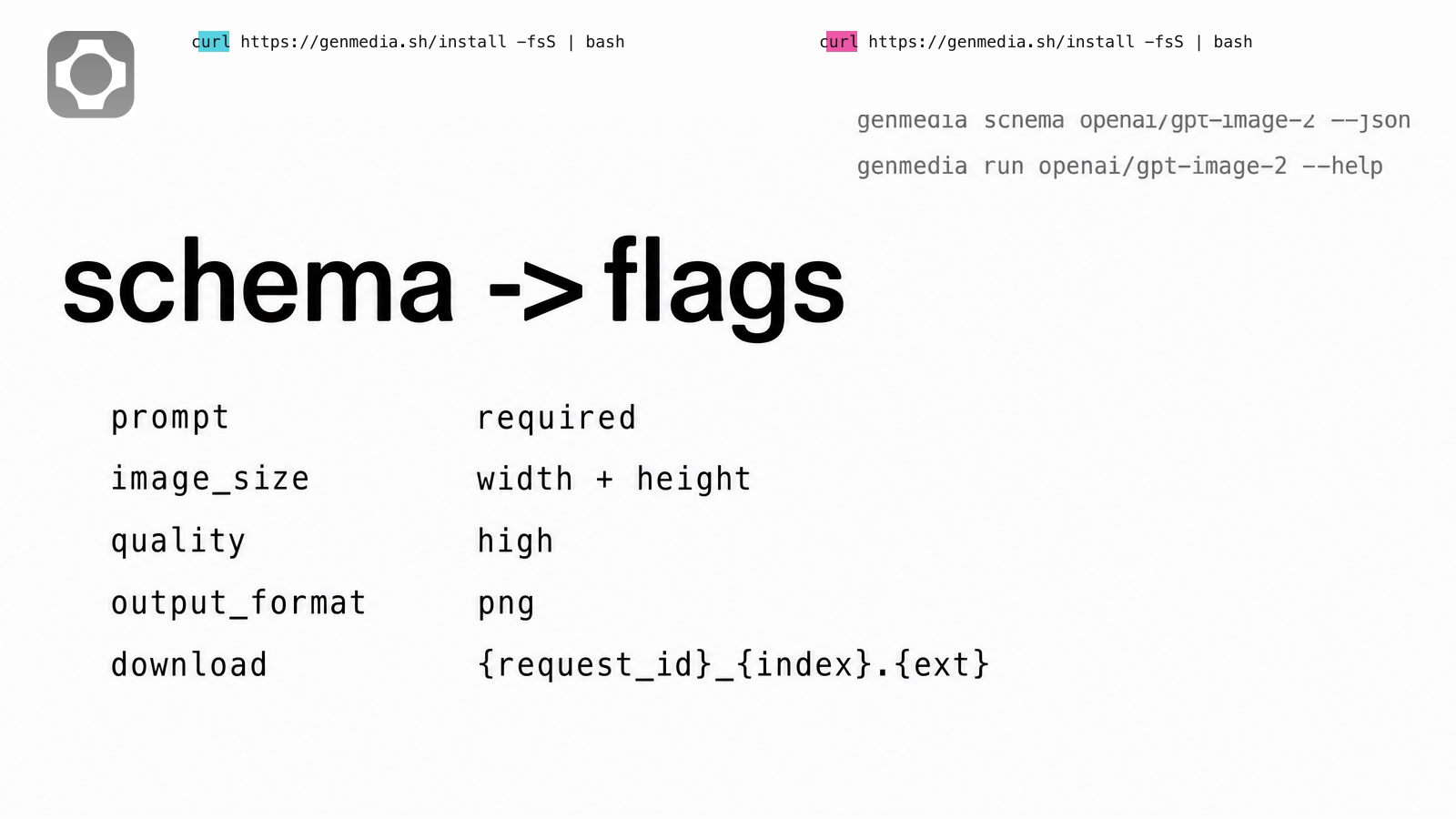
Schema fields mapped to command flags.
That is the reason genmedia is useful inside agents. The agent can inspect the endpoint and build a command from the actual fields instead of inventing arguments.
falMODEL APIs
The fastest, cheapest and most reliable way to run genAI models. 1 API, 100s of models
Generate an image and keep the receipt
Use GPT Image 2 when the output itself needs readable text, a poster, a labeled graphic, or a clean still that may become a video reference later.
bash
mkdir -p ./outputs/images ./outputs/logs

genmedia run openai/gpt-image-2 \
  --prompt "A clean ecommerce hero image for a black running shoe, no logo, no readable text" \
  --quality high \
  --image_size '{"width":1600,"height":1200}' \
  --num_images 1 \
  --output_format png \
  --download "./outputs/images/{request_id}_{index}.{ext}" \
  --json > ./outputs/logs/shoe-still.json
Now the next step can read the file or the result URL from the JSON:
bash
IMAGE_PATH=$(jq -r '.downloaded_files[0].path' ./outputs/logs/shoe-still.json)
IMAGE_URL=$(jq -r '.downloaded_files[0].url' ./outputs/logs/shoe-still.json)
If the output is for an article or launch page, review the image before using it. Do not let a model invent logos, wordmarks, command text, or endpoint names. For this article, the visuals were generated with GPT Image 2, then the fal mark and command text were locked from official assets and verified CLI evidence.
Upload local references
upload accepts a local file path or a remote URL and returns a CDN URL.
bash
genmedia upload "$IMAGE_PATH" --jsonUse this when the next model needs a public image URL. It is cleaner than manual upload, and it gives an agent a structured value to pass into the next command.
Run video jobs asynchronously
Video jobs take longer than image jobs. Use --async, store the request_id, then poll with status.
bash
genmedia run bytedance/seedance-2.0/image-to-video \
  --image_url "$IMAGE_URL" \
  --prompt "Subtle product motion on a clean studio table. No text, no logo, no labels." \
  --duration 4 \
  --resolution 720p \
  --aspect_ratio 16:9 \
  --generate_audio false \
  --async \
  --json > ./outputs/logs/shoe-video-submit.json
Then poll and download:
bash
REQUEST_ID=$(jq -r '.request_id' ./outputs/logs/shoe-video-submit.json)

genmedia status bytedance/seedance-2.0/image-to-video "$REQUEST_ID" --json

genmedia status bytedance/seedance-2.0/image-to-video "$REQUEST_ID" \
  --download "./outputs/videos/{request_id}_{index}.{ext}" \
  --json > ./outputs/logs/shoe-video-result.json
status uses the endpoint ID and the request ID. --download writes the returned media to disk and adds downloaded_files to the JSON.
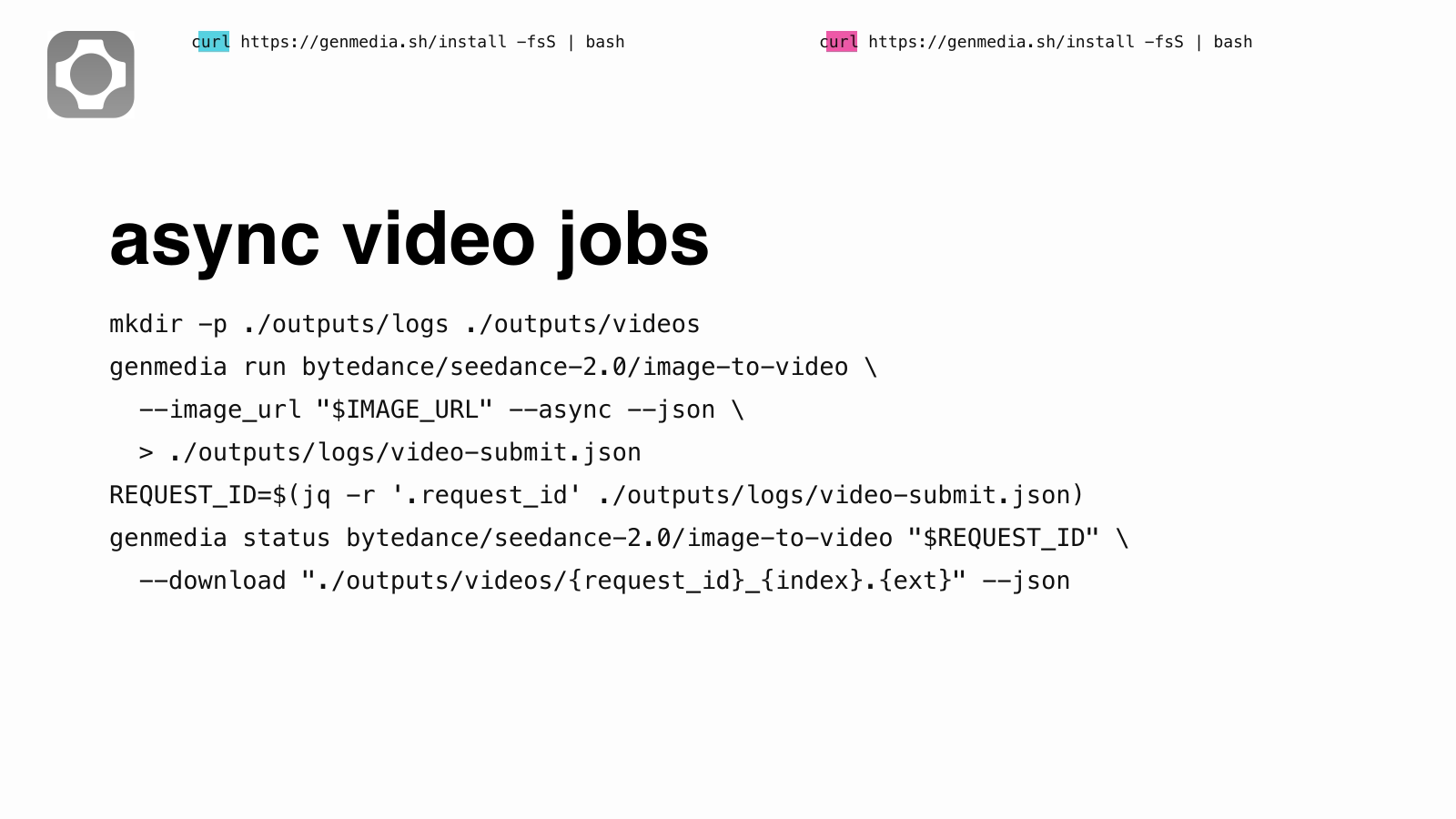
Async request ID and download flow.
Use reference to video when there is more than one input
bytedance/seedance-2.0/reference-to-video accepts reference images, videos, and audio files. The live help shows image_urls, video_urls, audio_urls, duration, aspect_ratio, resolution, and generate_audio.
bash
genmedia run bytedance/seedance-2.0/reference-to-video \
  --prompt "Use @Image1 as the product still and @Image2 as the final framing reference. Keep the motion clean and do not add text." \
  --image_urls '["https://example.com/start.png","https://example.com/end.png"]' \
  --audio_urls '[]' \
  --duration 6 \
  --resolution 720p \
  --aspect_ratio 16:9 \
  --generate_audio false \
  --async \
  --json
The important detail is the JSON array string. For array fields like image_urls, pass a JSON array, not a bare URL.
Short case examples
These are the kinds of small production loops where the CLI starts to pay off.
- Product still to short motion clip. Generate a clean still with
openai/gpt-image-2, keep the JSON, readdownloaded_files[0].url, then pass that URL intobytedance/seedance-2.0/image-to-videowith--async. The final folder has the source image, submit log, request ID, and MP4. - Launch page graphics. Use
openai/gpt-image-2/editwith a style reference and a simple layout reference, then source-lock logos and command text before publishing. This is the path used for the visuals in this article. - Model check before a campaign. Search Seedance base and fast endpoints, run the same prompt across both with
--async, download each result, and compare the files withffprobeplus a contact sheet. The prompt matters less than the record: every output keeps its endpoint ID and request ID.
Check pricing and docs from the same shell
Before putting a model inside a batch job, check pricing.
bash
genmedia pricing openai/gpt-image-2 --json
genmedia pricing bytedance/seedance-2.0/reference-to-video --json
You can also search fal docs without leaving the terminal:
bash
genmedia docs "image to video first frame" --json
genmedia docs "gpt image 2 image_size" --json
Do not cite a docs URL unless it resolves. The commands above search the docs; they are not a substitute for checking a final link before publishing it.
Built for agents, useful by hand
The same path works for a person in a terminal and for an agent inside a coding tool.
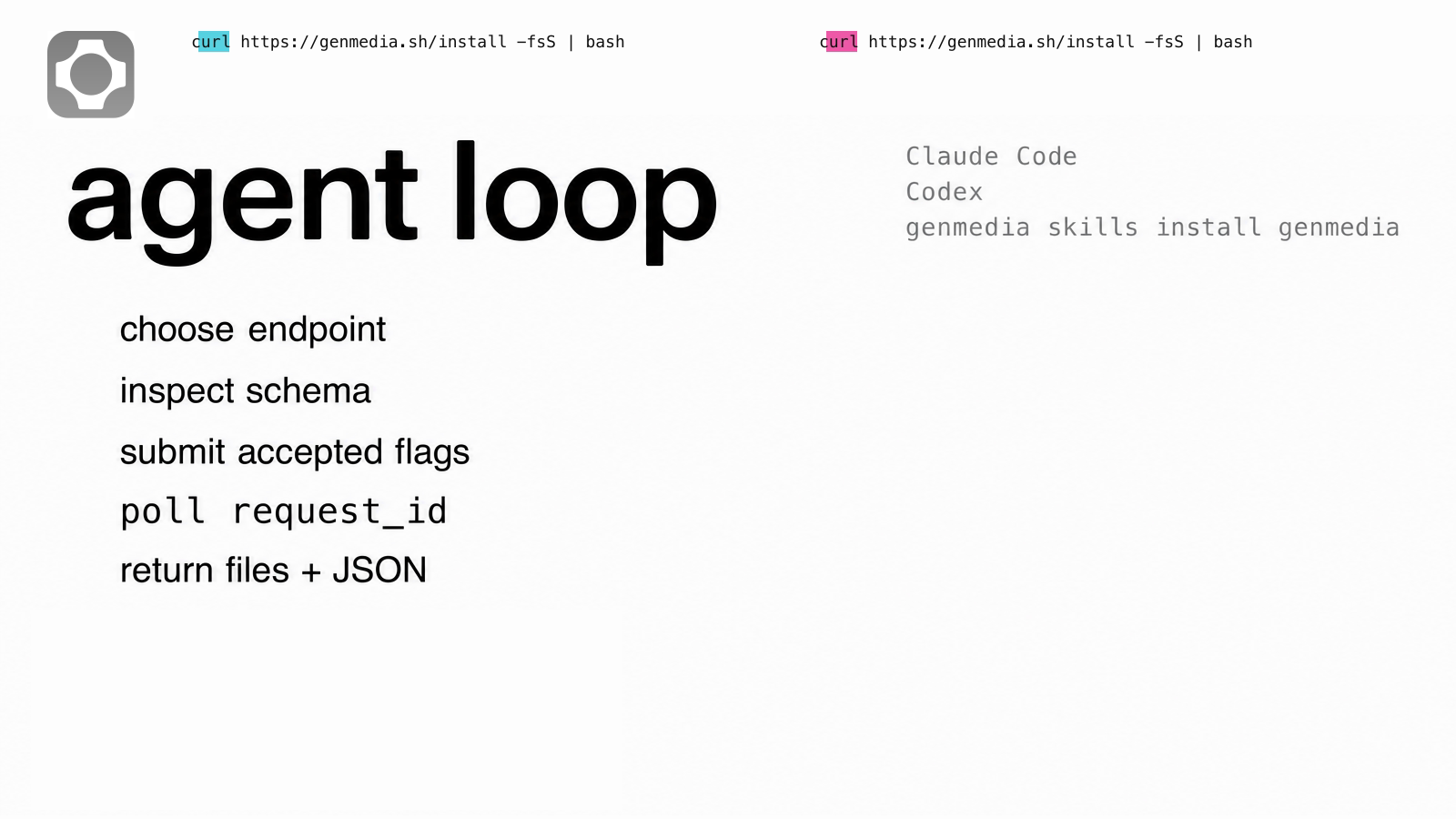
Agent loop for Claude Code, Codex, and genmedia.
For manual use, genmedia removes repeated browser work. You can keep one folder with images, videos, audio, and logs:
outputs/
  images/
  videos/
  audio/
  logs/
For agents, the win is stricter. The agent can choose a model, inspect the schema, run the job, wait for the request, and return the finished local files. That is why the CLI is agent-first rather than only a human convenience wrapper.
The agent skill bundle is part of that design:
bash
genmedia init
genmedia skills list
genmedia skills install genmedia
Those skills are plain instructions for agents: search models first, inspect schemas, use async for slow jobs, download outputs directly, and keep metadata.
When to use it
Use genmedia when the work will repeat:
- A CSV of prompts that should produce files on disk
- One asset rendered across
16:9,1:1, and9:16 - GPT Image 2 stills sent into Seedance clips
- Seedance base and fast endpoints tested with the same prompt
- Generated audio or speech saved next to video outputs
- An agent that needs to hand back a finished folder, not a browser tab
If you are exploring one image by eye, the website may be faster. If you need endpoint IDs, request IDs, JSON, and downloaded files, use the CLI.
Recently Added
















Quick reference
bash
# install
curl https://genmedia.sh/install -fsS | bash

# configure
genmedia setup

# non-interactive setup for agents or CI
genmedia setup --non-interactive --api-key "$FAL_KEY"

# search models
genmedia models "image to video" --json

# inspect inputs
genmedia schema openai/gpt-image-2 --json
genmedia run openai/gpt-image-2 --help

# run and download
genmedia run openai/gpt-image-2 \
  --prompt "A clean product hero image" \
  --download "./outputs/{request_id}_{index}.{ext}" \
  --json

# submit async video
genmedia run bytedance/seedance-2.0/image-to-video \
  --image_url "$IMAGE_URL" \
  --prompt "Subtle product motion" \
  --duration 4 \
  --resolution 720p \
  --aspect_ratio 16:9 \
  --generate_audio false \
  --async \
  --json

# poll and download
genmedia status bytedance/seedance-2.0/image-to-video "$REQUEST_ID" --json
genmedia status bytedance/seedance-2.0/image-to-video "$REQUEST_ID" \
  --download "./outputs/{request_id}_{index}.{ext}" \
  --json

# upload a local reference
genmedia upload ./input.png --json

# pricing and docs
genmedia pricing openai/gpt-image-2 --json
genmedia docs "image to video first frame" --json