fal-ai/kling-video/v3/4k/image-to-video
Input
Hint: Drag and drop image files from your computer, images from web pages, paste from clipboard (Ctrl/Cmd+V), or provide a URL. Accepted file types: jpg, jpeg, png, webp, gif, avif
Hint: Drag and drop image files from your computer, images from web pages, paste from clipboard (Ctrl/Cmd+V), or provide a URL. Accepted file types: jpg, jpeg, png, webp, gif, avif
Hint: Drag and drop image files from your computer, images from web pages, paste from clipboard (Ctrl/Cmd+V), or provide a URL. Accepted file types: jpg, jpeg, png, webp, gif, avif

Hint: Drag and drop files from your computer, images from web pages, paste from clipboard (Ctrl/Cmd+V), or provide a URL.

Hint: Drag and drop video files from your computer, video from web pages, paste from clipboard (Ctrl/Cmd+V), or provide a URL. Accepted file types: mp4, mov, webm, m4v, gif
Hint: Drag and drop image files from your computer, images from web pages, paste from clipboard (Ctrl/Cmd+V), or provide a URL. Accepted file types: jpg, jpeg, png, webp, gif, avif
Hint: Drag and drop files from your computer, images from web pages, paste from clipboard (Ctrl/Cmd+V), or provide a URL.
Hint: Drag and drop video files from your computer, video from web pages, paste from clipboard (Ctrl/Cmd+V), or provide a URL. Accepted file types: mp4, mov, webm, m4v, gif
Customize your input with more control.
Result
What would you like to do next?
For every second of video you generated, you will be charged $0.42 regardless of whether audio is on or off. For example, a 5s video will cost $2.10.
Logs
Run Kling Video V3 4K Image To Video API on fal
Kling's Native 4K is the world's first AI video model with native 4K output — cinema-grade visuals generated in a single step, with no post-production upscaling or third-party tools required. The image-to-video endpoint animates a starting frame (and optionally an ending frame) into a production-ready 4K clip. Built for: Bringing stills to life in 4K — product photography, portrait animation, concept-art motion, storyboard previsualization, and reference-driven shots with specific characters or objects.
Pricing
Kling V3.0 in 4K mode is billed per second of generated video.
| Configuration | Price per second |
|---|---|
| 4K mode, without native audio generation | $0.42 |
| 4K mode, with native audio generation (without voice control) | $0.42 |
A 5-second clip at 4K therefore costs $2.10; a 10-second clip costs $4.20.
Features
Kling V3 4K Image-to-Video turns a static image into cinema-grade 4K motion in a single pass. It preserves the input image's subject identity, lighting, and color treatment while adding natural, physically plausible movement. You can anchor both the first and last frame of the clip with `start_image_url` and `end_image_url`, reference specific characters or objects across shots via the `elements` system (addressed in prompts as `@Element1`, `@Element2`, etc.), and sequence distinct shots through `multi_prompt`. Native audio in Chinese and English is generated alongside the video (other languages are translated to English), durations run from 3 to 15 seconds, and reference consistency is maintained throughout 4K generation. If you want to learn more visit our kling v3 image-to-video page.
Default prompt template
Scene: [environment continuation from the input image, time of day, ambient context]
Subject motion: [how the subject moves — breathing, turning, expression changes, gestures]
Camera: [static / slow push / pull / pan / dolly / handheld feel]
Important details: [lens, lighting continuity with the source image, color grade, atmosphere]
Elements:
[@Element1, @Element2 — characters or objects referenced from the `elements` input]
Audio:
[dialogue, ambient sound, music cues — if `generate_audio` is enabled]
Constraints: [preserve subject identity / preserve background / no watermark / no logos]
Technical Specifications
| Spec | Details |
|---|---|
| Architecture | Kling Video V3 (Native 4K) |
| Input Formats | Start image URL (required), optional end image URL, text prompt or multi-shot prompt list, optional reference elements (images or videos) |
| Output Format | MP4 video via URL |
| Resolution | Native 4K, no post-processing upscale |
| Duration Range | 3 to 15 seconds |
| Aspect Ratio | Inherited from the input image |
| Audio | Native audio generation (Chinese / English) |
| License | Commercial use via fal Partner agreement |
What's New in Kling V3 4K Image-to-Video
Industry-First Native 4K from a Still
One-click animation at commercial 4K resolution directly from the source image. No upscaling pass, no chained models, no third-party tools.
Cinema-Grade Clarity
Ultra-clear visuals that faithfully capture every intricate detail from the input image. Sharpness, atmosphere, and lighting carry over at a level suitable for large-screen display and professional production workflows.
Greater Refinement
Richer color gradations and smoother transitions extend the source image's grade naturally into motion, preserving dimensionality and avoiding banding in subtle lighting areas.
More Realistic Motion
Faithful skin textures, natural facial expressions, and convincing material response (fabric, hair, metal, liquid) when animating portraits and close-ups.
Stable Reference Consistency
During 4K generation the model preserves the input image's element features, stylistic expression, color, lighting, and overall mood — crucial when the still establishes a specific look that the clip must inherit.
Start + End Frame Control
Anchor both ends of the clip with `start_image_url` and `end_image_url` to drive a specific transition between two states rather than free-form motion.
Character and Object Elements
Pass reusable `elements` — image sets (frontal + reference images) or entire reference videos — and address them in the prompt as `@Element1`, `@Element2`, and so on. Useful for keeping a specific character, prop, or wardrobe piece consistent across the generated shot.
Native Audio Generation
Audio is produced alongside the video in the same request. Supports Chinese and English speech with correct pronunciation; other languages are translated to English automatically. Use lowercase for conversational English and uppercase for acronyms and proper nouns.
Multi-Shot Composition
Pass a list of prompts via `multi_prompt` to build a sequenced clip with distinct shots and per-shot durations, with `shot_type` controlling whether cuts are user-defined or model-planned.
Quick Start
Install the client
bashnpm install --save @fal-ai/client
Set your API key
bashexport FAL_KEY="YOUR_API_KEY"
Image to video
javascriptimport { fal } from "@fal-ai/client";

const result = await fal.subscribe("fal-ai/kling-video/v3/4k/image-to-video", {
  input: {
    start_image_url: "...",
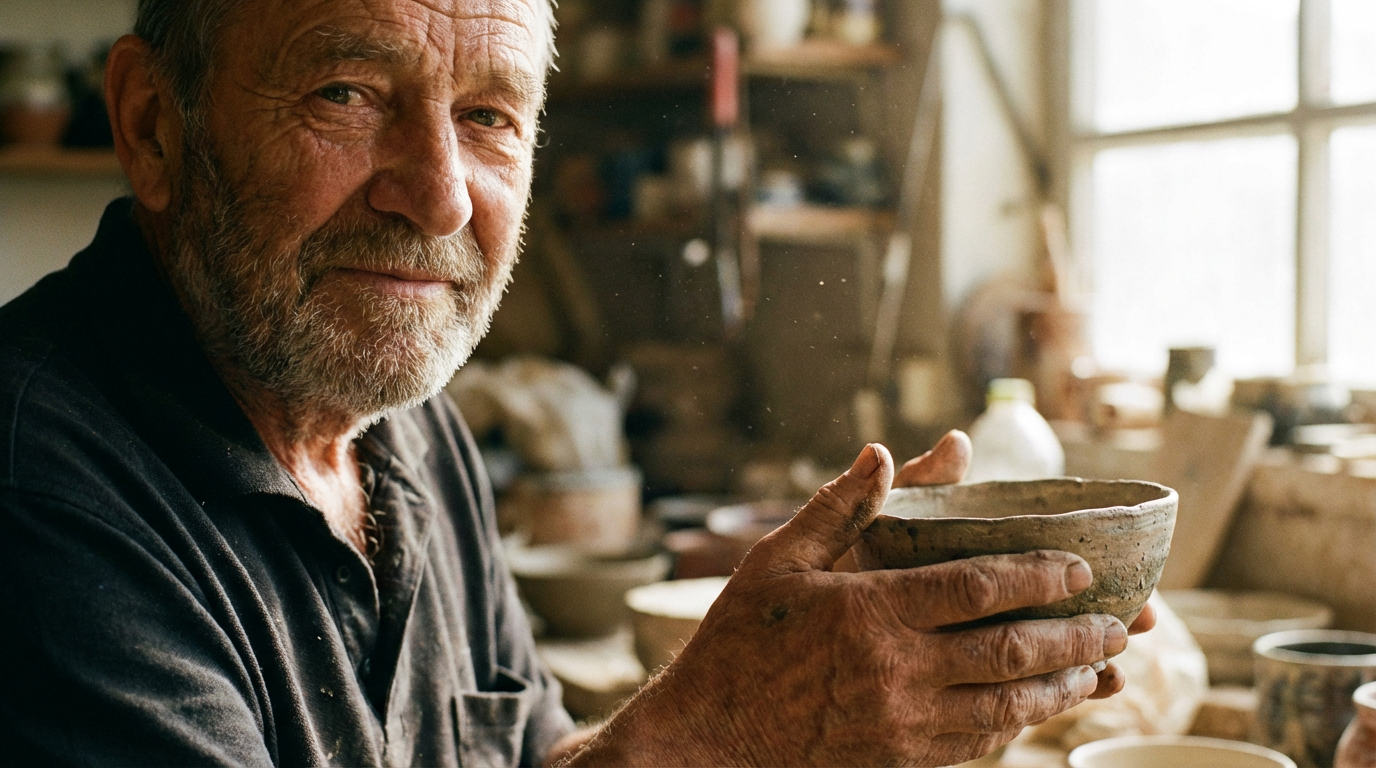
    prompt: "The craftsman slowly examines the bowl, turning it gently in his weathered hands. Subtle smile forms on his face. Dust particles drift in warm light. Breathing motion, blinking eyes.",
    duration: "5",
    generate_audio: true,
  },
  logs: true,
  onQueueUpdate: (update) => {
    if (update.status === "IN_PROGRESS") {
      update.logs.map((log) => log.message).forEach(console.log);
    }
  },
});

console.log(result.data.video.url);
Start-to-end frame control
javascriptconst result = await fal.subscribe("fal-ai/kling-video/v3/4k/image-to-video", {
  input: {
    start_image_url: "...",
    end_image_url: "...",
    prompt: "Smooth transformation between the two states, steady camera.",
    duration: "5",
  },
});
Reference characters and objects with elements
javascriptconst result = await fal.subscribe("fal-ai/kling-video/v3/4k/image-to-video", {
  input: {
    start_image_url: "...",
    prompt: "@Element1 puts on @Element2 and walks into frame.",
    elements: [
      { video_url: "..." },
      {
        frontal_image_url: "...",
        reference_image_urls: ["..."],
      },
    ],
    duration: "6",
  },
});
Multi-shot from a single starting image
javascriptconst result = await fal.subscribe("fal-ai/kling-video/v3/4k/image-to-video", {
  input: {
    start_image_url: "...",
    multi_prompt: [
      { prompt: "Wide shot, subject enters the frame.", duration: "4" },
      { prompt: "Close-up on the subject's hands working.", duration: "4" },
      { prompt: "Pull back to reveal the finished piece.", duration: "4" },
    ],
    shot_type: "customize",
    generate_audio: true,
  },
});
API Reference
Input
| Parameter | Type | Default | Description |
|---|---|---|---|
`start_image_url` | string | required | URL of the image used as the first frame |
`end_image_url` | string | optional | URL of the image used as the last frame |
`prompt` | string | optional | Text prompt describing the motion. Either `prompt` or `multi_prompt` must be provided, not both |
`multi_prompt` | array | optional | List of per-shot prompts with durations for multi-shot generation |
`elements` | array | optional | Reusable characters/objects. Each entry is either an image set (`frontal_image_url` + `reference_image_urls`) or a `video_url`. Reference in the prompt as `@Element1`, `@Element2`, etc. |
`duration` | enum | `"5"` | Video duration in seconds. One of `"3"`–`"15"` |
`generate_audio` | boolean | `true` | Generate native audio alongside the video |
`shot_type` | string | `"customize"` | Multi-shot mode. Required when `multi_prompt` is provided |
`negative_prompt` | string | `"blur, distort, and low quality"` | Attributes to avoid |
`cfg_scale` | float | `0.5` | Prompt adherence strength, range `0`–`1` |
Element structure
Each element in the `elements` array takes one of two shapes:
json{
  "frontal_image_url": "https://.../subject_front.png",
  "reference_image_urls": [
    "https://.../subject_back.png",
    "https://.../subject_side.png"
  ]
}
or
json{
  "video_url": "https://.../reference_clip.mp4"
}
Elements are referenced positionally in prompts as `@Element1`, `@Element2`, etc.
Output
json{
  "video": {
    "file_name": "out.mp4",
    "content_type": "video/mp4",
    "url": "https://v3b.fal.media/files/...",
    "file_size": 8431922
  }
}
Use Cases
Product and e-commerce -- Animate packshots and hero stills into 4K product motion without a separate upscaler.
Portrait and character animation -- Bring portraits to life with natural skin textures, facial expressions, and breathing motion.
Concept art and pre-viz -- Turn storyboard panels or concept frames into moving pre-visualization shots at delivery resolution.
Brand and wardrobe continuity -- Use `elements` to carry specific characters, props, or garments consistently across generated shots.
Transition and morph shots -- Drive a specific start-to-end change using `start_image_url` + `end_image_url`.
Large-screen and broadcast -- Content mastered for high-definition playback, cinema projection, and professional production pipelines.
Long-Running Requests
Video generation is a long-running job. Use the Queue API to submit asynchronously and retrieve results via webhook or polling.
javascriptconst { request_id } = await fal.queue.submit("fal-ai/kling-video/v3/4k/image-to-video", {
  input: { start_image_url: "..." },
  webhookUrl: "https://your-server.com/webhook",
});

const status = await fal.queue.status("fal-ai/kling-video/v3/4k/image-to-video", {
  requestId: request_id,
  logs: true,
});

const result = await fal.queue.result("fal-ai/kling-video/v3/4k/image-to-video", {
  requestId: request_id,
});
File Inputs
The endpoint accepts publicly reachable image URLs for `start_image_url`, `end_image_url`, and element images, plus video URLs for video-based elements. For files that are not publicly accessible, upload them first using the fal storage API:
javascriptimport { fal } from "@fal-ai/client";

const file = new File([imageBuffer], "start.png", { type: "image/png" });
const url = await fal.storage.upload(file);

// Use the returned URL as start_image_url
Notes
`start_image_url`is required; all other inputs are optional- Provide exactly one of
`prompt`or`multi_prompt`— not both - When
`multi_prompt`is used,`shot_type`is required - Reference elements positionally in prompts: first entry in
`elements`is`@Element1`, second is`@Element2`, etc. - For English speech in
`generate_audio`, use lowercase for regular words and uppercase for acronyms and proper nouns - Non-English / non-Chinese audio prompts are translated to English automatically
`cfg_scale`trades prompt adherence against motion freedom; lower values allow more creative variation- When running client-side code, never expose your
`FAL_KEY`. Use a server-side proxy instead
cURL
bashcurl --request POST \
  --url https://fal.run/fal-ai/kling-video/v3/4k/image-to-video \
  --header "Authorization: Key $FAL_KEY" \
  --header "Content-Type: application/json" \
  --data '{
    "start_image_url": "...",
    "prompt": "The craftsman slowly examines the bowl, turning it gently in his weathered hands.",
    "duration": "5",
    "generate_audio": true
  }'
Python
pythonimport fal_client

def on_queue_update(update):
    if isinstance(update, fal_client.InProgress):
        for log in update.logs:
            print(log["message"])

result = fal_client.subscribe(
    "fal-ai/kling-video/v3/4k/image-to-video",
    arguments={
        "start_image_url": "...",
        "prompt": "The craftsman slowly examines the bowl, turning it gently in his weathered hands.",
        "duration": "5",
        "generate_audio": True,
    },
    with_logs=True,
    on_queue_update=on_queue_update,
)
print(result)