 Documentation
 Examples
 Model API Reference
 SDK Reference
 Platform API
 Changelog

requirements, initialize a tracer in setup(), and wrap your inference stages with spans. For exporting metrics to your monitoring stack, see Exporting Metrics. For tracing across multiple fal apps, see Cross-Service Tracing.
Prerequisites
You need an OTLP-compatible backend. Any of the following work:
Store your credentials as fal secrets so they are available as environment variables on the runner without being embedded in your code.
- Datadog (US)
- Datadog (EU)
- New Relic (US)
- New Relic (EU)
- Grafana Cloud
- Honeycomb
Adding Traces to Your App
Addopentelemetry-sdk and opentelemetry-exporter-otlp-proto-http to your app’s requirements. The exporter reads OTEL_EXPORTER_OTLP_ENDPOINT and OTEL_EXPORTER_OTLP_HEADERS from the environment automatically, no endpoint or auth code required.
Initialize the tracer in setup(). The provider and export connection are created once per runner, not once per request.
The example below builds on the Stable Diffusion XL quickstart and adds spans around each stage of a text-to-image request.
Python
Span Structure
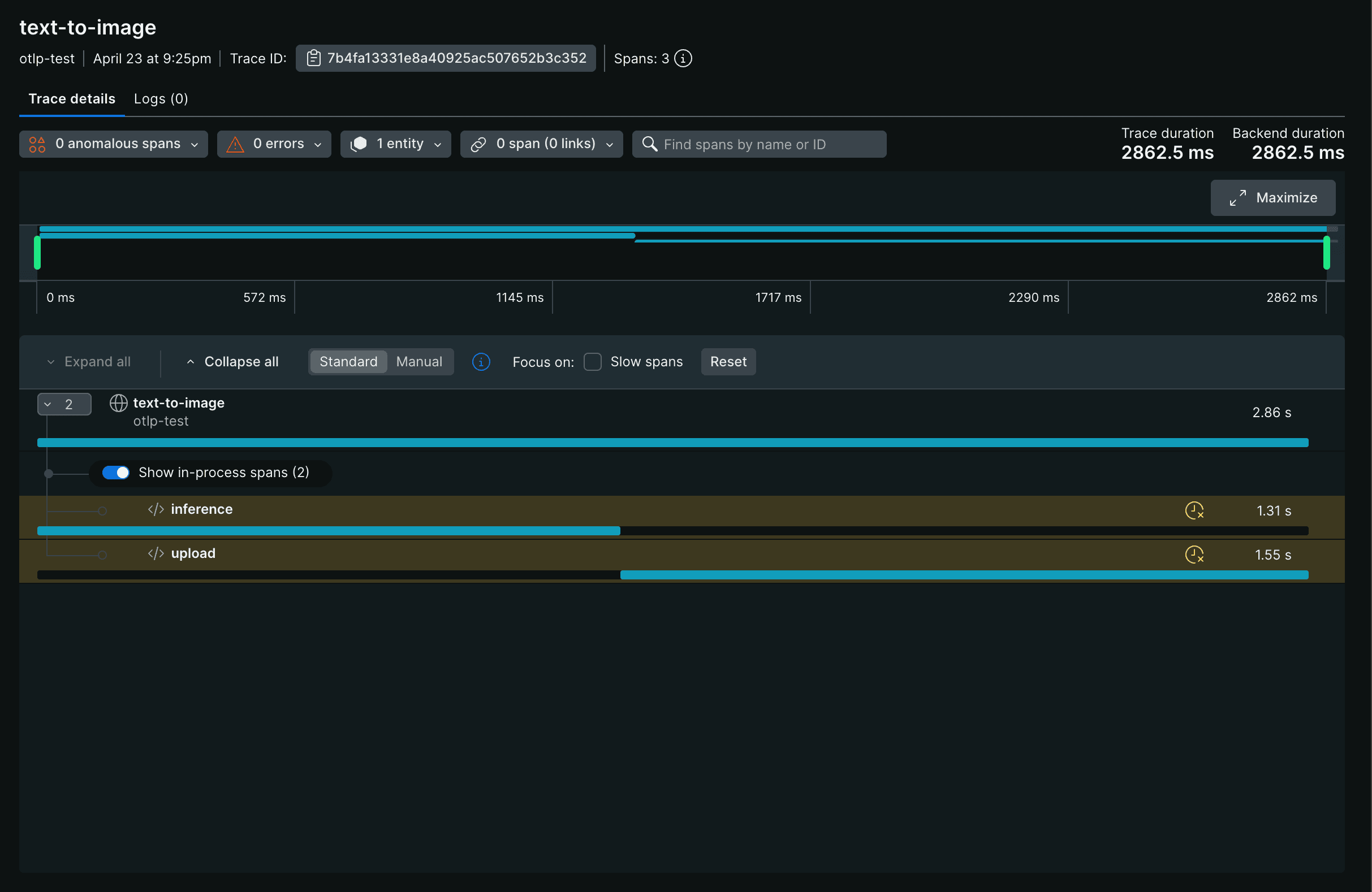
The example above produces a tree of spans under a single root:warmup span appears in your backend attached to the runner’s startup trace, not to individual requests. Each request produces its own text-to-image root span. The parent span’s duration covers all of its children, so text-to-image reflects the total request time including upload.
The trace appears in your backend like this, with inference and upload shown as timed children of the root span:
Span Attributes
Callspan.set_attribute(key, value) to attach metadata to a span. Attributes appear as filterable fields in your backend’s trace viewer, so you can search for all traces where num_inference_steps is above a threshold or prompt.length exceeds a limit.
Python
model.* or inference.*.
Marking Errors
Userecord_exception and set_status to mark a span as failed. This is the portable OpenTelemetry pattern — all OTLP backends interpret StatusCode.ERROR as a failed span, whereas a custom error attribute is backend-specific metadata.
Python
BatchSpanProcessor exports spans asynchronously in the background. On a long-running runner, spans are batched and exported on a schedule. On shutdown, spans still in the buffer are flushed in teardown(). See Production Configuration for how to configure this flush.What’s Next
Exporting Metrics
Scrape fal’s Prometheus-compatible metrics endpoint
Cross-Service Tracing
Connect traces across two fal apps into a single parent trace
Production Configuration
Sampling, batch export tuning, and graceful flush on shutdown
App Lifecycle
How setup() and teardown() fit into the runner lifecycle