 Documentation
 Examples
 Model API Reference
 SDK Reference
 Platform API
 Changelog

- Schnell
- Redux
Endpoint: 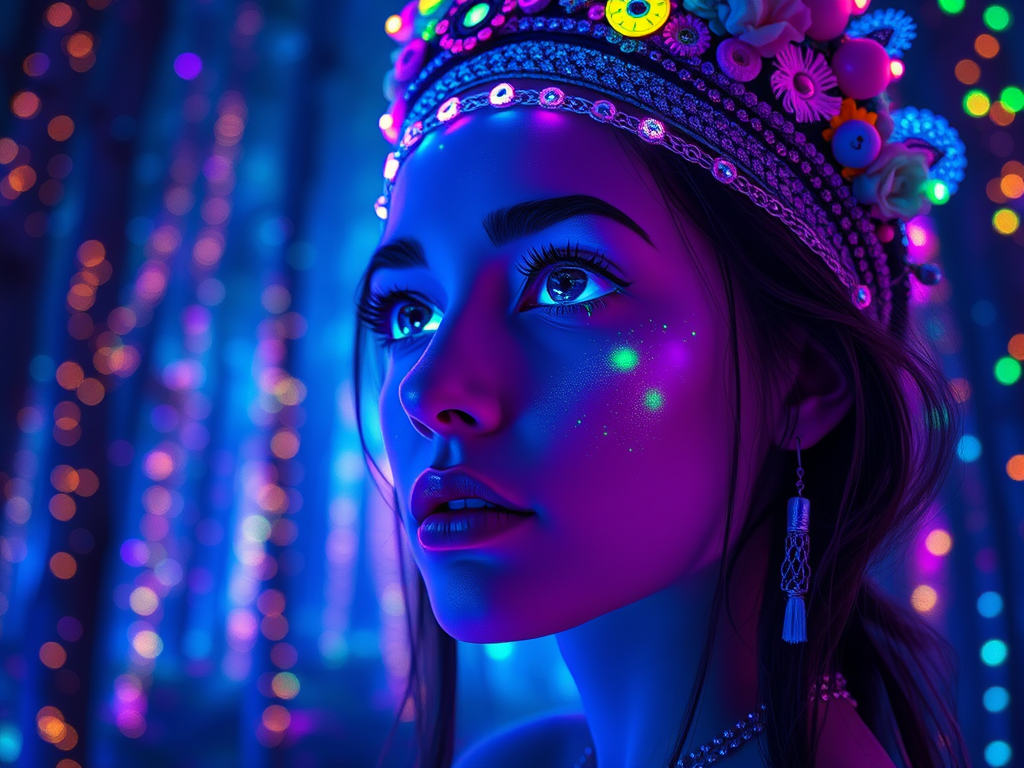


POST https://fal.run/fal-ai/flux/schnell
Endpoint ID: fal-ai/flux/schnellTry it in the Playground
Run this model interactively with your own prompts.
Quick Start
Examples
portrait | wide angle shot of eyes off to one side of frame, lucid dream-like woman, looking off in distance ::8 style | daydreampunk with glowing skin and eyes, styled in headdress, beautiful, she is dripping in neon lights, very colorful blue, green, purple, bioluminescent, glowing ::8 background …
Anime style portrait of a female samurai at a beautiful lake with cherry trees, mountain fuji background, spring, sunset
A vibrant custom illustration, retro-style, featuring a vintage ice cream cart, by the beach, with palm trees. The text ‘Gelato’ is displayed in a retro, distressed style, with each letter in a different color, exuding a sense of nostalgia. The design is perfect for a t-shirt print, with an isolated…
Input Schema
integer
default:"4"
The number of inference steps to perform. Default value:
4Range: 1 to 12string
required
The prompt to generate an image from.
ImageSize | Enum
default:"landscape_4_3"
The size of the generated image. Default value:
landscape_4_3Possible values: square_hd, square, portrait_4_3, portrait_16_9, landscape_4_3, landscape_16_9integer
The same seed and the same prompt given to the same version of the model
will output the same image every time.
float
default:"3.5"
The CFG (Classifier Free Guidance) scale is a measure of how close you want
the model to stick to your prompt when looking for a related image to show you. Default value:
3.5Range: 1 to 20boolean
default:"false"
If
True, the media will be returned as a data URI and the output data won’t be available in the request history.integer
default:"1"
The number of images to generate. Default value:
1Range: 1 to 4boolean
default:"true"
If set to true, the safety checker will be enabled. Default value:
trueOutputFormatEnum
default:"jpeg"
The format of the generated image. Default value:
"jpeg"Possible values: jpeg, pngAccelerationEnum
default:"none"
The speed of the generation. The higher the speed, the faster the generation. Default value:
"none"Possible values: none, regular, highOutput Schema
list<Image>
required
The generated image files info.
Timings
required
integer
required
Seed of the generated Image. It will be the same value of the one passed in the
input or the randomly generated that was used in case none was passed.
list<boolean>
required
Whether the generated images contain NSFW concepts.
string
required
The prompt used for generating the image.
Input Example
Output Example
FLUX.1 [schnell] - Ultra-Fast Text-to-Image Generation
Transform your ideas into stunning visuals in seconds with FLUX.1 [schnell], a powerful 12 billion parameter flow transformer designed for production-ready image generation. Whether you’re creating content for commercial projects or personal artwork, FLUX.1 [schnell] delivers exceptional quality in just 1-4 inference steps with sub-second results.Key Capabilities
Create high-fidelity images with remarkable speed and precision. FLUX.1 [schnell] excels at:- Professional-grade image generation with precise detail control
- Lightning-fast inference (1-4 steps with sub-second results)
- Commercial-ready outputs with full usage rights
- Consistent style maintenance across multiple generations
- Advanced prompt interpretation for accurate results
- Text-to-image and image-to-image generation capabilities
Popular Use Cases
Content Creation Generate marketing visuals, social media assets, and blog illustrations at scale. Perfect for agencies and content teams who need consistent, high-quality imagery. Product DevelopmentCreate concept art, UI mockups, and design variations for rapid prototyping. Ideal for designers exploring visual directions. E-commerce Generate product lifestyle images, seasonal campaigns, and A/B testing visuals to boost conversion rates. Entertainment Produce game assets, storyboard illustrations, and creative concept art for media projects.
Getting Started
Getting up and running with FLUX.1 [schnell] is straightforward. Here’s how to begin:- Install your preferred SDK:
- Configure your credentials:
- Generate your first image:
Technical Specifications
FLUX.1 [schnell] represents the latest in flow-based architecture:Architecture
- 12B parameter flow transformer optimized for speed
- Flow-based distillation for ultra-fast inference
- 1-4 inference steps (default: 4 steps)
- Sub-second response times for fastest generation
- Commercial usage rights included
API Parameters
- prompt: Text description of desired image
- image_size: Various preset sizes or custom dimensions
- num_inference_steps: Generation steps (default: 4)
- num_images: Number of images to generate (default: 1)
- seed: For reproducible results
- enable_safety_checker: Content safety filtering (default: true)
- output_format: Image format (default: PNG)
Performance
- Sub-second response times for rapid generation
- Fastest AI image generation among FLUX models
- Concurrent request handling capability
- Enterprise-grade reliability and uptime
Best Practices
To achieve optimal results with FLUX.1 [schnell]:- Write detailed, specific prompts that describe both content and style
- Use 4 steps (default) for balanced speed/quality, adjust as needed
- Leverage the fastest generation for iterative workflows
- Monitor API usage through the dashboard for optimization
- Take advantage of sub-second generation for real-time applications
Integration Guide
FLUX.1 [schnell] integrates seamlessly into existing workflows:- Set up authentication using environment variables
- Initialize the client in your application
- Implement error handling and retries
- Add response validation
- Configure webhook endpoints for async processing
Advanced Features
Take advantage of FLUX.1 [schnell]‘s advanced capabilities:Speed Optimization
FLUX.1 [schnell] is specifically optimized for ultra-fast generation, making it ideal for applications requiring rapid iteration and real-time image creation.Image Size Control
Generate images at various dimensions with preset sizes or custom width/height configurations to match your specific requirements.Batch Processing
Create multiple variations efficiently with built-in batching support for rapid prototyping and content generation.Turbo Mode
The “schnell” (German for “fast”) variant is the turbo mode of the FLUX.1 family, prioritizing speed while maintaining high image quality.Pricing and Usage
Your request will cost $0.003 per megapixel. Images are billed by rounding up to the nearest megapixel. Our transparent, usage-based pricing scales with your needs:- Most cost-effective: $0.003 per megapixel
- Commercial usage rights included
- No subscription fees or minimum commitments
- Fastest generation with competitive pricing
Support and Resources
We’re here to help you succeed with FLUX.1 [schnell]:- Documentation: Comprehensive API references and guides
- Community: Active Discord community for peer support
- Technical Support: Direct assistance through support tickets
- Examples: Growing library of implementation examples
- Updates: Regular model improvements and feature additions
Related
- FLUX.1 [dev] — Image Generation
- FLUX.1 [dev] Redux — Image Generation
Limitations
num_inference_stepsrange: 1 to 12image_sizerestricted to:square_hd,square,portrait_4_3,portrait_16_9,landscape_4_3,landscape_16_9guidance_scalerange: 1 to 20num_imagesrange: 1 to 4output_formatrestricted to:jpeg,pngaccelerationrestricted to:none,regular,high- Content moderation via safety checker