> ## Documentation Index
> Fetch the complete documentation index at: https://fal.ai/docs/llms.txt
> Use this file to discover all available pages before exploring further.
# Flux Pro Kontext API
> API reference for Flux Pro Kontext. FLUX.1 Kontext [pro] handles both text and reference images as inputs, seamlessly enabling targeted, local edits and complex transformations of entire scenes.
**Endpoint:** `POST https://fal.run/fal-ai/flux-pro/kontext`
**Endpoint ID:** `fal-ai/flux-pro/kontext`
Run this model interactively with your own prompts.
## Quick Start
```python title="Python" theme={null}
import fal_client
def on_queue_update(update):
if isinstance(update, fal_client.InProgress):
for log in update.logs:
print(log["message"])
result = fal_client.subscribe(
"fal-ai/flux-pro/kontext",
arguments={
"prompt": "Put a donut next to the flour.",
"image_url": "https://v3.fal.media/files/rabbit/rmgBxhwGYb2d3pl3x9sKf_output.png"
},
with_logs=True,
on_queue_update=on_queue_update,
)
print(result)
```
```javascript title="JavaScript" theme={null}
import { fal } from "@fal-ai/client";
const result = await fal.subscribe("fal-ai/flux-pro/kontext", {
input: {
prompt: "Put a donut next to the flour.",
image_url: "https://v3.fal.media/files/rabbit/rmgBxhwGYb2d3pl3x9sKf_output.png"
},
logs: true,
onQueueUpdate: (update) => {
if (update.status === "IN_PROGRESS") {
update.logs.map((log) => log.message).forEach(console.log);
}
},
});
console.log(result.data);
console.log(result.requestId);
```
```bash title="cURL" theme={null}
curl --request POST \
--url https://fal.run/fal-ai/flux-pro/kontext \
--header "Authorization: Key $FAL_KEY" \
--header "Content-Type: application/json" \
--data '{
"prompt": "Put a donut next to the flour.",
"image_url": "https://v3.fal.media/files/rabbit/rmgBxhwGYb2d3pl3x9sKf_output.png"
}'
```
## Examples
> Change the car color to red
 > Change to daytime while maintaining the same style of the painting
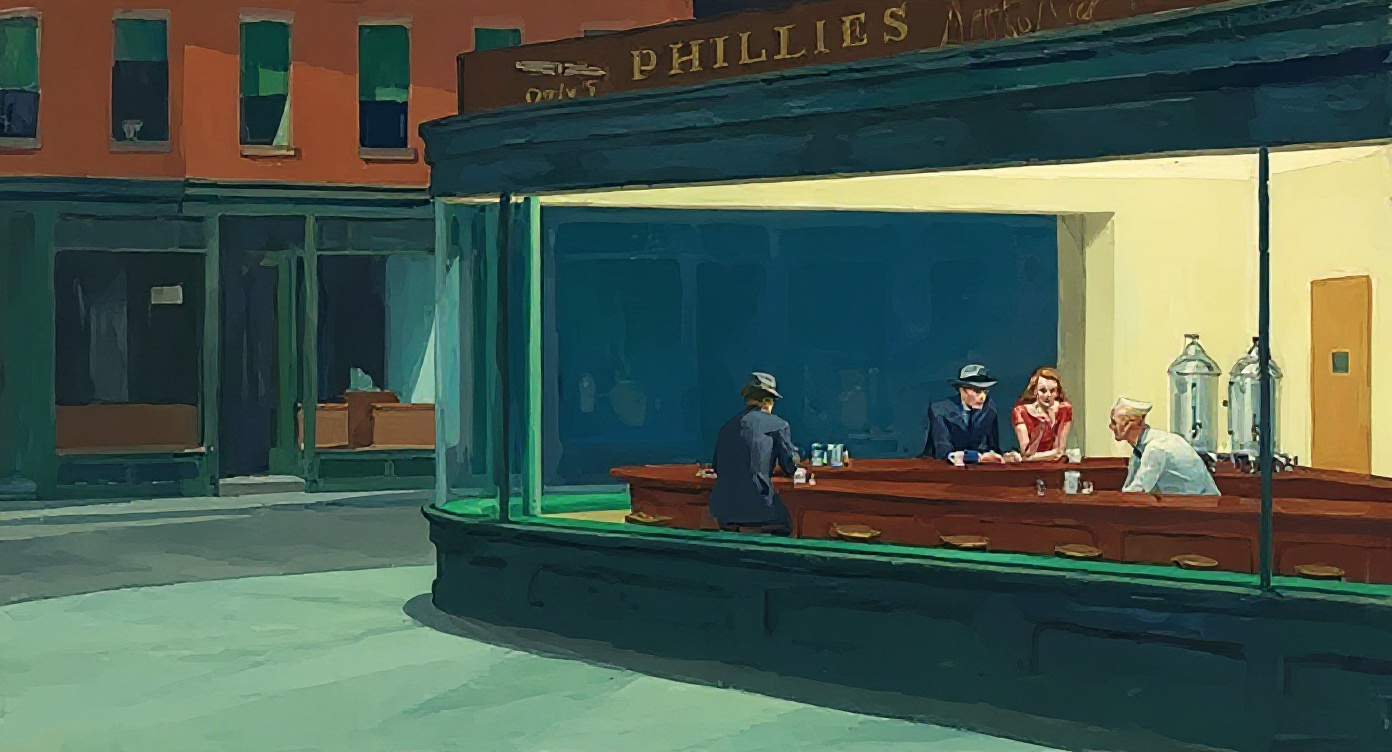 > Convert to pencil sketch with natural graphite lines, cross-hatching, and visible paper texture
 ## FLUX.1 Kontext \[pro] - Advanced Image-to-Image Generation and Editing
Transform your images with intelligent editing using FLUX.1 Kontext \[pro], a powerful 12-billion parameter multimodal flow transformer designed for in-context image generation and editing. Seamlessly modify existing images with simple text instructions while preserving character consistency and visual quality.
### Overview
FLUX.1 Kontext \[pro] delivers exceptional image editing and generation capabilities through its multimodal architecture. Built to understand both text and visual context, it excels at intelligent image modifications, character preservation, and complex scene transformations without requiring fine-tuning or complex workflows.
#### Key Capabilities
* **In-context image editing** with simple text instructions
* **Character consistency** preservation across multiple edits
* **Local and global editing** capabilities in one unified model
* **Text-to-image generation** with state-of-the-art prompt following
* **Typography handling** for text editing within images
* **Commercial-ready output** quality with fast inference
### Popular Use Cases
**Creative Image Editing**
Modify existing images with natural language instructions. Change styles, swap objects, adjust lighting, or transform scenes while maintaining visual coherence.
**Character Consistency**
Preserve unique characters, objects, or styles across different scenes and environments without any fine-tuning required.
**Typography and Text Editing**
Seamlessly edit text within images - change signs, labels, posters, or any text elements with precision.
**Style Transfer and Remixing**
Transform images from one artistic style to another - oil painting to pencil sketch, modern poster to surreal collage.
### Getting Started
Getting up and running with FLUX.1 Kontext \[pro] takes just a few minutes. Here's how to begin:
1. Get your API key at [https://fal.ai/login](https://fal.ai/login)
2. Install the client library for your preferred language
3. Make your first API call
For JavaScript/TypeScript:
```javascript theme={null}
import { fal } from "@fal-ai/client";
fal.config({
credentials: "YOUR_FAL_KEY"
});
const result = await fal.subscribe("fal-ai/flux-pro/kontext", {
input: {
prompt: "Change the red car to blue while keeping everything else the same",
image_url: "https://your-image-url.com/image.jpg"
}
});
```
For Python:
```python theme={null}
from fal_client import FalClient
client = FalClient("YOUR_FAL_KEY")
result = client.subscribe("fal-ai/flux-pro/kontext", {
"prompt": "Change the red car to blue while keeping everything else the same",
"image_url": "https://your-image-url.com/image.jpg"
})
```
### Technical Specifications
#### Model Architecture
* 12 billion parameter multimodal flow transformer
* In-context image generation and editing capabilities
* Handles both text and reference images as inputs
* Supports targeted local edits and complex scene transformations
#### Input Capabilities
* **Image input**: jpg, jpeg, png, webp, gif, avif formats
* **Text prompts**: Natural language editing instructions
* **Multimodal processing**: Simultaneous text and image understanding
#### Performance
* Fast inference optimized for iterative editing
* Up to 8x faster than competing state-of-the-art models
* Minimal latency for real-time creative workflows
* 99.9% uptime guarantee
### Best Practices
Achieve optimal results with these proven approaches:
#### Write Clear Edit Instructions
Be specific about what you want to change and what should remain the same. Instead of "make it better," try "change the background to a sunset while keeping the person's pose and clothing identical."
#### Leverage Character Consistency
Use Kontext's strength in preserving characters across edits. You can modify lighting, backgrounds, or scenes while maintaining the same person, object, or style.
#### Handle Text Editing Precisely
When editing text in images, specify exactly what text to change and what it should become: "Change 'SALE' to 'SOLD OUT' on the storefront sign."
#### Iterative Refinement
Build upon previous edits through multiple turns while maintaining visual consistency and character identity.
### Advanced Features
#### Local and Global Editing
* **Targeted edits**: Modify specific regions or objects
* **Scene transformations**: Change entire backgrounds or contexts
* **Style preservation**: Maintain artistic consistency during modifications
#### Multi-turn Editing
Refine images through successive edits while preserving quality and character consistency across multiple editing sessions.
#### Context Understanding
The model reads both image context and text instructions to ensure edits make logical and visual sense.
### API Reference
The FLUX.1 Kontext \[pro] API accepts the following core parameters:
```typescript theme={null}
interface FluxKontextParameters {
prompt: string; // Your editing instruction
image_url: string; // Input image to edit
guidance_scale?: number; // Prompt adherence strength
num_inference_steps?: number; // Generation steps
seed?: number; // For reproducible results
}
```
### Pricing and Usage
Your request will cost \$0.04 per image. Our transparent, per-image pricing makes it cost-effective for both experimentation and production use:
* Fixed \$0.04 cost per image edit
* No hidden fees or minimum commitments
* Commercial usage rights included
* Volume discounts available for enterprise users
[View detailed pricing](https://fal.ai/pricing) or [contact sales](mailto:support@fal.ai) for enterprise solutions.
### Support and Resources
We're here to help you succeed with FLUX.1 Kontext \[pro]:
* **Documentation**: Complete API reference at [https://docs.fal.ai/](https://docs.fal.ai/)
* **Community**: Join our Discord for support and creative showcases
* **Examples**: Browse our GitHub repository for sample implementations
* **Support**: Enterprise support available for production deployments
Ready to transform your images with intelligent editing? Sign up now at [https://fal.ai](https://fal.ai) and start creating with FLUX.1 Kontext \[pro].
[Get Started with FLUX Kontext Pro](https://fal.ai/login)
## Related
* [FLUX.1 Kontext \[max\]](/model-api-reference/image-generation-api/flux.1-kontext) — Image Generation
## Capabilities
* Text prompt input
* Reproducible generation (seed)
* CFG guidance scale
* Synchronous mode
* Batch generation
* Aspect ratio control
* Image input
## API Reference
### Input Schema
The prompt to generate an image from.
The same seed and the same prompt given to the same version of the model
will output the same image every time.
The CFG (Classifier Free Guidance) scale is a measure of how close you want
the model to stick to your prompt when looking for a related image to show you. Default value: `3.5`
Range: `1` to `20`
If `True`, the media will be returned as a data URI and the output data won't be available in the request history.
The number of images to generate. Default value: `1`
Range: `1` to `4`
The format of the generated image. Default value: `"jpeg"`
Possible values: `jpeg`, `png`
The safety tolerance level for the generated image. 1 being the most strict and 5 being the most permissive. Default value: `"2"`
Possible values: `1`, `2`, `3`, `4`, `5`, `6`
Whether to enhance the prompt for better results.
The aspect ratio of the generated image.
Possible values: `21:9`, `16:9`, `4:3`, `3:2`, `1:1`, `2:3`, `3:4`, `9:16`, `9:21`
Image prompt for the omni model.
### Output Schema
The generated image files info.
Seed of the generated Image. It will be the same value of the one passed in the
input or the randomly generated that was used in case none was passed.
Whether the generated images contain NSFW concepts.
The prompt used for generating the image.
## Input Example
```json theme={null}
{
"prompt": "Put a donut next to the flour.",
"guidance_scale": 3.5,
"sync_mode": false,
"num_images": 1,
"output_format": "jpeg",
"safety_tolerance": "2",
"enhance_prompt": false,
"image_url": "https://v3.fal.media/files/rabbit/rmgBxhwGYb2d3pl3x9sKf_output.png"
}
```
## Output Example
```json theme={null}
{
"images": [
{
"height": 1024,
"url": "https://fal.media/files/tiger/7dSJbIU_Ni-0Zp9eaLsvR_fe56916811d84ac69c6ffc0d32dca151.jpg",
"width": 1024
}
],
"prompt": ""
}
```
## Limitations
* `guidance_scale` range: 1 to 20
* `num_images` range: 1 to 4
* `output_format` restricted to: `jpeg`, `png`
* `safety_tolerance` restricted to: `1`, `2`, `3`, `4`, `5`, `6`
## FLUX.1 Kontext \[pro] - Advanced Image-to-Image Generation and Editing
Transform your images with intelligent editing using FLUX.1 Kontext \[pro], a powerful 12-billion parameter multimodal flow transformer designed for in-context image generation and editing. Seamlessly modify existing images with simple text instructions while preserving character consistency and visual quality.
### Overview
FLUX.1 Kontext \[pro] delivers exceptional image editing and generation capabilities through its multimodal architecture. Built to understand both text and visual context, it excels at intelligent image modifications, character preservation, and complex scene transformations without requiring fine-tuning or complex workflows.
#### Key Capabilities
* **In-context image editing** with simple text instructions
* **Character consistency** preservation across multiple edits
* **Local and global editing** capabilities in one unified model
* **Text-to-image generation** with state-of-the-art prompt following
* **Typography handling** for text editing within images
* **Commercial-ready output** quality with fast inference
### Popular Use Cases
**Creative Image Editing**
Modify existing images with natural language instructions. Change styles, swap objects, adjust lighting, or transform scenes while maintaining visual coherence.
**Character Consistency**
Preserve unique characters, objects, or styles across different scenes and environments without any fine-tuning required.
**Typography and Text Editing**
Seamlessly edit text within images - change signs, labels, posters, or any text elements with precision.
**Style Transfer and Remixing**
Transform images from one artistic style to another - oil painting to pencil sketch, modern poster to surreal collage.
### Getting Started
Getting up and running with FLUX.1 Kontext \[pro] takes just a few minutes. Here's how to begin:
1. Get your API key at [https://fal.ai/login](https://fal.ai/login)
2. Install the client library for your preferred language
3. Make your first API call
For JavaScript/TypeScript:
```javascript theme={null}
import { fal } from "@fal-ai/client";
fal.config({
credentials: "YOUR_FAL_KEY"
});
const result = await fal.subscribe("fal-ai/flux-pro/kontext", {
input: {
prompt: "Change the red car to blue while keeping everything else the same",
image_url: "https://your-image-url.com/image.jpg"
}
});
```
For Python:
```python theme={null}
from fal_client import FalClient
client = FalClient("YOUR_FAL_KEY")
result = client.subscribe("fal-ai/flux-pro/kontext", {
"prompt": "Change the red car to blue while keeping everything else the same",
"image_url": "https://your-image-url.com/image.jpg"
})
```
### Technical Specifications
#### Model Architecture
* 12 billion parameter multimodal flow transformer
* In-context image generation and editing capabilities
* Handles both text and reference images as inputs
* Supports targeted local edits and complex scene transformations
#### Input Capabilities
* **Image input**: jpg, jpeg, png, webp, gif, avif formats
* **Text prompts**: Natural language editing instructions
* **Multimodal processing**: Simultaneous text and image understanding
#### Performance
* Fast inference optimized for iterative editing
* Up to 8x faster than competing state-of-the-art models
* Minimal latency for real-time creative workflows
* 99.9% uptime guarantee
### Best Practices
Achieve optimal results with these proven approaches:
#### Write Clear Edit Instructions
Be specific about what you want to change and what should remain the same. Instead of "make it better," try "change the background to a sunset while keeping the person's pose and clothing identical."
#### Leverage Character Consistency
Use Kontext's strength in preserving characters across edits. You can modify lighting, backgrounds, or scenes while maintaining the same person, object, or style.
#### Handle Text Editing Precisely
When editing text in images, specify exactly what text to change and what it should become: "Change 'SALE' to 'SOLD OUT' on the storefront sign."
#### Iterative Refinement
Build upon previous edits through multiple turns while maintaining visual consistency and character identity.
### Advanced Features
#### Local and Global Editing
* **Targeted edits**: Modify specific regions or objects
* **Scene transformations**: Change entire backgrounds or contexts
* **Style preservation**: Maintain artistic consistency during modifications
#### Multi-turn Editing
Refine images through successive edits while preserving quality and character consistency across multiple editing sessions.
#### Context Understanding
The model reads both image context and text instructions to ensure edits make logical and visual sense.
### API Reference
The FLUX.1 Kontext \[pro] API accepts the following core parameters:
```typescript theme={null}
interface FluxKontextParameters {
prompt: string; // Your editing instruction
image_url: string; // Input image to edit
guidance_scale?: number; // Prompt adherence strength
num_inference_steps?: number; // Generation steps
seed?: number; // For reproducible results
}
```
### Pricing and Usage
Your request will cost \$0.04 per image. Our transparent, per-image pricing makes it cost-effective for both experimentation and production use:
* Fixed \$0.04 cost per image edit
* No hidden fees or minimum commitments
* Commercial usage rights included
* Volume discounts available for enterprise users
[View detailed pricing](https://fal.ai/pricing) or [contact sales](mailto:support@fal.ai) for enterprise solutions.
### Support and Resources
We're here to help you succeed with FLUX.1 Kontext \[pro]:
* **Documentation**: Complete API reference at [https://docs.fal.ai/](https://docs.fal.ai/)
* **Community**: Join our Discord for support and creative showcases
* **Examples**: Browse our GitHub repository for sample implementations
* **Support**: Enterprise support available for production deployments
Ready to transform your images with intelligent editing? Sign up now at [https://fal.ai](https://fal.ai) and start creating with FLUX.1 Kontext \[pro].
[Get Started with FLUX Kontext Pro](https://fal.ai/login)
## Related
* [FLUX.1 Kontext \[max\]](/model-api-reference/image-generation-api/flux.1-kontext) — Image Generation
## Capabilities
* Text prompt input
* Reproducible generation (seed)
* CFG guidance scale
* Synchronous mode
* Batch generation
* Aspect ratio control
* Image input
## API Reference
### Input Schema
The prompt to generate an image from.
The same seed and the same prompt given to the same version of the model
will output the same image every time.
The CFG (Classifier Free Guidance) scale is a measure of how close you want
the model to stick to your prompt when looking for a related image to show you. Default value: `3.5`
Range: `1` to `20`
If `True`, the media will be returned as a data URI and the output data won't be available in the request history.
The number of images to generate. Default value: `1`
Range: `1` to `4`
The format of the generated image. Default value: `"jpeg"`
Possible values: `jpeg`, `png`
The safety tolerance level for the generated image. 1 being the most strict and 5 being the most permissive. Default value: `"2"`
Possible values: `1`, `2`, `3`, `4`, `5`, `6`
Whether to enhance the prompt for better results.
The aspect ratio of the generated image.
Possible values: `21:9`, `16:9`, `4:3`, `3:2`, `1:1`, `2:3`, `3:4`, `9:16`, `9:21`
Image prompt for the omni model.
### Output Schema
The generated image files info.
Seed of the generated Image. It will be the same value of the one passed in the
input or the randomly generated that was used in case none was passed.
Whether the generated images contain NSFW concepts.
The prompt used for generating the image.
## Input Example
```json theme={null}
{
"prompt": "Put a donut next to the flour.",
"guidance_scale": 3.5,
"sync_mode": false,
"num_images": 1,
"output_format": "jpeg",
"safety_tolerance": "2",
"enhance_prompt": false,
"image_url": "https://v3.fal.media/files/rabbit/rmgBxhwGYb2d3pl3x9sKf_output.png"
}
```
## Output Example
```json theme={null}
{
"images": [
{
"height": 1024,
"url": "https://fal.media/files/tiger/7dSJbIU_Ni-0Zp9eaLsvR_fe56916811d84ac69c6ffc0d32dca151.jpg",
"width": 1024
}
],
"prompt": ""
}
```
## Limitations
* `guidance_scale` range: 1 to 20
* `num_images` range: 1 to 4
* `output_format` restricted to: `jpeg`, `png`
* `safety_tolerance` restricted to: `1`, `2`, `3`, `4`, `5`, `6`