> ## Documentation Index
> Fetch the complete documentation index at: https://fal.ai/docs/llms.txt
> Use this file to discover all available pages before exploring further.
# AI Tools
> Connect AI coding assistants to fal's 1,000+ models via the Model Context Protocol
fal provides an [MCP](https://modelcontextprotocol.io) server that gives any compatible AI assistant direct access to the full fal platform: search models, check schemas, run inference, upload files, and browse documentation — all without leaving your editor. Your assistant becomes an expert in every fal model and can generate working code on the first try.
The server is hosted at `mcp.fal.ai/mcp` and works with any client that supports the [Model Context Protocol](https://modelcontextprotocol.io), including Claude Code, Claude Desktop, Cursor, Windsurf, and more. Every request uses your own [API key](/documentation/setting-up/authentication/index) — nothing is stored on the server.
You need a fal API key to use the MCP server. If you don't have one yet, [create one here](https://fal.ai/dashboard/keys).
## Setup
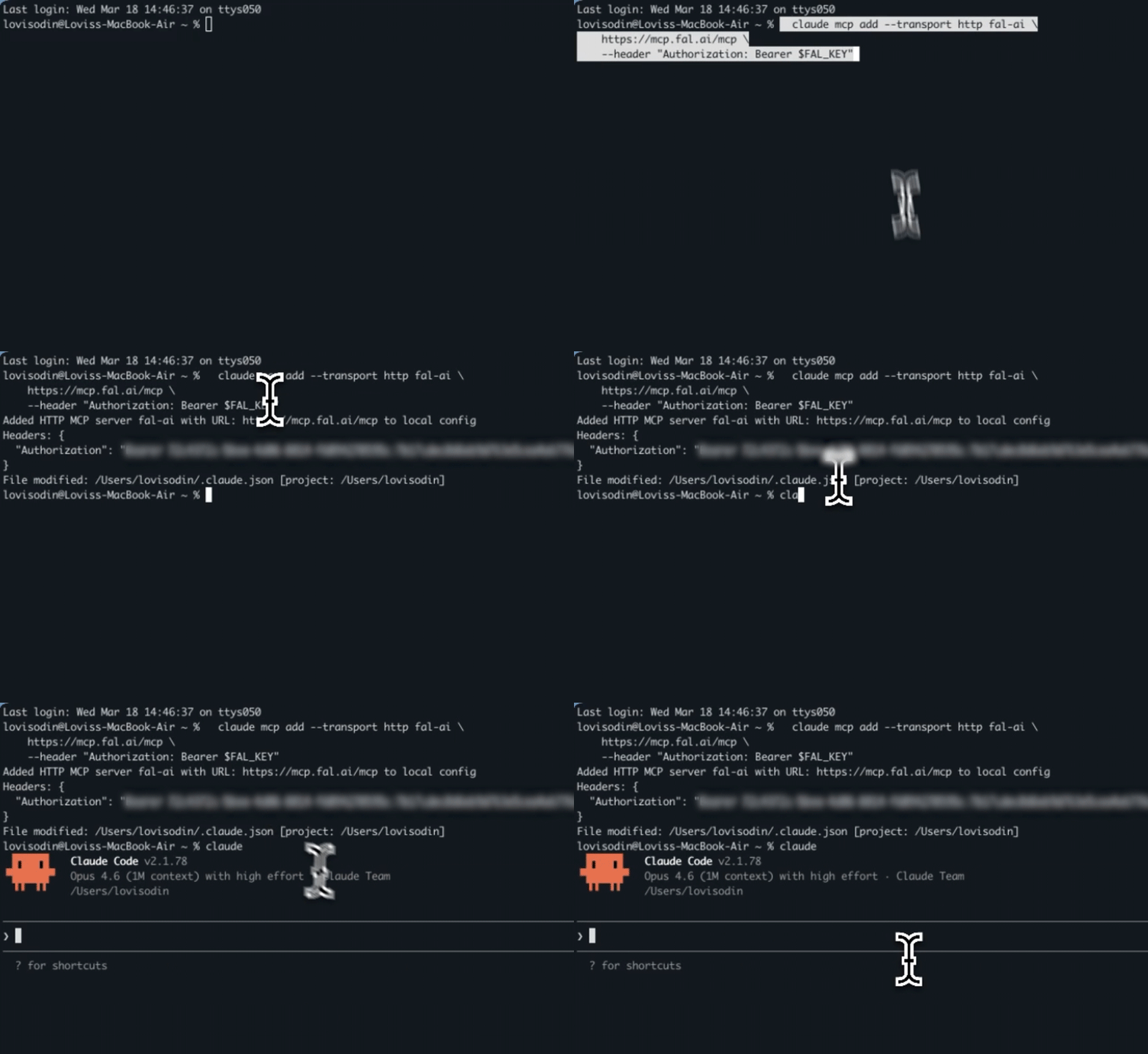
Run this command in your terminal:
```bash theme={null}
claude mcp add --transport http fal-ai \
https://mcp.fal.ai/mcp \
--header "Authorization: Bearer YOUR_FAL_KEY"
```
That's it. Claude Code will now have access to all fal tools.
Claude Desktop and claude.ai Custom Connectors require OAuth 2.0 authentication, which is not yet supported by the fal MCP server. OAuth support is coming soon. In the meantime, use **Claude Code**, **Cursor**, or **Windsurf** to connect.
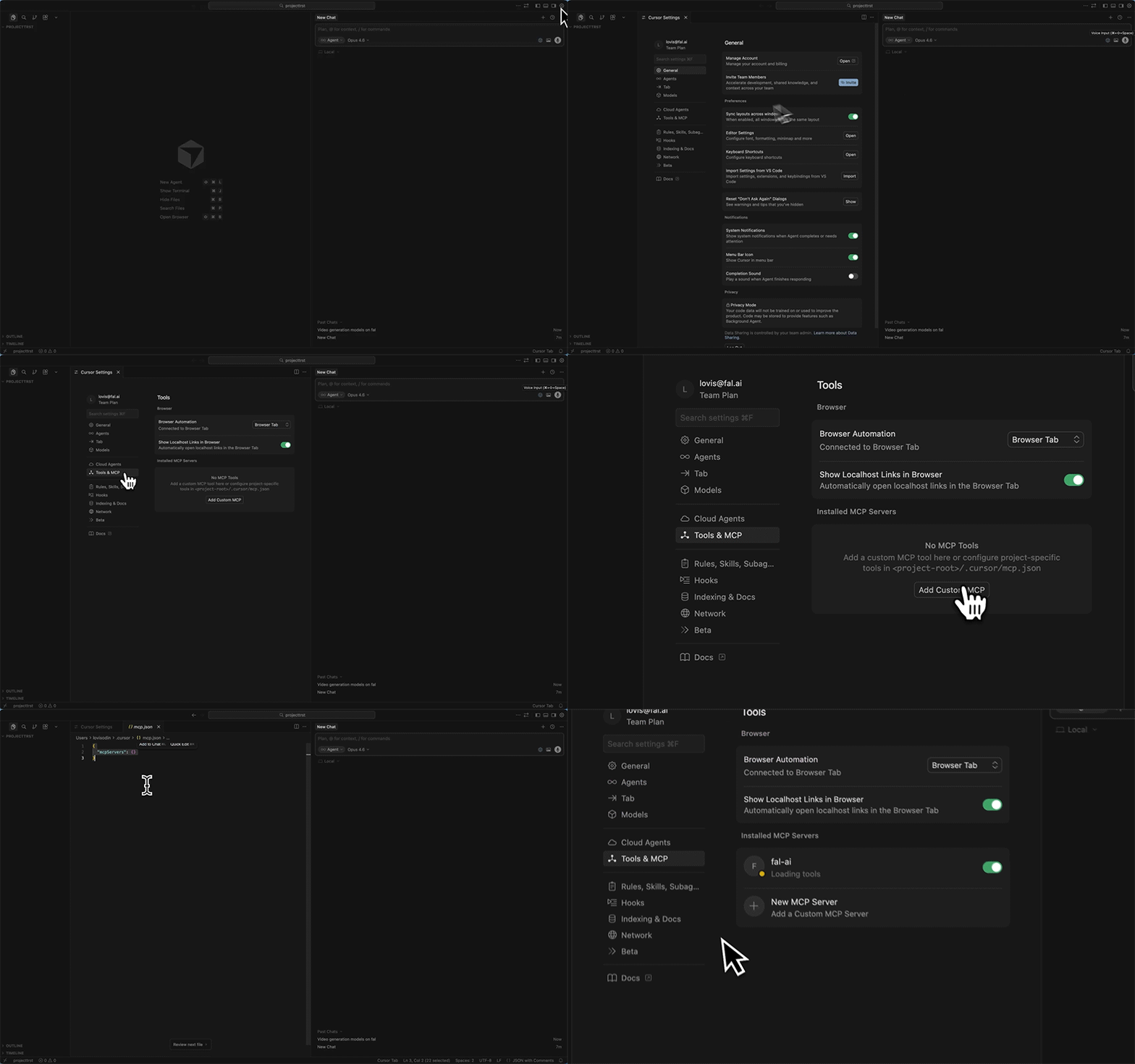
Use `Cmd+Shift+P` (`Ctrl+Shift+P` on Windows) and search for **"Open MCP settings"**.
Add the following to your `mcp.json` file:
```json theme={null}
{
"mcpServers": {
"fal-ai": {
"url": "https://mcp.fal.ai/mcp",
"headers": {
"Authorization": "Bearer YOUR_FAL_KEY"
}
}
}
}
```
Save the file and restart Cursor to activate the connection.
Open **Settings → MCP** and add a new server:
```json theme={null}
{
"mcpServers": {
"fal-ai": {
"serverUrl": "https://mcp.fal.ai/mcp",
"headers": {
"Authorization": "Bearer YOUR_FAL_KEY"
}
}
}
}
```
The fal MCP server uses the **Streamable HTTP** transport at:
```
https://mcp.fal.ai/mcp
```
Authentication is via the `Authorization` header:
```
Authorization: Bearer YOUR_FAL_KEY
```
Any MCP client that supports Streamable HTTP transport can connect. Refer to your client's documentation for the exact configuration format.
***
## Available Tools
The MCP server exposes 9 tools organized in three categories. Your AI assistant picks the right tool automatically based on what you ask.
### Discovery
| Tool | What it does |
| ---------------------- | --------------------------------------------------------------------- |
| **`search_models`** | Search fal's catalog of 1,000+ models by keyword or category |
| **`get_model_schema`** | Get the full input/output parameters for any model |
| **`get_pricing`** | Check the cost of running a model before you use it |
| **`search_docs`** | Search the fal documentation for guides, examples, and API references |
### Execution
| Tool | What it does |
| ---------------- | ------------------------------------------------------------------ |
| **`run_model`** | Run any model and wait for the result (images, video, audio, etc.) |
| **`submit_job`** | Submit a long-running job and return immediately with a request ID |
| **`check_job`** | Check job status, fetch results, or cancel a running job |
### Utility
| Tool | What it does |
| --------------------- | --------------------------------------------------------------------- |
| **`upload_file`** | Upload a file (local path or URL) to fal's CDN for use as model input |
| **`recommend_model`** | Describe what you want to build and get model recommendations |
***
## Examples
Here are concrete examples of what you can ask your AI assistant once the MCP server is connected.
### Generate an image
> "Generate a photorealistic image of a mountain lake at golden hour using fal"
The assistant will:
1. Use `search_models` to find image generation models
2. Use `get_model_schema` to check the parameters for the chosen model
3. Use `run_model` to generate the image
4. Return the image URL
### Generate a video from an image
> "Take this image and turn it into a 5-second cinematic video"
The assistant will:
1. Use `upload_file` to upload your image to fal's CDN
2. Use `recommend_model` to find the best image-to-video model
3. Use `submit_job` (since video generation takes longer)
4. Use `check_job` to poll for the result
### Check pricing before running
> "How much does it cost to generate a video with Kling 3.0?"
The assistant will call `get_pricing` with `fal-ai/kling-video/v3/pro/image-to-video` and return the per-run cost.
### Find the right model
> "What's the best model for removing backgrounds from product photos?"
The assistant will call `recommend_model` with your task description and return a ranked list of models with tips on how to use them.
### Search the docs
> "How do I set up webhooks with fal?"
The assistant will call `search_docs` and return relevant guides and code examples from the fal documentation.
***
## How It Works
The MCP server is a stateless API hosted on Vercel. Each request is fully isolated:
1. Your AI assistant sends a request to `mcp.fal.ai/mcp` with your API key
2. The server calls the [fal Platform API](https://fal.ai/docs) on your behalf
3. Results are returned to your assistant, which formats them for you
Your API key is sent per-request in the `Authorization` header and is never stored. The server has no sessions, no state, and no access to anything beyond what the fal public API provides with your key.
The MCP server uses the same [Model APIs](/documentation/model-apis/overview) you would call directly with the fal client SDK. Anything you can do with the SDK, your AI assistant can do through MCP.
***
## Tool Reference
### search\_models
Search fal's model catalog by keyword, category, or both.
**Parameters:**
| Parameter | Type | Description |
| ---------- | ----------------- | ----------------------------------------------------------------------------------------------------------------------------------------- |
| `query` | string (optional) | Free-text search, e.g. `"flux"`, `"video generation"`, `"upscale"` |
| `category` | string (optional) | Filter by category: `text-to-image`, `image-to-video`, `text-to-video`, `text-to-speech`, `image-to-3d`, `image-editing`, `llm`, and more |
| `limit` | number (optional) | Max results to return (default 20, max 100) |
**Example response:**
```json theme={null}
{
"models": [
{
"endpoint_id": "fal-ai/flux/dev",
"name": "FLUX.1 [dev]",
"category": "text-to-image",
"description": "State-of-the-art text-to-image model"
}
],
"total_shown": 1,
"has_more": true
}
```
***
### get\_model\_schema
Get the full input/output schema for a specific model. Use this before `run_model` to understand what parameters are accepted.
**Parameters:**
| Parameter | Type | Description |
| ------------- | ------ | -------------------------------------- |
| `endpoint_id` | string | The model ID, e.g. `"fal-ai/flux/dev"` |
***
### run\_model
Run any fal model. Submits to the queue, polls until complete, and returns the result.
**Parameters:**
| Parameter | Type | Description |
| ------------- | ------ | ------------------------------------------------------------------------ |
| `endpoint_id` | string | The model ID, e.g. `"fal-ai/flux/dev"` |
| `input` | object | Model parameters as JSON. Use `get_model_schema` to see accepted fields. |
**Example:**
```json theme={null}
{
"endpoint_id": "fal-ai/flux/dev",
"input": {
"prompt": "a photorealistic mountain landscape at sunset",
"image_size": "landscape_16_9"
}
}
```
For long-running models (video, 3D, training), use `submit_job` + `check_job` instead to avoid timeouts.
***
### submit\_job
Submit a job without waiting for the result. Returns immediately with a `request_id` you can use with `check_job`.
**Parameters:**
| Parameter | Type | Description |
| ------------- | ------ | ------------------------ |
| `endpoint_id` | string | The model ID |
| `input` | object | Model parameters as JSON |
***
### check\_job
Check the status of a running job, fetch the result, or cancel it.
**Parameters:**
| Parameter | Type | Description |
| ------------- | ----------------- | ----------------------------------------------- |
| `endpoint_id` | string | The model ID |
| `request_id` | string | The request ID from `run_model` or `submit_job` |
| `action` | string (optional) | `"status"` (default), `"result"`, or `"cancel"` |
***
### upload\_file
Upload a file to fal's CDN so it can be used as input to models. Accepts a URL to a remote file.
**Parameters:**
| Parameter | Type | Description |
| ----------- | ----------------- | ------------------------------ |
| `url` | string | URL of a remote file to upload |
| `file_name` | string (optional) | Custom filename for the upload |
Returns a `cdn_url` that you can pass to any model parameter that accepts a URL (e.g. `image_url`, `audio_url`).
***
### get\_pricing
Get the cost of running a model.
**Parameters:**
| Parameter | Type | Description |
| ------------- | ------ | --------------------------------- |
| `endpoint_id` | string | The model ID to check pricing for |
***
### recommend\_model
Describe what you want to create and get model recommendations ranked by popularity.
**Parameters:**
| Parameter | Type | Description |
| --------- | ------ | --------------------------------------------------------------------------------------------------------------------------------------- |
| `task` | string | What you want to do, e.g. `"generate a photorealistic portrait"`, `"create a 10s cinematic video"`, `"remove background from an image"` |
***
### search\_docs
Search the fal documentation for guides, API references, and code examples.
**Parameters:**
| Parameter | Type | Description |
| --------- | ------ | ---------------------------------------------------------------------------------------- |
| `query` | string | What you're looking for, e.g. `"how to upload a file"`, `"queue API"`, `"LoRA training"` |
***
## FAQ
All 1,000+ models in the [fal catalog](https://fal.ai/models) — image generation, video, audio, speech, 3D, LLMs, and more. Use `search_models` or `recommend_model` to find what you need.
No. The hosted server is fully stateless. Your key is sent per-request in the `Authorization` header and is never stored or logged.
No. The MCP server is free. You only pay for the fal model runs you trigger, at the same [pricing](https://fal.ai/pricing) as direct API calls.
The MCP server respects the same [concurrency limits](/documentation/model-apis/concurrency-limits) as direct API calls. There are no additional rate limits on the MCP endpoint itself.