> ## Documentation Index
> Fetch the complete documentation index at: https://fal.ai/docs/llms.txt
> Use this file to discover all available pages before exploring further.
# Scaling Parameter Reference
> All scaling parameters for controlling runners, cold starts, and costs.
**WebSocket apps:** All runner scaling parameters below (`keep_alive`, `min_concurrency`, `max_concurrency`, `concurrency_buffer`, `scaling_delay`, `max_multiplexing`, `request_timeout`) apply to WebSocket-based apps the same as queue-based apps. See [Real-Time Inference](/documentation/model-apis/inference/real-time#differences-from-queue-based-inference) for differences in queue-level parameters like retries and priority.
### min\_concurrency
**Default:** 0
Minimum number of runners always alive, regardless of traffic.
```python theme={null}
class MyApp(fal.App):
min_concurrency = 2
```
```bash theme={null}
fal apps scale myapp --min-concurrency 2
```
**When to use:** Your app has slow cold starts and you need guaranteed baseline capacity.
**Trade-off:** Costs money even with zero traffic.
### concurrency\_buffer
**Default:** 0
Extra runners kept warm beyond current demand.
```python theme={null}
class MyApp(fal.App):
concurrency_buffer = 2
```
```bash theme={null}
fal apps scale myapp --concurrency-buffer 2
```
**When to use:** You expect traffic spikes and want headroom.
When `concurrency_buffer` is higher than `min_concurrency`, it takes precedence. The system keeps whichever is higher.
### concurrency\_buffer\_perc
**Default:** 0
Buffer as a percentage of current request volume.
```python theme={null}
class MyApp(fal.App):
concurrency_buffer_perc = 20 # 20% buffer
```
```bash theme={null}
fal apps scale myapp --concurrency-buffer-perc 20
```
The actual buffer is the **maximum** of `concurrency_buffer` and `concurrency_buffer_perc / 100 * request volume`. So `concurrency_buffer` acts as a minimum floor for the buffer.
### max\_concurrency
Upper limit for total runners. Prevents runaway costs.
```python theme={null}
class MyApp(fal.App):
max_concurrency = 10
```
```bash theme={null}
fal apps scale myapp --max-concurrency 10
```
### keep\_alive
**Default:** 60 seconds
Seconds to keep an idle runner alive before shutdown. This applies after a runner finishes a request and when a newly started runner gets no request. Longer values reduce cold starts for sporadic traffic but increase cost.
```python theme={null}
class MyApp(fal.App):
keep_alive = 300 # 5 minutes
```
```bash theme={null}
fal apps scale myapp --keep-alive 300
```
### scaling\_delay
**Default:** 0 seconds
Seconds to wait before scaling up when a request is queued. Prevents premature scaling for brief spikes.
```python theme={null}
class MyApp(fal.App):
scaling_delay = 30
```
```bash theme={null}
fal apps scale myapp --scaling-delay 30
```
### max\_multiplexing
**Default:** 1
Maximum concurrent requests per runner. Only increase this if your handlers are async and your model has capacity for concurrent inference (e.g., enough GPU memory).
```python theme={null}
class MyApp(fal.App):
max_multiplexing = 4 # Each runner handles up to 4 requests
```
### startup\_timeout
Maximum seconds allowed for `setup()` to complete.
```python theme={null}
class MyApp(fal.App):
startup_timeout = 600 # 10 minutes
```
**When to use:** Large model downloads or complex initialization that exceeds the default timeout.
### termination\_grace\_period\_seconds
**Default:** 5 seconds | **Maximum:** 1 hour
The termination grace period sets the total time window between the runner receiving a shutdown signal (`SIGTERM`) and being forcefully killed (`SIGKILL`). By default, this window is **5 seconds** and can be set to a maximum of **1 hour** (3600 seconds). This time is shared between finishing in-flight requests and running your `teardown()` method.
A runner can be shut down for several reasons:
* **Scaling down** -- demand has decreased and the autoscaler is removing excess runners.
* **`keep_alive` expiration** -- the runner has been idle longer than its configured keep-alive window.
* **New deployment** -- a newer revision of your application is replacing existing runners.
* **Host maintenance** -- the underlying host requires intervention due to GPU failures, networking instability, or scheduled infrastructure updates.
In all cases, the same shutdown sequence occurs:
1. **`SIGTERM` received** -- `handle_exit()` is called immediately. Use this to signal your request handlers to stop processing early.
2. **In-flight requests finish** -- the runner stops accepting new requests but continues processing existing ones.
3. **`teardown()` runs** -- called after all in-flight requests complete, to clean up resources.
4. **`SIGKILL` sent** -- when the grace period expires, the process is forcefully killed regardless of whether `teardown()` has finished.
Without a sufficient grace period, long-running requests may consume the entire window, causing `teardown()` to be skipped when `SIGKILL` arrives. See [App Lifecycle](/documentation/development/app-lifecycle) for more details on the shutdown lifecycle.
```python theme={null}
class MyApp(fal.App):
termination_grace_period_seconds = 20 # total seconds for requests + teardown
def handle_exit(self):
# Called immediately on SIGTERM.
# Signal your handlers to stop early so teardown() has time to run.
self.should_stop = True
def teardown(self):
# Called after in-flight requests complete.
# Must finish before the grace period expires or it will be killed.
self.save_checkpoint()
self.upload_results()
```
The grace period is a **shared budget** between finishing in-flight requests and running `teardown()`. If your requests take 90 seconds to complete and your grace period is 120 seconds, `teardown()` only has 30 seconds to run. Use `handle_exit()` to stop request processing early and leave enough time for cleanup.
During the grace period, the runner is still billed as active compute. Set this to the minimum value needed for your workload to shut down cleanly.
### machine\_type
GPU/CPU instance type for your runners.
```python theme={null}
class MyApp(fal.App):
machine_type = "GPU-A100"
# With fallback options (tried in order)
class MyApp(fal.App):
machine_type = ["GPU-H100", "GPU-A100"]
```
***
## Scaling Examples
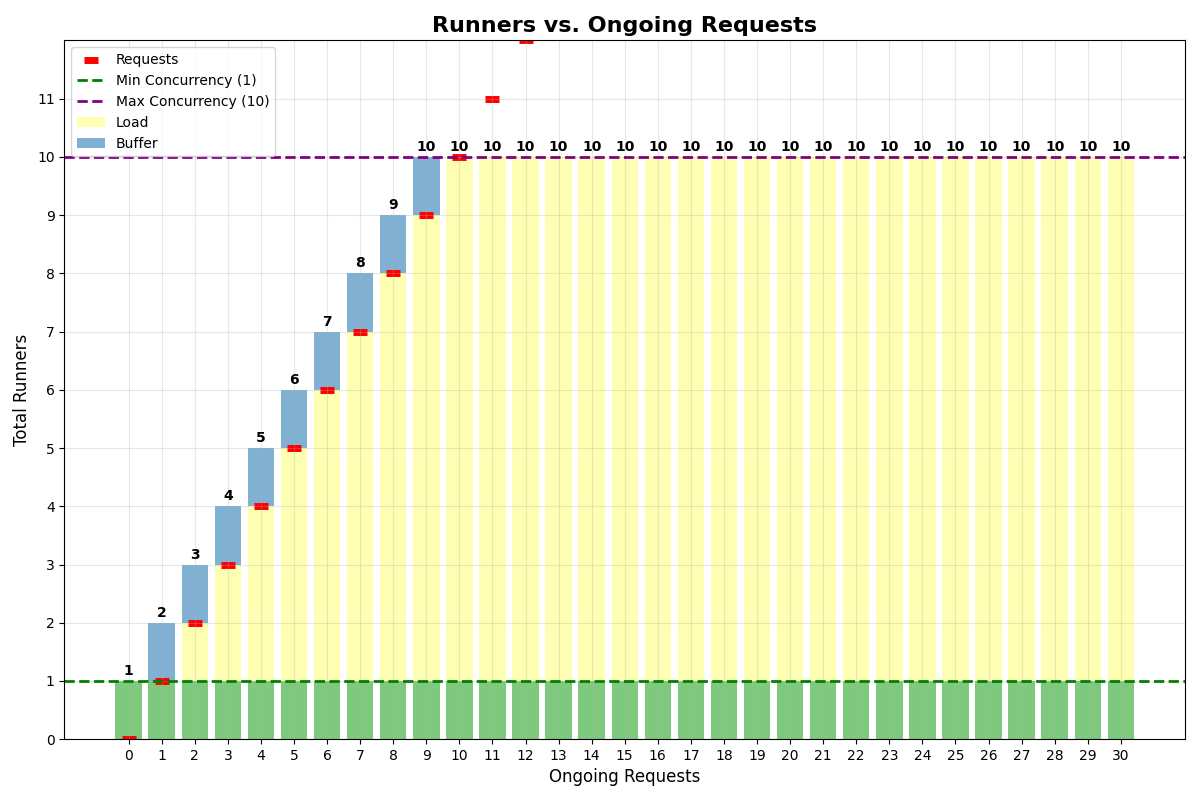
#### Same buffer and min concurrency
App with `min_concurrency=1`, `concurrency_buffer=1`, `max_multiplexing=1`, `max_concurrency=10`:
 #### No multiplexing
App with `min_concurrency=3`, `concurrency_buffer=2`, `max_multiplexing=1`, `max_concurrency=10`:
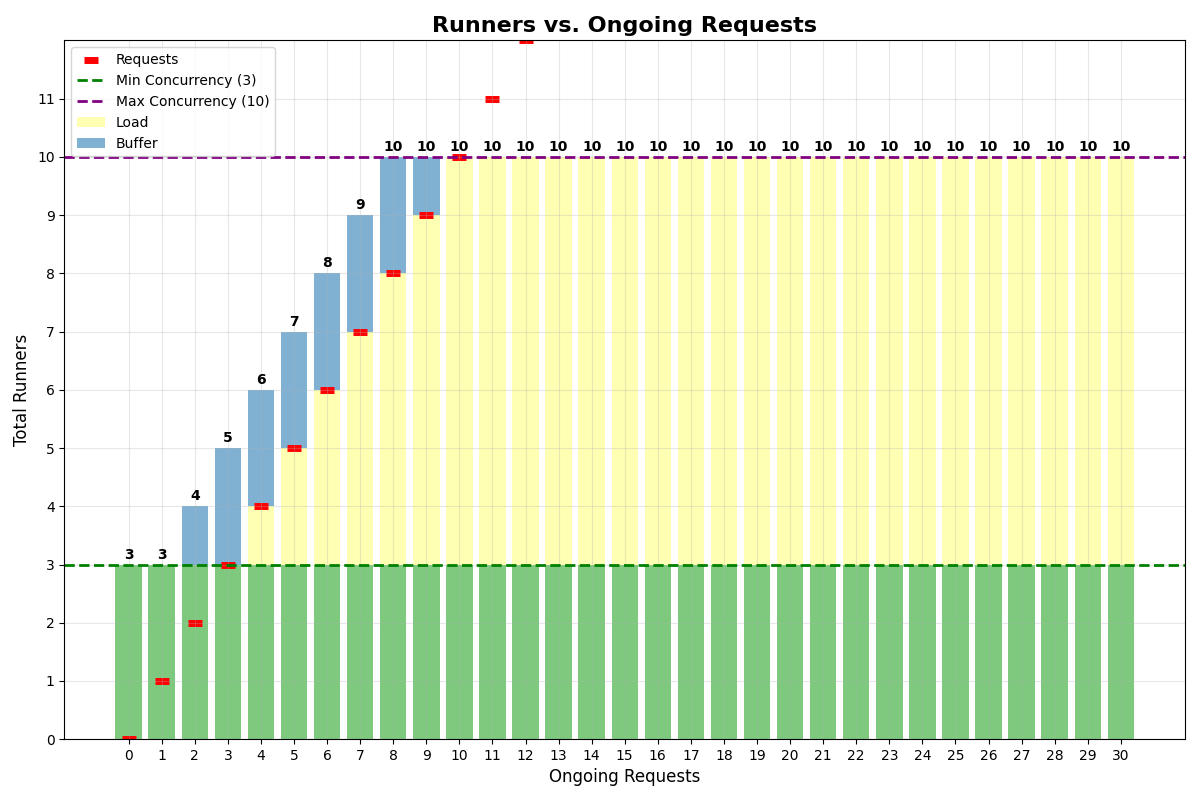
#### No multiplexing
App with `min_concurrency=3`, `concurrency_buffer=2`, `max_multiplexing=1`, `max_concurrency=10`:
 #### With multiplexing
App with `min_concurrency=0`, `concurrency_buffer=2`, `max_multiplexing=4`, `max_concurrency=6`:
#### With multiplexing
App with `min_concurrency=0`, `concurrency_buffer=2`, `max_multiplexing=4`, `max_concurrency=6`:
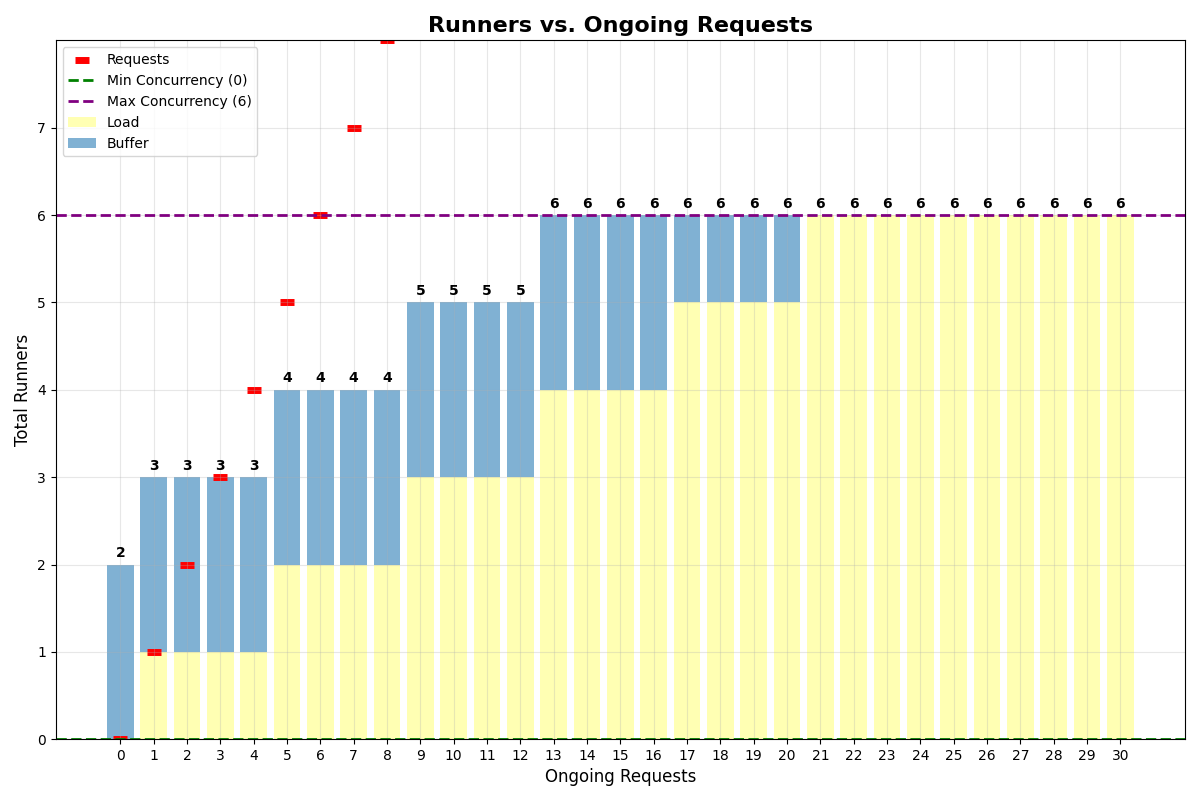 With multiplexing of 4, a single runner handles up to 4 requests simultaneously. Even with `min_concurrency=0`, the system keeps 2 runners alive for the buffer.
***
## Cost Optimization
* **Start conservative** and adjust based on actual traffic
* **Use `concurrency_buffer`** for apps with slow startup instead of high `min_concurrency`
* **Enable multiplexing** when your model has spare GPU capacity for concurrent requests
* **Monitor with analytics** and tune parameters based on real usage patterns
* **Set `max_concurrency`** to prevent runaway costs during unexpected traffic spikes
Learn how to set parameters via code, CLI, or dashboard -- and how they behave across deploys
## Video Walkthrough
See concurrency buffer and scaling delay in action:
With multiplexing of 4, a single runner handles up to 4 requests simultaneously. Even with `min_concurrency=0`, the system keeps 2 runners alive for the buffer.
***
## Cost Optimization
* **Start conservative** and adjust based on actual traffic
* **Use `concurrency_buffer`** for apps with slow startup instead of high `min_concurrency`
* **Enable multiplexing** when your model has spare GPU capacity for concurrent requests
* **Monitor with analytics** and tune parameters based on real usage patterns
* **Set `max_concurrency`** to prevent runaway costs during unexpected traffic spikes
Learn how to set parameters via code, CLI, or dashboard -- and how they behave across deploys
## Video Walkthrough
See concurrency buffer and scaling delay in action: