> ## Documentation Index
> Fetch the complete documentation index at: https://fal.ai/docs/llms.txt
> Use this file to discover all available pages before exploring further.
# Spending caps
> Confirm expensive generations before they run, per media type, with a safety cap in USD.
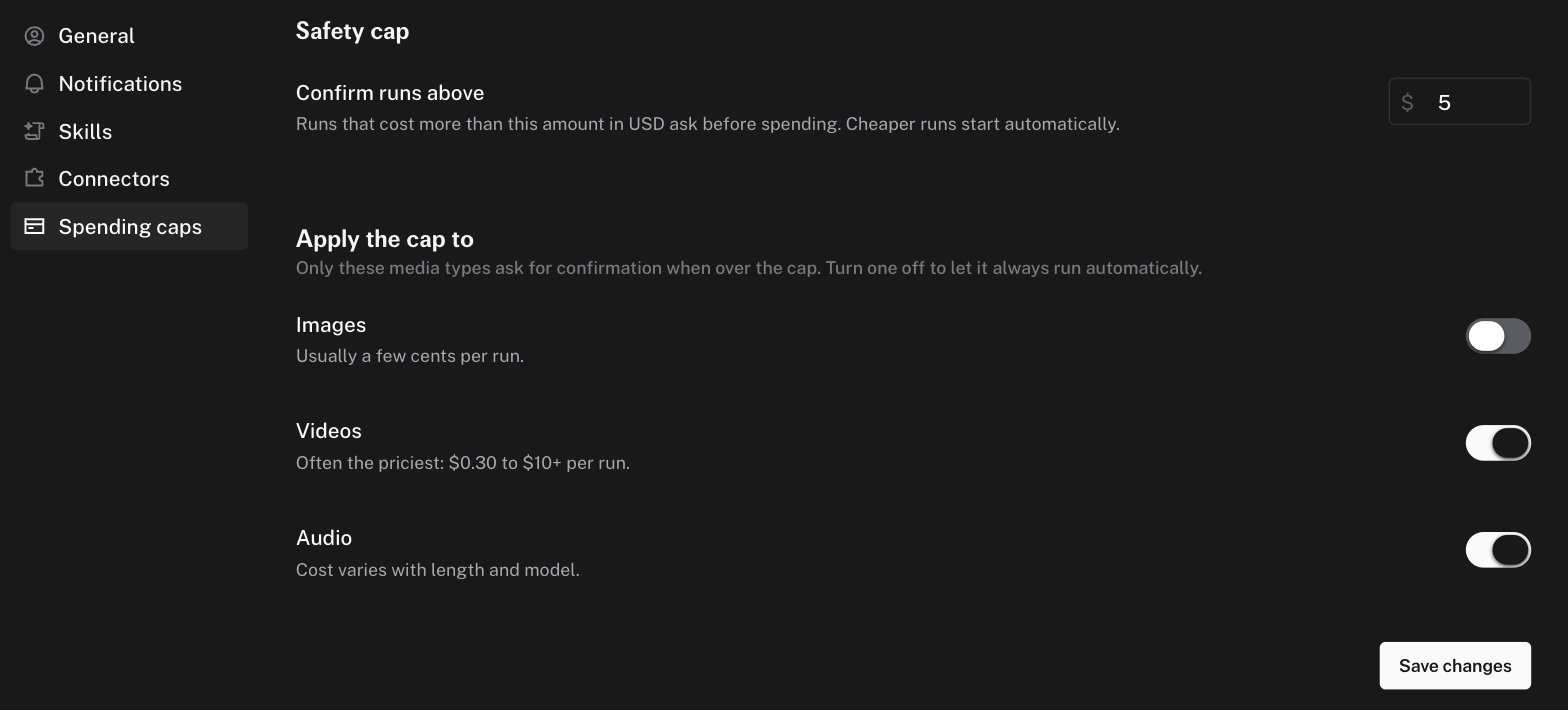
Spending caps stop the agent from starting an expensive run without your confirmation. They are configured in **Settings → Spending caps**.
 ## How the cap works
A run group asks for confirmation when both conditions are true:
1. The projected cost of the turn, including this run, is above your **safety cap**.
2. The run's media type has confirmation turned **on**.
Runs below the cap, and runs of a media type with confirmation off, start automatically. Runs with an unknown cost never ask.
## Defaults
| Setting | Default |
| :--------------------- | :-------------------------------------------------------- |
| **Confirm runs above** | \$5 |
| **Images** | Off. Usually a few cents per run |
| **Videos** | On. Often the priciest, from $0.30 to $10 or more per run |
| **Audio** | On. Cost varies with length and model |
## Cost estimates
The agent estimates cost from the model's price and from historical cost per request for that endpoint. The estimate is conservative. It uses a high percentile of past requests, so real costs are usually lower than the estimate. The agent also has a pricing tool and must check a model's real price before it quotes a cost to you.
## When a run is waiting
An approval alert appears in the chat with the estimated cost. Until you approve or reject it, the agent cannot submit further runs in that chat. A blocked submit shows the message "Blocked because a previous generation is awaiting cost approval." In a [model comparison](/docs/documentation/agent/models-and-generation#model-comparison), waiting columns show **Awaiting approval**.
## The spend chip
Next to the composer, a chip shows the number of generations and the total cost of the chat. Hover it for a breakdown **By model** or **By modality**. A dot on the chip means some runs are not priced yet.
## Related controls
* [Plan card checkpoints](/docs/documentation/agent/plan-cards#approval-checkpoints) gate on a step, not on cost.
* [Model access controls](/docs/documentation/organizations/access-controls) restrict which models your organization can run at all.
## How the cap works
A run group asks for confirmation when both conditions are true:
1. The projected cost of the turn, including this run, is above your **safety cap**.
2. The run's media type has confirmation turned **on**.
Runs below the cap, and runs of a media type with confirmation off, start automatically. Runs with an unknown cost never ask.
## Defaults
| Setting | Default |
| :--------------------- | :-------------------------------------------------------- |
| **Confirm runs above** | \$5 |
| **Images** | Off. Usually a few cents per run |
| **Videos** | On. Often the priciest, from $0.30 to $10 or more per run |
| **Audio** | On. Cost varies with length and model |
## Cost estimates
The agent estimates cost from the model's price and from historical cost per request for that endpoint. The estimate is conservative. It uses a high percentile of past requests, so real costs are usually lower than the estimate. The agent also has a pricing tool and must check a model's real price before it quotes a cost to you.
## When a run is waiting
An approval alert appears in the chat with the estimated cost. Until you approve or reject it, the agent cannot submit further runs in that chat. A blocked submit shows the message "Blocked because a previous generation is awaiting cost approval." In a [model comparison](/docs/documentation/agent/models-and-generation#model-comparison), waiting columns show **Awaiting approval**.
## The spend chip
Next to the composer, a chip shows the number of generations and the total cost of the chat. Hover it for a breakdown **By model** or **By modality**. A dot on the chip means some runs are not priced yet.
## Related controls
* [Plan card checkpoints](/docs/documentation/agent/plan-cards#approval-checkpoints) gate on a step, not on cost.
* [Model access controls](/docs/documentation/organizations/access-controls) restrict which models your organization can run at all.